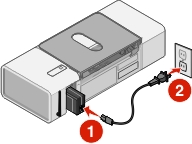
Plug the power cord all the way into the power supply at the back of the printer.
Plug the cord into an electrical outlet that other electrical devices have been using.
If the  light is not on, press .
Make sure you have disconnected the power cord from the wall outlet and then from the printer.
Plug the power cord all the way into the power supply at the back of the printer.
Plug the cord into an electrical outlet that other electrical devices have been using.
If the light is not on, press .