紙詰まりを取り除く

紙詰まりを防止する

用紙を正しくセットする
推奨用紙を使用する

紙詰まりの場所を特定する

メモ:

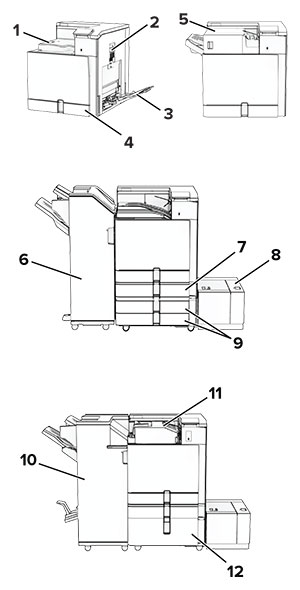
Paper jam areas in the printer with numbered callouts.
 

紙詰まりの場所

1

標準排紙トレイ

2

ドア B

3

多目的フィーダ

4

標準トレイ

5

ホチキスフィニッシャ

6

ホチキス、ホールパンチフィニッシャ

7

オプションの 550 枚トレイ

8

1500 枚トレイ

9

2 x 550 枚トレイ

10

冊子フィニッシャ

11

折り畳みオプション付き用紙搬送ユニット

12

2000 枚デュアル給紙


標準カセットの紙づまり

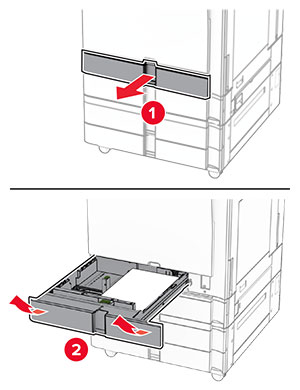
  1. 標準トレイを引き出します。

    Tray insert is pulled out from the tray base with a slightly upward motion.
  2. 詰まっている用紙を取り除きます。

    メモ: 必ずすべての紙片を取り除いてください。
    Jammed paper in the standard tray is removed.
  3. トレイを挿入します。

オプションの 550 枚トレイの紙詰まり

  1. ドア D を開きます。

    The door handle is lifted, and then the door is opened.
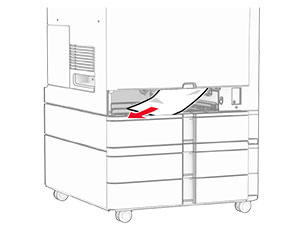
  2. 詰まっている用紙を取り除きます。

    メモ: 必ずすべての紙片を取り除いてください。
    Paper jam in door D is removed.
  3. ドアを閉じます。

  4. オプションの 550 枚トレイを引き出します。

    Using the front handle, the tray is pulled out.
  5. 詰まっている用紙を取り除きます。

    メモ: 必ずすべての紙片を取り除いてください。
    Paper jam in the optional tray is removed.
  6. トレイを挿入します。

多目的フィーダの紙詰まり

  1. 多目的フィーダからすべての用紙を取り除きます。

  2. 詰まっている用紙を取り除きます。

    メモ: 必ずすべての紙片を取り除いてください。
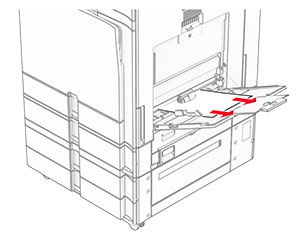
    Jammed paper in the multipurpose feeder is removed.

2 x 550 枚トレイの紙詰まり

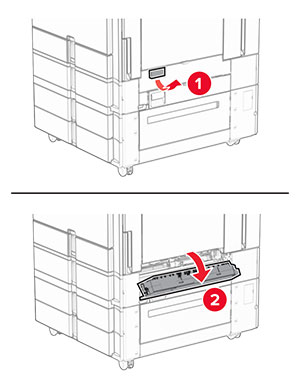
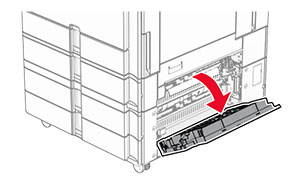
  1. ドア E を開きます。

    Door E is opened.
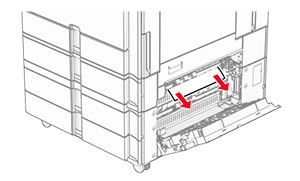
  2. ドア E の内側につまった用紙を取り除きます。

    メモ: 必ずすべての紙片を取り除いてください。
    The jammed paper in door E is removed.
  3. ドア E を閉じます。

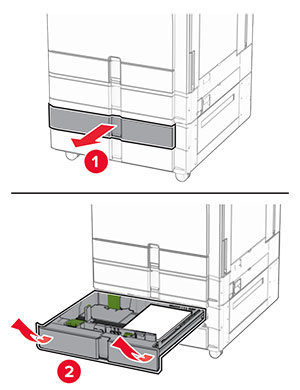
  4. トレイ 3 を取り外します。

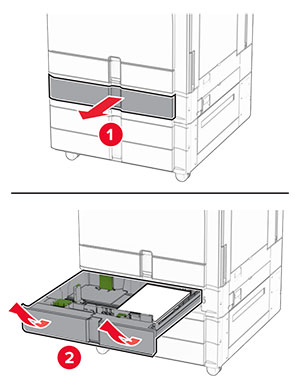
    The tray is pulled out of the printer.
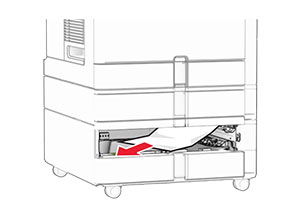
  5. 詰まっている用紙を取り除きます。

    メモ: 必ずすべての紙片を取り除いてください。
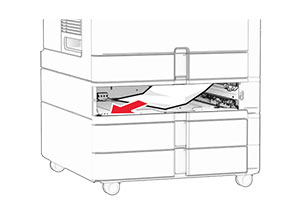
    The jammed paper in tray 3 is removed.
  6. トレイ 3 を挿入します。

  7. トレイ 4 についても、手順 4 から 手順 6 を繰り返します。

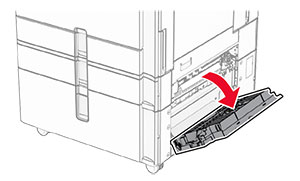
2000 枚デュアル給紙の紙詰まり

  1. ドア E を開きます。

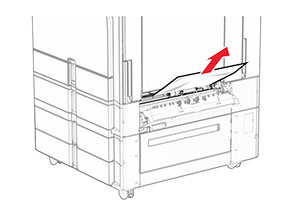
    Door E is opened.
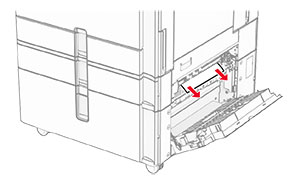
  2. ドア E の内側につまった用紙を取り除きます。

    メモ: 必ずすべての紙片を取り除いてください。
    Jammed paper in door E is removed.
  3. ドア E を閉じます。

1500 枚トレイの紙詰まり

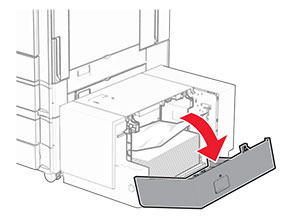
  1. ドア K を開きます。

    Door K is pulled down to access the paper jam.
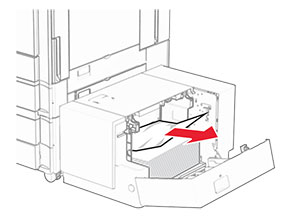
  2. 詰まっている用紙を取り除きます。

    メモ: 必ずすべての紙片を取り除いてください。
    The jammed paper in the 1500-sheet tray is removed.
  3. ドア K を閉じます。

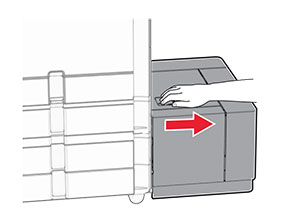
  4. ハンドル J をつかんで、トレイを右にスライドします。

    The 1500-sheet tray is slid away from the printer.
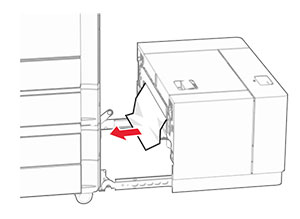
  5. 詰まっている用紙を取り除きます。

    メモ: 必ずすべての紙片を取り除いてください。
    The jammed paper in the 1500-sheet tray is removed.
  6. トレイをスライドさせ、元の位置に戻します。

ドア B 内の紙詰まり

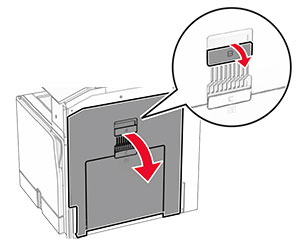
  1. ドア B を開きます。

    表面高温注意アイコン 注意—表面高温: プリンタの内部が高温になっている場合があります。高温のコンポーネントによる負傷の危険を減らすために、コンポーネントの表面が冷えるのを待ってから触れてください。
    警告—破損の恐れあり: 静電気放電による損傷を防ぐため、プリンタ内部に手を入れたり触れたりする前に、プリンタの露出している金属製フレームに触れてください。
    The door handle is pulled, and then door B is opened.
  2. 詰まっている用紙を次の場所から取り除きます。

    メモ: 必ずすべての紙片を取り除いてください。
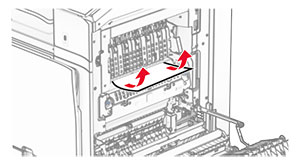
    • フューザーの上

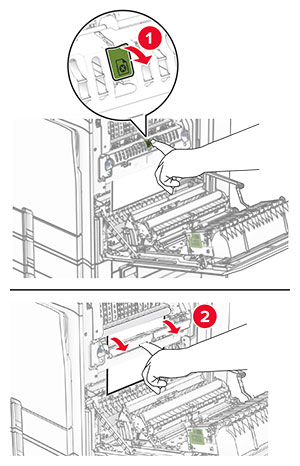
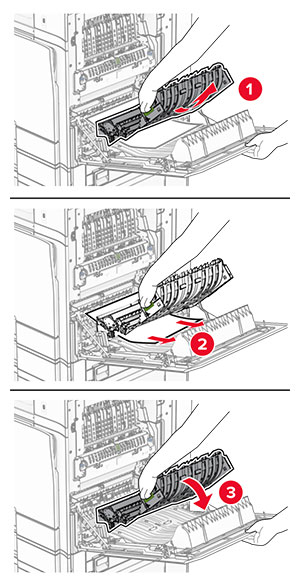
      Jammed paper above the fuser is removed.
    • フューザー内

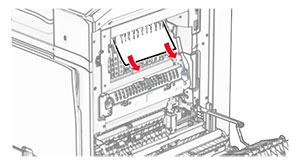
      Jammed paper in the fuser area is removed.
    • フューザーの下

      Jammed paper below the fuser is removed.
    • 標準排紙トレイの排紙ローラーの下

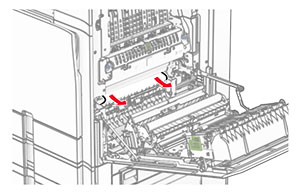
      Jammed paper in the standard bin exit roller is removed.
    • 両面印刷ユニット内

      Jammed paper in the duplex unit is removed.
  3. ドア B を閉じます。

標準排紙トレイの紙詰まり

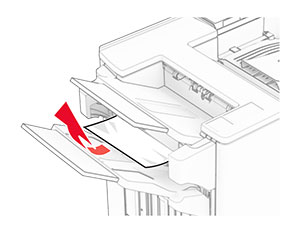
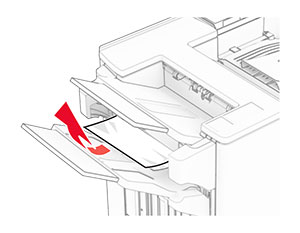
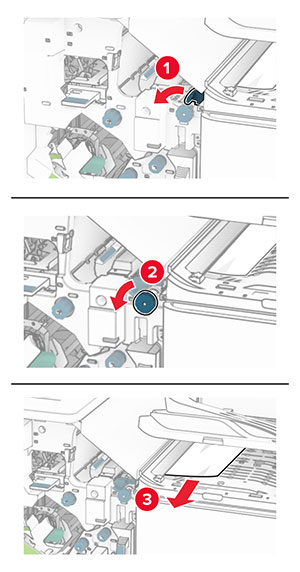
  1. 標準排紙トレイから用紙を取り除きます。

  2. 詰まっている用紙を取り除きます。

    メモ: 必ずすべての紙片を取り除いてください。
    Jammed paper in the standard bin is removed.

ホチキスフィニッシャの紙詰まり

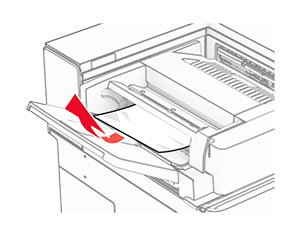
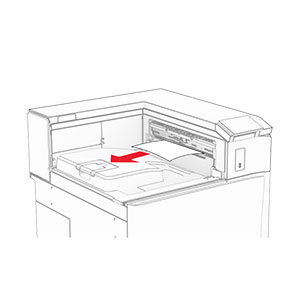
  1. ホチキスフィニッシャ排紙トレイから詰まっている用紙を取り除きます。

    メモ: 必ずすべての紙片を取り除いてください。
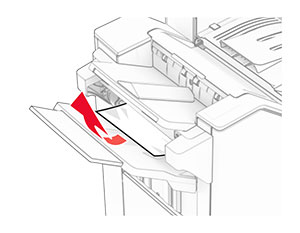
    Jammed paper in the staple finisher bin is removed.
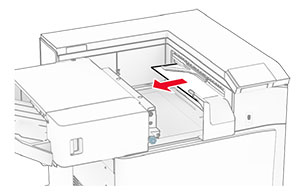
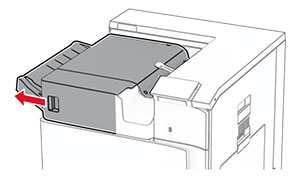
  2. ハンドル F をつかんで、ホチキスフィニッシャを左にスライドします。

    The staple finisher is slid to the left.
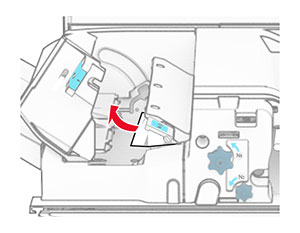
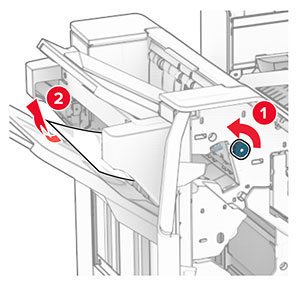
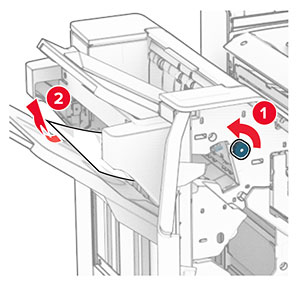
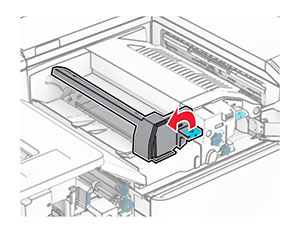
  3. ドア R1 を開いて、ノブ R2 を時計回りに回します。

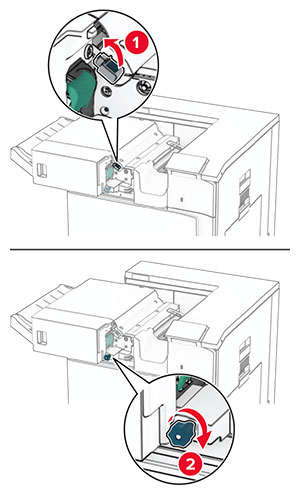
    Door R1 is opened, and then the blue knob is rotated clockwise.
  4. 詰まっている用紙を取り除きます。

    メモ: 必ずすべての紙片を取り除いてください。
    Jammed paper in door R1 is removed.
  5. ドア R1 を閉じます。

  6. 標準排紙トレイの排紙ローラーから詰まった用紙を取り除きます。

    メモ: 必ずすべての紙片を取り除いてください。
    Jammed paper in the standard bin exit roller is removed.
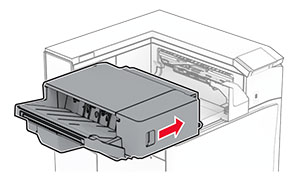
  7. ホチキスフィニッシャを元の位置にスライドさせます。

    The staple finisher is slid back into place.

折り畳みオプション付き用紙搬送ユニットの紙づまり

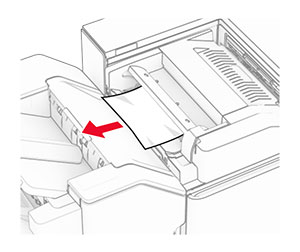
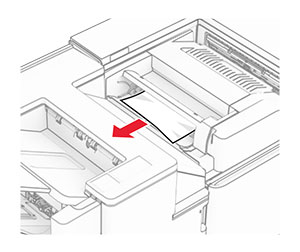
  1. 詰まっている用紙を取り除きます。

    メモ: 必ずすべての紙片を取り除いてください。
    Jammed paper is removed from the paper transport with folding option.
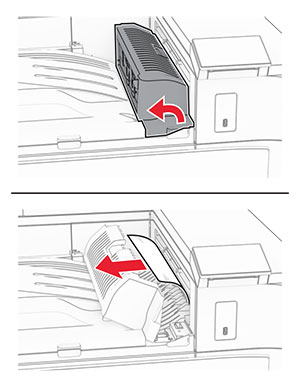
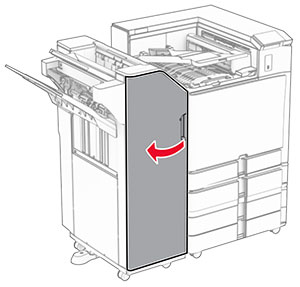
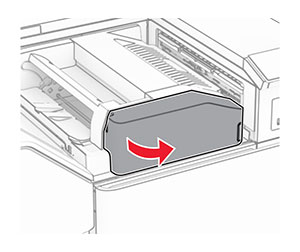
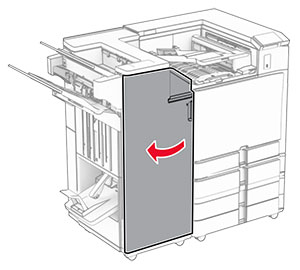
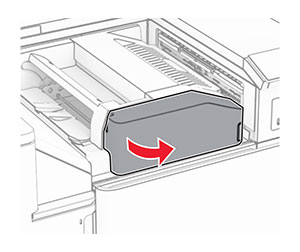
  2. ドア F を開きます。

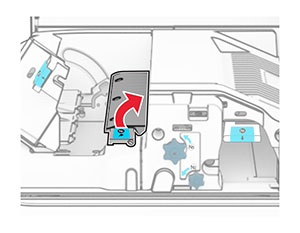
    Door F is being opened.
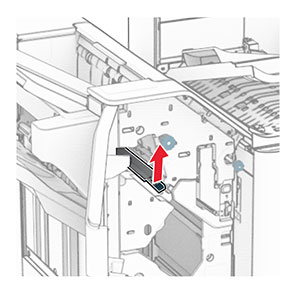
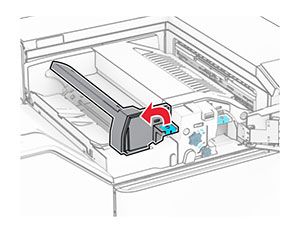
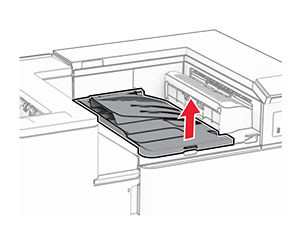
  3. ハンドル N4 を持ち上げます。

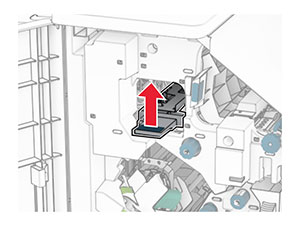
    Handle N4 of the paper transport with folding option is being lifted.
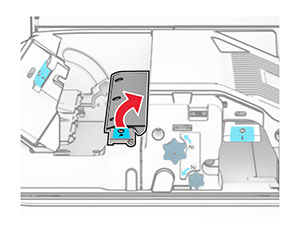
  4. ハンドル N5 を持ち上げます。

    Handle N5 of the paper transport with folding option is being lifted.
  5. 詰まっている用紙を取り除きます。

    メモ: 必ずすべての紙片を取り除いてください。
    Jammed paper is removed from the paper transport with folding option.
  6. ハンドル N5 を閉じ、次にハンドル N4 を閉じます。

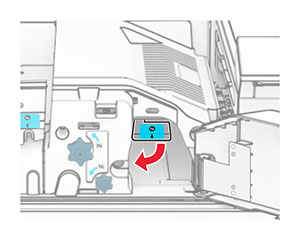
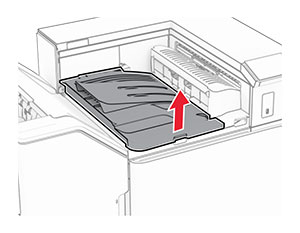
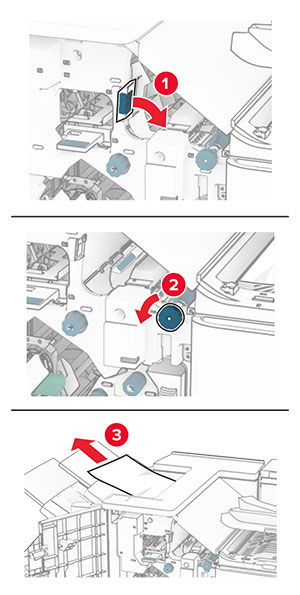
  7. ハンドル N1 を押し下げます。

    Handle N1 of the paper transport with folding option is being pushed down.
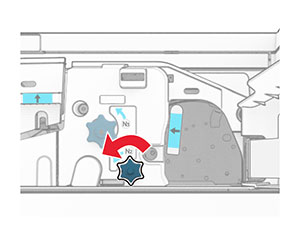
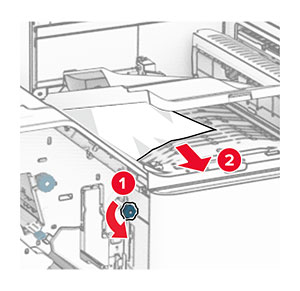
  8. ノブ N2 を反時計方向に回します。

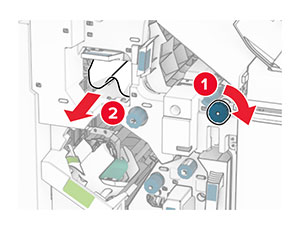
    Knob N2 of the paper transport with folding option is being turned counterclockwise.
  9. 詰まっている用紙を取り除きます。

    警告—破損の恐れあり: プリンタの損傷を防ぐため、詰まった用紙を取り除く前に、身に付けているアクセサリはすべて外してください。
    メモ: 必ずすべての紙片を取り除いてください。
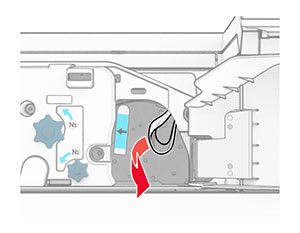
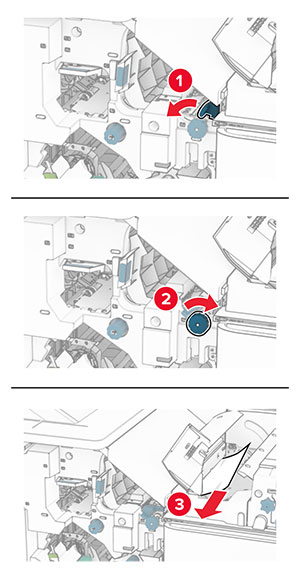
    Jammed paper is removed from the paper transport with folding option.
  10. ハンドル N1 を元の位置に戻します。

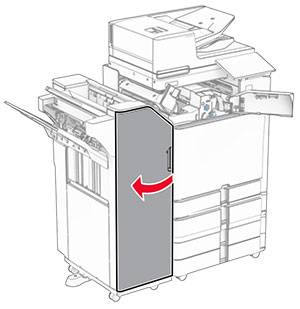
  11. ドア F を閉じます。

ホチキスパンチフィニッシャの紙詰まり

お使いのプリンタで用紙搬送ユニットが設定されている場合は、以下の手順に従います。

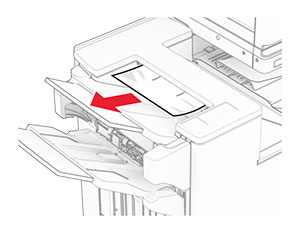
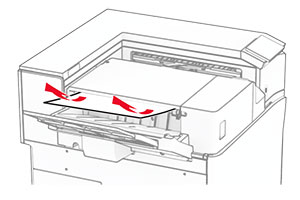
  1. 排紙トレイ 1 で詰まっている用紙を取り除きます。

    メモ:

    • 必ずすべての紙片を取り除いてください。
    • ページの欠落を防ぐため、ホチキスコンパイラにある印刷済みのページは取り出さないでください。
    Jammed paper is removed from the finisher staple, hole punch, offset bin.
  2. フィニッシャ標準排紙トレイから詰まった用紙を取り除きます。

    メモ: 必ずすべての紙片を取り除いてください。
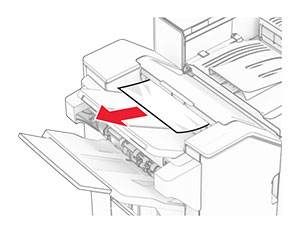
    Jammed paper is removed from the finisher top bin.
  3. 排紙トレイ 2 で詰まっている用紙を取り除きます。

    メモ: 必ずすべての紙片を取り除いてください。
    Jammed paper is removed from the paper transport bin.
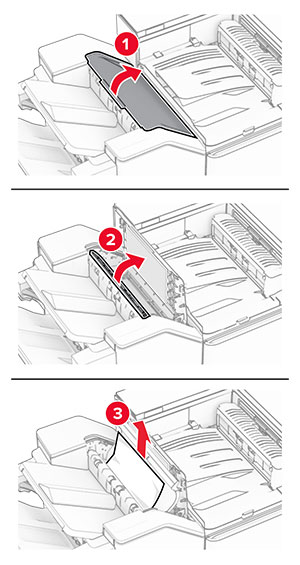
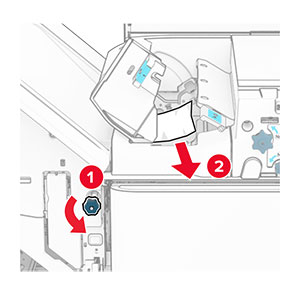
  4. 用紙搬送ユニットのカバー G を開き、詰まっている用紙を取り除きます。

    メモ: 必ずすべての紙片を取り除いてください。
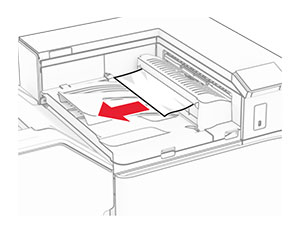
    Paper transport cover G is opened, and then jammed paper is removed.
  5. 用紙搬送ユニットのカバー G を閉じます。

  6. ドア I と ドア R1 を開いて、詰まっている用紙を取り除きます。

    メモ: 必ずすべての紙片を取り除いてください。
    Door I and door R1 of the finisher are opened, and then jammed paper is removed from the finisher.
  7. ドア R1 を閉じ、次にドア I を閉じます。

  8. 用紙搬送ユニットのカバー F を閉じます。

    Paper transport cover F is opened.
  9. ドア H を開きます。

    Door H of the finisher is opened.
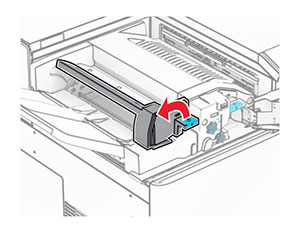
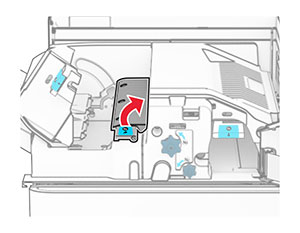
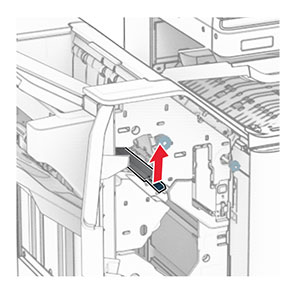
  10. ハンドル R4 を持ち上げます。

    Handle R4 inside the finisher is lifted.
  11. ノブ R3 を反時計回りに回し、排紙トレイ 1 で詰まっている用紙を取り除きます。

    メモ: 必ずすべての紙片を取り除いてください。
    Knob R3 in the finisher is turned to the left, and then jammed paper is removed from the staple, hole punch, offset bin.
  12. ノブ R2 を反時計回りに回し、用紙搬送ユニットのカバー F から詰まっている用紙を取り除きます。

    メモ: 必ずすべての紙片を取り除いてください。
    Knob R2 in the finisher is turned to the left, and then jammed paper is removed from inside paper transport cover F.
  13. 用紙搬送ユニットのカバー F を閉じます。

  14. ハンドル R4 を元の位置に戻します。

  15. ドア H を閉じます。
お使いのプリンタで折り畳みオプション付きの用紙搬送ユニットが設定されている場合は、以下の手順に従います。

  1. 排紙トレイ 1 で詰まっている用紙を取り除きます。

    メモ:

    • 必ずすべての紙片を取り除いてください。
    • ページの欠落を防ぐため、ホチキスコンパイラにある印刷済みのページは取り出さないでください。
    Jammed paper is removed from the finisher staple, hole punch, offset bin.
  2. フィニッシャ標準排紙トレイから詰まった用紙を取り除きます。

    メモ: 必ずすべての紙片を取り除いてください。
    Jammed paper is removed from the finisher top bin.
  3. 排紙トレイ 2 で詰まっている用紙を取り除きます。

    メモ: 必ずすべての紙片を取り除いてください。
    Jammed paper is removed from the paper transport bin.
  4. ドア F を開きます。

    Door F of the paper transport with folding option is opened.
  5. ドア N4 を開きます。

    Door N4 of the paper transport with folding option is opened.
  6. ドア N5 を開きます。

    Door N5 of the paper transport with folding option is opened.
  7. ドア H を開きます。

    Door H in the finisher is opened.
  8. ハンドル R4 を持ち上げます。

    Handle R4 inside the finisher is lifted.
  9. ノブ R3 を反時計回りに回し、排紙トレイ 1 で詰まっている用紙を取り除きます。

    メモ: 必ずすべての紙片を取り除いてください。
    Knob R3 in the finisher is turned to the left, and then jammed paper is removed from the staple, hole punch, offset bin.
  10. ノブ R2 を反時計回りに回し、ドア N4 と N5 の間で詰まった用紙があれば取り除きます。

    メモ: 必ずすべての紙片を取り除いてください。
    Knob R2 in the finisher is turned to the left, and then jammed paper is removed from between doors N4 and N5.
  11. ドア B を開きます。

    表面高温注意アイコン 注意—表面高温: プリンタの内部が高温になっている場合があります。高温のコンポーネントによる負傷の危険を減らすために、コンポーネントの表面が冷えるのを待ってから触れてください。
    警告—破損の恐れあり: 静電気放電による損傷を防ぐため、プリンタ内部に手を入れたり触れたりする前に、プリンタの露出している金属製フレームに触れてください。
    Door B is pulled down.
  12. 標準排紙トレイの排紙ローラーから詰まった用紙を取り除きます。

    メモ: 必ずすべての紙片を取り除いてください。
    Jammed paper in the standard bin exit roller is pulled out.
  13. ドア B を閉じます。

  14. ハンドル N1 を押し下げます。

    Handle N1 of the paper transport with folding option is being pushed down.
  15. ノブ N2 を反時計方向に回します。

    Knob N2 of the paper transport with folding option is being turned counterclockwise.
  16. 詰まっている用紙を取り除きます。

    警告—破損の恐れあり: プリンタの損傷を防ぐため、詰まった用紙を取り除く前に、身に付けているアクセサリはすべて外してください。
    メモ: 必ずすべての紙片を取り除いてください。
    Jammed paper is removed from the paper transport with folding option.
  17. ハンドル N1 を元の位置に戻します。

  18. ハンドル N5 を閉じ、次にハンドル N4 を閉じます。

  19. ドア F を閉じます。

  20. ハンドル R4 を元の位置に戻します。

  21. ドア H を閉じます。
冊子フィニッシャの紙詰まり

お使いのプリンタで用紙搬送ユニットが設定されている場合は、以下の手順に従います。

  1. フィニッシャ標準排紙トレイから詰まった用紙を取り除きます。

    メモ: 必ずすべての紙片を取り除いてください。
    Jammed paper is removed from the finisher top bin.
  2. 排紙トレイ 1 で詰まっている用紙を取り除きます。

    メモ: 必ずすべての紙片を取り除いてください。
    Jammed paper is removed from the finisher staple, hole punch, offset bin.
  3. 排紙トレイ 1 で詰まっている用紙を取り除きます。

    メモ:

    • 必ずすべての紙片を取り除いてください。
    • ページの欠落を防ぐため、ホチキスコンパイラにある印刷済みのページは取り出さないでください。
    Jammed paper is removed from the finisher staple, hole punch, offset bin.
  4. 排紙トレイ 3 で詰まっている用紙を取り除きます。

    メモ: 必ずすべての紙片を取り除いてください。
    Jammed paper is removed from the paper transport bin.
  5. 用紙搬送ユニットのカバー G を開き、詰まっている用紙を取り除きます。

    メモ: 必ずすべての紙片を取り除いてください。
    Paper transport cover G is opened, and then jammed paper is removed.
  6. 用紙搬送ユニットのカバー G を閉じます。

  7. 用紙搬送ユニットのカバー F を閉じます。

    Paper transport cover F is opened.
  8. ドア H を開きます。

    Door H of the finisher is opened.
  9. ハンドル R3 を右に移動し、つまった用紙があれば取り除きます。

    メモ: 必ずすべての紙片を取り除いてください。
    Handle R3 in the finisher is moved, and then jammed paper is removed from behind handle R3.
  10. ハンドル R1 を左に移動し、ノブ R2 を反時計回りに回し、詰まった用紙があれば取り除きます。

    メモ: 必ずすべての紙片を取り除いてください。
    The handle and the knob are moved and turned, and then jammed paper is removed.
  11. ノブ R5 を反時計回りに回し、フィニッシャ標準排紙トレイから詰まっている用紙を取り除きます。

    メモ: 必ずすべての紙片を取り除いてください。
    Knob R5 in the finisher is turned, and then jammed paper is removed from the finisher top bin.
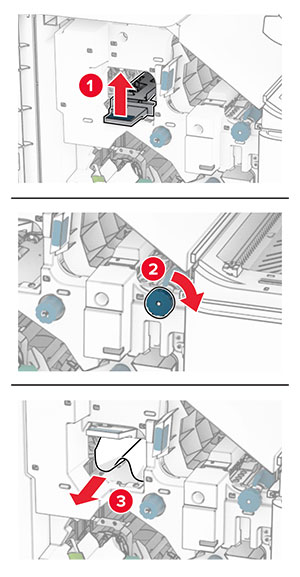
  12. ハンドル R4 を持ち上げ、ノブ R2 を時計回りに回し、詰まった用紙があれば取り除きます。

    メモ: 必ずすべての紙片を取り除いてください。
    The handle and the knob are lifted and turned, and then jammed paper is removed from inside handle R4.
  13. 用紙搬送ユニットのカバー F を閉じます。

  14. ハンドル R1、R3、R4 を元の位置に戻します。

  15. ドア H を閉じます。
お使いのプリンタで折り畳みオプション付きの用紙搬送ユニットが設定されている場合は、以下の手順に従います。

  1. フィニッシャ標準排紙トレイから詰まった用紙を取り除きます。

    メモ: 必ずすべての紙片を取り除いてください。
    Jammed paper is removed from the finisher top bin.
  2. 排紙トレイ 1 で詰まっている用紙を取り除きます。

    メモ: 必ずすべての紙片を取り除いてください。
    Jammed paper is removed from the finisher staple, hole punch, offset bin.
  3. 排紙トレイ 1 で詰まっている用紙を取り除きます。

    メモ:

    • 必ずすべての紙片を取り除いてください。
    • ページの欠落を防ぐため、ホチキスコンパイラにある印刷済みのページは取り出さないでください。
    Jammed paper is removed from the finisher staple, hole punch, offset bin.
  4. 排紙トレイ 3 で詰まっている用紙を取り除きます。

    メモ: 必ずすべての紙片を取り除いてください。
    Jammed paper is removed from the paper transport bin.
  5. ドア F を開きます。

    Door F of the paper transport with folding option is opened.
  6. ドア H を開きます。

    Door H in the finisher is opened.
  7. ドア N4 を開きます。

    Door N4 of the paper transport with folding option is opened.
  8. ドア N5 を開きます。

    Door N5 of the paper transport with folding option is opened.
  9. ハンドル R4 を持ち上げます。

    Handle R4 inside the finisher is lifted.
  10. ノブ R2 を時計回りに回し、ハンドル R4 で詰まっている用紙を取り除きます。

    メモ: 必ずすべての紙片を取り除いてください。
    Knob R2 in the finisher is turned to the right, and then jammed paper is removed from inside handle R4.
  11. ハンドル R1 を左に移動し、ノブ R2 を反時計回りに回し、ドア N4 と N5 の間で詰まった用紙があれば取り除きます。

    メモ: 必ずすべての紙片を取り除いてください。
    The handle and the knob are moved and turned, and then the jammed paper is removed between doors N4 and N5.
  12. ドア B を開きます。

    表面高温注意アイコン 注意—表面高温: プリンタの内部が高温になっている場合があります。高温のコンポーネントによる負傷の危険を減らすために、コンポーネントの表面が冷えるのを待ってから触れてください。
    警告—破損の恐れあり: 静電気放電による損傷を防ぐため、プリンタ内部に手を入れたり触れたりする前に、プリンタの露出している金属製フレームに触れてください。
    Door B is pulled down.
  13. 標準排紙トレイの排紙ローラーから詰まった用紙を取り除きます。

    メモ: 必ずすべての紙片を取り除いてください。
    Jammed paper in the standard bin exit roller is pulled out.
  14. ドア B を閉じます。

  15. ハンドル N1 を押し下げます。

    Handle N1 of the paper transport with folding option is being pushed down.
  16. ノブ N2 を反時計方向に回します。

    Knob N2 of the paper transport with folding option is being turned counterclockwise.
  17. 詰まっている用紙を取り除きます。

    警告—破損の恐れあり: プリンタの損傷を防ぐため、詰まった用紙を取り除く前に、身に付けているアクセサリはすべて外してください。
    メモ: 必ずすべての紙片を取り除いてください。
    Jammed paper is removed from the paper transport with folding option.
  18. ハンドル N1 を元の位置に戻します。

  19. ドア N5 を閉じ、次にドア N4 を閉じます。

  20. ドア F を閉じます。

  21. ハンドル R1 と R4 を元の位置に戻します。

  22. ドア H を閉じます。
冊子メーカーの紙詰まり
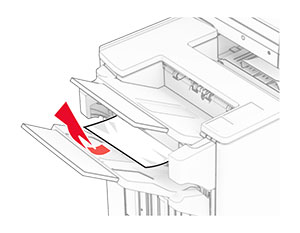
  1. 排紙トレイ 2 で詰まっている用紙を取り除きます。

    メモ: 必ずすべての紙片を取り除いてください。
    Jammed paper is removed from the finisher booklet bin.
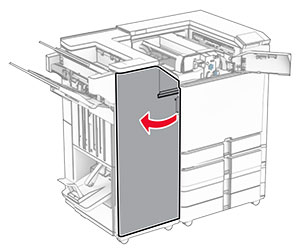
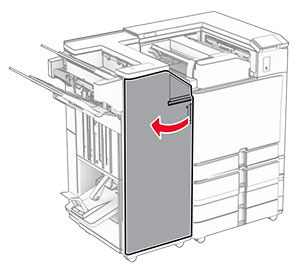
  2. ドア H を開きます。

    Door H in the finisher is opened.
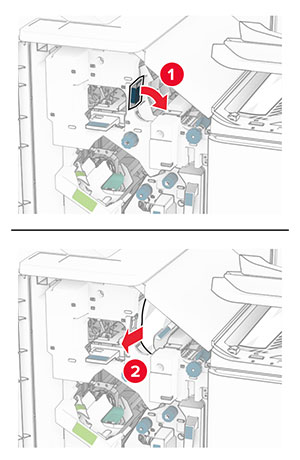
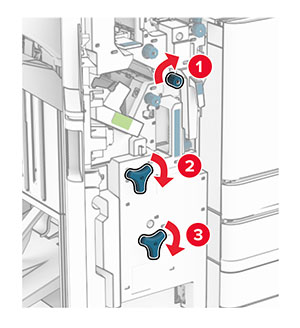
  3. ノブ R6、R11、R10 を時計回りに回します。

    Knobs R6, R11, and R10 inside the booklet finisher are turned to the right.
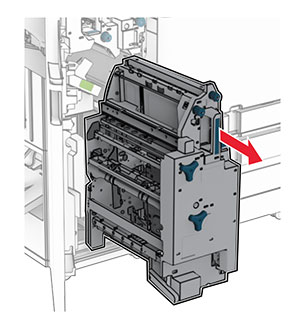
  4. 冊子メーカーを引き出します。

    Handle R7 is grasped, and then the booklet maker is pulled out of the finisher.
  5. 詰まっている用紙を取り除きます。

    メモ: 必ずすべての紙片を取り除いてください。
    Jammed paper is removed from the top of the booklet maker.
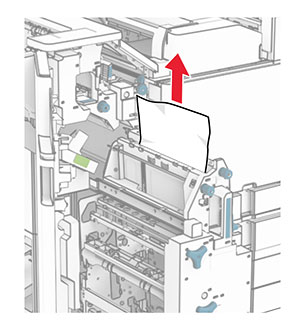
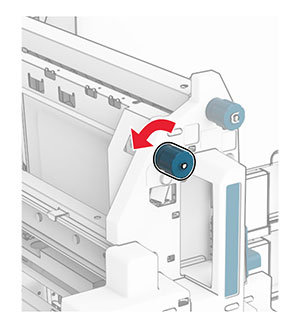
  6. ノブ R9 が止まるまで、反時計回りに回します。

    Knob R9 in the booklet maker is turned to the left.
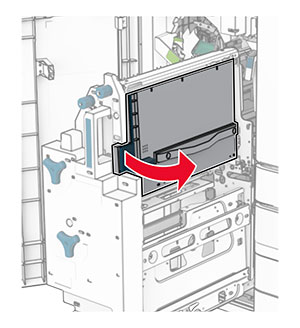
  7. ドア R8 を開きます。

    Handle R8 is grasped, and then door R8 is opened.
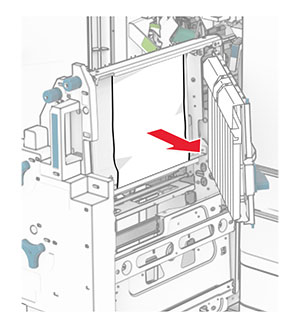
  8. 詰まっている用紙を取り除きます。

    メモ: 必ずすべての紙片を取り除いてください。
    Jammed paper is removed from behind door R8.
  9. ドア R8 を閉じます。
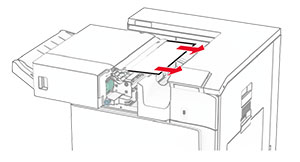
  10. 冊子メーカーを冊子フィニッシャに戻します。
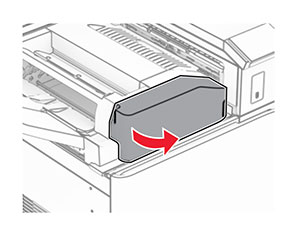
  11. ドア H を閉じます。