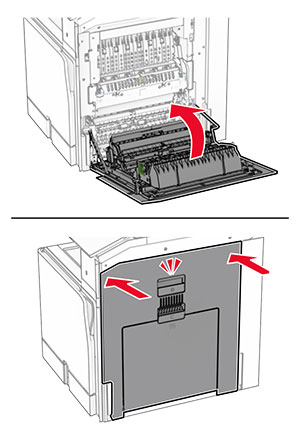
ハードウェアオプションを取り付ける

オプションの 550 枚トレイを取り付ける

感電注意アイコン 注意—感電危険: 感電を避けるため、プリンタのセットアップ後にコントローラボードにアクセスする際や、オプションのハードウェアまたはメモリデバイスを取り付ける際には、作業を進める前にプリンタの電源を切り、電源コードを抜きます。他のデバイスがプリンタに接続されている場合は、他のデバイスの電源も切り、プリンタに接続しているケーブルを抜きます。
メモ: この作業には、マイナスドライバが必要です。
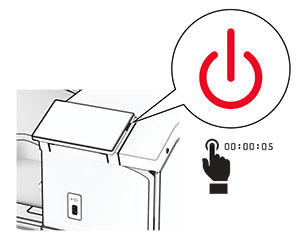
  1. プリンタの電源を切ります。

    Power button on the side of the control panel is pressed for at least 5 seconds.
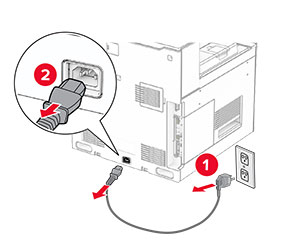
  2. 電源コードをコンセントから抜き、次にプリンタから抜きます。

    Power cord is unplugged from the electrical outlet and then from the printer.
  3. オプションの 550 枚トレイを梱包から取り出します。

    メモ: トレイの破損を防ぐため、トレイを持ち上げる際は必ず前面と背面を持ってください。
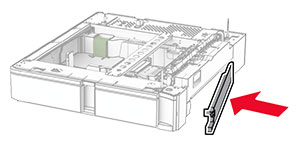
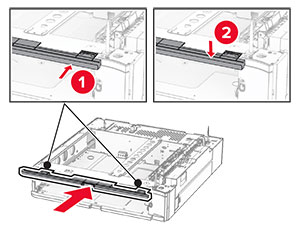
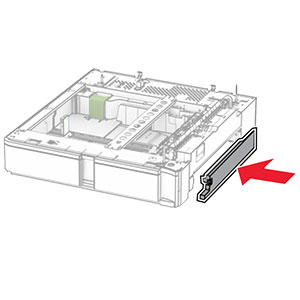
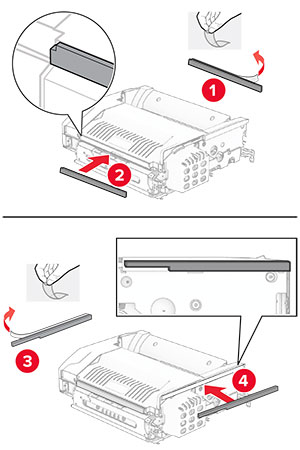
  4. 右トレイのカバーを取り付けます。

    The tray cover is attached to the right side of the optional 550-sheet tray.
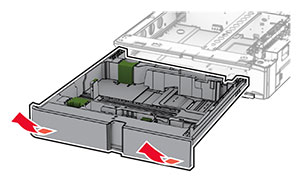
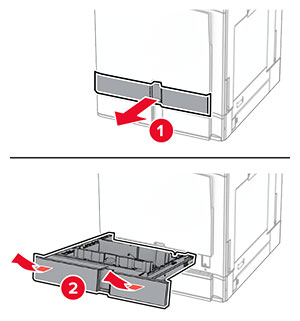
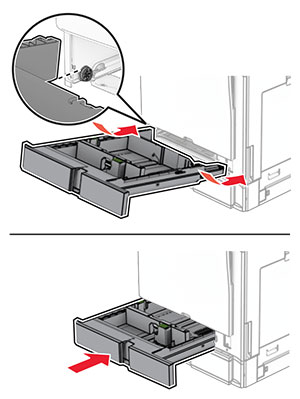
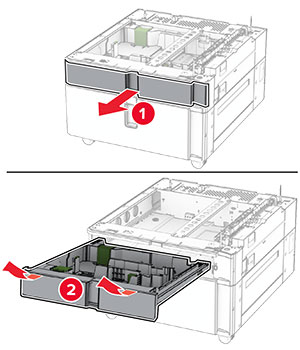
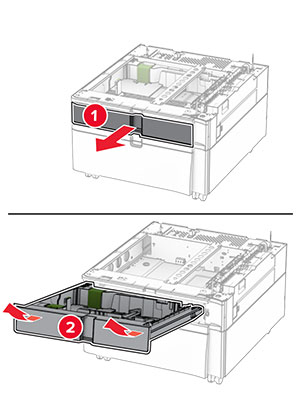
  5. 550 枚トレイの引き出し部を引き出します。

    The tray insert is pulled out from the optional 550-sheet tray.
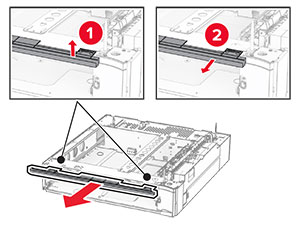
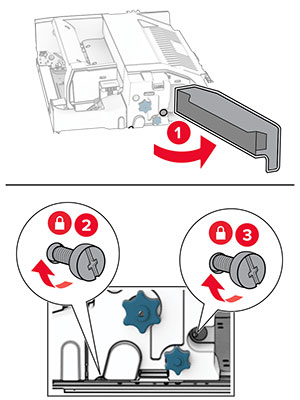
  6. 上部のトレイカバーを取り外します。

    The upper tray cover is lifted, and then removed from the tray base.
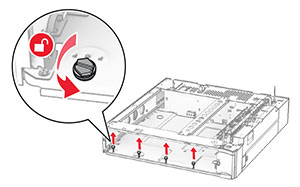
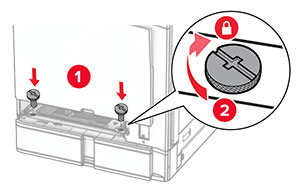
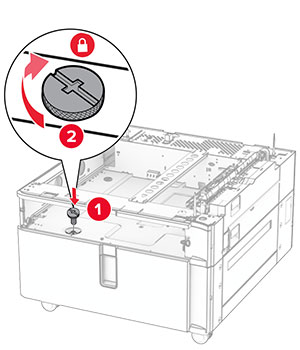
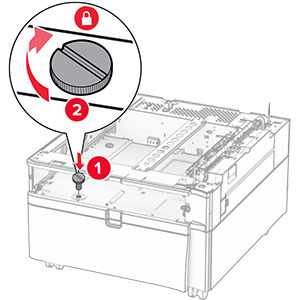
  7. ねじを外します。

    The screws inside the optional 550-sheet tray base are turned counterclockwise, and then removed.
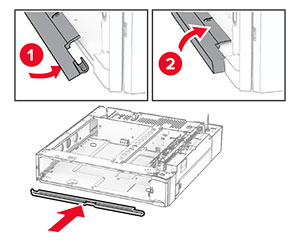
  8. 下部のトレイカバーを取り付けます。

    The lower tray cover is aligned, and then attached to the tray base.
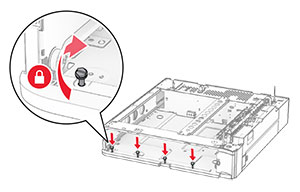
  9. ネジを取り付けます。

    The screws are aligned to the tray base, and then turned clockwise.
  10. 上部のトレイカバーを取り付けます。

    The upper tray cover is aligned, and then attached to the tray base.
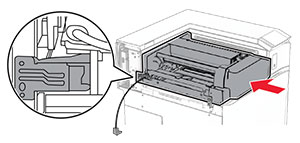
  11. 550 枚トレイの引き出し部を挿入します。

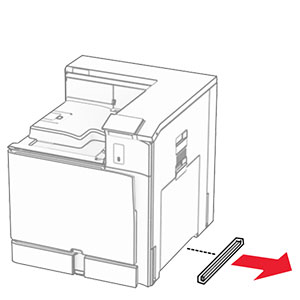
  12. プリンタの左下のカバーを取り外します。

    The cover under the right side of the printer is removed.
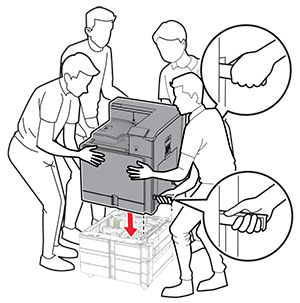
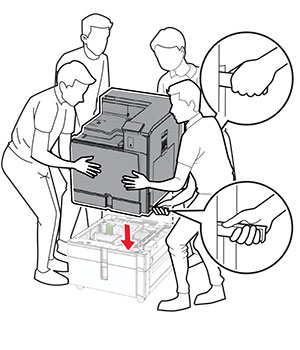
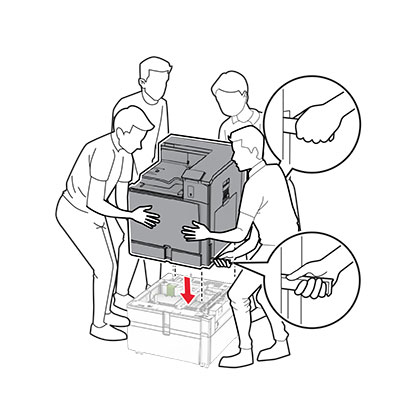
  13. プリンタを 550 枚トレイに合わせ、所定の位置まで下げます。

    標準の注意アイコン 注意—傷害の恐れあり: プリンタの重さが 20 kg(44 lb)以上ある場合、安全に持ち上げるために 2 名以上の人が必要になることがあります。
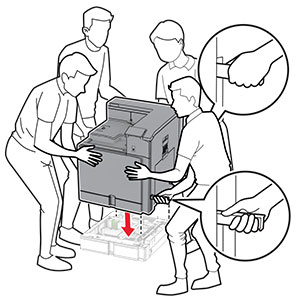
    Printer is aligned, and then lowered into the optional tray.
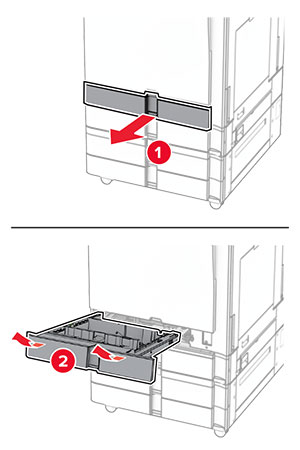
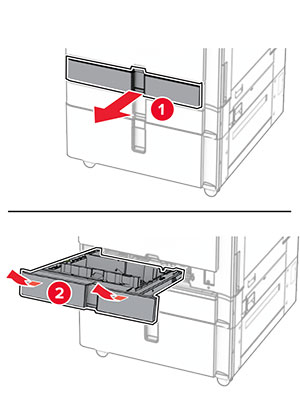
  14. 標準トレイの引き出し部を引き出します。

    Tray insert is pulled out from the tray base with a slightly upward motion.
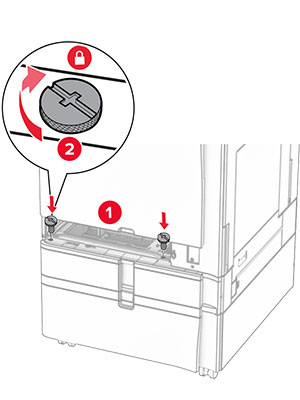
  15. 550 枚トレイにプリンタを固定します。

    The screws are aligned to the tray base, and then turned clockwise.
  16. 標準トレイの引き出し部を挿入します。

    Tray insert is inserted into the tray base with a slightly downward motion.
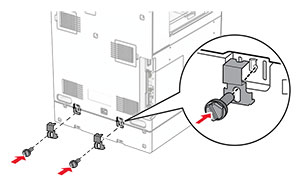
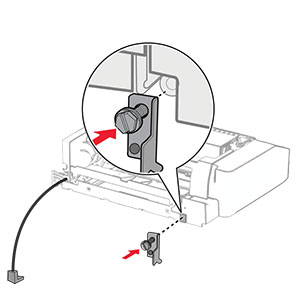
  17. 550 枚トレイの後部をプリンタに固定します。

    The 550-sheet tray and the printer are secured using brackets and screws.
  18. 電源コードの一方の端をプリンタに接続してから、もう一方の端をコンセントに差し込みます。

    標準の注意アイコン 注意—傷害の恐れあり: 火災や感電の危険を避けるため、電源コードを接続するコンセントが、製品の設置場所の近くにあること、アクセスしやすいこと、正しく接地されていること、適切な定格であることを確認してください。
  19. プリンタの電源を入れます。

プリントドライバにトレイを追加し、印刷ジョブで使用できるようにします。詳細については、プリンタドライバの使用可能なオプションを追加するを参照してください。
2 x 550 枚トレイの取り付け

感電注意アイコン 注意—感電危険: 感電を避けるため、プリンタのセットアップ後にコントローラボードにアクセスする際や、オプションのハードウェアまたはメモリデバイスを取り付ける際には、作業を進める前にプリンタの電源を切り、電源コードを抜きます。他のデバイスがプリンタに接続されている場合は、他のデバイスの電源も切り、プリンタに接続しているケーブルを抜きます。

メモ:

  1. プリンタの電源を切ります。

    The power button on the side of the control panel is pressed for at least 5 seconds.
  2. 電源コードをコンセントから抜き、次にプリンタから抜きます。

    The power cord is unplugged from the electrical outlet and then from the printer.
  3. 2 x 550 枚トレイを梱包から取り出し、梱包材をすべて取り除きます。

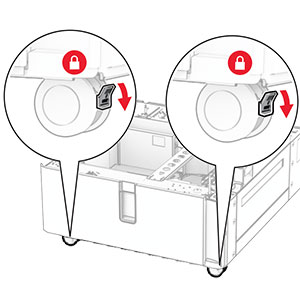
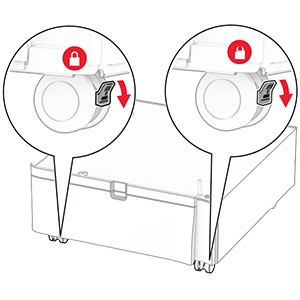
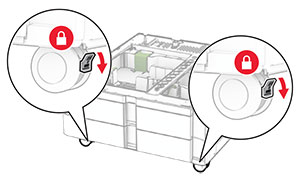
  4. キャスタをロックし、2 x 550 枚トレイを固定します。

    The levers of the front caster locks are pushed down.
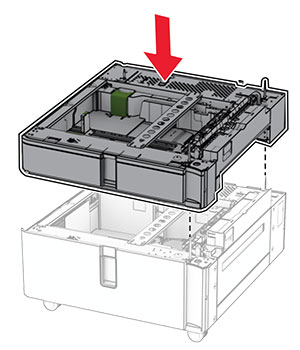
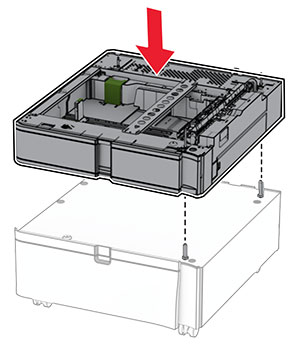
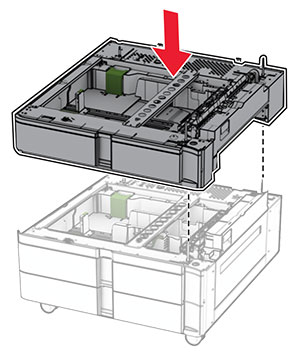
  5. 550 枚トレイを 2 x 550 枚トレイに合わせ、所定の位置まで下げます。

    メモ: トレイの破損を防ぐため、トレイを持ち上げる際は必ず前面と背面を持ってください。
    The 550-sheet tray is aligned and lowered into the 2 x 550-sheet tray.
  6. 550 枚トレイの引き出し部を引き出します。

    The tray insert is pulled out from the tray base with a slightly upward motion.
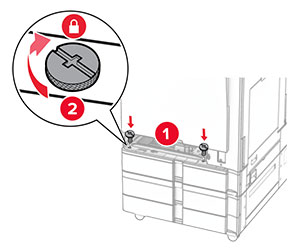
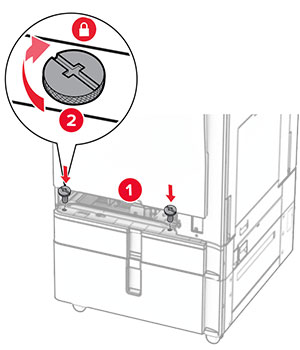
  7. 550 枚トレイを 2 x 550 枚トレイに固定します。

    The screws are aligned to the tray base, and then turned clockwise.
  8. 550 枚トレイの引き出し部を挿入します。

    The tray is inserted into the base with a slightly downward motion.
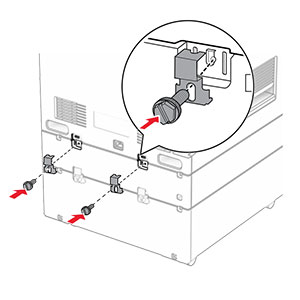
  9. 550 枚トレイの後部を 2 x 550 枚トレイに固定します。

    The 550-sheet tray and the 2 x 550-sheet tray are secured using brackets and screws.
  10. プリンタの左下のカバーを取り外します。

    The cover under the right side of the printer is removed.
  11. プリンタをデュアル給紙に合わせ、所定の位置まで下げます。

    標準の注意アイコン 注意—傷害の恐れあり: プリンタの重さが 20 kg(44 ポンド)以上ある場合、安全に持ち上げるために 2 名以上の人が必要になることがあります。
    The printer is aligned and lowered into the optional trays.
  12. 標準トレイの引き出し部を引き出します。

    The tray insert is pulled out from the tray base with a slightly upward motion.
  13. 550 枚トレイにプリンタを固定します。

    Inside the standard tray base, screws are inserted and twisted clockwise.
  14. 標準トレイの引き出し部を挿入します。

  15. 550 枚トレイの後部をプリンタに固定します。

    The 550-sheet tray and the printer are secured using brackets and screws.
  16. 電源コードの一方の端をプリンタに接続してから、もう一方の端をコンセントに差し込みます。

    標準の注意アイコン 注意—傷害の恐れあり: 火災や感電の危険を避けるため、電源コードを接続するコンセントが、製品の設置場所の近くにあること、アクセスしやすいこと、正しく接地されていること、適切な定格であることを確認してください。
  17. プリンタの電源を入れます。

プリントドライバにトレイを追加し、印刷ジョブで使用できるようにします。詳細については、プリンタドライバの使用可能なオプションを追加するを参照してください。
2000 枚デュアル給紙を取り付ける

感電注意アイコン 注意—感電危険: 感電を避けるため、プリンタのセットアップ後にコントローラボードにアクセスする際や、オプションのハードウェアまたはメモリデバイスを取り付ける際には、作業を進める前にプリンタの電源を切り、電源コードを抜きます。他のデバイスがプリンタに接続されている場合は、他のデバイスの電源も切り、プリンタに接続しているケーブルを抜きます。

メモ:

  1. プリンタの電源を切ります。

    The power button on the side of the control panel is pressed for at least 5 seconds.
  2. 電源コードをコンセントから抜き、次にプリンタから抜きます。

    The power cord is unplugged from the electrical outlet, and then from the printer.
  3. デュアル給紙を梱包から取り出し、梱包材をすべて取り除きます。

  4. キャスタをロックし、デュアル給紙を固定します。

    The levers of the front caster locks are pushed down.

    D

  5. 550 枚トレイをデュアル給紙に合わせ、所定の位置まで下げます。

    メモ: トレイの破損を防ぐため、トレイを持ち上げる際は必ず前面と背面を持ってください。
    The 550-sheet tray is aligned and lowered into the tandem tray.
  6. 550 枚トレイの引き出し部を引き出します。

    The tray insert is pulled out from the tray base with a slightly upward motion.
  7. 550 枚トレイをデュアル給紙に固定します。

    The screws are aligned to the tray base, and then turned clockwise.
  8. トレイの引き出し部を挿入します。

  9. 550 枚トレイの後部をデュアル給紙に固定します。

    The rear part of the 550-sheet tray and the tandem tray are secured using brackets and screws.
  10. プリンタの左下のカバーを取り外します。

    The cover under the right side of the printer is removed.
  11. プリンタをデュアル給紙に合わせ、所定の位置まで下げます。

    標準の注意アイコン 注意—傷害の恐れあり: プリンタの重さが 20 kg(44 ポンド)以上ある場合、安全に持ち上げるために 2 名以上の人が必要になることがあります。
    The printer is aligned, and then lowered into the optional tray.
  12. 標準トレイを引き出します。

    The tray insert is pulled out from the tray base with a slightly upward motion.
  13. 550 枚トレイにプリンタを固定します。

    The screws are aligned to the tray base, and then turned clockwise.
  14. トレイを挿入します。

  15. 550 枚トレイの後部をプリンタに固定します。

    The 550-sheet tray and the printer are secured using brackets and screws.
  16. 電源コードの一方の端をプリンタに接続してから、もう一方の端をコンセントに差し込みます。

    標準の注意アイコン 注意—傷害の恐れあり: 火災や感電の危険を避けるため、電源コードを接続するコンセントが、製品の設置場所の近くにあること、アクセスしやすいこと、正しく接地されていること、適切な定格であることを確認してください。
  17. プリンタの電源を入れます。

プリントドライバにトレイを追加し、印刷ジョブで使用できるようにします。詳細については、プリンタドライバの使用可能なオプションを追加するを参照してください。
キャビネットを取り付ける

感電注意アイコン 注意—感電危険: 感電を避けるため、プリンタのセットアップ後にコントローラボードにアクセスする際や、オプションのハードウェアまたはメモリデバイスを取り付ける際には、作業を進める前にプリンタの電源を切り、電源コードを抜きます。他のデバイスがプリンタに接続されている場合は、他のデバイスの電源も切り、プリンタに接続しているケーブルを抜きます。

メモ:

  1. 梱包から取り出し、キャビネット組み立てます。

  2. プリンタの電源を切ります。

    The power button on the side of the control panel is pressed for at least 5 seconds.
  3. 電源コードをコンセントから抜き、次にプリンタから抜きます。

    The power cord is unplugged from the electrical outlet, and then from the printer.
  4. キャスタをロックし、キャビネットを固定します。

    The levers of the front caster locks are pushed down.
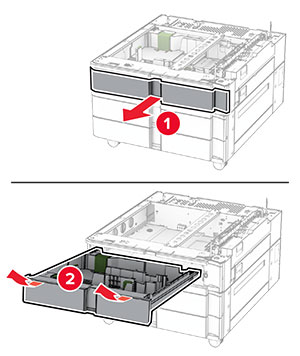
  5. 550 枚トレイのサイドカバーを取り付けます。

    The tray side cover is inserted under the optional 550-sheet tray.
  6. トレイをキャビネットに合わせ、所定の位置まで下げます。

    メモ: トレイの破損を防ぐため、トレイを持ち上げる際は必ず前面と背面を持ってください。
    The optional 550-sheet tray is aligned and lowered into the cabinet.
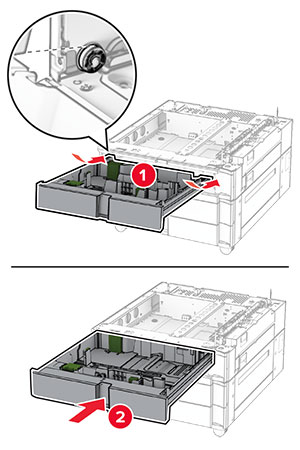
  7. トレイの引き出し部を引き出します。

    The tray insert is pulled out from the tray base with a slightly upward motion.
  8. キャビネットにトレイを固定します。

    The screws are aligned to the tray base, and then turned clockwise.
  9. トレイの引き出し部を挿入します。

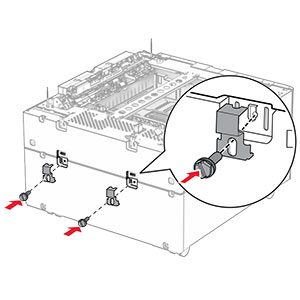
  10. トレイの後部をキャビネットに固定します。

    The rear part of the optional 550-sheet tray and the 2000-sheet tandem tray is secured using brackets and screws.
  11. プリンタの左下のカバーを取り外します。

    The cover under the right side of the printer is removed.
  12. プリンタをキャビネットとトレイに合わせ、所定の位置まで下げます。

    標準の注意アイコン 注意—傷害の恐れあり: プリンタの重さが 20 kg(44 ポンド)以上ある場合、安全に持ち上げるために 2 名以上の人が必要になることがあります。
    The printer is aligned, and then lowered into the optional tray.
  13. 標準トレイの引き出し部を引き出します。

  14. 550 枚トレイにプリンタを固定します。

    The screws are aligned to the tray base, and then turned clockwise.
  15. 標準トレイの引き出し部を挿入します。

  16. 550 枚トレイの後部をプリンタに固定します。

    The rear part of the optional 550-sheet tray and the printer are secured using brackets and screws.
  17. 電源コードの一方の端をプリンタに接続してから、もう一方の端をコンセントに差し込みます。

    標準の注意アイコン 注意—傷害の恐れあり: 火災や感電の危険を避けるため、電源コードを接続するコンセントが、製品の設置場所の近くにあること、アクセスしやすいこと、正しく接地されていること、適切な定格であることを確認してください。
  18. プリンタの電源を入れます。

1500 枚トレイを取り付ける

感電注意アイコン 注意—感電危険: 感電を避けるため、プリンタのセットアップ後にコントローラボードにアクセスする際や、オプションのハードウェアまたはメモリデバイスを取り付ける際には、作業を進める前にプリンタの電源を切り、電源コードを抜きます。他のデバイスがプリンタに接続されている場合は、他のデバイスの電源も切り、プリンタに接続しているケーブルを抜きます。

メモ:

メモ: 
  1. プリンタの電源を切ります。

    Power button on the side of the control panel is pressed for 5 seconds.
  2. 電源コードをコンセントから抜き、次にプリンタから抜きます。

    Power cord is unplugged from the electrical outlet, and then from the printer.
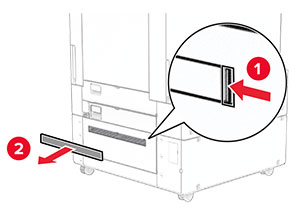
  3. 接続カバーを取り外します。

    メモ: カバーを捨てないでください。
    The tray cover is pried, and then removed from the printer.
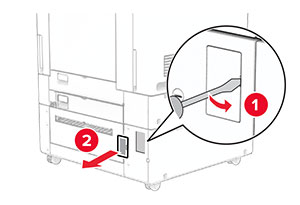
  4. ポートカバーを取り外します。

    メモ: カバーを捨てないでください。
    The port cover is pried open with a screwdriver, and then removed from the printer.
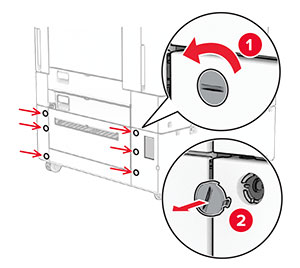
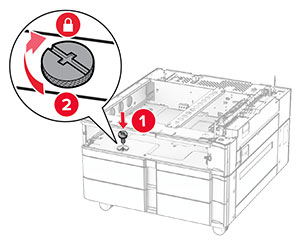
  5. プリンタからネジ蓋を取り外します。

    メモ: ネジ蓋は捨てないでください。
    The screws are turned counterclockwise, and then removed from the printer.
  6. 1500 枚トレイを梱包から取り出し、梱包材をすべて取り除きます。

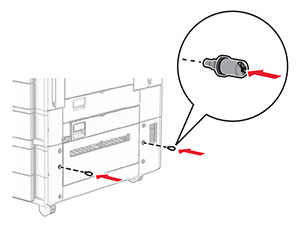
  7. ネジを取り付けブラケットに取り付けます。

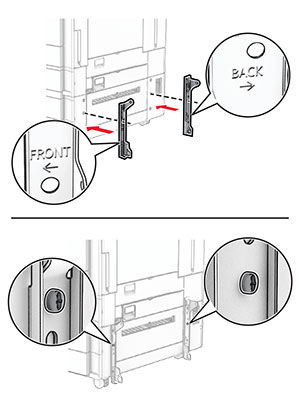
    The screws are installed into the lower-right side of the printer.
  8. プリンタに取り付けブラケットを取り付けます。

    メモ: 1500 枚トレイに付属の取り付けブラケットとネジを使用します。
    The mounting brackets are aligned, and then secured with screws.
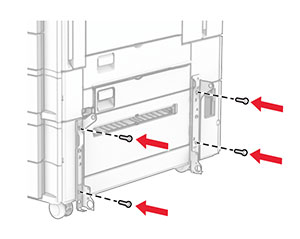
  9. 残りのネジを取り付けます。

    The remaining screws are installed into the mounting bracket.
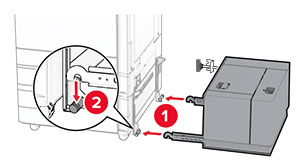
  10. 1500 枚トレイを取り付けます。

    Tray is being aligned, and then pushed into the right side of the printer.
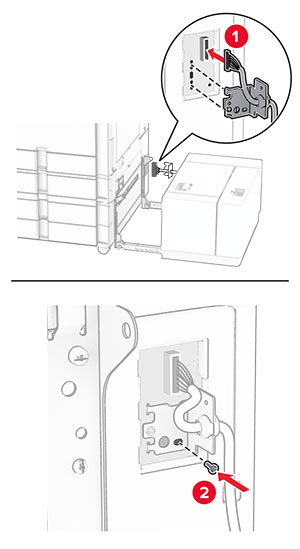
  11. トレイケーブルをプリンタに接続します。

    The tray cable is connected to the printer.
  12. トレイのケーブルカバーを取り付けます。

    The tray cable cover is attached, and secured with a screw.
  13. 1500 枚トレイをプリンタに向かってスライドします。

    The 1500-sheet tray is positioned into place.
  14. プリンタの電源コードの一方の端をプリンタに接続してから、もう一方の端をコンセントに差し込みます。

    標準の注意アイコン 注意—傷害の恐れあり: 火災や感電の危険を避けるため、電源コードを接続するコンセントが、製品の設置場所の近くにあること、アクセスしやすいこと、正しく接地されていること、適切な定格であることを確認してください。
  15. プリンタの電源を入れます。

プリントドライバにトレイを追加し、印刷ジョブで使用できるようにします。詳細については、プリンタドライバの使用可能なオプションを追加するを参照してください。
ホチキスフィニッシャを取り付ける

感電注意アイコン 注意—感電危険: 感電を避けるため、プリンタのセットアップ後にコントローラボードにアクセスする際や、オプションのハードウェアまたはメモリデバイスを取り付ける際には、作業を進める前にプリンタの電源を切り、電源コードを抜きます。他のデバイスがプリンタに接続されている場合は、他のデバイスの電源も切り、プリンタに接続しているケーブルを抜きます。
メモ: この作業には、マイナスドライバが必要です。
  1. プリンタの電源を切ります。

    Power button on the side of the control panel is pressed for 5 seconds.
  2. 電源コードをコンセントから抜き、次にプリンタから抜きます。

    Power cord is unplugged from the electrical outlet, and then from the printer.
  3. ホチキスフィニッシャを梱包から取り出し、梱包材をすべて取り除きます。

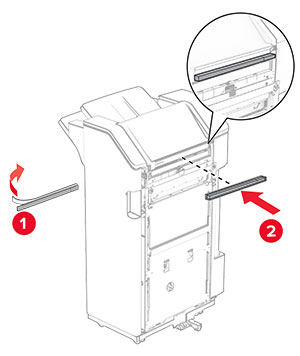
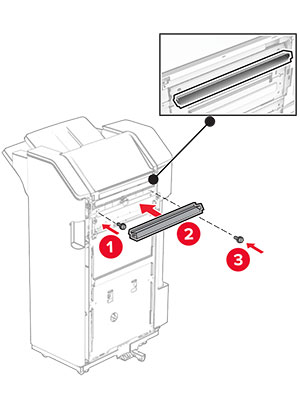
  4. フィードガイドを取り付けます。

    The feed guide is aligned to the staple finisher, and then secured with screws.
  5. 標準排紙トレイを取り外します。

    メモ: 排紙トレイは捨てないでください。
    The tray extender is opened, and then the standard bin is pulled out from the printer.
  6. このオプションを取り付ける前に、排紙トレイフラグを閉位置にします。

    メモ: このオプションを取り外したら、排紙トレイフラグを開位置にします。
    The exit bin flag is stored back into the printer.
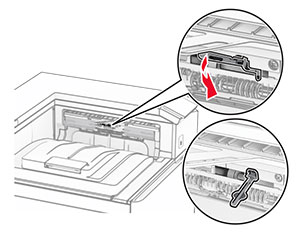
  7. バックアップローラーを取り外します。

    メモ: ローラーを捨てないでください。
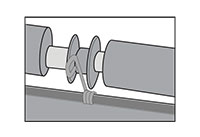
    The backup roller is pried using a screwdriver, and then removed from the printer.
  8. ホチキスフィニッシャに付属しているフィードローラーを挿入し、カチッと音がすることを確認します。

    The feed roller is aligned, and then inserted into the printer.
    メモ: 金属バネが給紙ローラーの前面にあることを確認してください。
    The metal spring is positioned in front of the roller.
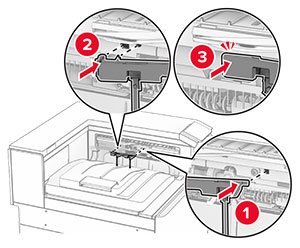
  9. ローラーカバーを取り付けるときは、カチッと音がすることを確認します。

    The roller cover is aligned, and then attached to the printer.
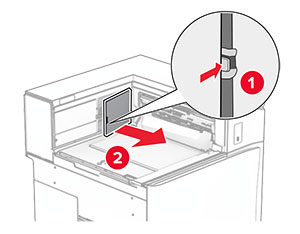
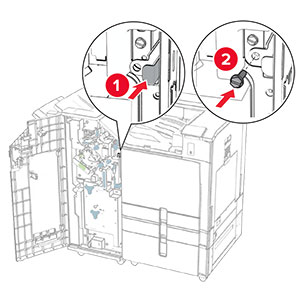
  10. 前面ドアを開いてから、プリンタの左側にあるカバーを取り外します。

    メモ: ネジとカバーを捨てないでください。
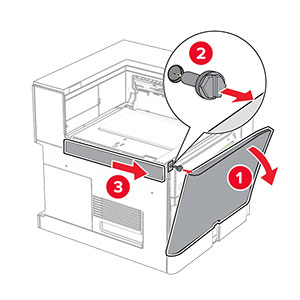
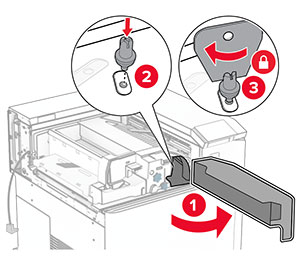
    The front door is opened, the screw is removed, and then the left cover is removed.
  11. 左の背面カバーを取り外します。

    メモ: ネジとカバーを捨てないでください。
    The left rear cover is unscrewed and removed.
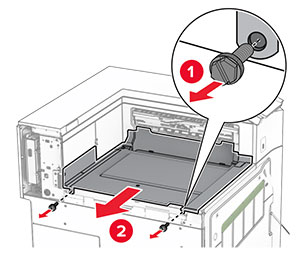
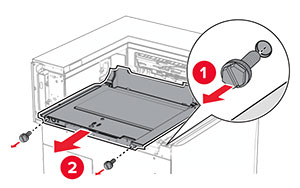
  12. 内部排紙トレイのカバーを取り外します。

    メモ: カバーを捨てないでください。
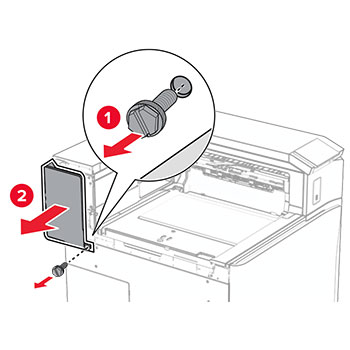
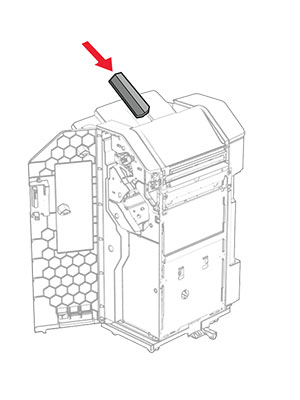
    The staple finisher slider is aligned to the printer, and then secured with screws.
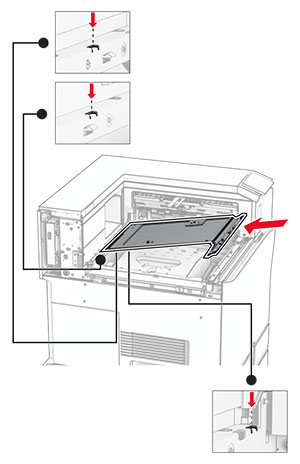
  13. 位置を合わせてから、ホチキスフィニッシャに付属する内部排紙トレイカバーを挿入します。

    The inner bin cover is aligned, and then inserted into the printer.
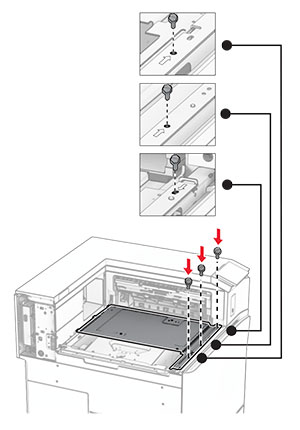
  14. ネジを内部排紙トレイカバーに取り付けます。

    The screws are aligned, and then installed into the inner bin cover.
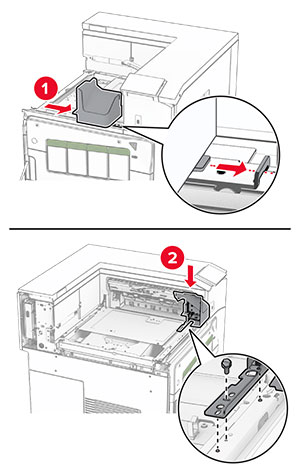
  15. ホチキスフィニッシャのスライドバーを取り付けます。

     The mounting bracket is installed, and secured with a screw.
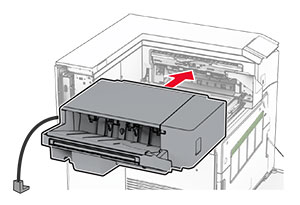
  16. ホチキスフィニッシャを挿入します。

    The finisher is inserted into the standard bin.
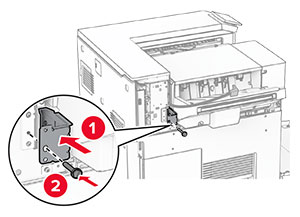
  17. 取り付けブラケットを取り付けて、フィニッシャをプリンタに固定します。

    メモ: フィニッシャに付属のネジを使用します。
    The mounting bracket is installed.
  18. 左側の背面カバーを取り付けて、ホチキスフィニッシャを左にスライドします。

    The left rear cover is closed, and then secured with a screw.
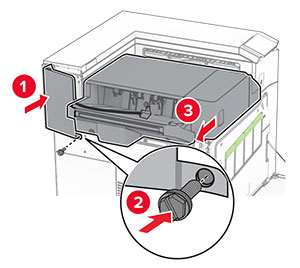
  19. フィニッシャに付属する左上のトリムカバーを取り付けます。

    The upper trim cover is inserted to the printer, and then secured with a screw.
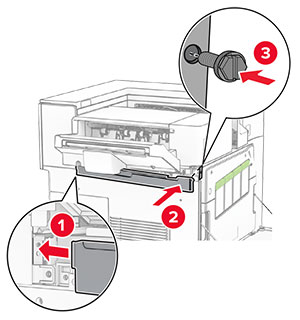
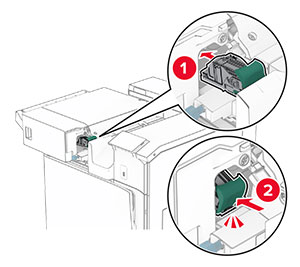
  20. ホチキスカートリッジを挿入し、カチッと音がすることを確認します。

    The staple cartridge is inserted into place.
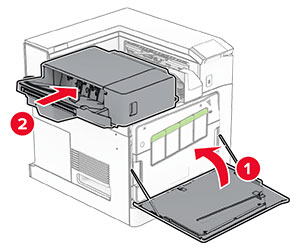
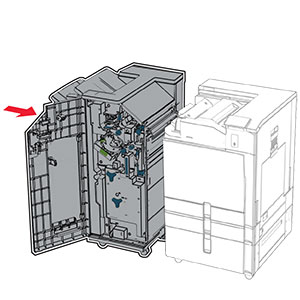
  21. 前面ドアを閉じて、プリンタに向かってフィニッシャをスライドします。

    The front door is closed, and then the staple finisher is secured into place.
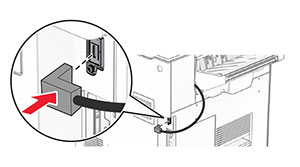
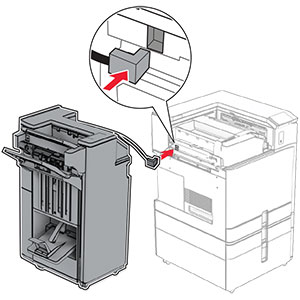
  22. オプションケーブルをプリンタに接続します。

     The staple finisher cable is connected to the printer.
  23. プリンタの電源コードの一方の端をプリンタに接続してから、もう一方の端をコンセントに差し込みます。

    標準の注意アイコン 注意—傷害の恐れあり: 火災や感電の危険を避けるため、電源コードを接続するコンセントが、製品の設置場所の近くにあること、アクセスしやすいこと、正しく接地されていること、適切な定格であることを確認してください。
  24. プリンタの電源を入れます。

必要に応じて、プリントドライバにフィニッシャを追加し、印刷ジョブで使用できるようにします。詳細については、プリンタドライバの使用可能なオプションを追加するを参照してください。
オフセットスタッカを取り付ける

感電注意アイコン 注意—感電危険: 感電を避けるため、プリンタのセットアップ後にコントローラボードにアクセスする際や、オプションのハードウェアまたはメモリデバイスを取り付ける際には、作業を進める前にプリンタの電源を切り、電源コードを抜きます。他のデバイスがプリンタに接続されている場合は、他のデバイスの電源も切り、プリンタに接続しているケーブルを抜きます。
  1. プリンタの電源を切ります。

    Power button on the side of the control panel is pressed for 5 seconds.
  2. 電源コードをコンセントから抜き、次にプリンタから抜きます。

    Power cord is unplugged from the electrical outlet, and then from the printer.
  3. オフセットスタッカを梱包から取り出し、梱包材をすべて取り除きます。

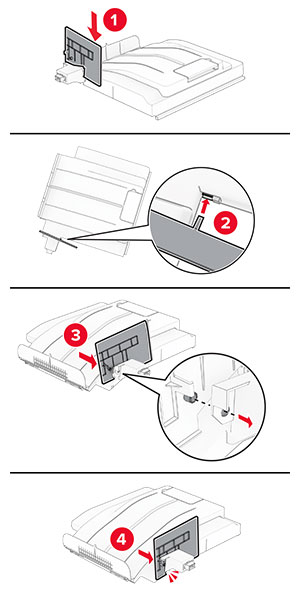
  4. 内部の背面カバーをオフセットスタッカに取り付けます。

    The inner rear cover is aligned, and then attached to the offset stacker.
  5. 標準排紙トレイを取り外します。

    メモ: 排紙トレイは捨てないでください。
    The tray extender is opened, and then the standard bin is pulled out from the printer.
  6. 用紙搬送ユニットのコネクタカバーを取り外します。

    メモ: カバーを捨てないでください。
    The paper transport connector cover is pried, and then removed from the printer.
  7. このオプションを取り付ける前に、排紙トレイフラグを閉位置にします。

    The exit bin flag is stored back into the printer.
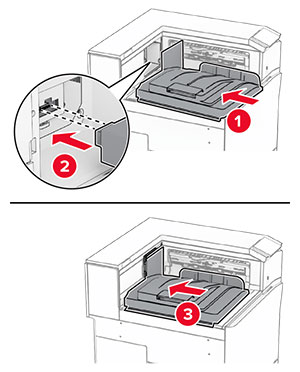
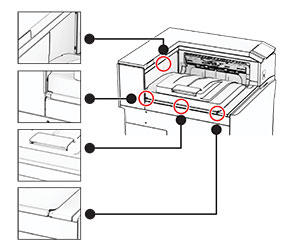
  8. 位置を合わせ、オフセットスタッカをプリンタに取り付けます。

    The offset stacker is aligned, and then inserted into the printer.
    メモ: 部品がプリンタの正しい位置にしっかりと接続されていることを確認します。
    Correct alignment and placement of the offset stacker.
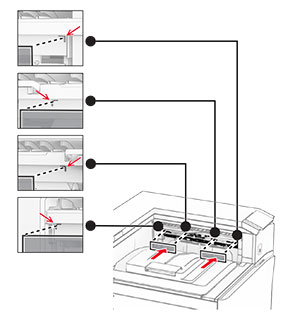
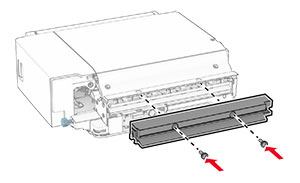
  9. オフセットスタッカの保護ストリップをプリンタに取り付けます。

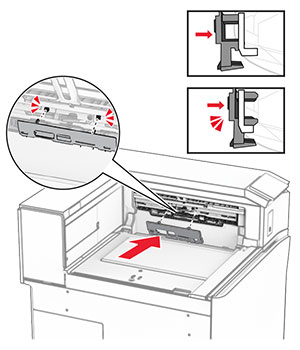
    The protective strips are aligned, and then attached to the printer.
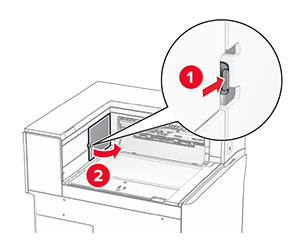
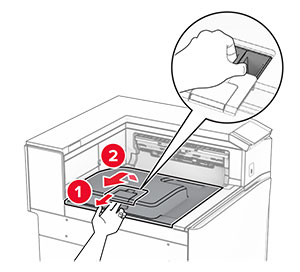
  10. 排紙トレイのフラグを開位置にします。

    The exit bin flag is pulled out, and then placed into the open position.
  11. 排紙トレイフラグカバーを取り付け、カチッと音がすることを確認します。

    The exit bin flag cover is aligned, and then attached to the printer.
  12. プリンタの電源コードの一方の端をプリンタに接続してから、もう一方の端をコンセントに差し込みます。

    標準の注意アイコン 注意—傷害の恐れあり: 火災や感電の危険を避けるため、電源コードを接続するコンセントが、製品の設置場所の近くにあること、アクセスしやすいこと、正しく接地されていること、適切な定格であることを確認してください。
  13. プリンタの電源を入れます。

プリントドライバにオフセットスタッカを追加し、印刷ジョブで使用できるようにします。詳細については、プリンタドライバの使用可能なオプションを追加するを参照してください。
折り畳みオプション付きの用紙搬送ユニットを取り付ける

感電注意アイコン 注意—感電危険: 感電を避けるため、プリンタのセットアップ後にコントローラボードにアクセスする際や、オプションのハードウェアまたはメモリデバイスを取り付ける際には、作業を進める前にプリンタの電源を切り、電源コードを抜きます。他のデバイスがプリンタに接続されている場合は、他のデバイスの電源も切り、プリンタに接続しているケーブルを抜きます。

メモ:

  1. プリンタの電源を切ります。

    Power button on the side of the control panel is pressed for 5 seconds.
  2. 電源コードをコンセントから抜き、次にプリンタから抜きます。

    Power cord is unplugged from the electrical outlet, and then the other end is removed from the printer.
  3. 折り畳みオプション付きの用紙搬送ユニットを梱包から取り出し、梱包材をすべて取り除きます。

  4. 標準排紙トレイを取り外します。

    メモ: 排紙トレイは捨てないでください。
    The standard bin is removed.
  5. このオプションを取り付ける前に、排紙トレイフラグを閉位置にします。

    メモ: このオプションを取り外したら、排紙トレイフラグを開位置にします。
    The exit bin flag is stored back into the printer.
  6. バックアップローラーを取り外します。

    メモ: ローラーを捨てないでください。
    The backup roller is pried using a screwdriver, and then removed from the printer.
  7. オプションに付属しているフィードローラーを挿入し、カチッと音がすることを確認します。

    The roller is inserted into the printer.
    メモ: 金属バネが給紙ローラーの前面にあることを確認してください。
    The metal spring is positioned in front of the roller.
  8. ローラーカバーを取り付けるときは、カチッと音がすることを確認します。

    The cover is attached to the printer.
  9. 前面ドアを開いてから、プリンタの左側にあるカバーを取り外します。

    メモ: ネジとカバーを捨てないでください。
    The front door is opened, and then the cover is unscrewed and removed.
  10. 前面ドアを閉じます。

  11. 用紙搬送ユニットのコネクタカバーを取り外します。

    メモ: カバーを捨てないでください。
    The paper transport connector cover is removed from the printer.
  12. 左の背面カバーを取り外します。

    メモ: ネジとカバーを捨てないでください。
    The left rear cover is unscrewed and removed.
  13. 内部排紙トレイのカバーを取り外します。

    メモ: ネジとカバーを捨てないでください。
    The inner bin cover is unscrewed, and then removed from the printer.
  14. 位置を合わせてから、オプションに付属する内部排紙トレイカバーを挿入します。

    The inner bin cover is aligned, and then inserted into the printer.
  15. ネジを内部排紙トレイカバーに取り付けます。

    The screws are aligned, and then installed into the inner bin cover.
  16. フォームテープの一部をオプションに取り付けます。

    The foam tapes are peeled, and then attached to the paper transport with folding option.
  17. ドア F を開き、ねじを締めます。

    Door F is opened, and then the screws inside it are tightened.
  18. ドア F を閉じます。

  19. オプションに金属のブラケットを取り付けます。

    The metal bracket with a screw is attached to the paper transport with folding option.
  20. オプションを挿入します。

    メモ: 金属のブラケットがプリンタの前面にあることを確認してください。
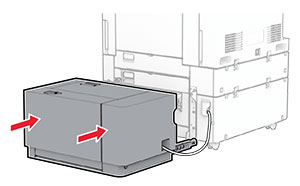
    The paper transport with folding option is inserted into the printer, with the metal bracket in front of the printer.
  21. ドア F を開いてから、オプションに付属するドライバでネジを取り付けます。

    Door F is opened, and then the screw is installed using the screwdriver that came with the option.
  22. ドア F を閉じます。

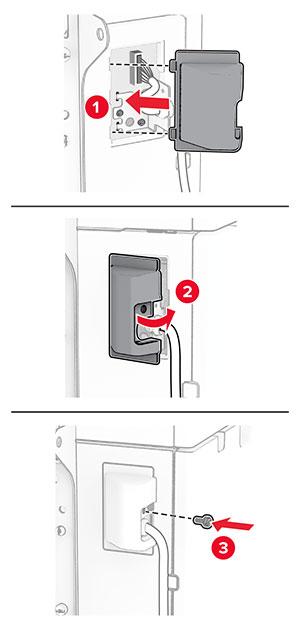
  23. ネジをオプションに取り付けます。

    The screws are installed into the paper transport with folding option.
  24. 左の背面カバーを取り付けます。

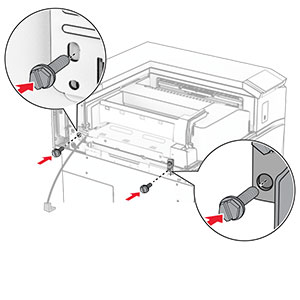
    The left rear cover is attached to the printer, and then secured with a screw.
  25. 前面ドアを開いてから、カバーをプリンタの左側に取り付けます。

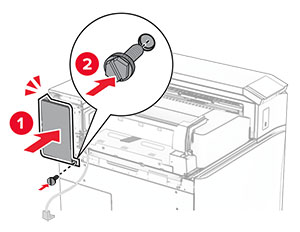
    The front door is opened, and then the cover is attached and secured with a screw.
  26. 前面ドアを閉じます。

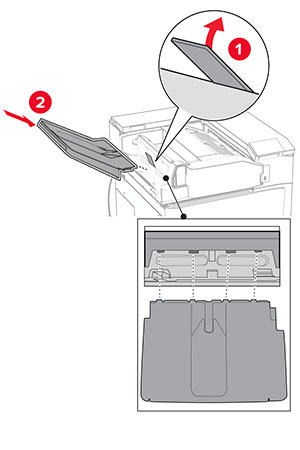
  27. 排紙トレイのフラップを上げ、位置を合わせてオプションの排紙トレイに取り付けます。

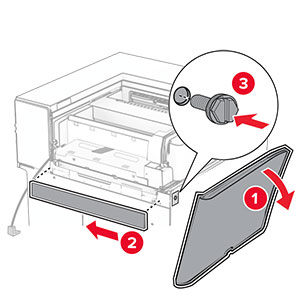
    The bin flap is raised, and then the option bin is attached to the paper transport with folding option.
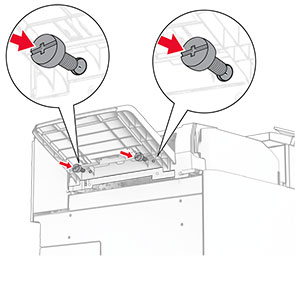
  28. ネジをオプションの排紙トレイに取り付けます。

    Screws are installed under the bin of the paper transport with folding option.
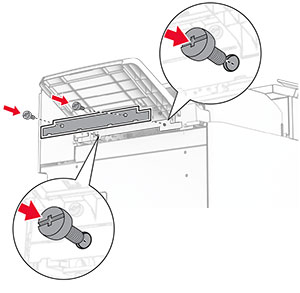
  29. トリムカバーを取り付けます。

    The trim cover is attached to the paper transport with folding option, and then secured with screws.
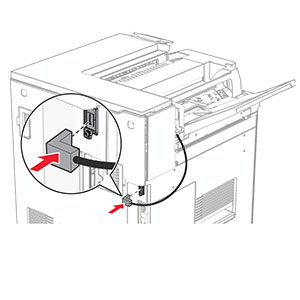
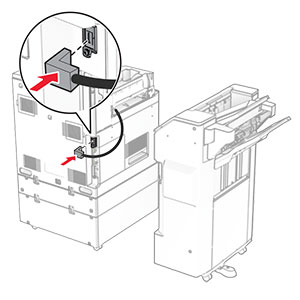
  30. オプションケーブルをプリンタに接続します。

    The paper transport with folding option cable is connected to the printer.
  31. 電源コードの一方の端をプリンタに接続してから、もう一方の端をコンセントに差し込みます。

    標準の注意アイコン 注意—傷害の恐れあり: 火災や感電の危険を避けるため、電源コードを接続するコンセントが、製品の設置場所の近くにあること、アクセスしやすいこと、正しく接地されていること、適切な定格であることを確認してください。
  32. プリンタの電源を入れます。

ホチキス、ホールパンチフィニッシャと用紙搬送オプションを取り付ける

感電注意アイコン 注意—感電危険: 感電を避けるため、プリンタのセットアップ後にコントローラボードにアクセスする際や、オプションのハードウェアまたはメモリデバイスを取り付ける際には、作業を進める前にプリンタの電源を切り、電源コードを抜きます。他のデバイスがプリンタに接続されている場合は、他のデバイスの電源も切り、プリンタに接続しているケーブルを抜きます。
メモ: この作業には、マイナスドライバが必要です。
  1. プリンタの電源を切ります。

    Power button on the side of the control panel is pressed for 5 seconds.
  2. 電源コードをコンセントから抜き、次にプリンタから抜きます。

    Power cord is unplugged from the electrical outlet, and then the other end is removed from the printer.
  3. 用紙搬送ユニットを梱包を取り出します。

  4. 標準排紙トレイを取り外します。

    メモ: 排紙トレイは捨てないでください。
    The standard bin is removed.
  5. このオプションを取り付ける前に、排紙トレイフラグを閉位置にします。

    メモ: このオプションを取り外したら、排紙トレイフラグを開位置にします。
    The exit bin flag is stored back into the printer.
  6. バックアップローラーを取り外します。

    メモ: ローラーを捨てないでください。
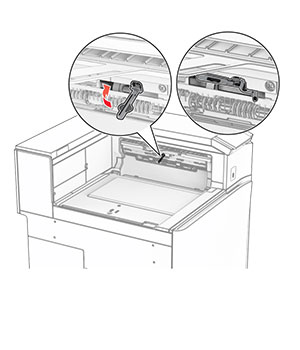
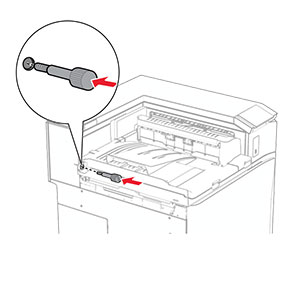
    The backup roller is pried using a screwdriver, and then removed from the printer.
  7. 用紙搬送ユニットに付属しているフィードローラーを挿入し、カチッと音がすることを確認します。

    The roller is inserted into the printer.
    メモ: 金属バネが給紙ローラーの前面にあることを確認してください。
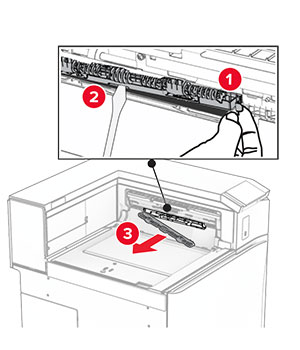
    The metal spring is positioned in front of the roller.
  8. カバーを取り付けて、カチッと音がすることを確認します。
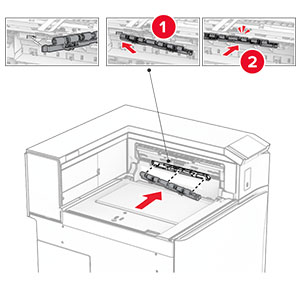
    The cover is attached to the printer.
  9. 前面ドアを開いてから、プリンタの左側にあるカバーを取り外します。

    メモ: ネジとカバーを捨てないでください。
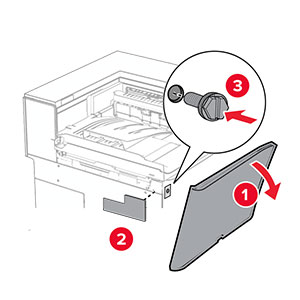
    The front door is opened, and then the cover is unscrewed and removed.
  10. 前面ドアを閉じます。

  11. 用紙搬送ユニットのコネクタカバーを取り外します。

    メモ: カバーを捨てないでください。
    The paper transport connector cover is removed from the printer.
  12. カバーを取り外します。

    メモ: カバーを捨てないでください。
    The cover above the front door is removed from the printer.
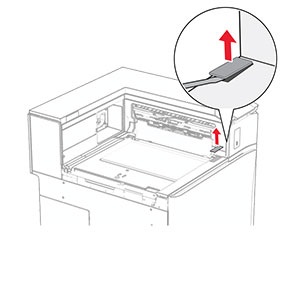
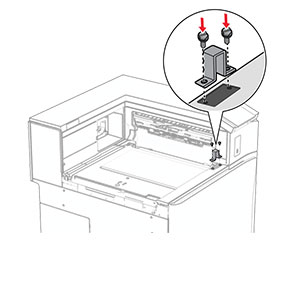
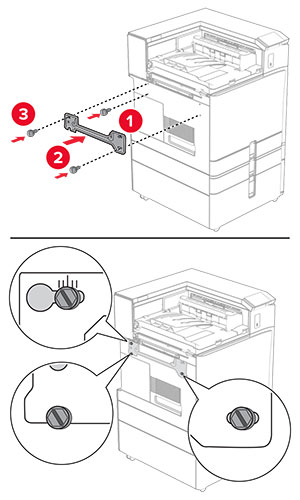
  13. 金属のブラケットを取り付けます。

    The metal bracket is attached into the slot above the front door.
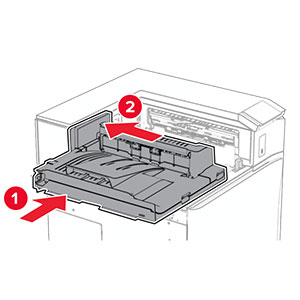
  14. 用紙搬送ユニットを挿入します。

    The paper transport is inserted into the printer.
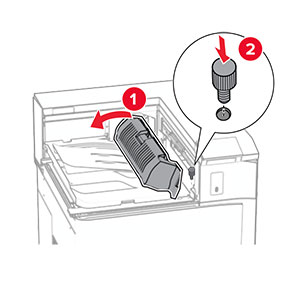
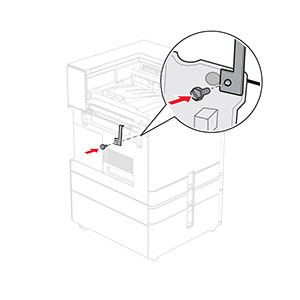
  15. ハンドル G を開いてから、ネジを用紙搬送ユニットの前面に取り付けます。

    Handle G is opened, and then the screw is inserted into the paper transport.
  16. ハンドル G を閉じます。

  17. 用紙搬送ユニットの背面にねじを取り付けます。

    The screw is inserted into the rear slot of the paper transport.
  18. 前面ドアを開け、用紙搬送ユニットに付属のカバーをプリンタの左側に取り付けます。

    The front door is opened, and then the cover is attached and secured with a screw.
  19. 前面ドアを閉じます。

  20. ホチキス、ホールパンチフィニッシャを取り出します。

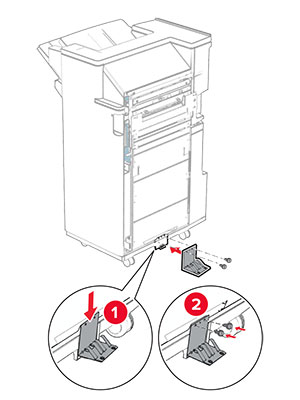
  21. 固定用器具を取り付けます。

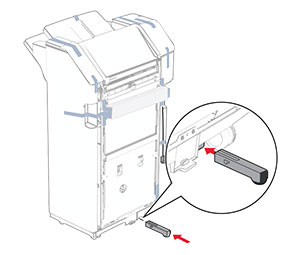
    The stabilizer is installed to the lower part of the finisher.
  22. フィニッシャ周辺のテープ片を取り除きます。

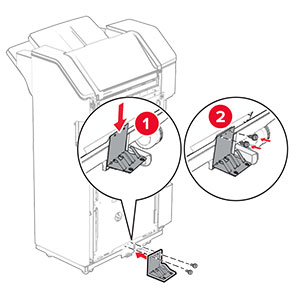
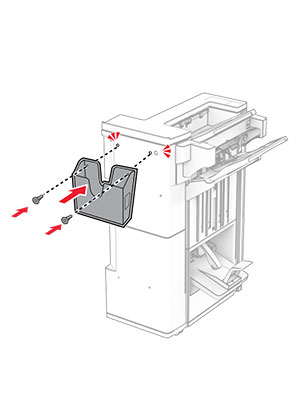
  23. フィニッシャにブラケットを取り付けます。

    The metal bracket is attached to the base of the staple, hole punch finisher, and then secured with screws.
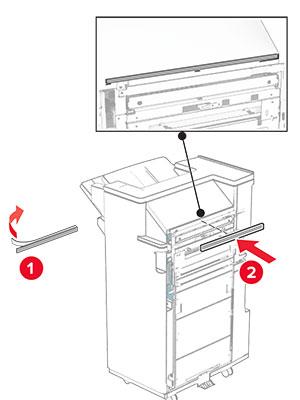
  24. フォームテープをフィニッシャに取り付けます。

    The foam tape is peeled, and then attached to the staple, hole punch finisher.
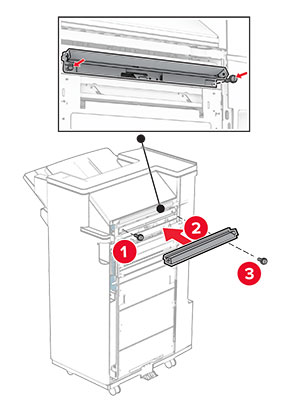
  25. フィードガイドをフィニッシャに取り付けます。

    The feed guide is attached to the staple, hole punch finisher, and then secured with screws.
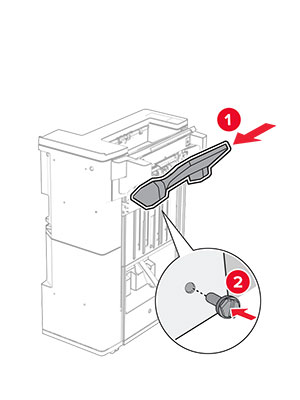
  26. 排紙トレイをフィニッシャに取り付けます。

    The bin is attached to the staple, hole punch finisher, and then secured with screws.
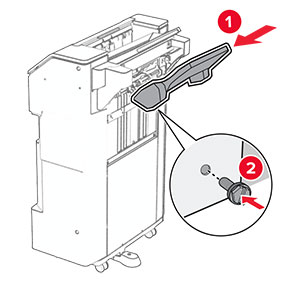
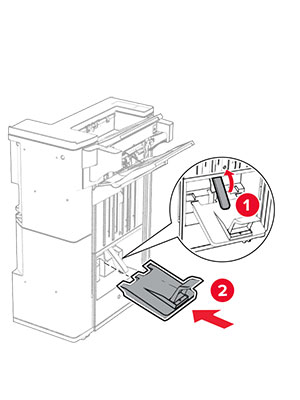
  27. フィニッシャのドアを開いてから、穴パンチボックスを挿入します。

    The finisher door is opened, and then the hole punch box is inserted into the finisher.
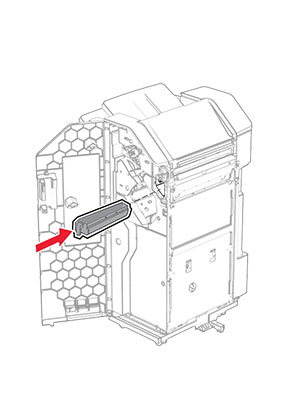
  28. フィニッシャ排紙トレイに排紙トレイ拡張装置をセットします。

    メモ:

    • 排紙トレイ拡張装置は、A3 サイズ以上の用紙や湿度の高い環境で用紙を束ねるのに役立ちます。
    • 排紙トレイ拡張装置を使用すると、排紙トレイの容量が減少します。
    The bin extender is placed on the staple, hole punch finisher bin.
  29. フィニッシャのドアを閉じます。

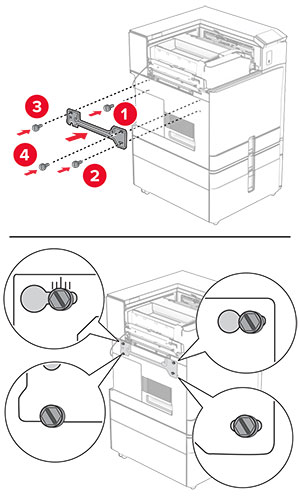
  30. プリンタに取り付けブラケットを取り付けます。

    メモ: ネジが取り付けブラケットのマーカーと合っていることを確認してください。
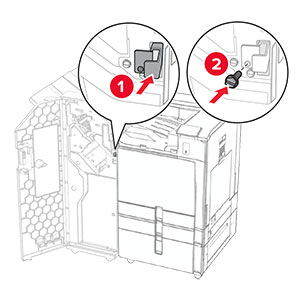
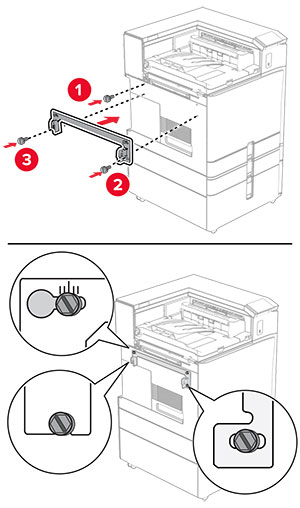
    The mounting bracket is attached to the printer, and then secured with screws.
  31. 用紙搬送ユニットに付属の金属のブラケットをプリンタに取り付けます。

    The metal bracket is attached to the printer, and then secured with a screw.
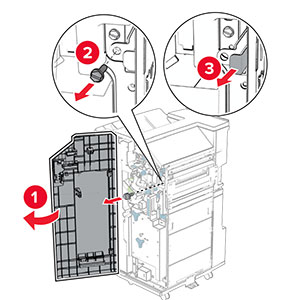
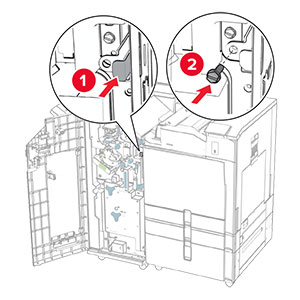
  32. フィニッシャのドアを開け、ネジを外し、フィニッシャのロックを引き出します。

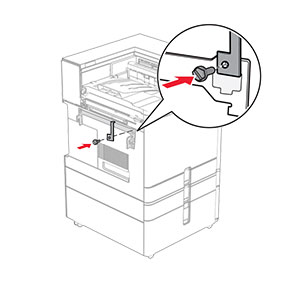
    The finisher door is opened, and then the finisher is unlocked by removing the screw.
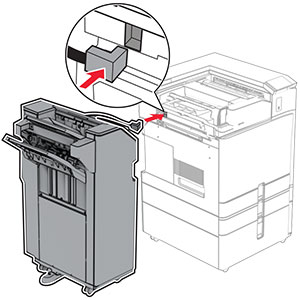
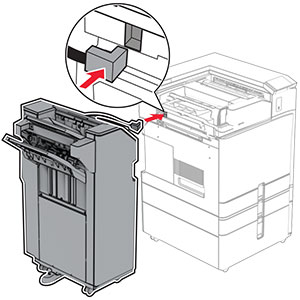
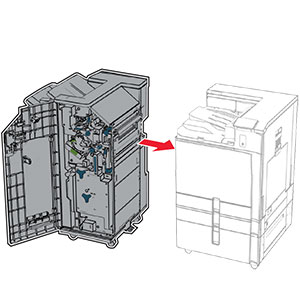
  33. フィニッシャをプリンタに取り付けます。

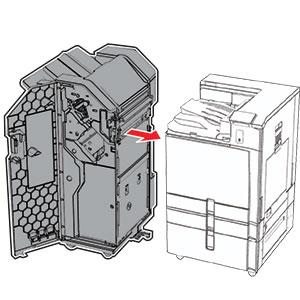
    The staple, hole punch finisher is being attached to the printer.
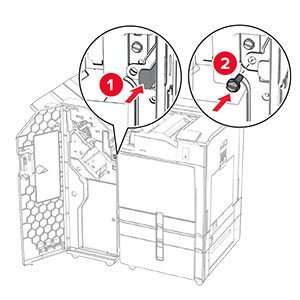
  34. フィニッシャをプリンタに固定し、ネジを取り付けます。

    The staple, hole punch finisher lock is pushed into the finisher, and then secured with a screw.
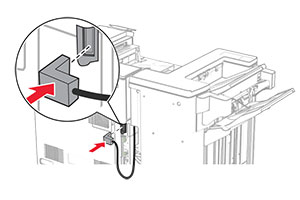
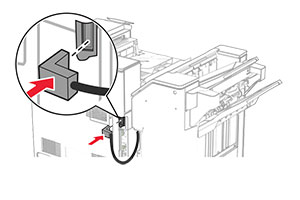
  35. フィニッシャケーブルをプリンタに接続します。

    The staple, hole punch finisher cable is being connected to the printer.
  36. 電源コードの一方の端をプリンタに接続してから、もう一方の端をコンセントに差し込みます。

    標準の注意アイコン 注意—傷害の恐れあり: 火災や感電の危険を避けるため、電源コードを接続するコンセントが、製品の設置場所の近くにあること、アクセスしやすいこと、正しく接地されていること、適切な定格であることを確認してください。
  37. プリンタの電源を入れます。

ホチキス、ホールパンチフィニッシャと折り畳みオプション付き用紙搬送ユニットを取り付ける

感電注意アイコン 注意—感電危険: 感電を避けるため、プリンタのセットアップ後にコントローラボードにアクセスする際や、オプションのハードウェアまたはメモリデバイスを取り付ける際には、作業を進める前にプリンタの電源を切り、電源コードを抜きます。他のデバイスがプリンタに接続されている場合は、他のデバイスの電源も切り、プリンタに接続しているケーブルを抜きます。
メモ: この作業には、マイナスドライバが必要です。
  1. プリンタの電源を切ります。

    Power button on the side of the control panel is pressed for 5 seconds.
  2. 電源コードをコンセントから抜き、次にプリンタから抜きます。

    Power cord is unplugged from the electrical outlet, and then the other end is removed from the printer.
  3. 折り畳みオプション付きの用紙搬送ユニットを梱包から取り出し、梱包材をすべて取り除きます。

  4. 標準排紙トレイを取り外します。

    メモ: 排紙トレイは捨てないでください。
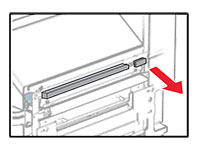
    The standard bin is removed.
  5. このオプションを取り付ける前に、排紙トレイフラグを閉位置にします。

    メモ: このオプションを取り外したら、排紙トレイフラグを開位置にします。
    The exit bin flag is stored back into the printer.
  6. バックアップローラーを取り外します。

    メモ: ローラーを捨てないでください。
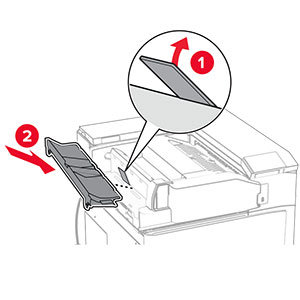
    The backup roller is pried using a screwdriver, and then removed from the printer.
  7. オプションに付属しているフィードローラーを挿入し、カチッと音がすることを確認します。

    The roller is inserted into the printer.
    メモ: 金属バネが給紙ローラーの前面にあることを確認してください。
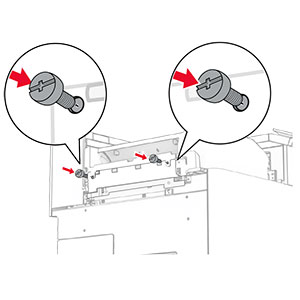
    The metal spring is positioned in front of the roller.
  8. カバーを取り付けて、カチッと音がすることを確認します。

    The cover is attached to the printer.
  9. 前面ドアを開いてから、プリンタの左側にあるカバーを取り外します。

    メモ: ネジとカバーを捨てないでください。
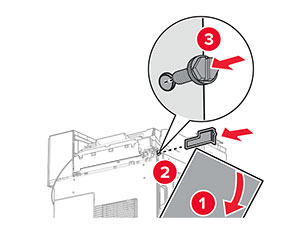
    The front door is opened, and then the cover is unscrewed and removed.
  10. 前面ドアを閉じます。
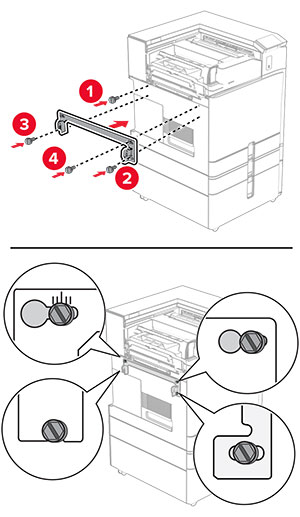
  11. 用紙搬送ユニットのコネクタカバーを取り外します。

    メモ: カバーを捨てないでください。
    The paper transport connector cover is removed from the printer.
  12. 左の背面カバーを取り外します。

    メモ: ネジとカバーを捨てないでください。
    The left rear cover is unscrewed and removed.
  13. 内部排紙トレイのカバーを取り外します。

    メモ: ネジとカバーを捨てないでください。
    The inner bin cover is unscrewed, and then removed from the printer.
  14. 位置を合わせてから、折り畳みオプション付き用紙搬送ユニットに付属する内部排紙トレイカバーを挿入します。

    The inner bin cover is aligned, and then inserted into the printer.
  15. ネジを内部排紙トレイカバーに取り付けます。

    The screws are aligned, and then installed into the inner bin cover.
  16. フォームテープの一部をオプションに取り付けます。

    The foam tapes are peeled, and then attached to the paper transport with folding option.
  17. ドア F を開き、ねじを締めます。

    Door F is opened, and then the screws inside it are tightened.
  18. ドア F を閉じます。

  19. オプションにブラケットを取り付けます。

    The metal bracket with a screw is attached to the paper transport with folding option.
  20. オプションを挿入します。

    メモ: 金属のブラケットがプリンタの前面にあることを確認してください。
    The paper transport with folding option is inserted into the printer, with the metal bracket in front of the printer.
  21. ドア F を開いてから、オプションに付属するドライバでネジを取り付けます。

    Door F is opened, and then the screw is installed using the screwdriver that came with the option.
  22. ドア F を閉じます。

  23. ネジをオプションに取り付けます。

    The screws are installed into the paper transport with folding option.
  24. 左の背面カバーを取り付けます。

    The left rear cover is attached to the printer, and then secured with a screw.
  25. ホチキス、ホールパンチフィニッシャを取り出します。

  26. 固定用器具を取り付けます。

    The stabilizer is installed to the lower part of the finisher.
  27. フィニッシャ周辺のテープ片を取り除きます。

  28. フィニッシャにブラケットを取り付けます。

    The metal bracket is attached to the base of the staple, hole punch finisher, and then secured with screws.
  29. フォームテープをフィニッシャに取り付けます。

    The foam tape is peeled, and then attached to the staple, hole punch finisher.
    メモ: フィニッシャの右側にある小さな発泡スチロールを取り除きます。
    The small portion of foam is removed from the finisher.
  30. フィードガイドをフィニッシャに取り付けます。

    The feed guide is attached to the staple, hole punch finisher, and then secured with screws.
  31. 排紙トレイをフィニッシャに取り付けます。

    The bin is attached to the staple, hole punch finisher, and then secured with screws.
  32. フィニッシャのドアを開いてから、穴パンチボックスを挿入します。

    The finisher door is opened, and then the hole punch box is inserted into the finisher.
  33. フィニッシャ排紙トレイに排紙トレイ拡張装置をセットします。

    メモ:

    • 排紙トレイ拡張装置は、A3 サイズ以上の用紙や湿度の高い環境で用紙を束ねるのに役立ちます。
    • 排紙トレイ拡張装置を使用すると、排紙トレイの容量が減少します。
    The bin extender is placed on the staple, hole punch finisher bin.
  34. フィニッシャのドアを閉じます。

  35. 排紙トレイのフラップを上げ、カバーの位置を合わせてオプションに取り付けます。

    The bin flap is raised, and then the cover is attached to the paper transport with folding option.
  36. ネジを取り付けます。

    The screws are installed into the paper transport with folding option.
  37. 前面ドアを開けてから、オプションに付属のトリムカバーを取り付けます。

    The front door is opened, the trim cover is attached and then secured with a screw.
  38. プリンタに取り付けブラケットを取り付けます。

    メモ: ネジが取り付けブラケットのマーカーと合っていることを確認してください。
    The mounting bracket is attached to the printer, and then secured with screws.
  39. フィニッシャのドアを開け、ネジを外し、フィニッシャのロックを引き出します。

    The finisher door is opened, and then the finisher is unlocked by removing the screw.
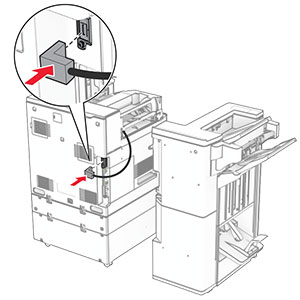
  40. オプションケーブルをプリンタに接続します。

    The paper transport with folding option cable is connected to the printer.
  41. フィニッシャケーブルをオプションに接続します。

    The staple, hole punch finisher cable is being connected to the paper transport with folding option.
  42. フィニッシャをプリンタに取り付けます。

    The staple, hole punch finisher is being attached to the printer.
  43. フィニッシャをプリンタに固定し、ネジを取り付けます。

    The staple, hole punch finisher lock is pushed into the finisher, and then secured with a screw.
  44. フィニッシャのドアを閉じます。

  45. 電源コードの一方の端をプリンタに接続してから、もう一方の端をコンセントに差し込みます。

    標準の注意アイコン 注意—傷害の恐れあり: 火災や感電の危険を避けるため、電源コードを接続するコンセントが、製品の設置場所の近くにあること、アクセスしやすいこと、正しく接地されていること、適切な定格であることを確認してください。
  46. プリンタの電源を入れます。

冊子フィニッシャと用紙搬送ユニットを取り付ける

感電注意アイコン 注意—感電危険: 感電を避けるため、プリンタのセットアップ後にコントローラボードにアクセスする際や、オプションのハードウェアまたはメモリデバイスを取り付ける際には、作業を進める前にプリンタの電源を切り、電源コードを抜きます。他のデバイスがプリンタに接続されている場合は、他のデバイスの電源も切り、プリンタに接続しているケーブルを抜きます。
メモ: この作業には、マイナスドライバが必要です。
  1. プリンタの電源を切ります。

    Power button on the side of the control panel is pressed for 5 seconds.
  2. 電源コードをコンセントから抜き、次にプリンタから抜きます。

    Power cord is unplugged from the electrical outlet, and then the other end is removed from the printer.
  3. 用紙搬送ユニットを梱包を取り出します。

  4. 標準排紙トレイを取り外します。

    メモ: 排紙トレイは捨てないでください。
    The standard bin is removed.
  5. このオプションを取り付ける前に、排紙トレイフラグを閉位置にします。

    メモ: このオプションを取り外したら、排紙トレイフラグを開位置にします。
    The exit bin flag is stored back into the printer.
  6. バックアップローラーを取り外します。

    メモ: ローラーを捨てないでください。
    The backup roller is pried using a screwdriver, and then removed from the printer.
  7. 用紙搬送ユニットに付属しているフィードローラーを挿入し、カチッと音がすることを確認します。

    The roller is inserted into the printer.
    メモ: 金属バネが給紙ローラーの前面にあることを確認してください。
    The metal spring is positioned in front of the roller.
  8. ローラーカバーを取り付けるときは、カチッと音がすることを確認します。

    The cover is attached to the printer.
  9. 前面ドアを開いてから、プリンタの左側にあるカバーを取り外します。

    メモ: ネジとカバーを捨てないでください。
    The front door is opened, and then the cover is unscrewed and removed.
  10. 前面ドアを閉じます。

  11. 用紙搬送ユニットのコネクタカバーを取り外します。

    メモ: カバーを捨てないでください。
    The paper transport connector cover is removed from the printer.
  12. カバーを取り外します。

    メモ: カバーを捨てないでください。
    The cover located at above the front door is removed from the printer.
  13. 金属のブラケットを取り付けます。

    The metal bracket is attached into the slot above the front door.
  14. 用紙搬送ユニットを挿入します。

    The paper transport is inserted into the printer.
  15. ハンドル G を開いてから、ネジを用紙搬送ユニットの前面に取り付けます。

    Handle G is opened, and then the screw is inserted into the paper transport.
  16. ハンドル G を閉じます。

  17. 用紙搬送ユニットの背面にねじを取り付けます。

    The screw is inserted into the rear slot of the paper transport.
  18. 前面ドアを開け、用紙搬送ユニットに付属のカバーをプリンタの左側に取り付けます。

    The front door is opened, and then the cover is attached and secured with a screw.
  19. 前面ドアを閉じます。

  20. 冊子フィニッシャを梱包から取り出し、梱包材をすべて取り除きます。

  21. フィニッシャにブラケットを取り付けます。

    The metal bracket is attached to the base of the booklet finisher, and then secured with screws.
  22. フォームテープをフィニッシャに取り付けます。

    The foam tape is peeled, and then attached to the booklet finisher.
  23. フィードガイドをフィニッシャに取り付けます。

    The feed guide is attached to the booklet finisher, and then secured with screws.
  24. 上部排紙トレイをフィニッシャに取り付けます。

    The upper bin is attached to the booklet finisher, and then secured with a screw.
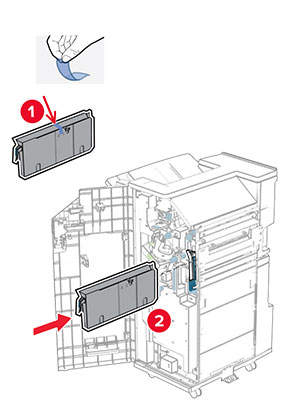
  25. 排紙トレイのフラップを上げ、下部排紙トレイをフィニッシャに取り付けます。

    The bin flap is raised, and then the lower bin is attached to the booklet finisher.
  26. フィニッシャのドアを開きます。

  27. 穴パンチボックスから梱包材を取り除いてから、フィニッシャに挿入します。

    The hole punch box has its packing material removed, and then inserted into the booklet finisher.
  28. フィニッシャ排紙トレイに排紙トレイ拡張装置をセットします。

    メモ:

    • 排紙トレイ拡張装置は、A3 サイズ以上の用紙や湿度の高い環境で用紙を束ねるのに役立ちます。
    • 排紙トレイ拡張装置を使用すると、排紙トレイの容量が減少します。
    The bin extender is placed on the booklet finisher bin.
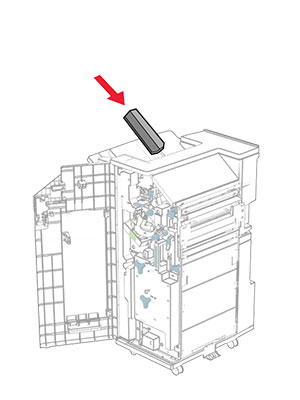
  29. フィニッシャの背面にバスケットを添付します。

    The basket is aligned, and then attaced to the booklet finisher using pins.
  30. フィニッシャのドアを閉じます。

  31. プリンタに取り付けブラケットを取り付けます。

    メモ: ネジが取り付けブラケットのマーカーと合っていることを確認してください。
    The mounting bracket is attached to the printer, and then secured with screws.
  32. 用紙搬送ユニットに付属のブラケットをプリンタに取り付けます。

    The metal bracket is attached to the printer, and then secured with a screw.
  33. フィニッシャのドアを開け、ネジを外し、フィニッシャのロックを引き出します。

    The finisher door is opened, and then the finisher is unlocked by removing the screw.
  34. フィニッシャをプリンタに取り付けます。

    The booklet finisher is being attached to the printer.
  35. フィニッシャをプリンタに固定し、ネジを取り付けます。

    The booklet finisher lock is pushed into the finisher, and then secured with a screw.
  36. フィニッシャのドアを閉じます。

  37. フィニッシャケーブルをプリンタに接続します。

    The booklet finisher cable is being connected to the printer.
  38. 電源コードの一方の端をプリンタに接続してから、もう一方の端をコンセントに差し込みます。

    標準の注意アイコン 注意—傷害の恐れあり: 火災や感電の危険を避けるため、電源コードを接続するコンセントが、製品の設置場所の近くにあること、アクセスしやすいこと、正しく接地されていること、適切な定格であることを確認してください。
  39. プリンタの電源を入れます。

冊子フィニッシャと折り畳みオプション付き用紙搬送ユニットを取り付ける

感電注意アイコン 注意—感電危険: 感電を避けるため、プリンタのセットアップ後にコントローラボードにアクセスする際や、オプションのハードウェアまたはメモリデバイスを取り付ける際には、作業を進める前にプリンタの電源を切り、電源コードを抜きます。他のデバイスがプリンタに接続されている場合は、他のデバイスの電源も切り、プリンタに接続しているケーブルを抜きます。
メモ: この作業には、マイナスドライバが必要です。
  1. プリンタの電源を切ります。

    Power button on the side of the control panel is pressed for 5 seconds.
  2. 電源コードをコンセントから抜き、次にプリンタから抜きます。

    Power cord is unplugged from the electrical outlet, and then the other end is removed from the printer.
  3. 折り畳みオプション付きの用紙搬送ユニットを梱包から取り出します。

  4. 標準排紙トレイを取り外します。

    メモ: 排紙トレイは捨てないでください。
    The standard bin is removed.
  5. このオプションを取り付ける前に、排紙トレイフラグを閉位置にします。

    メモ: このオプションを取り外したら、排紙トレイフラグを開位置にします。
    The exit bin flag is stored back into the printer.
  6. バックアップローラーを取り外します。

    メモ: ローラーを捨てないでください。
    The backup roller is pried using a screwdriver, and then removed from the printer.
  7. オプションに付属しているフィードローラーを挿入し、カチッと音がすることを確認します。

    The roller is inserted into the printer.
    メモ: 金属バネが給紙ローラーの前面にあることを確認してください。
    The metal spring is positioned in front of the roller.
  8. ローラーカバーを取り付けるときは、カチッと音がすることを確認します。

    The cover is attached to the printer.
  9. 前面ドアを開いてから、プリンタの左側にあるカバーを取り外します。

    メモ: ネジとカバーを捨てないでください。
    The front door is opened, and then the cover is unscrewed and removed.
  10. 前面ドアを閉じます。

  11. 用紙搬送ユニットのコネクタカバーを取り外します。

    メモ: カバーを捨てないでください。
    The paper transport connector cover is removed from the printer.
  12. 左の背面カバーを取り外します。

    メモ: ネジとカバーを捨てないでください。
    The left rear cover is unscrewed and removed.
  13. 内部排紙トレイのカバーを取り外します。

    メモ: ネジとカバーを捨てないでください。
    The inner bin cover is unscrewed, and then removed from the printer.
  14. 位置を合わせてから、オプションに付属する内部排紙トレイカバーを挿入します。

    The inner bin cover is aligned, and then inserted into the printer.
  15. ネジを内部排紙トレイカバーに取り付けます。

    The screws are aligned, and then installed into the inner bin cover.
  16. フォームテープの一部をオプションに取り付けます。

    The foam tapes are peeled, and then attached to the paper transport with folding option.
  17. ドア F を開き、ねじを締めます。

    Door F is opened, and then the screws inside it are tightened.
  18. ドア F を閉じます。

  19. オプションにブラケットを取り付けます。

    The metal bracket with a screw is attached to the paper transport with folding option.
  20. オプションを挿入します。

    メモ: 金属のブラケットがプリンタの前面にあることを確認してください。
    The paper transport with folding option is inserted into the printer, with the metal bracket in front of the printer.
  21. ドア F を開いてから、オプションに付属するドライバでネジを取り付けます。

    Door F is opened, and then the screw is installed using the screwdriver that came with the option.
  22. ドア F を閉じます。

  23. ネジをオプションに取り付けます。

    The screws are installed into the paper transport with folding option.
  24. 左の背面カバーを取り付けます。

    The left rear cover is attached to the printer, and then secured with a screw.
  25. 冊子フィニッシャを梱包から取り出し、梱包材をすべて取り除きます。

  26. フィニッシャにブラケットを取り付けます。

    The metal bracket is attached to the base of the booklet finisher, and then secured with screws.
  27. フォームテープをフィニッシャに取り付けます。

    The foam tape is peeled, and then attached to the booklet finisher.
  28. フィードガイドをフィニッシャに取り付けます。

    The feed guide is attached to the booklet finisher, and then secured with screws.
  29. 上部排紙トレイをフィニッシャに取り付けます。

    The upper bin is attached to the booklet finisher, and then secured with a screw.
  30. 排紙トレイのフラップを上げ、下部排紙トレイをフィニッシャに取り付けます。

    The bin flap is raised, and then the lower bin is attached to the booklet finisher.
  31. フィニッシャのドアを開きます。

  32. 穴パンチボックスから梱包材を取り除いてから、フィニッシャに挿入します。

    The hole punch box has its packing material removed, and then inserted into the booklet finisher.
  33. フィニッシャ排紙トレイに排紙トレイ拡張装置をセットします。

    メモ:

    • 排紙トレイ拡張装置は、A3 サイズ以上の用紙や湿度の高い環境で用紙を束ねるのに役立ちます。
    • 排紙トレイ拡張装置を使用すると、排紙トレイの容量が減少します。
    The bin extender is placed on the booklet finisher bin.
  34. フィニッシャの背面にバスケットを添付します。

    The basket is aligned, and then attaced to the booklet finisher using pins.
  35. フィニッシャのドアを閉じます。

  36. 排紙トレイのフラップを上げ、カバーの位置を合わせてオプションに取り付けます。

    The bin flap is raised, and then the cover is attached to the paper transport with folding option.
  37. ネジを取り付けます。

    The screws are installed into the paper transport with folding option.
  38. 前面ドアを開けてから、オプションに付属のトリムカバーを取り付けます。

    The front door is opened, the trim cover is attached, and then secured with a screw.
  39. プリンタに取り付けブラケットを取り付けます。

    メモ: ネジが取り付けブラケットのマーカーと合っていることを確認してください。
    The mounting bracket is attached to the printer, and then secured with screws.
  40. フィニッシャのドアを開け、ネジを外し、フィニッシャのロックを引き出します。

    The finisher door is opened, and then the finisher is unlocked by removing the screw.
  41. オプションケーブルをプリンタに接続します。

    The paper transport with folding option cable is connected to the printer.
  42. フィニッシャケーブルをオプションに接続します。

    The booklet finisher cable is being connected to the paper transport with folding option.
  43. フィニッシャをプリンタに取り付けます。

    The booklet finisher is being attached to the printer.
  44. フィニッシャをプリンタに固定し、ネジを取り付けます。

    The booklet finisher lock is pushed into the finisher, and then secured with a screw.
  45. フィニッシャのドアを閉じます。

  46. 電源コードの一方の端をプリンタに接続してから、もう一方の端をコンセントに差し込みます。

    標準の注意アイコン 注意—傷害の恐れあり: 火災や感電の危険を避けるため、電源コードを接続するコンセントが、製品の設置場所の近くにあること、アクセスしやすいこと、正しく接地されていること、適切な定格であることを確認してください。
  47. プリンタの電源を入れます。

インテリジェントストレージドライブを取り付ける

感電注意アイコン 注意—感電危険: 感電を避けるため、プリンタのセットアップ後にコントローラボードにアクセスする際や、オプションのハードウェアまたはメモリデバイスを取り付ける際には、作業を進める前にプリンタの電源を切り、電源コードを抜きます。他のデバイスがプリンタに接続されている場合は、他のデバイスの電源も切り、プリンタに接続しているケーブルを抜きます。
メモ: この作業には、マイナスドライバが必要です。
  1. プリンタの電源を切ります。

    The power button on the side of the control panel is pressed for 5 seconds.
  2. 電源コードをコンセントから抜き、次にプリンタから抜きます。

    The power cord is unplugged from the electrical outlet, and then from the printer.
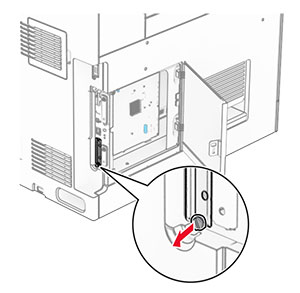
  3. コントローラボードのアクセスカバーを開きます。

    警告—破損の恐れあり: コントローラボードの電気コンポーネントは、静電気により簡単に損傷します。コントローラボードのコンポーネントまたはコネクタに触れる前に、プリンタの金属面を触ります。
    The screw is removed, and then the controller board access cover is opened.
  4. インテリジェントストレージドライブ(ISD)を開梱します。

    警告—破損の恐れあり: ストレージドライブの端に沿った接点に触れないでください。
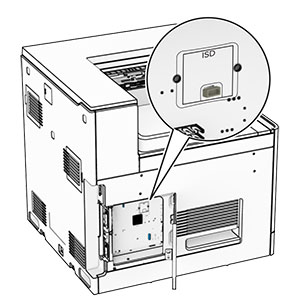
  5. ISD コネクタの位置を確認します。

    The ISD connector is at the center of the controller board.
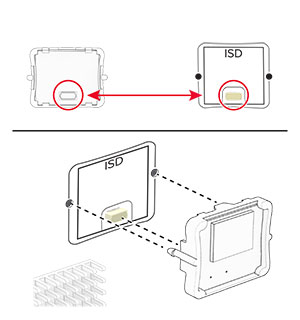
  6. ISD をコネクタに挿入します。

    The ISD is inserted into its location on the controller board.
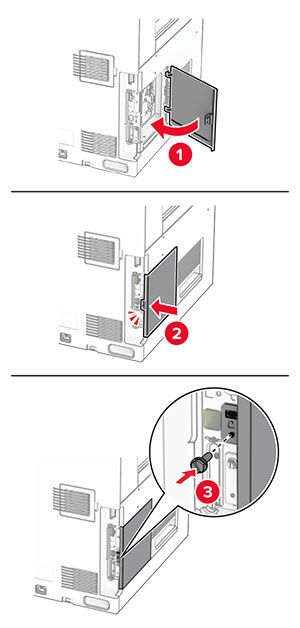
  7. コントローラボードのアクセスカバーを閉じます。

    The door at the left side of the printer is closed, and then secured with a screw.
  8. 電源コードの一方の端をプリンタに接続してから、もう一方の端をコンセントに差し込みます。

    標準の注意アイコン 注意—傷害の恐れあり: 火災や感電の危険を避けるため、電源コードを接続するコンセントが、製品の設置場所の近くにあること、アクセスしやすいこと、正しく接地されていること、適切な定格であることを確認してください。
  9. プリンタの電源を入れます。

内蔵ソリューションポートを取り付ける

感電注意アイコン 注意—感電危険: 感電を避けるため、プリンタのセットアップ後にコントローラボードにアクセスする際や、オプションのハードウェアまたはメモリデバイスを取り付ける際には、作業を進める前にプリンタの電源を切り、電源コードを抜きます。他のデバイスがプリンタに接続されている場合は、他のデバイスの電源も切り、プリンタに接続しているケーブルを抜きます。
メモ: この作業には、マイナスドライバが必要です。
  1. プリンタの電源を切ります。

    Power button on the side of the control panel is pressed for 5 seconds.
  2. 電源コードをコンセントから抜き、次にプリンタから抜きます。

    Power cord is unplugged from the electrical outlet, and then from the printer.
  3. コントローラボードのアクセスカバーを開きます。

    警告—破損の恐れあり: コントローラボードの電気コンポーネントは、静電気により簡単に損傷します。コントローラボードの電気コンポーネントまたはコネクタに触れる前に、プリンタの金属面を触ります。
    The screw is removed, and then the controller board access cover is opened.
  4. 内蔵ソリューションポート(ISP)をパッケージから取り出します。

    メモ: ネジとカバーを捨てないでください。
    The ISP cover is unscrewed, and then removed.
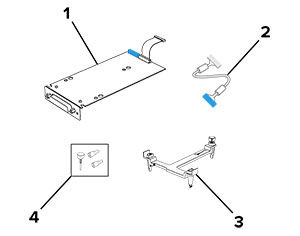
  5. ISP キットを開梱します。

    Items that are included in the ISP kit with callouts.

    1 年

    ISP

    2 年

    ISP 延長ケーブル

    3 年

    取り付けブラケット

    4 年

    つまみネジ


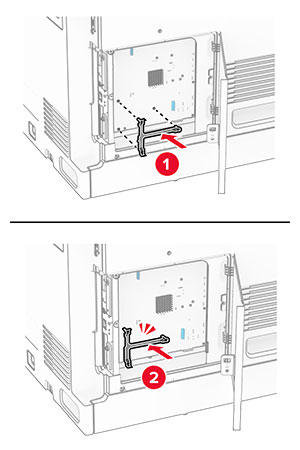
  6. 取り付けブラケットをコントローラボードに取り付けて、カチッと音がすることを確認します。

    The mounting bracket is aligned, and then attached to the controller board.
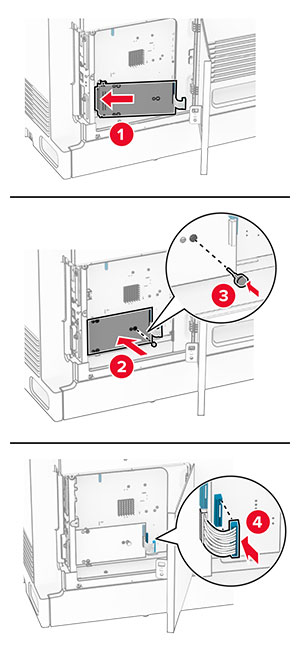
  7. ISP を取り付けブラケットに取り付け、ISP 延長ケーブルをコントローラボードのコネクタに接続します。

    The ISP is aligned to the mounting bracket, secured using a thumbscrew, and then the ISP extended cable is connected.
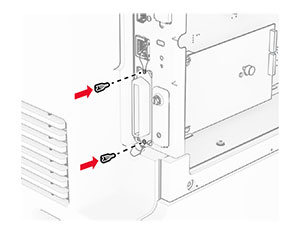
  8. プリンタに ISP を固定します。

    The internal solutions port is secured using thumb screws.
  9. コントローラボードのアクセスカバーを閉じます。

    The door at the left side of the printer is closed, and then secured with a screw.
  10. 電源コードの一方の端をプリンタに接続してから、もう一方の端をコンセントに差し込みます。

    標準の注意アイコン 注意—傷害の恐れあり: 火災や感電の危険を避けるため、電源コードを接続するコンセントが、製品の設置場所の近くにあること、アクセスしやすいこと、正しく接地されていること、適切な定格であることを確認してください。
  11. プリンタの電源を入れます。

カードリーダーを取り付る

感電注意アイコン 注意—感電危険: 感電を避けるため、プリンタのセットアップ後にコントローラボードにアクセスする際や、オプションのハードウェアまたはメモリデバイスを取り付ける際には、作業を進める前にプリンタの電源を切り、電源コードを抜きます。他のデバイスがプリンタに接続されている場合は、他のデバイスの電源も切り、プリンタに接続しているケーブルを抜きます。
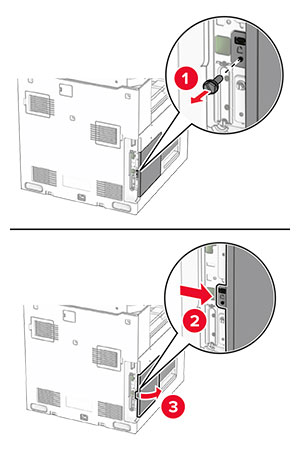
  1. プリンタの電源を切ります。

    The power button on the side of the control panel is pressed for five seconds.
  2. ドア B を開きます。

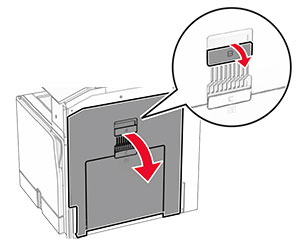
    The door handle is pulled and door B is opened.
  3. 前面の USB ポートカバーを開きます。

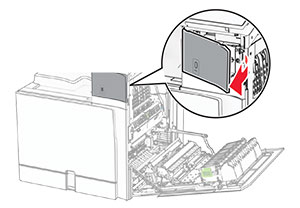
    The front cover of the USB port is removed.
  4. 下部の USB ポートカバーを取り外します。

    メモ: お使いのプリンタにこの部品がない場合は、次の手順に進みます。
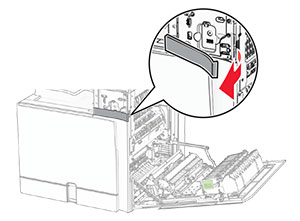
    The lower port cover is removed.
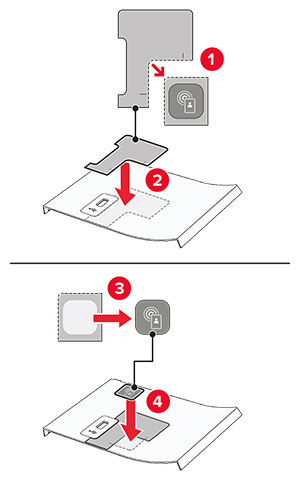
  5. カードリーダーから保護カバーを取り外します。

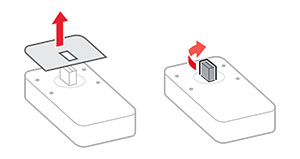
    The protective cover of the card reader is removed.
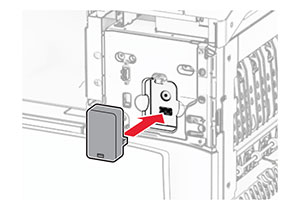
  6. カードリーダーを挿入します。

    The card reader is aligned and inserted into the USB port.
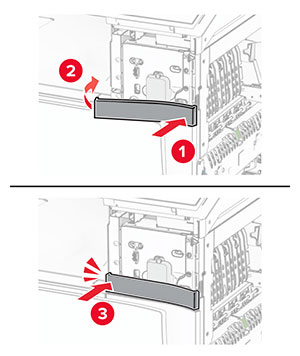
  7. 下部のポートカバーを取り付け、カチッと音がすることを確認します。

    The lower cover of the port is attached.
  8. ラベルガイドを取り付けます。

    The sticker guides for the front cover are attached.
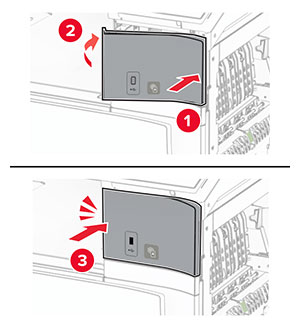
  9. 前面の USB ポートカバーを取り付け、カチッと音がすることを確認します。

    The front cover for the USB port is attached.
  10. ドア B を閉じて、カチッという音がすることを確認します。

    Door B is closed.
  11. プリンタの電源を入れます。

内蔵ソリューションポートを取り付けた後でプリンタのポート設定を変更する

メモ:

Windows の場合
  1. プリンタフォルダを開きます。

  2. 新しい ISP を追加したプリンタのショートカットメニューから、プリンタのプロパティを開きます。

  3. リストからポートを設定します。

  4. IP アドレスを更新します。

  5. 変更を適用します。

Macintosh の場合
  1. アップルメニューの「システム環境設定」から、プリンタの一覧に移動して、「+ > IP」の順に選択します。

  2. アドレスフィールドに IP アドレスを入力します。

  3. 変更を適用します。