安装硬件选件

安装 550 页进纸匣选件

电击危险小心图标 小心—电击危险: 为避免电击危险,如果您在设置完打印机后访问控制器主板或者安装可选的硬件或内存设备,请在继续操作之前先关闭打印机电源并从电源插座中拔掉电源线。如果您还有其他设备连接在打印机上,也应关闭它们的电源并拔掉所有连接到打印机上的电缆。
注意: 此任务需要平头螺丝起子。
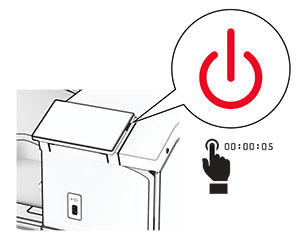
  1. 关闭打印机电源。

    Power button on the side of the control panel is pressed for at least 5 seconds.
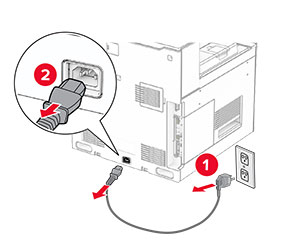
  2. 从电源插座上拔掉电源线,然后从打印机上拔掉电源线。

    Power cord is unplugged from the electrical outlet and then from the printer.
  3. 拆开 550 页进纸匣选件的包装。

    注意: 为避免损坏进纸匣,抬起进纸匣时一定要握住前后两侧。
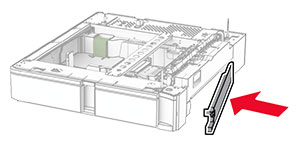
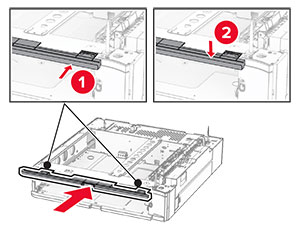
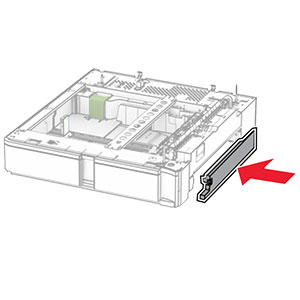
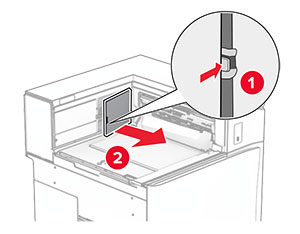
  4. 安装右进纸匣盖板。

    The tray cover is attached to the right side of the optional 550-sheet tray.
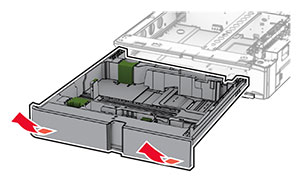
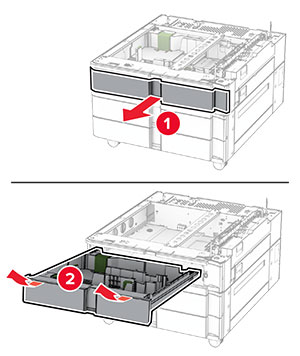
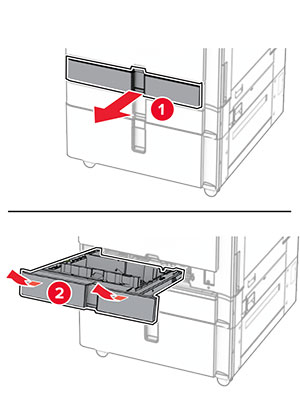
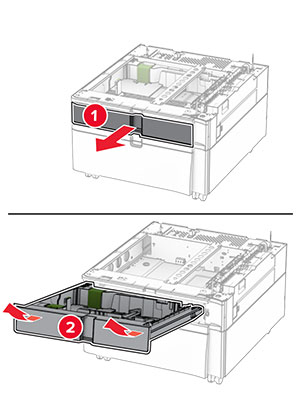
  5. 拉出 550 页进纸匣托盘。

    The tray insert is pulled out from the optional 550-sheet tray.
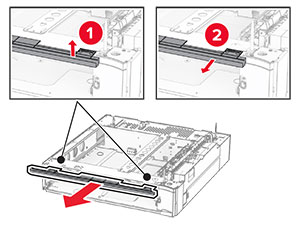
  6. 移除上部进纸匣盖板。

    The upper tray cover is lifted, and then removed from the tray base.
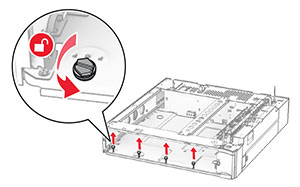
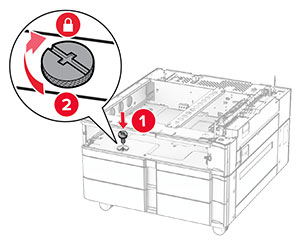
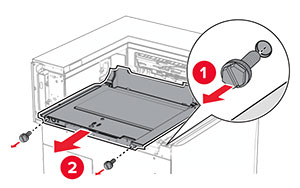
  7. 移除螺钉。

    The screws inside the optional 550-sheet tray base are turned counterclockwise, and then removed.
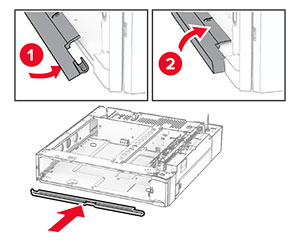
  8. 安装下部进纸匣盖板。

    The lower tray cover is aligned, and then attached to the tray base.
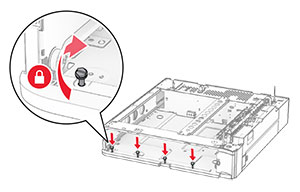
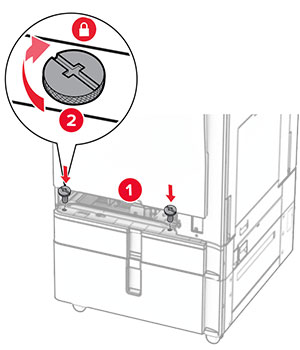
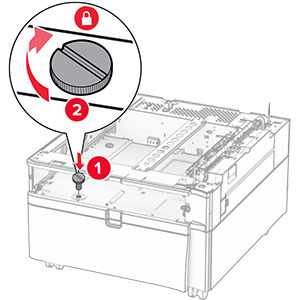
  9. 安装螺钉。

    The screws are aligned to the tray base, and then turned clockwise.
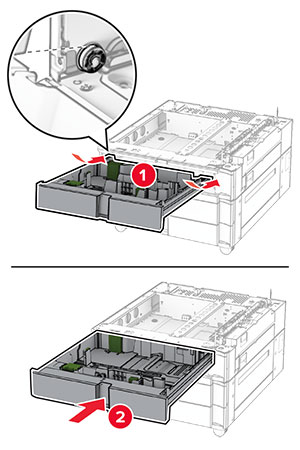
  10. 安装上部进纸匣盖板。

    The upper tray cover is aligned, and then attached to the tray base.
  11. 插入 550 页进纸匣托盘。

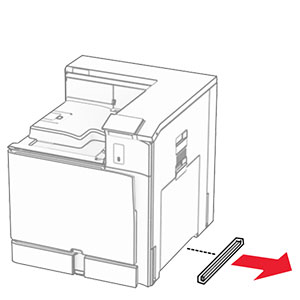
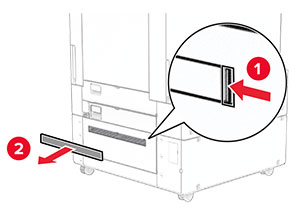
  12. 移除打印机右侧下方的盖板。

    The cover under the right side of the printer is removed.
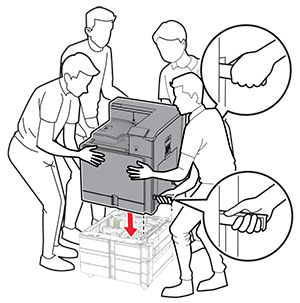
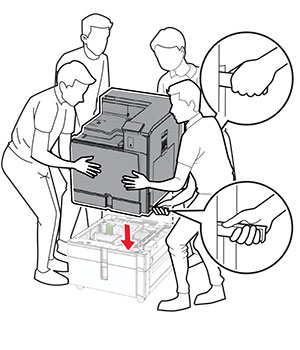
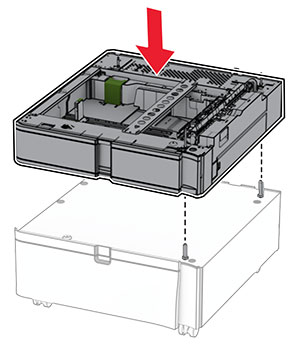
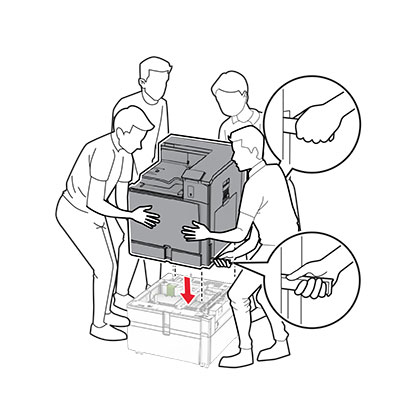
  13. 将打印机与 550 页进纸匣对齐,然后将它向下放到位。

    标准的小心图标 小心—可能的伤害: 如果打印机的重量大于 20 千克(44 磅),则可能需要两人或更多人才能安全地抬起它。
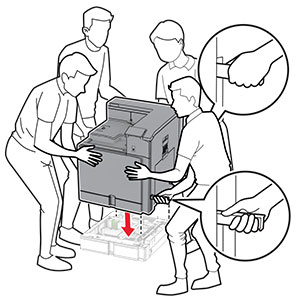
    Printer is aligned, and then lowered into the optional tray.
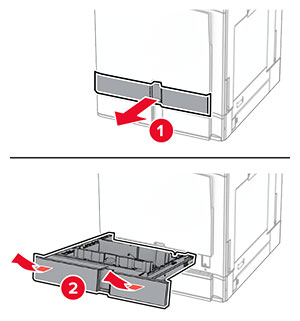
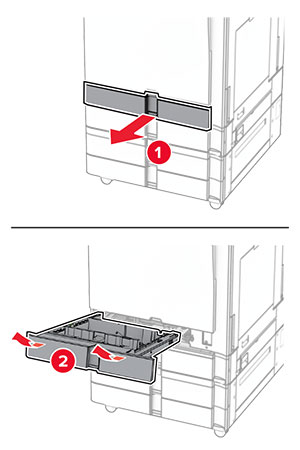
  14. 拉出标准进纸匣托盘。

    Tray insert is pulled out from the tray base with a slightly upward motion.
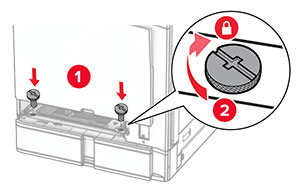
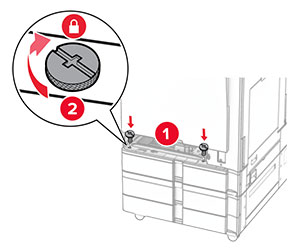
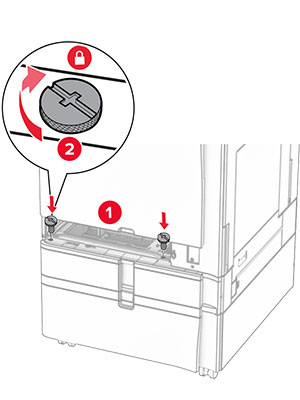
  15. 将 550 页进纸匣固定到打印机上。

    The screws are aligned to the tray base, and then turned clockwise.
  16. 插入标准进纸匣托盘。

    Tray insert is inserted into the tray base with a slightly downward motion.
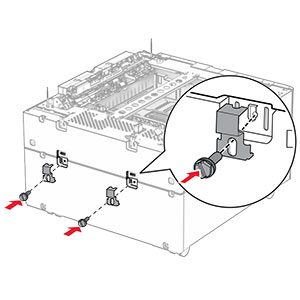
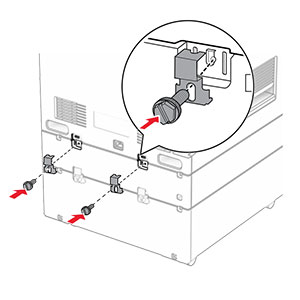
  17. 将 550 页进纸匣的后部固定到打印机上。

    The 550-sheet tray and the printer are secured using brackets and screws.
  18. 将电源线的一端连接到打印机上,然后将另一端连接到电源插座上。

    标准的小心图标 小心—可能的伤害: 为避免火灾或电击危险,请将电源线连接到具有适当额定电压并正确接地的电源插座上,该插座应该靠近产品并且便于使用。
  19. 打开打印机电源。

在打印驱动程序中添加进纸匣以使它可用于打印作业。如需更多信息,请参阅添加打印驱动程序中的可用选件

安装 2 x 550 页进纸匣

电击危险小心图标 小心—电击危险: 为避免电击危险,如果您在设置完打印机后访问控制器主板或者安装可选的硬件或内存设备,请在继续操作之前先关闭打印机电源并从电源插座中拔掉电源线。如果您还有其他设备连接在打印机上,也应关闭它们的电源并拔掉所有连接到打印机上的电缆。

注意:

  1. 关闭打印机电源。

    The power button on the side of the control panel is pressed for at least 5 seconds.
  2. 从电源插座上拔掉电源线,然后从打印机上拔掉电源线。

    The power cord is unplugged from the electrical outlet and then from the printer.
  3. 拆开 2 x 550 页进纸匣的包装,然后移除所有包装材料。

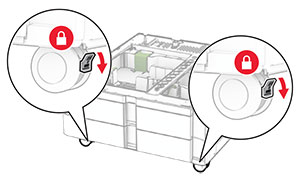
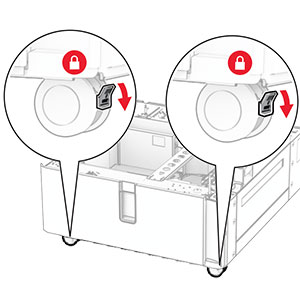
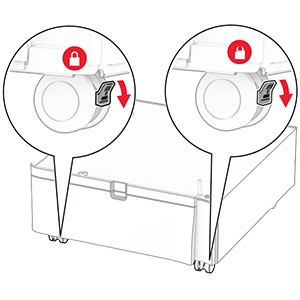
  4. 锁定脚轮以防止 2 x 550 页进纸匣移动。

    The levers of the front caster locks are pushed down.
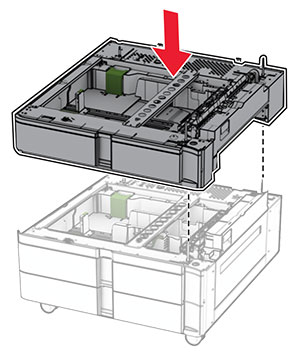
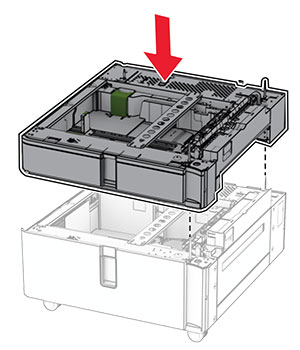
  5. 将 550 页进纸匣与 2 x 550 页进纸匣对齐,然后将它向下放到位。

    注意: 为避免损坏进纸匣,抬起进纸匣时一定要握住前后两侧。
    The 550-sheet tray is aligned and lowered into the 2 x 550-sheet tray.
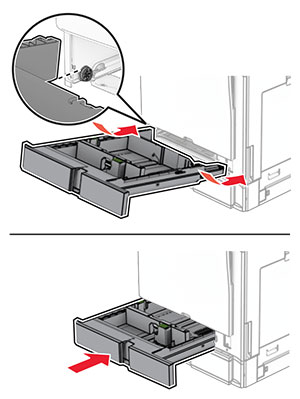
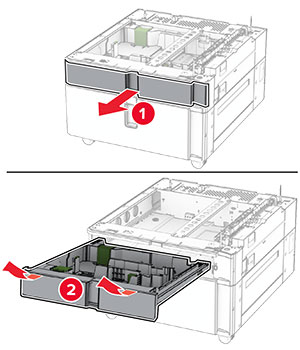
  6. 拉出 550 页进纸匣托盘。

    The tray insert is pulled out from the tray base with a slightly upward motion.
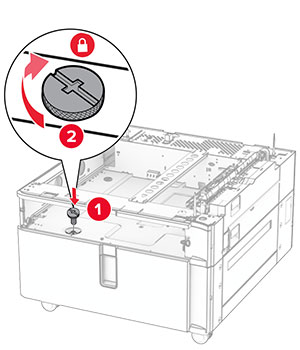
  7. 将 550 页进纸匣固定到 2 x 550 页进纸匣上。

    The screws are aligned to the tray base, and then turned clockwise.
  8. 插入 550 页进纸匣托盘。

    The tray is inserted into the base with a slightly downward motion.
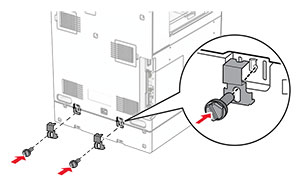
  9. 将 550 页进纸匣的后部固定到 2 x 550 页进纸匣上。

    The 550-sheet tray and the 2 x 550-sheet tray are secured using brackets and screws.
  10. 移除打印机右侧下方的盖板。

    The cover under the right side of the printer is removed.
  11. 将打印机与进纸匣选件对齐,然后将它向下放到位。

    标准的小心图标 小心—可能的伤害: 如果打印机的重量大于 20千克(44磅),则可能需要两人或更多人才能安全地抬起它。
    The printer is aligned and lowered into the optional trays.
  12. 拉出标准进纸匣托盘。

    The tray insert is pulled out from the tray base with a slightly upward motion.
  13. 将 550 页进纸匣固定到打印机上。

    Inside the standard tray base, screws are inserted and twisted clockwise.
  14. 插入标准进纸匣托盘。

  15. 将 550 页进纸匣的后部固定到打印机上。

    The 550-sheet tray and the printer are secured using brackets and screws.
  16. 将电源线的一端连接到打印机上,然后将另一端连接到电源插座上。

    标准的小心图标 小心—可能的伤害: 为避免火灾或电击危险,请将电源线连接到具有适当额定电压并正确接地的电源插座上,该插座应该靠近产品并且便于使用。
  17. 打开打印机电源。

在打印驱动程序中添加进纸匣以使它可用于打印作业。如需更多信息,请参阅添加打印驱动程序中的可用选件

安装 2000 页串联进纸匣

电击危险小心图标 小心—电击危险: 为避免电击危险,如果您在设置完打印机后访问控制器主板或者安装可选的硬件或内存设备,请在继续操作之前先关闭打印机电源并从电源插座中拔掉电源线。如果您还有其他设备连接在打印机上,也应关闭它们的电源并拔掉所有连接到打印机上的电缆。

注意:

  1. 关闭打印机电源。

    The power button on the side of the control panel is pressed for at least 5 seconds.
  2. 从电源插座上拔掉电源线,然后从打印机上拔掉电源线。

    The power cord is unplugged from the electrical outlet, and then from the printer.
  3. 拆开串联进纸匣的包装,然后移除所有包装材料。

  4. 锁定脚轮以防止串联进纸匣移动。

    The levers of the front caster locks are pushed down.

    D

  5. 将 550 页进纸匣与串联进纸匣对齐,然后将它向下放到位。

    注意: 为避免损坏进纸匣,抬起进纸匣时一定要握住前后两侧。
    The 550-sheet tray is aligned and lowered into the tandem tray.
  6. 拉出 550 页进纸匣托盘。

    The tray insert is pulled out from the tray base with a slightly upward motion.
  7. 将 550 页进纸匣固定到串联进纸匣上。

    The screws are aligned to the tray base, and then turned clockwise.
  8. 插入进纸匣托盘。

  9. 将 550 页进纸匣的后部固定到串联进纸匣上。

    The rear part of the 550-sheet tray and the tandem tray are secured using brackets and screws.
  10. 移除打印机右侧下方的盖板。

    The cover under the right side of the printer is removed.
  11. 将打印机与进纸匣选件对齐,然后将它向下放到位。

    标准的小心图标 小心—可能的伤害: 如果打印机的重量大于 20千克(44磅),则可能需要两人或更多人才能安全地抬起它。
    The printer is aligned, and then lowered into the optional tray.
  12. 拉出标准进纸匣。

    The tray insert is pulled out from the tray base with a slightly upward motion.
  13. 将 550 页进纸匣固定到打印机上。

    The screws are aligned to the tray base, and then turned clockwise.
  14. 插入进纸匣。

  15. 将 550 页进纸匣的后部固定到打印机上。

    The 550-sheet tray and the printer are secured using brackets and screws.
  16. 将电源线的一端连接到打印机上,然后将另一端连接到电源插座上。

    标准的小心图标 小心—可能的伤害: 为避免火灾或电击危险,请将电源线连接到具有适当额定电压并正确接地的电源插座上,该插座应该靠近产品并且便于使用。
  17. 打开打印机电源。

在打印驱动程序中添加进纸匣以使它可用于打印作业。如需更多信息,请参阅添加打印驱动程序中的可用选件

安装机柜

电击危险小心图标 小心—电击危险: 为避免电击危险,如果您在设置完打印机后访问控制器主板或者安装可选的硬件或内存设备,请在继续操作之前先关闭打印机电源并从电源插座中拔掉电源线。如果您还有其他设备连接在打印机上,也应关闭它们的电源并拔掉所有连接到打印机上的电缆。

注意:

  1. 拆开包装,然后组装机柜。

  2. 关闭打印机电源。

    The power button on the side of the control panel is pressed for at least 5 seconds.
  3. 从电源插座上拔掉电源线,然后从打印机上拔掉电源线。

    The power cord is unplugged from the electrical outlet, and then from the printer.
  4. 锁定脚轮以防止机柜移动。

    The levers of the front caster locks are pushed down.
  5. 安装 550 页进纸匣的侧盖板。

    The tray side cover is inserted under the optional 550-sheet tray.
  6. 将进纸匣与机柜对齐,然后将它向下放到位。

    注意: 为避免损坏进纸匣,抬起进纸匣时一定要握住前后两侧。
    The optional 550-sheet tray is aligned and lowered into the cabinet.
  7. 拉出进纸匣托盘。

    The tray insert is pulled out from the tray base with a slightly upward motion.
  8. 将进纸匣固定到机柜上。

    The screws are aligned to the tray base, and then turned clockwise.
  9. 插入进纸匣托盘。

  10. 将进纸匣的后部固定到机柜上。

    The rear part of the optional 550-sheet tray and the 2000-sheet tandem tray is secured using brackets and screws.
  11. 移除打印机右侧下方的盖板。

    The cover under the right side of the printer is removed.
  12. 将打印机与机柜和进纸匣对齐,然后将它向下放到位。

    标准的小心图标 小心—可能的伤害: 如果打印机的重量大于 20千克(44磅),则可能需要两人或更多人才能安全地抬起它。
    The printer is aligned, and then lowered into the optional tray.
  13. 拉出标准进纸匣托盘。

  14. 将 550 页进纸匣固定到打印机上。

    The screws are aligned to the tray base, and then turned clockwise.
  15. 插入标准进纸匣托盘。

  16. 将 550 页进纸匣的后部固定到打印机上。

    The rear part of the optional 550-sheet tray and the printer are secured using brackets and screws.
  17. 将电源线的一端连接到打印机上,然后将另一端连接到电源插座上。

    标准的小心图标 小心—可能的伤害: 为避免火灾或电击危险,请将电源线连接到具有适当额定电压并正确接地的电源插座上,该插座应该靠近产品并且便于使用。
  18. 打开打印机电源。

安装 1500 页进纸匣

电击危险小心图标 小心—电击危险: 为避免电击危险,如果您在设置完打印机后访问控制器主板或者安装可选的硬件或内存设备,请在继续操作之前先关闭打印机电源并从电源插座中拔掉电源线。如果您还有其他设备连接在打印机上,也应关闭它们的电源并拔掉所有连接到打印机上的电缆。

注意:

注意: 
  1. 关闭打印机电源。

    Power button on the side of the control panel is pressed for 5 seconds.
  2. 从电源插座上拔掉电源线,然后从打印机上拔掉电源线。

    Power cord is unplugged from the electrical outlet, and then from the printer.
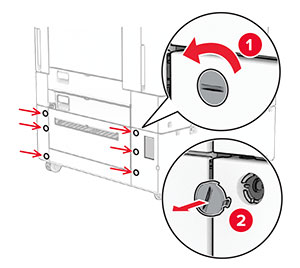
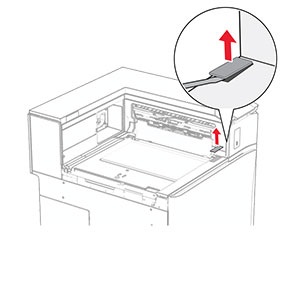
  3. 取下连接盖板。

    注意: 不要扔掉盖板。
    The tray cover is pried, and then removed from the printer.
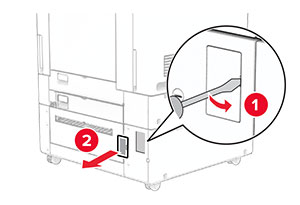
  4. 取下端口盖板。

    注意: 不要扔掉盖板。
    The port cover is pried open with a screwdriver, and then removed from the printer.
  5. 从打印机上移除螺帽。

    注意: 不要扔掉螺帽。
    The screws are turned counterclockwise, and then removed from the printer.
  6. 拆开 1500 页进纸匣的包装,然后移除所有包装材料。

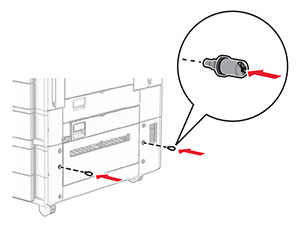
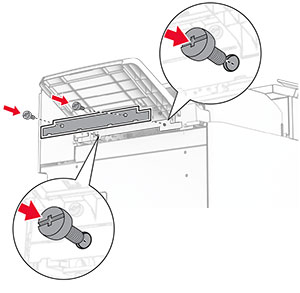
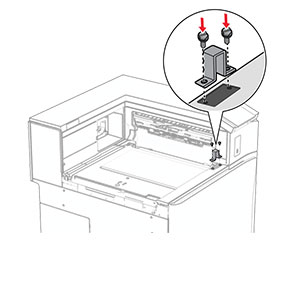
  7. 将螺钉安装到安装支架上。

    The screws are installed into the lower-right side of the printer.
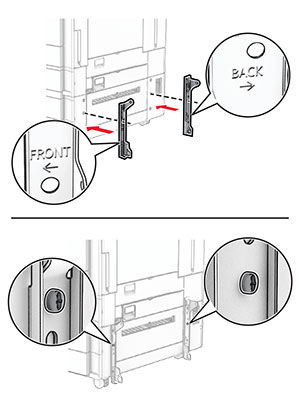
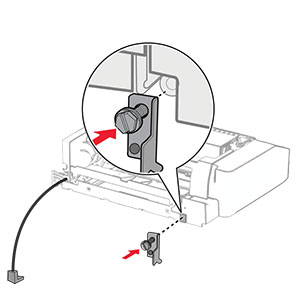
  8. 将安装支架安装到打印机上。

    注意: 使用随 1500 页进纸匣附带的安装支架和螺钉。
    The mounting brackets are aligned, and then secured with screws.
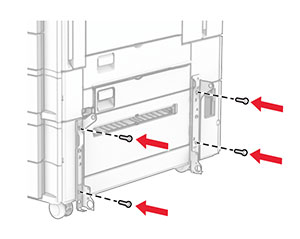
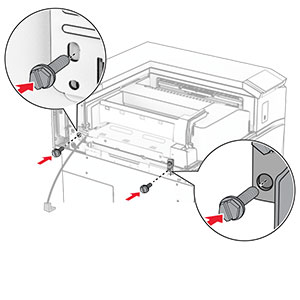
  9. 安装其余螺钉。

    The remaining screws are installed into the mounting bracket.
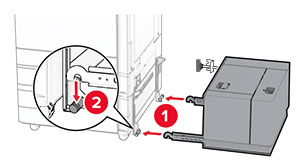
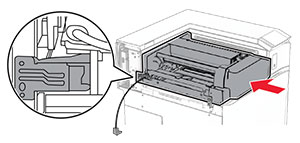
  10. 安装 1500 页进纸匣。

    Tray is being aligned, and then pushed into the right side of the printer.
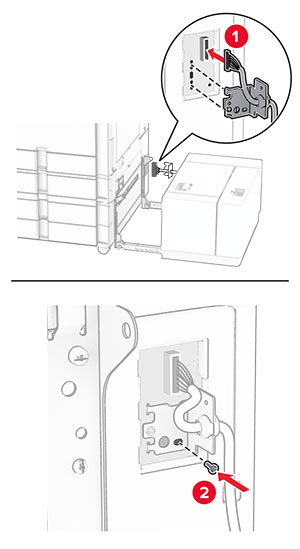
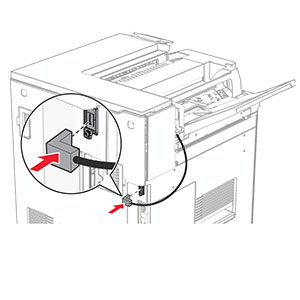
  11. 将进纸匣电缆连接到打印机上。

    The tray cable is connected to the printer.
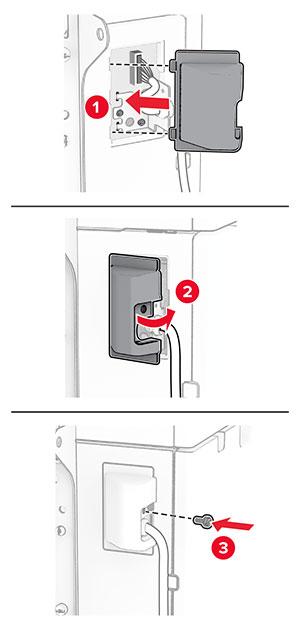
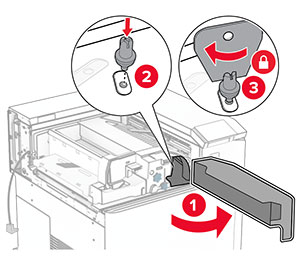
  12. 安装进纸匣电缆盖板。

    The tray cable cover is attached, and secured with a screw.
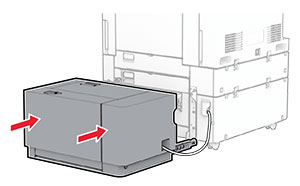
  13. 将 1500 页进纸匣滑向打印机。

    The 1500-sheet tray is positioned into place.
  14. 将打印机电源线的一端连接到打印机上,然后将另一端连接到电源插座上。

    标准的小心图标 小心—可能的伤害: 为避免火灾或电击危险,请将电源线连接到具有适当额定电压并正确接地的电源插座上,该插座应该靠近产品并且便于使用。
  15. 打开打印机电源。

在打印驱动程序中添加进纸匣以使它可用于打印作业。如需更多信息,请参阅添加打印驱动程序中的可用选件

安装装订器

电击危险小心图标 小心—电击危险: 为避免电击危险,如果您在设置完打印机后访问控制器主板或者安装可选的硬件或内存设备,请在继续操作之前先关闭打印机电源并从电源插座中拔掉电源线。如果您还有其他设备连接在打印机上,也应关闭它们的电源并拔掉所有连接到打印机上的电缆。
注意: 此任务需要平头螺丝起子。
  1. 关闭打印机电源。

    Power button on the side of the control panel is pressed for 5 seconds.
  2. 从电源插座上拔掉电源线,然后从打印机上拔掉电源线。

    Power cord is unplugged from the electrical outlet, and then from the printer.
  3. 拆开装订器的包装,然后移除所有包装材料。

  4. 安装进纸导片。

    The feed guide is aligned to the staple finisher, and then secured with screws.
  5. 移除标准接纸架。

    注意: 不要扔掉接纸架。
    The tray extender is opened, and then the standard bin is pulled out from the printer.
  6. 安装此选件前,将出口接纸架标志置于关闭位置。

    注意: 移除此选件后,将出口接纸架标志置于打开位置。
    The exit bin flag is stored back into the printer.
  7. 移除备份辊。

    注意: 不要扔掉备份辊。
    The backup roller is pried using a screwdriver, and then removed from the printer.
  8. 插入随装订器附带的进纸辊,直至它卡入到位。

    The feed roller is aligned, and then inserted into the printer.
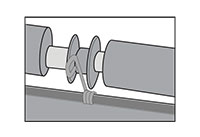
    注意: 确保金属弹簧位于进纸辊前方。
    The metal spring is positioned in front of the roller.
  9. 安装辊盖板,直至它卡入到位。

    The roller cover is aligned, and then attached to the printer.
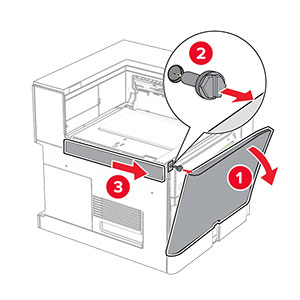
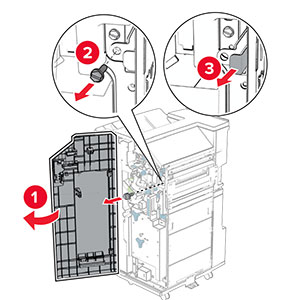
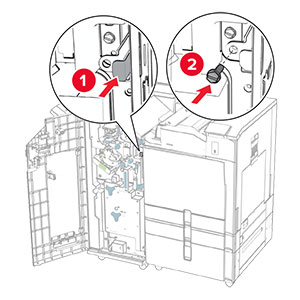
  10. 打开前部盖门,然后从打印机的左侧移除盖板。

    注意: 不要扔掉螺钉和盖板。
    The front door is opened, the screw is removed, and then the left cover is removed.
  11. 取下左后盖板。

    注意: 不要扔掉螺钉和盖板。
    The left rear cover is unscrewed and removed.
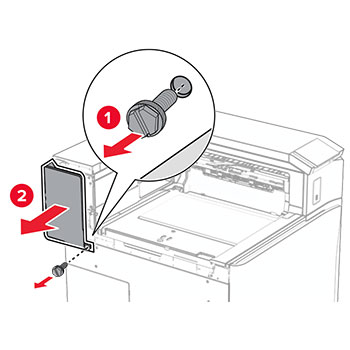
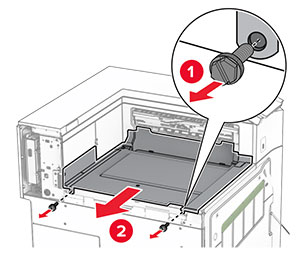
  12. 取下内部接纸架盖板。

    注意: 不要扔掉盖板。
    The staple finisher slider is aligned to the printer, and then secured with screws.
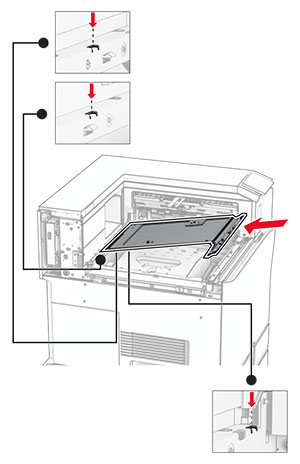
  13. 对齐随装订器附带的内部接纸架盖板,然后将它插入。

    The inner bin cover is aligned, and then inserted into the printer.
  14. 将螺钉安装到内部接纸架盖板上。

    The screws are aligned, and then installed into the inner bin cover.
  15. 安装装订器滑块。

     The mounting bracket is installed, and secured with a screw.
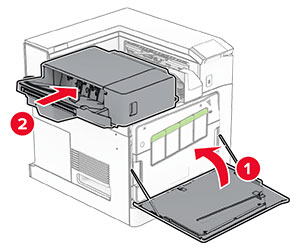
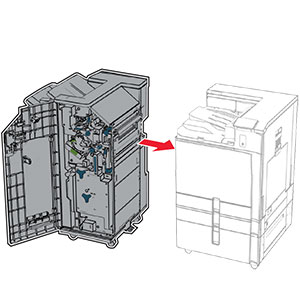
  16. 插入装订器。

    The finisher is inserted into the standard bin.
  17. 安装配套的安装支架,将装订器固定到打印机上。

    注意: 使用随装订器附带的螺钉。
    The mounting bracket is installed.
  18. 安装左后盖板,然后将装订器向左滑动。

    The left rear cover is closed, and then secured with a screw.
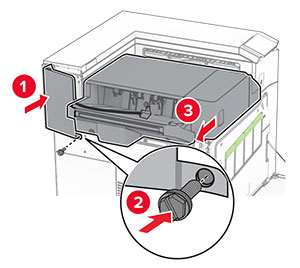
  19. 安装随装订器附带的左上装饰盖板。

    The upper trim cover is inserted to the printer, and then secured with a screw.
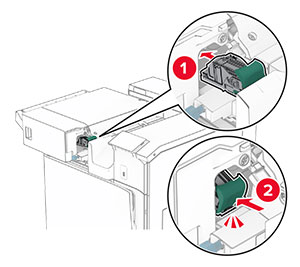
  20. 将订书钉盒插入装订器中,直至它卡入到位。

    The staple cartridge is inserted into place.
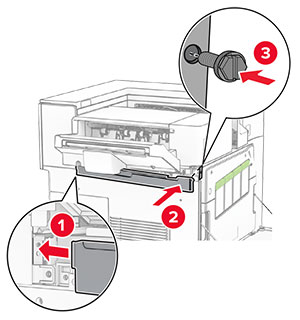
  21. 关闭前部盖门,然后将装订器滑向打印机。

    The front door is closed, and then the staple finisher is secured into place.
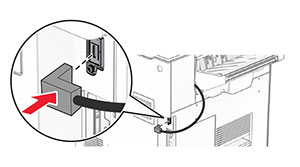
  22. 将选件电缆连接到打印机上。

     The staple finisher cable is connected to the printer.
  23. 将打印机电源线的一端连接到打印机上,然后将另一端连接到电源插座上。

    标准的小心图标 小心—可能的伤害: 为避免火灾或电击危险,请将电源线连接到具有适当额定电压并正确接地的电源插座上,该插座应该靠近产品并且便于使用。
  24. 打开打印机电源。

在打印驱动程序中添加装订器,使它可用于打印作业。如需更多信息,请参阅添加打印驱动程序中的可用选件

安装偏移接纸架

电击危险小心图标 小心—电击危险: 为避免电击危险,如果您在设置完打印机后访问控制器主板或者安装可选的硬件或内存设备,请在继续操作之前先关闭打印机电源并从电源插座中拔掉电源线。如果您还有其他设备连接在打印机上,也应关闭它们的电源并拔掉所有连接到打印机上的电缆。
  1. 关闭打印机电源。

    Power button on the side of the control panel is pressed for 5 seconds.
  2. 从电源插座上拔掉电源线,然后从打印机上拔掉电源线。

    Power cord is unplugged from the electrical outlet, and then from the printer.
  3. 拆开偏移接纸架的包装,然后移除所有包装材料。

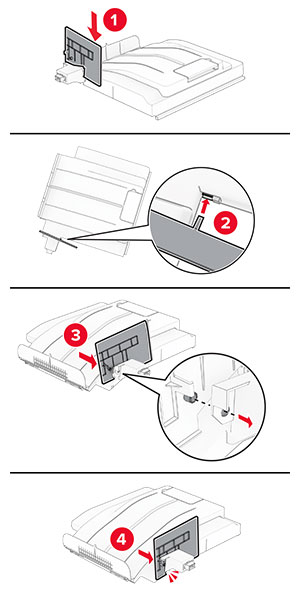
  4. 将内部后盖板安装到偏移接纸架上。

    The inner rear cover is aligned, and then attached to the offset stacker.
  5. 移除标准接纸架。

    注意: 不要扔掉接纸架。
    The tray extender is opened, and then the standard bin is pulled out from the printer.
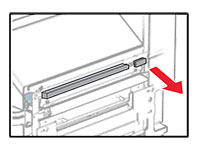
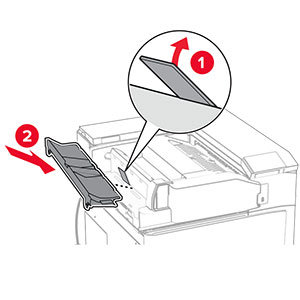
  6. 移除输纸器连接器盖板。

    注意: 不要扔掉盖板。
    The paper transport connector cover is pried, and then removed from the printer.
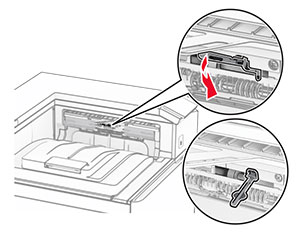
  7. 安装此选件前,将出口接纸架标志置于关闭位置。

    The exit bin flag is stored back into the printer.
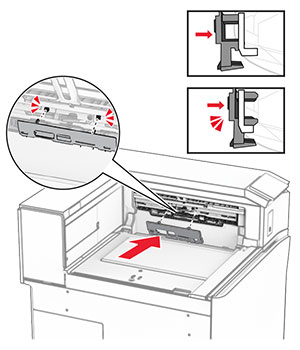
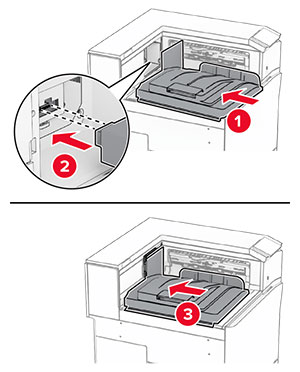
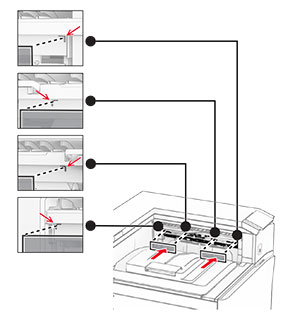
  8. 对齐偏移接纸架,然后将它安装到打印机上。

    The offset stacker is aligned, and then inserted into the printer.
    注意: 确保将部件对齐并牢固安装到打印机上。
    Correct alignment and placement of the offset stacker.
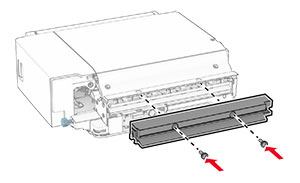
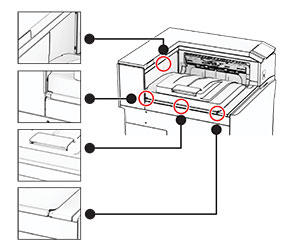
  9. 将偏移接纸架的保护条安装到打印机上。

    The protective strips are aligned, and then attached to the printer.
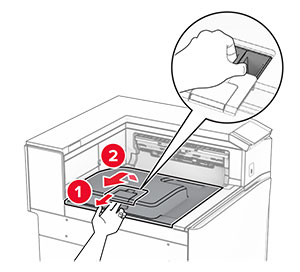
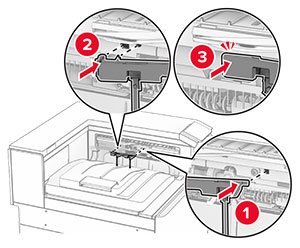
  10. 将出口接纸架标志置于打开位置。

    The exit bin flag is pulled out, and then placed into the open position.
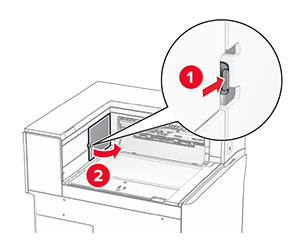
  11. 安装接纸架标志盖板,直到它卡入到位。

    The exit bin flag cover is aligned, and then attached to the printer.
  12. 将打印机电源线的一端连接到打印机上,然后将另一端连接到电源插座上。

    标准的小心图标 小心—可能的伤害: 为避免火灾或电击危险,请将电源线连接到具有适当额定电压并正确接地的电源插座上,该插座应该靠近产品并且便于使用。
  13. 打开打印机电源。

在打印驱动程序中添加偏移接纸架,使它可用于打印作业。如需更多信息,请参阅添加打印驱动程序中的可用选件

安装配有折叠选件的输纸器

电击危险小心图标 小心—电击危险: 为避免电击危险,如果您在设置完打印机后访问控制器主板或者安装可选的硬件或内存设备,请在继续操作之前先关闭打印机电源并从电源插座中拔掉电源线。如果您还有其他设备连接在打印机上,也应关闭它们的电源并拔掉所有连接到打印机上的电缆。

注意:

  1. 关闭打印机电源。

    Power button on the side of the control panel is pressed for 5 seconds.
  2. 从电源插座上拔掉电源线,然后从打印机上拔掉电源线。

    Power cord is unplugged from the electrical outlet, and then the other end is removed from the printer.
  3. 拆开配有折叠选件的输纸器的包装,然后移除所有包装材料。

  4. 移除标准接纸架。

    注意: 不要扔掉接纸架。
    The standard bin is removed.
  5. 安装此选件前,将出口接纸架标志置于关闭位置。

    注意: 移除此选件后,将出口接纸架标志置于打开位置。
    The exit bin flag is stored back into the printer.
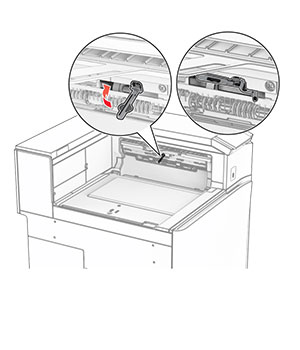
  6. 移除备份辊。

    注意: 不要扔掉备份辊。
    The backup roller is pried using a screwdriver, and then removed from the printer.
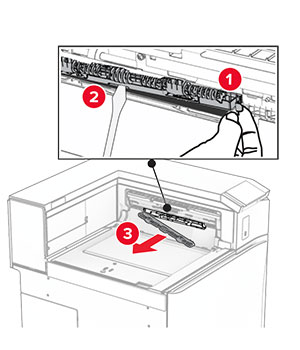
  7. 插入随此选件附带的进纸辊,直至它卡入到位。

    The roller is inserted into the printer.
    注意: 确保金属弹簧位于进纸辊前方。
    The metal spring is positioned in front of the roller.
  8. 安装辊盖板,直至它卡入到位。

    The cover is attached to the printer.
  9. 打开前部盖门,然后从打印机的左侧移除盖板。

    注意: 不要扔掉螺钉和盖板。
    The front door is opened, and then the cover is unscrewed and removed.
  10. 关闭前部盖门。

  11. 移除输纸器连接器盖板。

    注意: 不要扔掉盖板。
    The paper transport connector cover is removed from the printer.
  12. 取下左后盖板。

    注意: 不要扔掉螺钉和盖板。
    The left rear cover is unscrewed and removed.
  13. 取下内部接纸架盖板。

    注意: 不要扔掉螺钉和盖板。
    The inner bin cover is unscrewed, and then removed from the printer.
  14. 对齐随此选件附带的内部接纸架盖板,然后将它插入。

    The inner bin cover is aligned, and then inserted into the printer.
  15. 将螺钉安装到内部接纸架盖板上。

    The screws are aligned, and then installed into the inner bin cover.
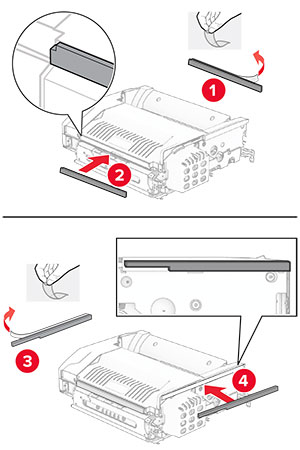
  16. 将泡沫胶带粘贴到此选件上。

    The foam tapes are peeled, and then attached to the paper transport with folding option.
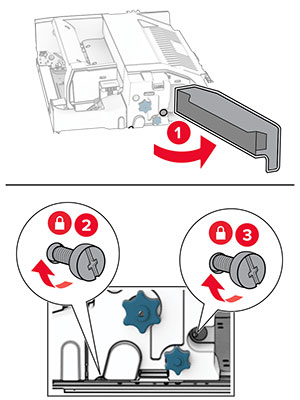
  17. 打开盖门 F,然后拧紧螺钉。

    Door F is opened, and then the screws inside it are tightened.
  18. 关闭盖门 F。

  19. 将金属支架安装到此选件上。

    The metal bracket with a screw is attached to the paper transport with folding option.
  20. 插入此选件。
    注意: 确保金属支架位于打印机前方。
    The paper transport with folding option is inserted into the printer, with the metal bracket in front of the printer.
  21. 打开盖门 F,然后使用随此选件附带的螺丝起子安装螺钉。

    Door F is opened, and then the screw is installed using the screwdriver that came with the option.
  22. 关闭盖门 F。

  23. 将螺钉安装在此选件上。

    The screws are installed into the paper transport with folding option.
  24. 安装左侧后部盖板。

    The left rear cover is attached to the printer, and then secured with a screw.
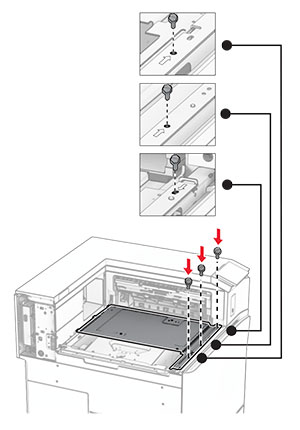
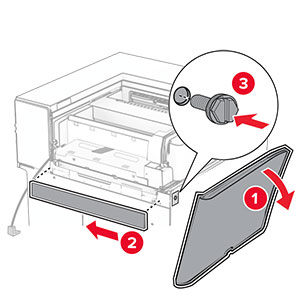
  25. 打开前部盖门,然后将盖板安装到打印机左侧。

    The front door is opened, and then the cover is attached and secured with a screw.
  26. 关闭前部盖门。

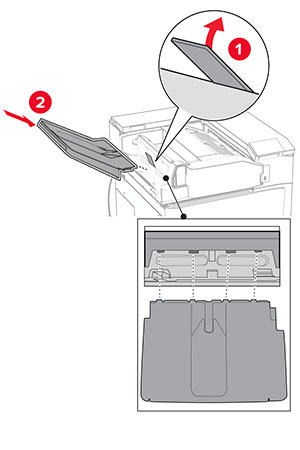
  27. 抬起选件箱挡板,然后对齐并安装选件箱。

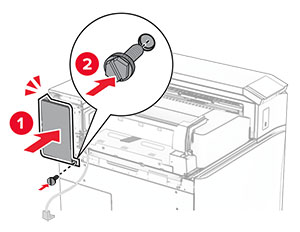
    The bin flap is raised, and then the option bin is attached to the paper transport with folding option.
  28. 将螺钉安装到选件箱上。

    Screws are installed under the bin of the paper transport with folding option.
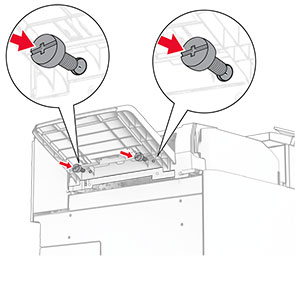
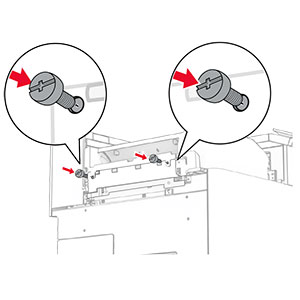
  29. 安装装饰盖板。

    The trim cover is attached to the paper transport with folding option, and then secured with screws.
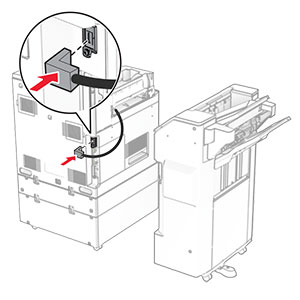
  30. 将选件电缆连接到打印机上。

    The paper transport with folding option cable is connected to the printer.
  31. 将电源线的一端连接到打印机上,然后将另一端连接到电源插座上。

    标准的小心图标 小心—可能的伤害: 为避免火灾或电击危险,请将电源线连接到具有适当额定电压并正确接地的电源插座上,该插座应该靠近产品并且便于使用。
  32. 打开打印机电源。

安装装订器、打孔装订器和输纸器

电击危险小心图标 小心—电击危险: 为避免电击危险,如果您在设置完打印机后访问控制器主板或者安装可选的硬件或内存设备,请在继续操作之前先关闭打印机电源并从电源插座中拔掉电源线。如果您还有其他设备连接在打印机上,也应关闭它们的电源并拔掉所有连接到打印机上的电缆。
注意: 此任务需要平头螺丝起子。
  1. 关闭打印机电源。

    Power button on the side of the control panel is pressed for 5 seconds.
  2. 从电源插座上拔掉电源线,然后从打印机上拔掉电源线。

    Power cord is unplugged from the electrical outlet, and then the other end is removed from the printer.
  3. 拆开纸张传输部件的包装。

  4. 移除标准接纸架。

    注意: 不要扔掉接纸架。
    The standard bin is removed.
  5. 安装此选件前,将出口接纸架标志置于关闭位置。

    注意: 移除此选件后,将出口接纸架标志置于打开位置。
    The exit bin flag is stored back into the printer.
  6. 移除备份辊。

    注意: 不要扔掉备份辊。
    The backup roller is pried using a screwdriver, and then removed from the printer.
  7. 插入随此输纸器附带的进纸辊,直至它卡入到位。

    The roller is inserted into the printer.
    注意: 确保金属弹簧位于进纸辊前方。
    The metal spring is positioned in front of the roller.
  8. 安装盖板,直至它卡入到位。

    The cover is attached to the printer.
  9. 打开前部盖门,然后从打印机的左侧移除盖板。

    注意: 不要扔掉螺钉和盖板。
    The front door is opened, and then the cover is unscrewed and removed.
  10. 关闭前部盖门。

  11. 移除输纸器连接器盖板。

    注意: 不要扔掉盖板。
    The paper transport connector cover is removed from the printer.
  12. 移除盖板。

    注意: 不要扔掉盖板。
    The cover above the front door is removed from the printer.
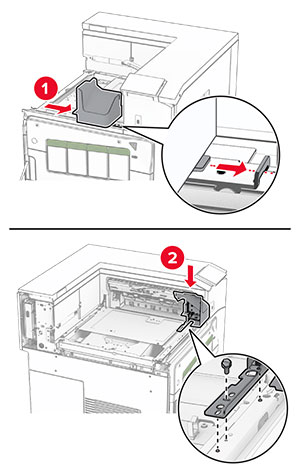
  13. 安装金属支架。

    The metal bracket is attached into the slot above the front door.
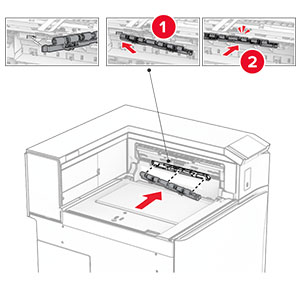
  14. 插入纸张传输部件。
    The paper transport is inserted into the printer.
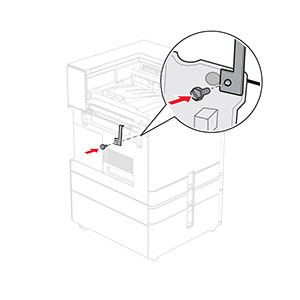
  15. 打开手柄 G,然后将螺钉安装到输纸器前部。
    Handle G is opened, and then the screw is inserted into the paper transport.
  16. 合上手柄 G。

  17. 将螺钉安装到输纸器后部。

    The screw is inserted into the rear slot of the paper transport.
  18. 打开前部盖门,然后将随输纸器附带的盖板安装到打印机左侧。

    The front door is opened, and then the cover is attached and secured with a screw.
  19. 关闭前部盖门。

  20. 拆开打孔装订器的包装。

  21. 安装稳定装置。

    The stabilizer is installed to the lower part of the finisher.
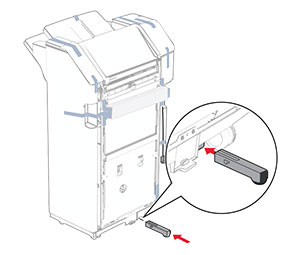
  22. 移除装订器周围的胶带。

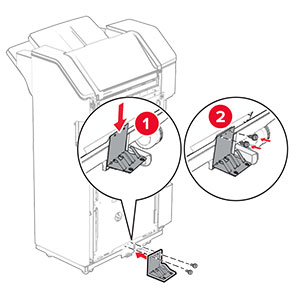
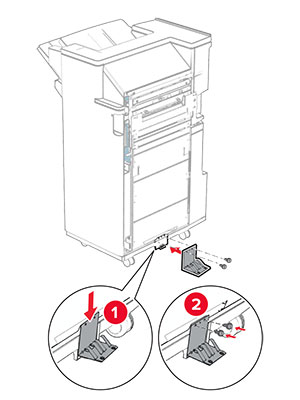
  23. 将支架安装到装订器上。

    The metal bracket is attached to the base of the staple, hole punch finisher, and then secured with screws.
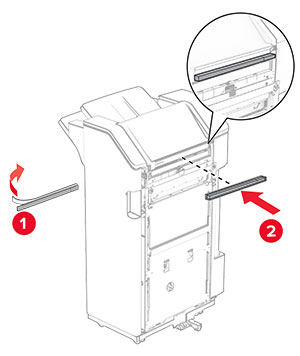
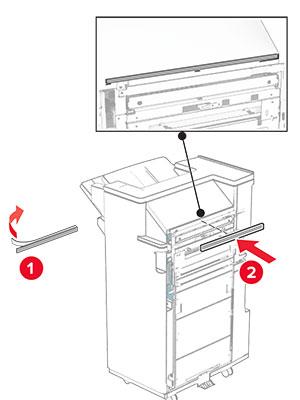
  24. 将泡沫胶带贴到装订器上。

    The foam tape is peeled, and then attached to the staple, hole punch finisher.
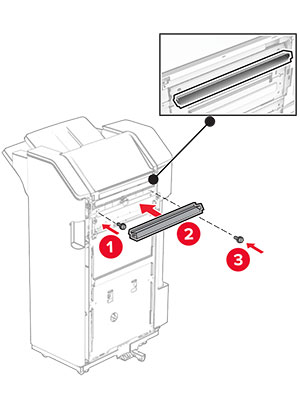
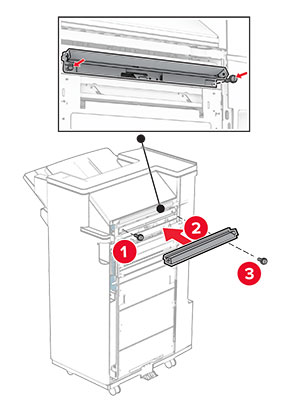
  25. 将进纸导片安装到装订器上。

    The feed guide is attached to the staple, hole punch finisher, and then secured with screws.
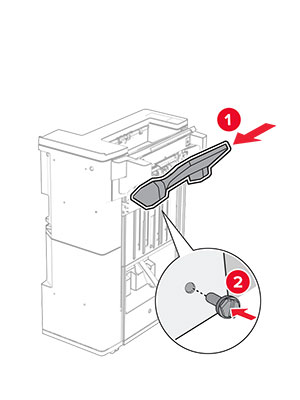
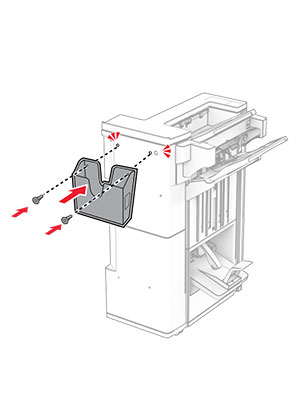
  26. 将接纸架安装到装订器上。

    The bin is attached to the staple, hole punch finisher, and then secured with screws.
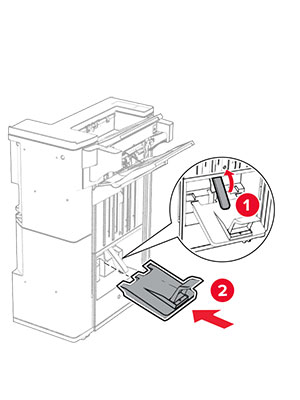
  27. 打开装订器盖门,然后插入打孔箱。

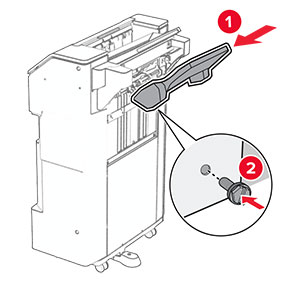
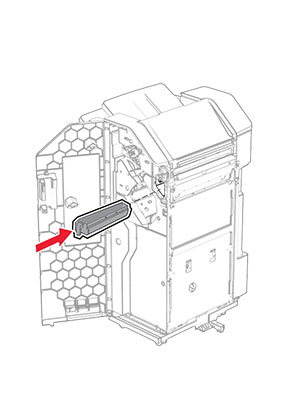
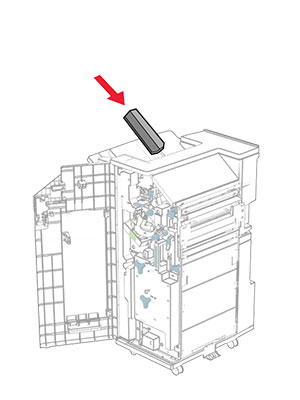
    The finisher door is opened, and then the hole punch box is inserted into the finisher.
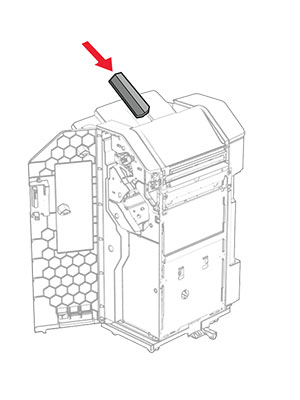
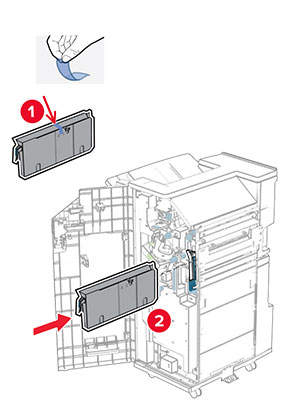
  28. 将接纸架扩展器放入装订器接纸架上。

    注意:

    • 接纸架扩展器可用于 A3 或更大尺寸的纸张,并且在高湿度条件下有助于堆叠纸张。
    • 使用接纸架扩展器时,接纸架容量会减小。
    The bin extender is placed on the staple, hole punch finisher bin.
  29. 关闭装订器盖门。

  30. 将安装支架安装到打印机上。

    注意: 确保螺钉与安装支架上的标记对齐。
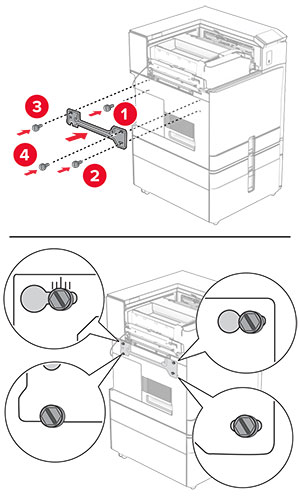
    The mounting bracket is attached to the printer, and then secured with screws.
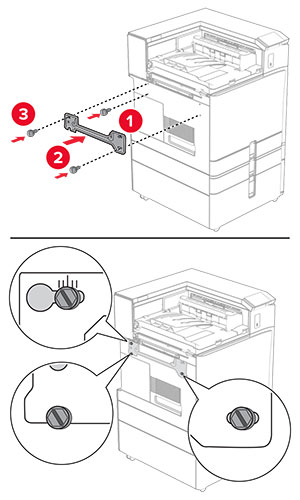
  31. 将随输纸器附带的金属支架安装到打印机上。

    The metal bracket is attached to the printer, and then secured with a screw.
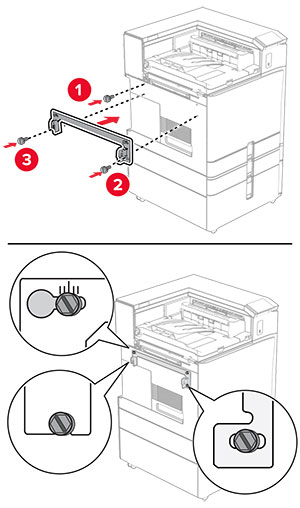
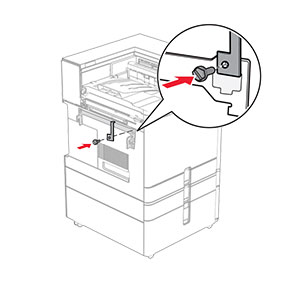
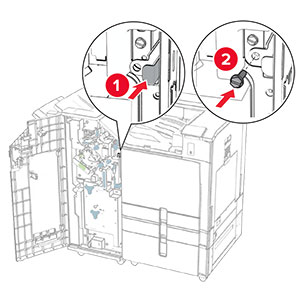
  32. 打开装订器盖门,卸下螺钉,然后拉出装订器锁。

    The finisher door is opened, and then the finisher is unlocked by removing the screw.
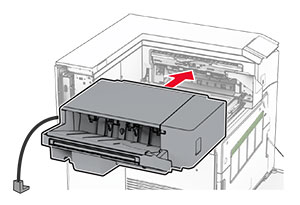
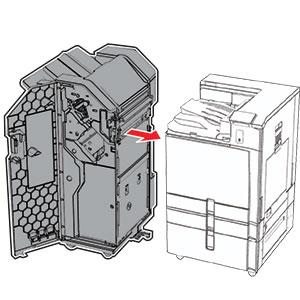
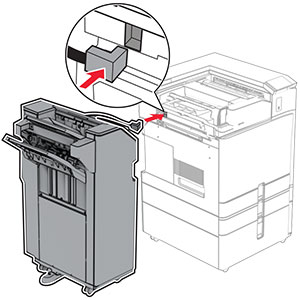
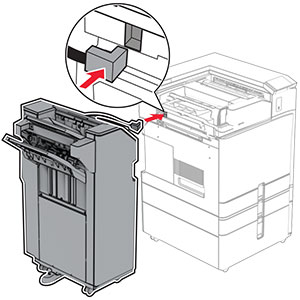
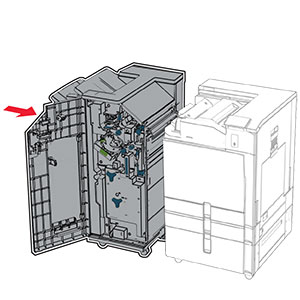
  33. 将装订器安装到打印机上。

    The staple, hole punch finisher is being attached to the printer.
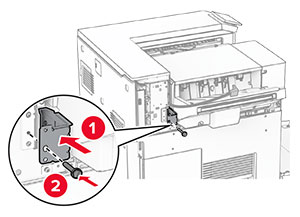
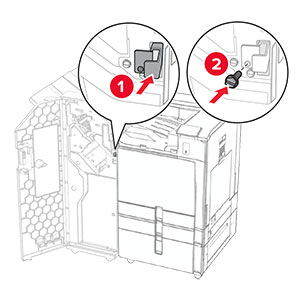
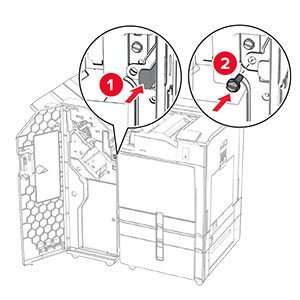
  34. 将装订器锁定到打印机上,然后安装螺钉。

    The staple, hole punch finisher lock is pushed into the finisher, and then secured with a screw.
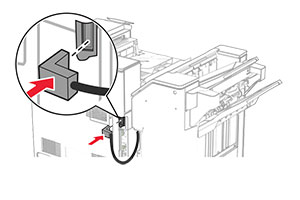
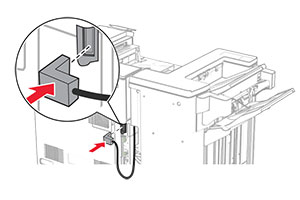
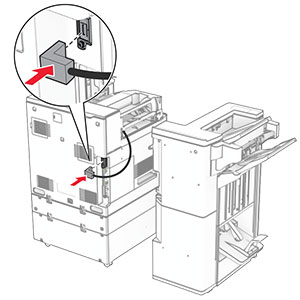
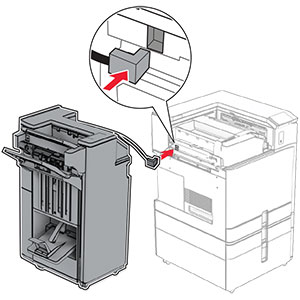
  35. 将装订器电缆连接到打印机上。

    The staple, hole punch finisher cable is being connected to the printer.
  36. 将电源线的一端连接到打印机上,然后将另一端连接到电源插座上。

    标准的小心图标 小心—可能的伤害: 为避免火灾或电击危险,请将电源线连接到具有适当额定电压并正确接地的电源插座上,该插座应该靠近产品并且便于使用。
  37. 打开打印机电源。

安装装订器、打孔装订器和配有折叠选件的输纸器

电击危险小心图标 小心—电击危险: 为避免电击危险,如果您在设置完打印机后访问控制器主板或者安装可选的硬件或内存设备,请在继续操作之前先关闭打印机电源并从电源插座中拔掉电源线。如果您还有其他设备连接在打印机上,也应关闭它们的电源并拔掉所有连接到打印机上的电缆。
注意: 此任务需要平头螺丝起子。
  1. 关闭打印机电源。

    Power button on the side of the control panel is pressed for 5 seconds.
  2. 从电源插座上拔掉电源线,然后从打印机上拔掉电源线。

    Power cord is unplugged from the electrical outlet, and then the other end is removed from the printer.
  3. 拆开配有折叠选件的输纸器的包装,然后移除所有包装材料。

  4. 移除标准接纸架。

    注意: 不要扔掉接纸架。
    The standard bin is removed.
  5. 安装此选件前,将出口接纸架标志置于关闭位置。

    注意: 移除此选件后,将出口接纸架标志置于打开位置。
    The exit bin flag is stored back into the printer.
  6. 移除备份辊。

    注意: 不要扔掉备份辊。
    The backup roller is pried using a screwdriver, and then removed from the printer.
  7. 插入随此选件附带的进纸辊,直至它卡入到位。

    The roller is inserted into the printer.
    注意: 确保金属弹簧位于进纸辊前方。
    The metal spring is positioned in front of the roller.
  8. 安装盖板,直至它卡入到位。

    The cover is attached to the printer.
  9. 打开前部盖门,然后从打印机的左侧移除盖板。

    注意: 不要扔掉螺钉和盖板。
    The front door is opened, and then the cover is unscrewed and removed.
  10. 关闭前部盖门。

  11. 移除输纸器连接器盖板。

    注意: 不要扔掉盖板。
    The paper transport connector cover is removed from the printer.
  12. 取下左后盖板。

    注意: 不要扔掉螺钉和盖板。
    The left rear cover is unscrewed and removed.
  13. 取下内部接纸架盖板。

    注意: 不要扔掉螺钉和盖板。
    The inner bin cover is unscrewed, and then removed from the printer.
  14. 对齐随配有折叠选件的输纸器附带的内部接纸架盖板,然后将它插入。

    The inner bin cover is aligned, and then inserted into the printer.
  15. 将螺钉安装到内部接纸架盖板上。

    The screws are aligned, and then installed into the inner bin cover.
  16. 将泡沫胶带粘贴到此选件上。

    The foam tapes are peeled, and then attached to the paper transport with folding option.
  17. 打开盖门 F,然后拧紧螺钉。

    Door F is opened, and then the screws inside it are tightened.
  18. 关闭盖门 F。

  19. 将支架安装到此选件上。

    The metal bracket with a screw is attached to the paper transport with folding option.
  20. 插入此选件。
    注意: 确保金属支架位于打印机前方。
    The paper transport with folding option is inserted into the printer, with the metal bracket in front of the printer.
  21. 打开盖门 F,然后使用随此选件附带的螺丝起子安装螺钉。

    Door F is opened, and then the screw is installed using the screwdriver that came with the option.
  22. 关闭盖门 F。

  23. 将螺钉安装在此选件上。

    The screws are installed into the paper transport with folding option.
  24. 安装左侧后部盖板。

    The left rear cover is attached to the printer, and then secured with a screw.
  25. 拆开打孔装订器的包装。

  26. 安装稳定装置。

    The stabilizer is installed to the lower part of the finisher.
  27. 移除装订器周围的胶带。

  28. 将支架安装到装订器上。

    The metal bracket is attached to the base of the staple, hole punch finisher, and then secured with screws.
  29. 将泡沫胶带贴到装订器上。

    The foam tape is peeled, and then attached to the staple, hole punch finisher.
    注意: 取下装订器右侧的一小块泡沫。
    The small portion of foam is removed from the finisher.
  30. 将进纸导片安装到装订器上。

    The feed guide is attached to the staple, hole punch finisher, and then secured with screws.
  31. 将接纸架安装到装订器上。

    The bin is attached to the staple, hole punch finisher, and then secured with screws.
  32. 打开装订器盖门,然后插入打孔箱。

    The finisher door is opened, and then the hole punch box is inserted into the finisher.
  33. 将接纸架扩展器放入装订器接纸架上。

    注意:

    • 接纸架扩展器可用于 A3 或更大尺寸的纸张,并且在高湿度条件下有助于堆叠纸张。
    • 使用接纸架扩展器时,接纸架容量会减小。
    The bin extender is placed on the staple, hole punch finisher bin.
  34. 关闭装订器盖门。

  35. 抬起选件箱挡板,然后对齐外盖并将它安装到此选件上。

    The bin flap is raised, and then the cover is attached to the paper transport with folding option.
  36. 安装螺钉。

    The screws are installed into the paper transport with folding option.
  37. 打开前部盖门,然后安装随此选件附带的装饰盖板。

    The front door is opened, the trim cover is attached and then secured with a screw.
  38. 将安装支架安装到打印机上。

    注意: 确保螺钉与安装支架上的标记对齐。
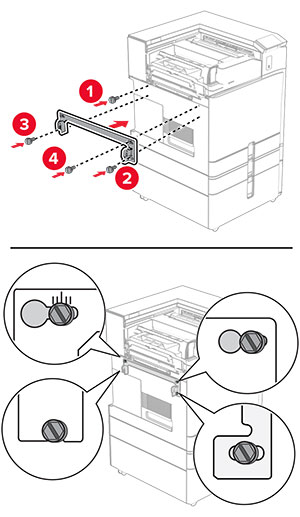
    The mounting bracket is attached to the printer, and then secured with screws.
  39. 打开装订器盖门,卸下螺钉,然后拉出装订器锁。

    The finisher door is opened, and then the finisher is unlocked by removing the screw.
  40. 将选件电缆连接到打印机上。

    The paper transport with folding option cable is connected to the printer.
  41. 将装订器电缆连接到此选件。
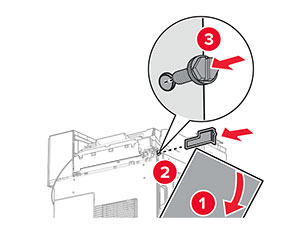
    The staple, hole punch finisher cable is being connected to the paper transport with folding option.
  42. 将装订器安装到打印机上。
    The staple, hole punch finisher is being attached to the printer.
  43. 将装订器锁定到打印机上,然后安装螺钉。

    The staple, hole punch finisher lock is pushed into the finisher, and then secured with a screw.
  44. 关闭装订器盖门。

  45. 将电源线的一端连接到打印机上,然后将另一端连接到电源插座上。

    标准的小心图标 小心—可能的伤害: 为避免火灾或电击危险,请将电源线连接到具有适当额定电压并正确接地的电源插座上,该插座应该靠近产品并且便于使用。
  46. 打开打印机电源。

安装小册子装订器和输纸器

电击危险小心图标 小心—电击危险: 为避免电击危险,如果您在设置完打印机后访问控制器主板或者安装可选的硬件或内存设备,请在继续操作之前先关闭打印机电源并从电源插座中拔掉电源线。如果您还有其他设备连接在打印机上,也应关闭它们的电源并拔掉所有连接到打印机上的电缆。
注意: 此任务需要平头螺丝起子。
  1. 关闭打印机电源。

    Power button on the side of the control panel is pressed for 5 seconds.
  2. 从电源插座上拔掉电源线,然后从打印机上拔掉电源线。

    Power cord is unplugged from the electrical outlet, and then the other end is removed from the printer.
  3. 拆开纸张传输部件的包装。

  4. 移除标准接纸架。

    注意: 不要扔掉接纸架。
    The standard bin is removed.
  5. 安装此选件前,将出口接纸架标志置于关闭位置。

    注意: 移除此选件后,将出口接纸架标志置于打开位置。
    The exit bin flag is stored back into the printer.
  6. 移除备份辊。

    注意: 不要扔掉备份辊。
    The backup roller is pried using a screwdriver, and then removed from the printer.
  7. 插入随此输纸器附带的进纸辊,直至它卡入到位。

    The roller is inserted into the printer.
    注意: 确保金属弹簧位于进纸辊前方。
    The metal spring is positioned in front of the roller.
  8. 安装辊盖板,直至它卡入到位。

    The cover is attached to the printer.
  9. 打开前部盖门,然后从打印机的左侧移除盖板。

    注意: 不要扔掉螺钉和盖板。
    The front door is opened, and then the cover is unscrewed and removed.
  10. 关闭前部盖门。

  11. 移除输纸器连接器盖板。

    注意: 不要扔掉盖板。
    The paper transport connector cover is removed from the printer.
  12. 移除盖板。

    注意: 不要扔掉盖板。
    The cover located at above the front door is removed from the printer.
  13. 安装金属支架。

    The metal bracket is attached into the slot above the front door.
  14. 插入纸张传输部件。

    The paper transport is inserted into the printer.
  15. 打开手柄 G,然后将螺钉安装到输纸器前部。

    Handle G is opened, and then the screw is inserted into the paper transport.
  16. 合上手柄 G。

  17. 将螺钉安装到输纸器后部。

    The screw is inserted into the rear slot of the paper transport.
  18. 打开前部盖门,然后将随输纸器附带的盖板安装到打印机左侧。

    The front door is opened, and then the cover is attached and secured with a screw.
  19. 关闭前部盖门。

  20. 拆开小册子装订器的包装,然后移除所有包装材料。

  21. 将支架安装到装订器上。

    The metal bracket is attached to the base of the booklet finisher, and then secured with screws.
  22. 将泡沫胶带贴到装订器上。

    The foam tape is peeled, and then attached to the booklet finisher.
  23. 将进纸导片安装到装订器上。

    The feed guide is attached to the booklet finisher, and then secured with screws.
  24. 将上接纸架安装到装订器上。

    The upper bin is attached to the booklet finisher, and then secured with a screw.
  25. 抬起选件箱挡板,然后将下接纸架安装到装订器上。

    The bin flap is raised, and then the lower bin is attached to the booklet finisher.
  26. 打开装订器盖门。

  27. 移除打孔箱的包装材料,然后将它插入装订器中。

    The hole punch box has its packing material removed, and then inserted into the booklet finisher.
  28. 将接纸架扩展器放在装订器接纸架上。

    注意:

    • 接纸架扩展器可用于 A3 或更大尺寸的纸张,并且在高湿度条件下有助于堆叠纸张。
    • 使用接纸架扩展器时,接纸架容量会减小。
    The bin extender is placed on the booklet finisher bin.
  29. 将成像篮安装到装订器后部。

    The basket is aligned, and then attaced to the booklet finisher using pins.
  30. 关闭装订器盖门。

  31. 将安装支架安装到打印机上。

    注意: 确保螺钉与安装支架上的标记对齐。
    The mounting bracket is attached to the printer, and then secured with screws.
  32. 将随输纸器附带的支架安装到打印机上。

    The metal bracket is attached to the printer, and then secured with a screw.
  33. 打开装订器盖门,卸下螺钉,然后拉出装订器锁。

    The finisher door is opened, and then the finisher is unlocked by removing the screw.
  34. 将装订器安装到打印机上。

    The booklet finisher is being attached to the printer.
  35. 将装订器锁定到打印机上,然后安装螺钉。

    The booklet finisher lock is pushed into the finisher, and then secured with a screw.
  36. 关闭装订器盖门。

  37. 将装订器电缆连接到打印机上。

    The booklet finisher cable is being connected to the printer.
  38. 将电源线的一端连接到打印机上,然后将另一端连接到电源插座上。

    标准的小心图标 小心—可能的伤害: 为避免火灾或电击危险,请将电源线连接到具有适当额定电压并正确接地的电源插座上,该插座应该靠近产品并且便于使用。
  39. 打开打印机电源。

安装小册子装订器和配有折叠选件的输纸器

电击危险小心图标 小心—电击危险: 为避免电击危险,如果您在设置完打印机后访问控制器主板或者安装可选的硬件或内存设备,请在继续操作之前先关闭打印机电源并从电源插座中拔掉电源线。如果您还有其他设备连接在打印机上,也应关闭它们的电源并拔掉所有连接到打印机上的电缆。
注意: 此任务需要平头螺丝起子。
  1. 关闭打印机电源。

    Power button on the side of the control panel is pressed for 5 seconds.
  2. 从电源插座上拔掉电源线,然后从打印机上拔掉电源线。

    Power cord is unplugged from the electrical outlet, and then the other end is removed from the printer.
  3. 拆开配有折叠选件的输纸器的包装

  4. 移除标准接纸架。

    注意: 不要扔掉接纸架。
    The standard bin is removed.
  5. 安装此选件前,将出口接纸架标志置于关闭位置。

    注意: 移除此选件后,将出口接纸架标志置于打开位置。
    The exit bin flag is stored back into the printer.
  6. 移除备份辊。

    注意: 不要扔掉备份辊。
    The backup roller is pried using a screwdriver, and then removed from the printer.
  7. 插入随此选件附带的进纸辊,直至它卡入到位。

    The roller is inserted into the printer.
    注意: 确保金属弹簧位于进纸辊前方。
    The metal spring is positioned in front of the roller.
  8. 安装辊盖板,直至它卡入到位。

    The cover is attached to the printer.
  9. 打开前部盖门,然后从打印机的左侧移除盖板。

    注意: 不要扔掉螺钉和盖板。
    The front door is opened, and then the cover is unscrewed and removed.
  10. 关闭前部盖门。

  11. 移除输纸器连接器盖板。

    注意: 不要扔掉盖板。
    The paper transport connector cover is removed from the printer.
  12. 取下左后盖板。

    注意: 不要扔掉螺钉和盖板。
    The left rear cover is unscrewed and removed.
  13. 取下内部接纸架盖板。

    注意: 不要扔掉螺钉和盖板。
    The inner bin cover is unscrewed, and then removed from the printer.
  14. 对齐随此选件附带的内部接纸架盖板,然后将它插入。

    The inner bin cover is aligned, and then inserted into the printer.
  15. 将螺钉安装到内部接纸架盖板上。

    The screws are aligned, and then installed into the inner bin cover.
  16. 将泡沫胶带粘贴到此选件上。

    The foam tapes are peeled, and then attached to the paper transport with folding option.
  17. 打开盖门 F,然后拧紧螺钉。

    Door F is opened, and then the screws inside it are tightened.
  18. 关闭盖门 F。

  19. 将支架安装到此选件上。

    The metal bracket with a screw is attached to the paper transport with folding option.
  20. 插入此选件。

    注意: 确保金属支架位于打印机前方。
    The paper transport with folding option is inserted into the printer, with the metal bracket in front of the printer.
  21. 打开盖门 F,然后使用随此选件附带的螺丝起子安装螺钉。

    Door F is opened, and then the screw is installed using the screwdriver that came with the option.
  22. 关闭盖门 F。

  23. 将螺钉安装在此选件上。

    The screws are installed into the paper transport with folding option.
  24. 安装左侧后部盖板。

    The left rear cover is attached to the printer, and then secured with a screw.
  25. 拆开小册子装订器的包装,然后移除所有包装材料。

  26. 将支架安装到装订器上。

    The metal bracket is attached to the base of the booklet finisher, and then secured with screws.
  27. 将泡沫胶带贴到装订器上。

    The foam tape is peeled, and then attached to the booklet finisher.
  28. 将进纸导片安装到装订器上。

    The feed guide is attached to the booklet finisher, and then secured with screws.
  29. 将上接纸架安装到装订器上。

    The upper bin is attached to the booklet finisher, and then secured with a screw.
  30. 抬起选件箱挡板,然后将下接纸架安装到装订器上。

    The bin flap is raised, and then the lower bin is attached to the booklet finisher.
  31. 打开装订器盖门。

  32. 移除打孔箱的包装材料,然后将它插入装订器中。

    The hole punch box has its packing material removed, and then inserted into the booklet finisher.
  33. 将接纸架扩展器放在装订器接纸架上。

    注意:

    • 接纸架扩展器可用于 A3 或更大尺寸的纸张,并且在高湿度条件下有助于堆叠纸张。
    • 使用接纸架扩展器时,接纸架容量会减小。
    The bin extender is placed on the booklet finisher bin.
  34. 将成像篮安装到装订器后部。

    The basket is aligned, and then attaced to the booklet finisher using pins.
  35. 关闭装订器盖门。

  36. 抬起选件箱挡板,然后对齐外盖并将它安装到此选件上。

    The bin flap is raised, and then the cover is attached to the paper transport with folding option.
  37. 安装螺钉。

    The screws are installed into the paper transport with folding option.
  38. 打开前部盖门,然后安装随此选件附带的装饰盖板。

    The front door is opened, the trim cover is attached, and then secured with a screw.
  39. 将安装支架安装到打印机上。

    注意: 确保螺钉与安装支架上的标记对齐。
    The mounting bracket is attached to the printer, and then secured with screws.
  40. 打开装订器盖门,卸下螺钉,然后拉出装订器锁。

    The finisher door is opened, and then the finisher is unlocked by removing the screw.
  41. 将选件电缆连接到打印机上。

    The paper transport with folding option cable is connected to the printer.
  42. 将装订器电缆连接到此选件。

    The booklet finisher cable is being connected to the paper transport with folding option.
  43. 将装订器安装到打印机上。

    The booklet finisher is being attached to the printer.
  44. 将装订器锁定到打印机上,然后安装螺钉。

    The booklet finisher lock is pushed into the finisher, and then secured with a screw.
  45. 关闭装订器盖门。

  46. 将电源线的一端连接到打印机上,然后将另一端连接到电源插座上。

    标准的小心图标 小心—可能的伤害: 为避免火灾或电击危险,请将电源线连接到具有适当额定电压并正确接地的电源插座上,该插座应该靠近产品并且便于使用。
  47. 打开打印机电源。

安装智能存储驱动器

电击危险小心图标 小心—电击危险: 为避免电击危险,如果您在设置完打印机后访问控制器主板或者安装可选的硬件或内存设备,请在继续操作之前先关闭打印机电源并从电源插座中拔掉电源线。如果您还有其他设备连接在打印机上,也应关闭它们的电源并拔掉所有连接到打印机上的电缆。
注意: 此任务需要平头螺丝起子。
  1. 关闭打印机电源。

    The power button on the side of the control panel is pressed for 5 seconds.
  2. 从电源插座上拔掉电源线,然后从打印机上拔掉电源线。

    The power cord is unplugged from the electrical outlet, and then from the printer.
  3. 打开控制器板通道盖板。

    警告—可能的损坏: 控制器板电子组件容易被静电损坏。在接触任何控制器板组件或连接器之前请先触摸一下打印机上的金属表面。
    The screw is removed, and then the controller board access cover is opened.
  4. 拆开智能存储驱动器 (ISD) 的包装。

    警告—可能的损坏: 避免接触存储驱动器边缘的接插脚。
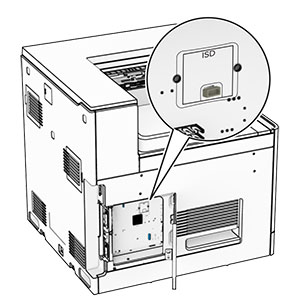
  5. 找到 ISD 连接器。

    The ISD connector is at the center of the controller board.
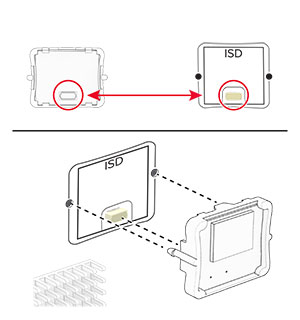
  6. 将 ISD 插入其连接器。

    The ISD is inserted into its location on the controller board.
  7. 关闭控制器板通道盖板。

    The door at the left side of the printer is closed, and then secured with a screw.
  8. 将电源线的一端连接到打印机上,然后将另一端连接到电源插座上。

    标准的小心图标 小心—可能的伤害: 为避免火灾或电击危险,请将电源线连接到具有适当额定电压并正确接地的电源插座上,该插座应该靠近产品并且便于使用。
  9. 打开打印机电源。

安装内置方案端口

电击危险小心图标 小心—电击危险: 为避免电击危险,如果您在设置完打印机后访问控制器主板或者安装可选的硬件或内存设备,请在继续操作之前先关闭打印机电源并从电源插座中拔掉电源线。如果您还有其他设备连接在打印机上,也应关闭它们的电源并拔掉所有连接到打印机上的电缆。
注意: 此任务需要平头螺丝起子。
  1. 关闭打印机电源。

    Power button on the side of the control panel is pressed for 5 seconds.
  2. 从电源插座上拔掉电源线,然后从打印机上拔掉电源线。

    Power cord is unplugged from the electrical outlet, and then from the printer.
  3. 打开控制器板通道盖板。

    警告—可能的损坏: 控制器板电子组件容易被静电损坏。在接触任何控制器电子组件或连接器之前请先触摸一下打印机上的金属表面。
    The screw is removed, and then the controller board access cover is opened.
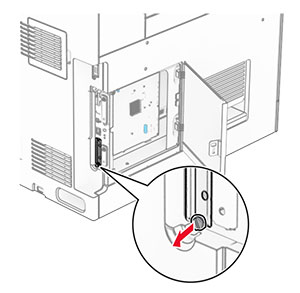
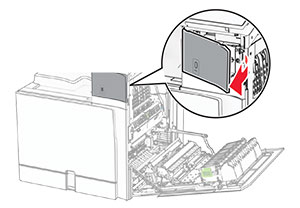
  4. 移除内置方案端口 (ISP) 盖板。

    注意: 不要扔掉螺钉和盖板。
    The ISP cover is unscrewed, and then removed.
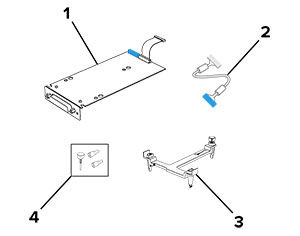
  5. 拆开 ISP 组件的包装。

    Items that are included in the ISP kit with callouts.

    1

    ISP

    2

    ISP 延长电缆

    3

    安装支架

    4

    翼形螺钉


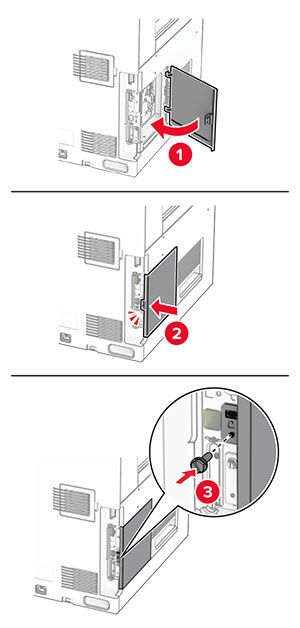
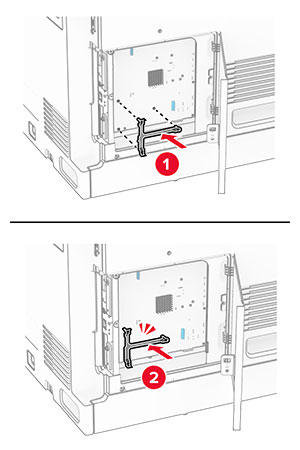
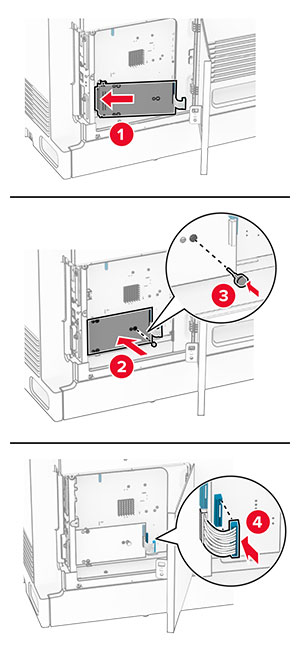
  6. 将安装支架安装到控制器板上,直到它卡入到位。

    The mounting bracket is aligned, and then attached to the controller board.
  7. 将 ISP 安装到安装支架上,然后将 ISP 延长电缆连接到控制器板上的连接器中。

    The ISP is aligned to the mounting bracket, secured using a thumbscrew, and then the ISP extended cable is connected.
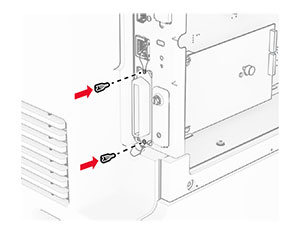
  8. 将 ISP 固定到打印机上。

    The internal solutions port is secured using thumb screws.
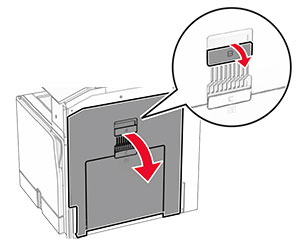
  9. 关闭控制器板通道盖板。

    The door at the left side of the printer is closed, and then secured with a screw.
  10. 将电源线的一端连接到打印机上,然后将另一端连接到电源插座上。

    标准的小心图标 小心—可能的伤害: 为避免火灾或电击危险,请将电源线连接到具有适当额定电压并正确接地的电源插座上,该插座应该靠近产品并且便于使用。
  11. 打开打印机电源。

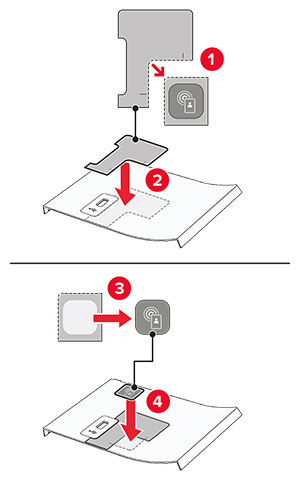
安装读卡器

电击危险小心图标 小心—电击危险: 为避免电击危险,如果您在设置完打印机后访问控制器主板或者安装可选的硬件或内存设备,请在继续操作之前先关闭打印机电源并从电源插座中拔掉电源线。如果您还有其他设备连接在打印机上,也应关闭它们的电源并拔掉所有连接到打印机上的电缆。
  1. 关闭打印机电源。

    The power button on the side of the control panel is pressed for five seconds.
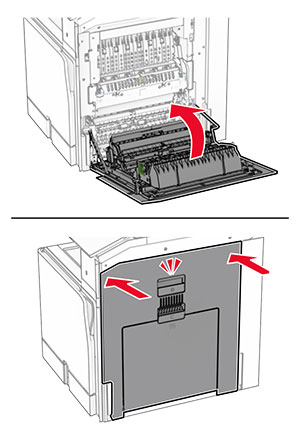
  2. 打开盖门 B。

    The door handle is pulled and door B is opened.
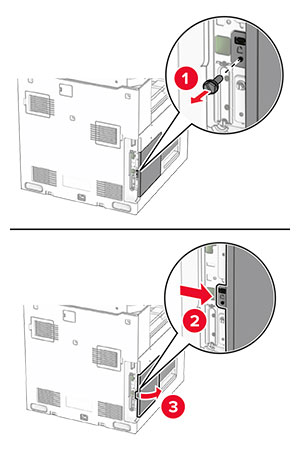
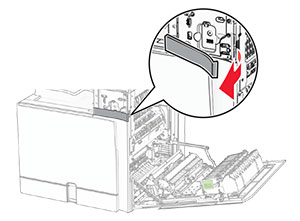
  3. 打开前部 USB 端口盖板。

    The front cover of the USB port is removed.
  4. 移除下部 USB 端口盖板。

    注意: 如果您的打印机没有该部件,请继续下一步。
    The lower port cover is removed.
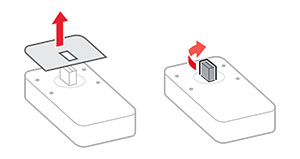
  5. 从读卡器上取下保护盖板。

    The protective cover of the card reader is removed.
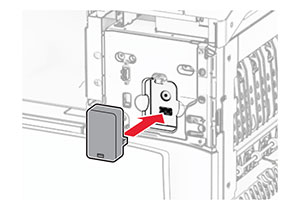
  6. 插入读卡器。

    The card reader is aligned and inserted into the USB port.
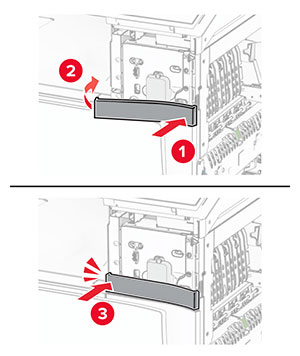
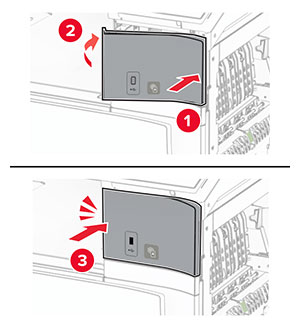
  7. 安装下部端口盖板,直到它卡入到位。

    The lower cover of the port is attached.
  8. 安装粘性导片。

    The sticker guides for the front cover are attached.
  9. 安装前部 USB 端口盖板,直到它卡入到位。

    The front cover for the USB port is attached.
  10. 关闭盖门 B,直至它卡入到位。

    Door B is closed.
  11. 打开打印机电源。

安装内置方案端口之后更改打印机端口设置

注意:

对于 Windows 用户
  1. 打开打印机文件夹。

  2. 从带有新 ISP 的打印机的快捷方式菜单,打开打印机属性。

  3. 从列表中配置端口。

  4. 更新 IP 地址。

  5. 应用更改。

对于 Macintosh 用户
  1. 从 Apple 菜单中的“系统预置”,导览至打印机列表,然后选择 + > IP

  2. 在地址字段中键入 IP 地址。

  3. 应用更改。