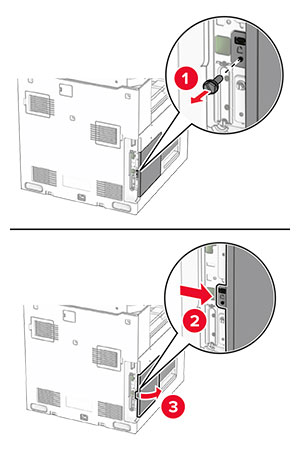
安裝硬體選購品

安裝選購性 550 張紙匣組件

觸電危險請當心圖示 請當心—觸電危險: 為避免發生電擊的風險,若您是在安裝印表機之後,才要取用控制板或安裝選購性硬體或記憶裝置,請先關閉印表機電源,並從電源插座拔除電源線,再繼續作業。若您有任何其他裝置連接至印表機,請同時關閉它們的電源,並拔下所有連接到印表機的電纜。
請注意: 此作業需要一字螺絲起子。
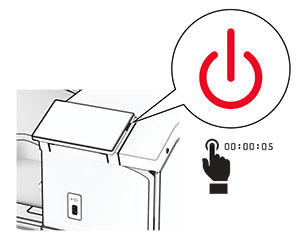
  1. 關閉印表機電源。

    Power button on the side of the control panel is pressed for at least 5 seconds.
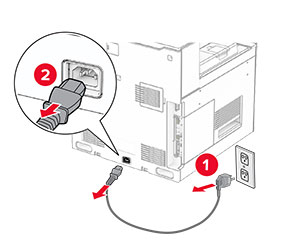
  2. 從電源插座拔除電源線,然後再從印表機拔除。

    Power cord is unplugged from the electrical outlet and then from the printer.
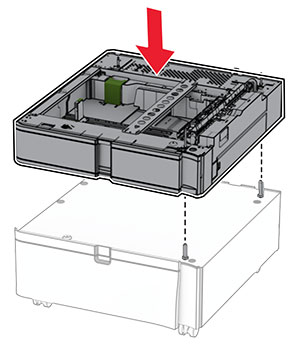
  3. 安裝選購性 550 張紙匣組件。

    請注意: 為了避免損壞紙匣組件,在提起紙匣組件時,請務必抓住前後兩側。
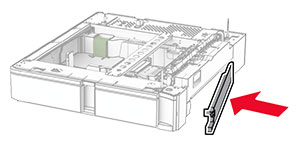
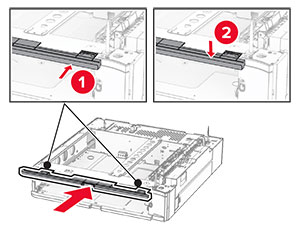
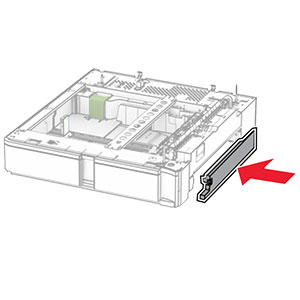
  4. 裝上右側紙匣組件蓋板。

    The tray cover is attached to the right side of the optional 550-sheet tray.
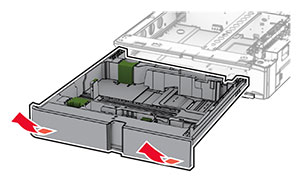
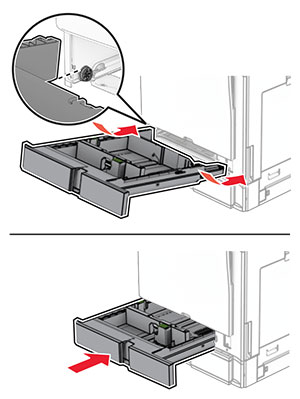
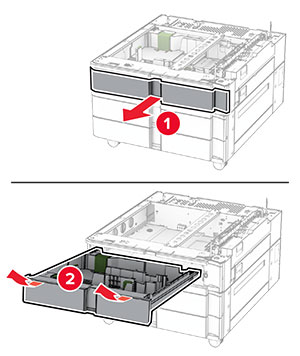
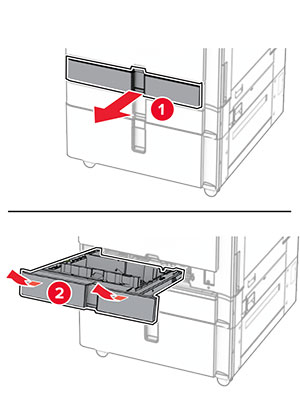
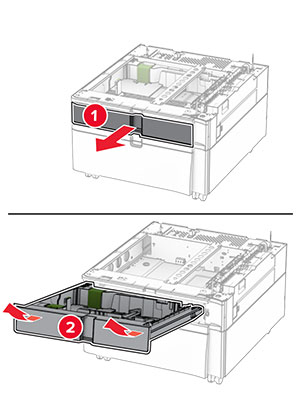
  5. 拉出 550 張紙匣組件。

    The tray insert is pulled out from the optional 550-sheet tray.
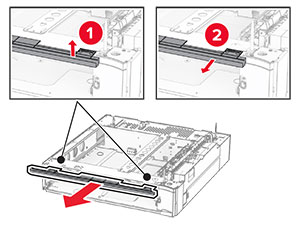
  6. 卸下上方紙匣組件蓋板。

    The upper tray cover is lifted, and then removed from the tray base.
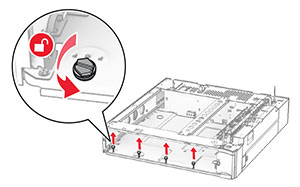
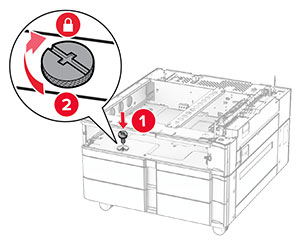
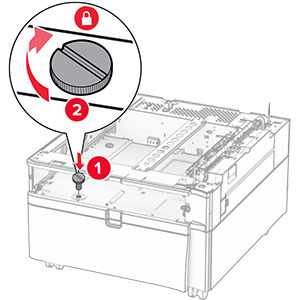
  7. 卸下螺絲。

    The screws inside the optional 550-sheet tray base are turned counterclockwise, and then removed.
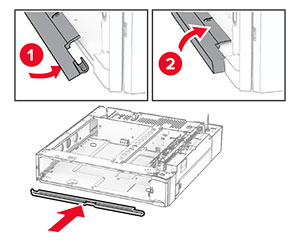
  8. 裝上下方紙匣組件蓋板。

    The lower tray cover is aligned, and then attached to the tray base.
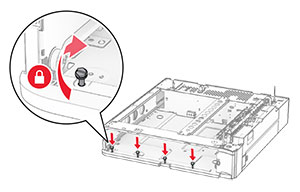
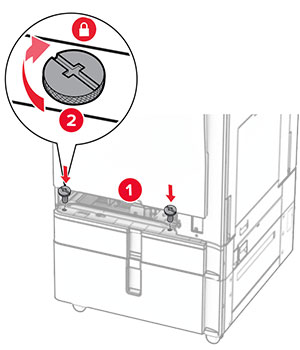
  9. 裝上螺絲。

    The screws are aligned to the tray base, and then turned clockwise.
  10. 裝上上方紙匣組件蓋板。

    The upper tray cover is aligned, and then attached to the tray base.
  11. 插入 550 張紙匣組件。

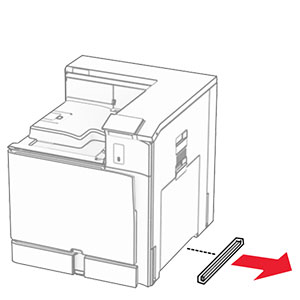
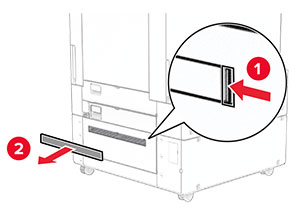
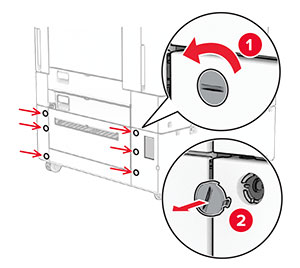
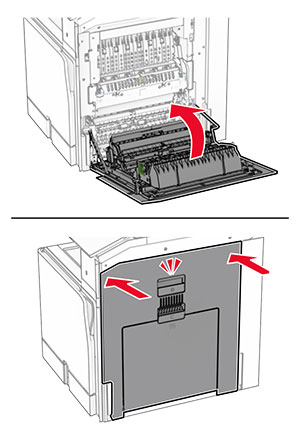
  12. 卸下印表機右側下方的蓋板。

    The cover under the right side of the printer is removed.
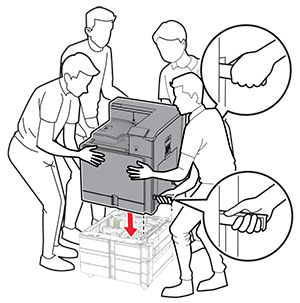
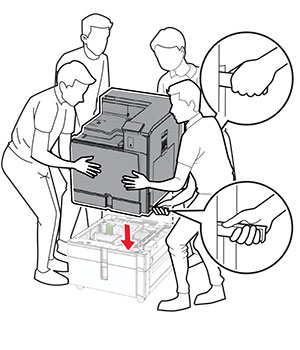
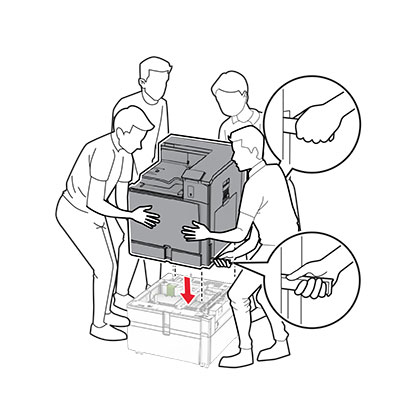
  13. 將印表機對齊 550 張紙匣組件,然後將其往下放至定位。

    標準請當心圖示 請當心—潛在受傷危險性: 若印表機的重量超過 20 公斤(44 磅),這時需要有兩名或以上的人員,才能安全地抬起該裝置。
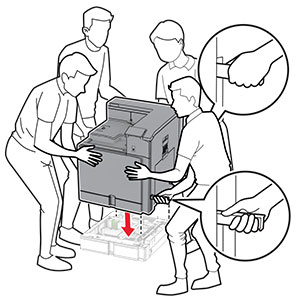
    Printer is aligned, and then lowered into the optional tray.
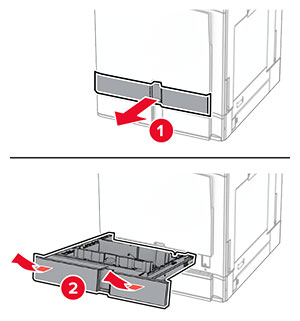
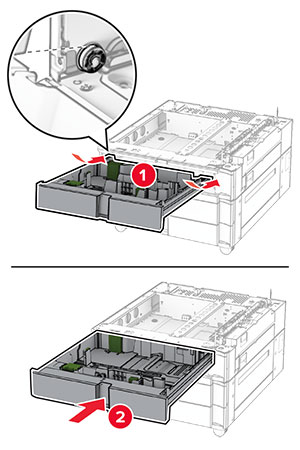
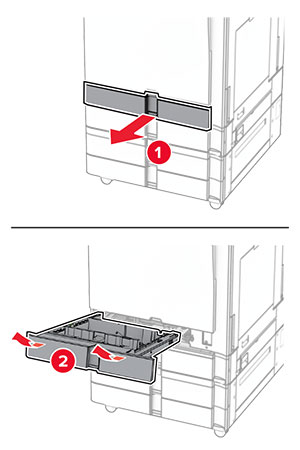
  14. 拉出標準紙匣組件。

    Tray insert is pulled out from the tray base with a slightly upward motion.
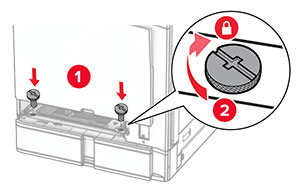
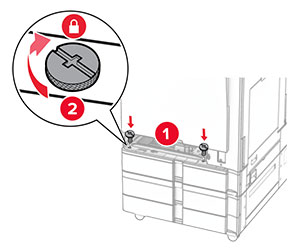
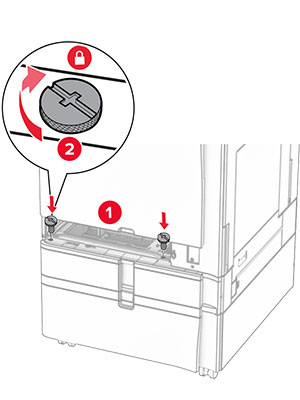
  15. 將 550 張紙匣組件固定至印表機。

    The screws are aligned to the tray base, and then turned clockwise.
  16. 插入標準紙匣組件。

    Tray insert is inserted into the tray base with a slightly downward motion.
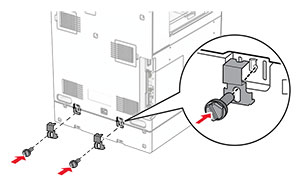
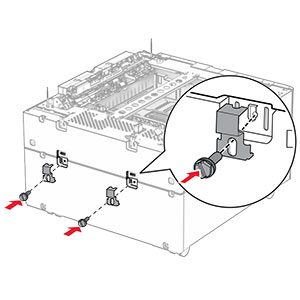
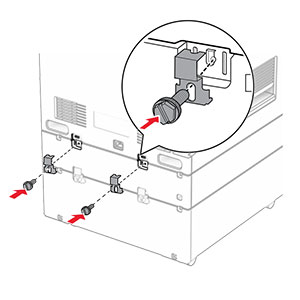
  17. 將 550 張紙匣組件的背部固定至印表機。

    The 550-sheet tray and the printer are secured using brackets and screws.
  18. 將電源線的一端連接到印表機,然後將另一端連接到電源插座。

    標準請當心圖示 請當心—潛在受傷危險性: 為避免發生火災或觸電的危險,請將電源線連接至產品附近額定電壓相符且正確接地的電源插座,以便於使用。
  19. 開啟印表機電源。

請在列印驅動程式中新增此紙匣組件,才能將它用於列印工作。如需詳細資訊,請參閱在列印驅動程式中新增可用選購品

安裝 2 x 550 張紙匣組件

觸電危險請當心圖示 請當心—觸電危險: 為避免發生電擊的風險,若您是在安裝印表機之後,才要取用控制板或安裝選購性硬體或記憶裝置,請先關閉印表機電源,並從電源插座拔除電源線,再繼續作業。若您有任何其他裝置連接至印表機,請同時關閉它們的電源,並拔下所有連接到印表機的電纜。

請注意:

  1. 關閉印表機電源。

    The power button on the side of the control panel is pressed for at least 5 seconds.
  2. 從電源插座拔除電源線,然後再從印表機拔除。

    The power cord is unplugged from the electrical outlet and then from the printer.
  3. 打開 2 x 550 張紙匣組件的包裝,並拆下所有的包裝材料。

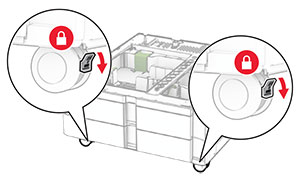
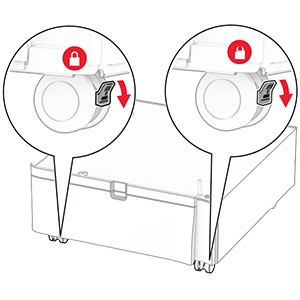
  4. 鎖定腳輪以免 2 x 550 張紙匣組件移動。

    The levers of the front caster locks are pushed down.
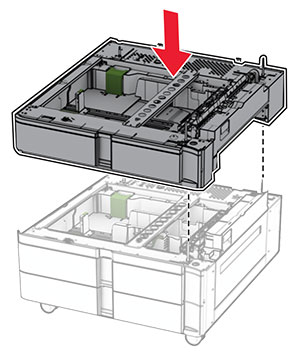
  5. 將 550 張紙匣組件與 2 x 550 張紙匣組件對齊,然後將其往下放至定位。

    請注意: 為了避免損壞紙匣組件,在提起紙匣組件時,請務必抓住前後兩側。
    The 550-sheet tray is aligned and lowered into the 2 x 550-sheet tray.
  6. 拉出 550 張紙匣組件。

    The tray insert is pulled out from the tray base with a slightly upward motion.
  7. 將 550 張紙匣組件固定至 2 x 550 張紙匣組件。

    The screws are aligned to the tray base, and then turned clockwise.
  8. 插入 550 張紙匣組件。

    The tray is inserted into the base with a slightly downward motion.
  9. 將 550 張紙匣組件的背部固定至 2 x 550 張紙匣組件。

    The 550-sheet tray and the 2 x 550-sheet tray are secured using brackets and screws.
  10. 卸下印表機右側下方的蓋板。

    The cover under the right side of the printer is removed.
  11. 將印表機對準選購性紙匣組件,然後將其往下放至定位。

    標準請當心圖示 請當心—潛在受傷危險性: 若印表機的重量超過 20公斤(44磅),這時需要有兩個或兩個以上人員,才能安全地抬起印表機。
    The printer is aligned and lowered into the optional trays.
  12. 拉出標準紙匣組件。

    The tray insert is pulled out from the tray base with a slightly upward motion.
  13. 將 550 張紙匣組件固定至印表機。

    Inside the standard tray base, screws are inserted and twisted clockwise.
  14. 插入標準紙匣組件。

  15. 將 550 張紙匣組件的背部固定至印表機。

    The 550-sheet tray and the printer are secured using brackets and screws.
  16. 將電源線的一端連接到印表機,然後將另一端連接到電源插座。

    標準請當心圖示 請當心—潛在受傷危險性: 為避免發生火災或觸電的危險,請將電源線連接至產品附近額定電壓相符且正確接地的電源插座,以便於使用。
  17. 開啟印表機電源。

請在列印驅動程式中新增此紙匣組件,才能將它用於列印工作。如需詳細資訊,請參閱在列印驅動程式中新增可用選購品

安裝 2000 張雙進紙器

觸電危險請當心圖示 請當心—觸電危險: 為避免發生電擊的風險,若您是在安裝印表機之後,才要取用控制板或安裝選購性硬體或記憶裝置,請先關閉印表機電源,並從電源插座拔除電源線,再繼續作業。若您有任何其他裝置連接至印表機,請同時關閉它們的電源,並拔下所有連接到印表機的電纜。

請注意:

  1. 關閉印表機電源。

    The power button on the side of the control panel is pressed for at least 5 seconds.
  2. 從電源插座拔除電源線,然後再從印表機拔除。

    The power cord is unplugged from the electrical outlet, and then from the printer.
  3. 打開雙進紙器的包裝,並移除所有的包裝材料。

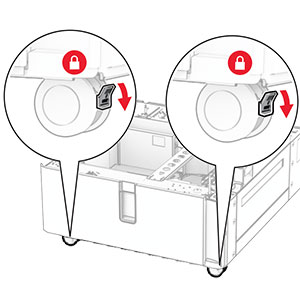
  4. 鎖定腳輪以免雙進紙器移動。

    The levers of the front caster locks are pushed down.

    D

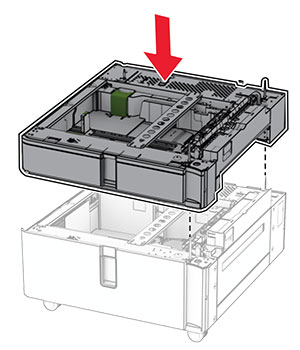
  5. 將 550 張紙匣組件與雙進紙器對齊,然後將其往下放至定位。

    請注意: 為了避免損壞紙匣組件,在提起紙匣組件時,請務必抓住前後兩側。
    The 550-sheet tray is aligned and lowered into the tandem tray.
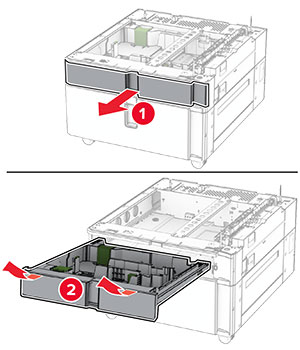
  6. 拉出 550 張紙匣組件。

    The tray insert is pulled out from the tray base with a slightly upward motion.
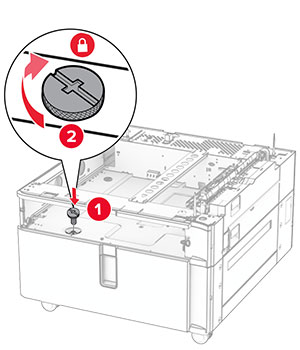
  7. 將 550 張紙匣組件固定至雙進紙器。

    The screws are aligned to the tray base, and then turned clockwise.
  8. 插入紙匣組件。

  9. 將 550 張紙匣組件的背部固定至雙進紙器。

    The rear part of the 550-sheet tray and the tandem tray are secured using brackets and screws.
  10. 卸下印表機右側下方的蓋板。

    The cover under the right side of the printer is removed.
  11. 將印表機對準選購性紙匣組件,然後將其往下放至定位。

    標準請當心圖示 請當心—潛在受傷危險性: 若印表機的重量超過 20公斤(44磅),這時需要有兩個或兩個以上人員,才能安全地抬起印表機。
    The printer is aligned, and then lowered into the optional tray.
  12. 將標準送紙匣拉出。

    The tray insert is pulled out from the tray base with a slightly upward motion.
  13. 將 550 張紙匣組件固定至印表機。

    The screws are aligned to the tray base, and then turned clockwise.
  14. 插入紙匣組件。

  15. 將 550 張紙匣組件的背部固定至印表機。

    The 550-sheet tray and the printer are secured using brackets and screws.
  16. 將電源線的一端連接到印表機,然後將另一端連接到電源插座。

    標準請當心圖示 請當心—潛在受傷危險性: 為避免發生火災或觸電的危險,請將電源線連接至產品附近額定電壓相符且正確接地的電源插座,以便於使用。
  17. 開啟印表機電源。

請在列印驅動程式中新增此紙匣組件,才能將它用於列印工作。如需詳細資訊,請參閱在列印驅動程式中新增可用選購品

安裝櫃子

觸電危險請當心圖示 請當心—觸電危險: 為避免發生電擊的風險,若您是在安裝印表機之後,才要取用控制板或安裝選購性硬體或記憶裝置,請先關閉印表機電源,並從電源插座拔除電源線,再繼續作業。若您有任何其他裝置連接至印表機,請同時關閉它們的電源,並拔下所有連接到印表機的電纜。

請注意:

  1. 拆開包裝,然後組裝櫃子。

  2. 關閉印表機電源。

    The power button on the side of the control panel is pressed for at least 5 seconds.
  3. 從電源插座拔除電源線,然後再從印表機拔除。

    The power cord is unplugged from the electrical outlet, and then from the printer.
  4. 鎖定腳輪,避免櫃子移動。

    The levers of the front caster locks are pushed down.
  5. 裝上 550 張紙匣組件的側邊蓋板。

    The tray side cover is inserted under the optional 550-sheet tray.
  6. 將紙匣組件對齊櫃子,然後將其往下放至定位。

    請注意: 為了避免損壞紙匣組件,在提起紙匣組件時,請務必抓住前後兩側。
    The optional 550-sheet tray is aligned and lowered into the cabinet.
  7. 拉出紙匣組件。

    The tray insert is pulled out from the tray base with a slightly upward motion.
  8. 將紙匣組件固定至櫃子。

    The screws are aligned to the tray base, and then turned clockwise.
  9. 插入紙匣組件。

  10. 將紙匣組件的背部固定至櫃子。

    The rear part of the optional 550-sheet tray and the 2000-sheet tandem tray is secured using brackets and screws.
  11. 卸下印表機右側下方的蓋板。

    The cover under the right side of the printer is removed.
  12. 將印表機對齊櫃子與紙匣組件,然後將其往下放至定位。

    標準請當心圖示 請當心—潛在受傷危險性: 若印表機的重量超過 20公斤(44磅),這時需要有兩個或兩個以上人員,才能安全地抬起印表機。
    The printer is aligned, and then lowered into the optional tray.
  13. 拉出標準紙匣組件。

  14. 將 550 張紙匣組件固定至印表機。

    The screws are aligned to the tray base, and then turned clockwise.
  15. 插入標準紙匣組件。

  16. 將 550 張紙匣組件的背部固定至印表機。

    The rear part of the optional 550-sheet tray and the printer are secured using brackets and screws.
  17. 將電源線的一端連接到印表機,然後將另一端連接到電源插座。

    標準請當心圖示 請當心—潛在受傷危險性: 為避免發生火災或觸電的危險,請將電源線連接至產品附近額定電壓相符且正確接地的電源插座,以便於使用。
  18. 開啟印表機電源。

安裝 1500 張紙匣組件

觸電危險請當心圖示 請當心—觸電危險: 為避免發生電擊的風險,若您是在安裝印表機之後,才要取用控制板或安裝選購性硬體或記憶裝置,請先關閉印表機電源,並從電源插座拔除電源線,再繼續作業。若您有任何其他裝置連接至印表機,請同時關閉它們的電源,並拔下所有連接到印表機的電纜。

請注意:

請注意: 
  1. 關閉印表機電源。

    Power button on the side of the control panel is pressed for 5 seconds.
  2. 從電源插座拔除電源線,然後再從印表機拔除。

    Power cord is unplugged from the electrical outlet, and then from the printer.
  3. 卸下連結器蓋板。

    請注意: 請勿丟棄蓋板。
    The tray cover is pried, and then removed from the printer.
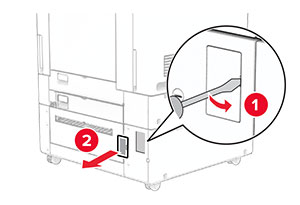
  4. 卸下連接埠蓋板。

    請注意: 請勿丟棄蓋板。
    The port cover is pried open with a screwdriver, and then removed from the printer.
  5. 從印表機卸下螺帽。

    請注意: 請勿丟棄螺帽。
    The screws are turned counterclockwise, and then removed from the printer.
  6. 打開 1500 張紙匣組件的包裝,並移除所有的包裝材料。

  7. 安裝裝載支架的螺絲。

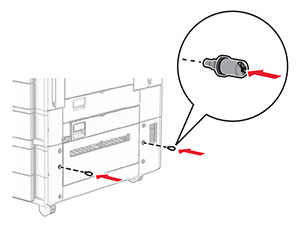
    The screws are installed into the lower-right side of the printer.
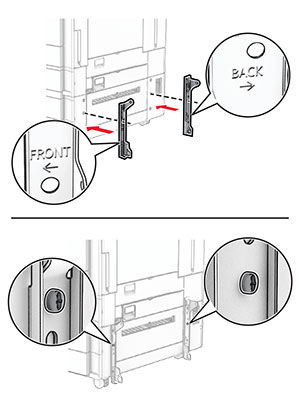
  8. 將裝載支架裝至印表機。

    請注意: 使用 1500 張紙匣組件隨附的裝載支架和螺絲。
    The mounting brackets are aligned, and then secured with screws.
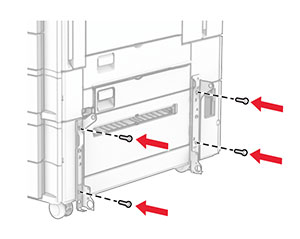
  9. 安裝剩餘的螺絲。

    The remaining screws are installed into the mounting bracket.
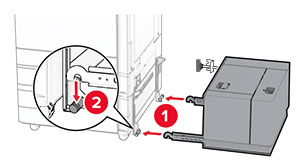
  10. 安裝 1500 張紙匣組件。

    Tray is being aligned, and then pushed into the right side of the printer.
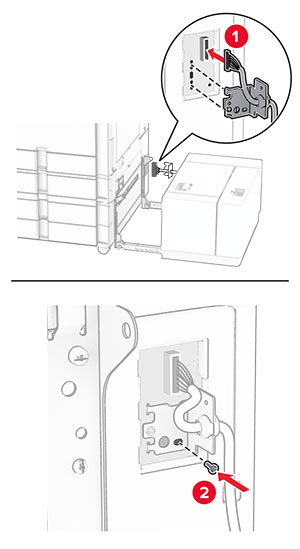
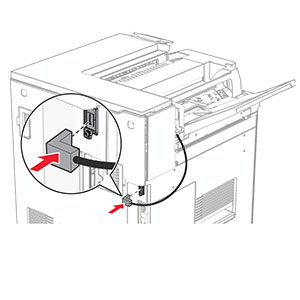
  11. 將紙匣組件的電纜連接至印表機。

    The tray cable is connected to the printer.
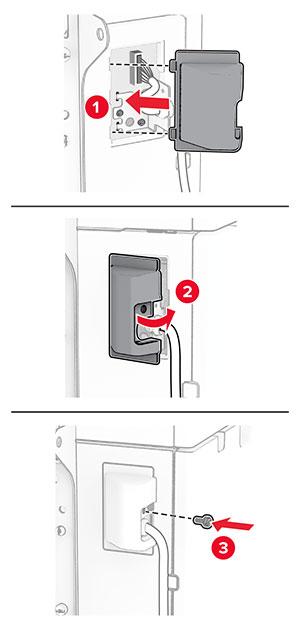
  12. 安裝電纜蓋板。

    The tray cable cover is attached, and secured with a screw.
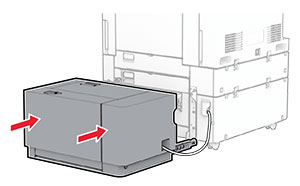
  13. 將 1500 張紙匣組件滑向印表機。

    The 1500-sheet tray is positioned into place.
  14. 將印表機電源線的一端連接到印表機,然後將另一端連接到電源插座。

    標準請當心圖示 請當心—潛在受傷危險性: 為避免發生火災或觸電的危險,請將電源線連接至產品附近額定電壓相符且正確接地的電源插座,以便於使用。
  15. 開啟印表機電源。

請在列印驅動程式中新增此紙匣組件,才能將它用於列印工作。如需詳細資訊,請參閱在列印驅動程式中新增可用選購品

安裝分頁裝訂器

觸電危險請當心圖示 請當心—觸電危險: 為避免發生電擊的風險,若您是在安裝印表機之後,才要取用控制板或安裝選購性硬體或記憶裝置,請先關閉印表機電源,並從電源插座拔除電源線,再繼續作業。若您有任何其他裝置連接至印表機,請同時關閉它們的電源,並拔下所有連接到印表機的電纜。
請注意: 此作業需要一字螺絲起子。
  1. 關閉印表機電源。

    Power button on the side of the control panel is pressed for 5 seconds.
  2. 從電源插座拔除電源線,然後再從印表機拔除。

    Power cord is unplugged from the electrical outlet, and then from the printer.
  3. 拆開分頁裝訂器的包裝,並移除所有的包裝材料。

  4. 安裝送紙導引夾。

    The feed guide is aligned to the staple finisher, and then secured with screws.
  5. 卸下標準出紙槽。

    請注意: 請勿丟棄出紙槽。
    The tray extender is opened, and then the standard bin is pulled out from the printer.
  6. 安裝選購品之前,請將出紙槽標記放入關閉位置。

    請注意: 移除選購品時,請將出紙槽標記放入開啟位置。
    The exit bin flag is stored back into the printer.
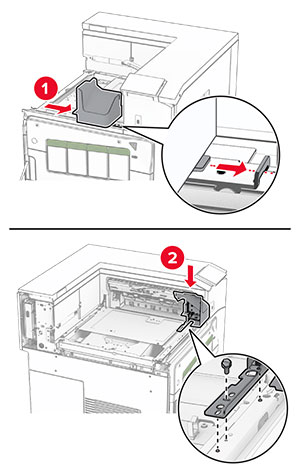
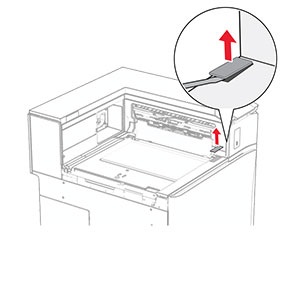
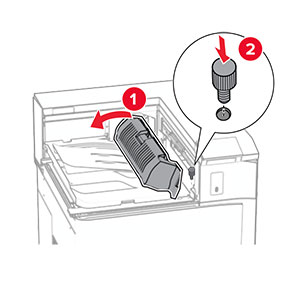
  7. 卸下備用滾輪。

    請注意: 請勿丟棄滾輪。
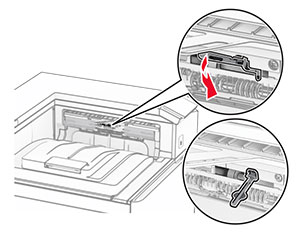
    The backup roller is pried using a screwdriver, and then removed from the printer.
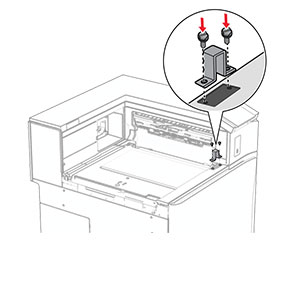
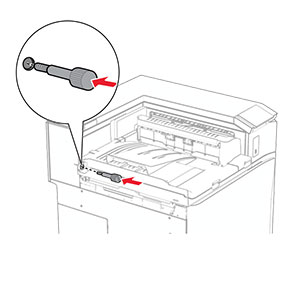
  8. 插入分頁裝訂器隨附的送紙滾輪,直到其卡入定位。

    The feed roller is aligned, and then inserted into the printer.
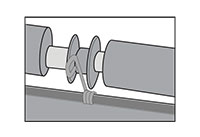
    請注意: 確保金屬彈簧位於印表機的前方。
    The metal spring is positioned in front of the roller.
  9. 裝上滾輪蓋板,直到其卡入定位。

    The roller cover is aligned, and then attached to the printer.
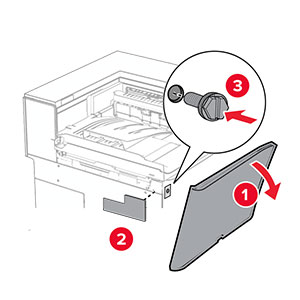
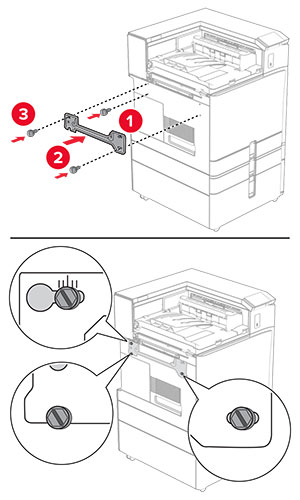
  10. 打開前門,然後卸下印表機左側的蓋板。

    請注意: 請勿丟棄螺絲和蓋板。
    The front door is opened, the screw is removed, and then the left cover is removed.
  11. 卸下左側後蓋板。

    請注意: 請勿丟棄螺絲和蓋板。
    The left rear cover is unscrewed and removed.
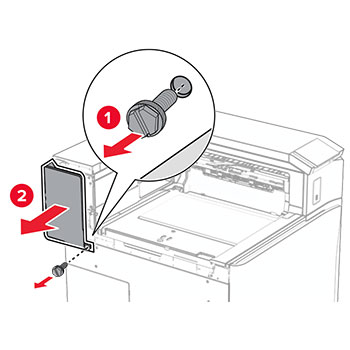
  12. 卸下內側出紙槽蓋板。

    請注意: 請勿丟棄蓋板。
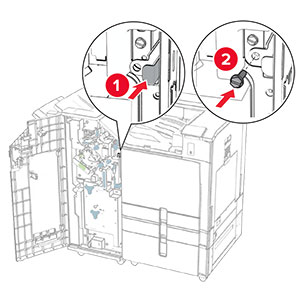
    The staple finisher slider is aligned to the printer, and then secured with screws.
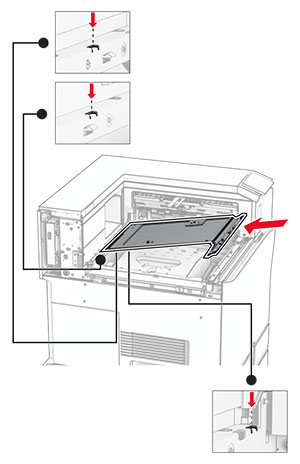
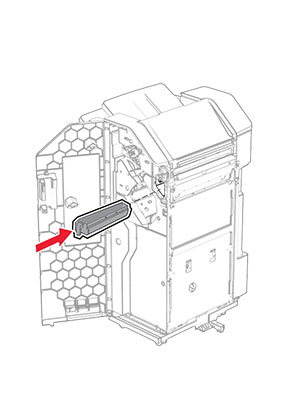
  13. 對齊,然後插入分頁裝訂器隨附的內側出紙槽蓋板。

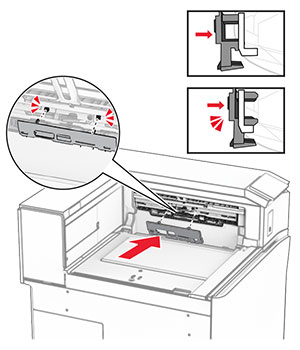
    The inner bin cover is aligned, and then inserted into the printer.
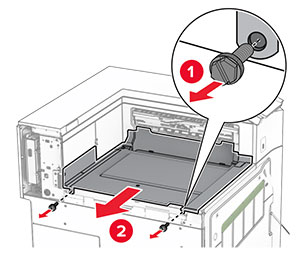
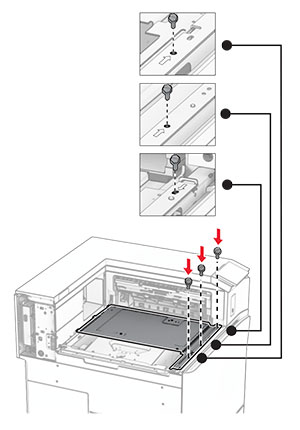
  14. 將螺絲安裝至內側出紙槽蓋板。

    The screws are aligned, and then installed into the inner bin cover.
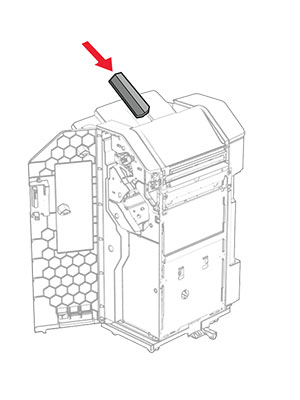
  15. 裝上分頁裝訂器滑桿。

     The mounting bracket is installed, and secured with a screw.
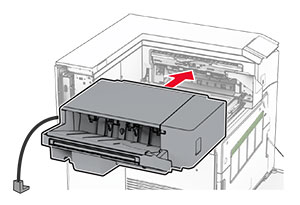
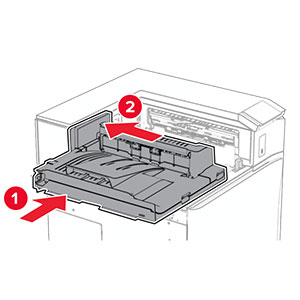
  16. 插入分頁裝訂器。

    The finisher is inserted into the standard bin.
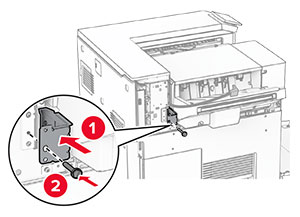
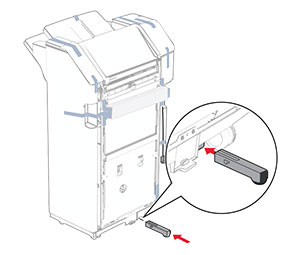
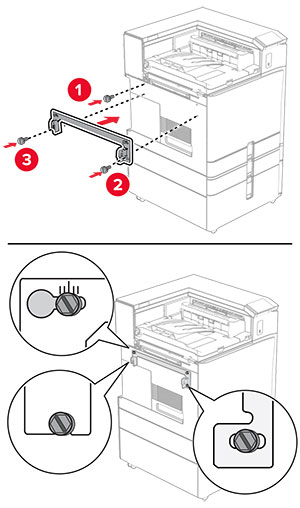
  17. 安裝裝載支架以將分頁裝訂器固定至印表機。

    請注意: 使用分頁裝訂器隨附的螺絲。
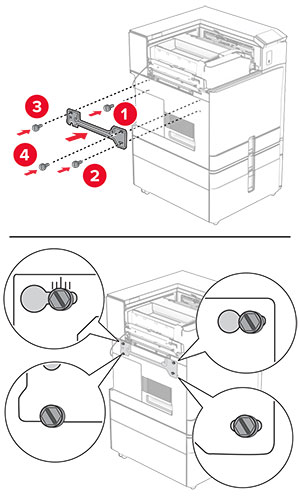
    The mounting bracket is installed.
  18. 裝上左側後蓋板,然後將分頁裝訂器滑至左側。

    The left rear cover is closed, and then secured with a screw.
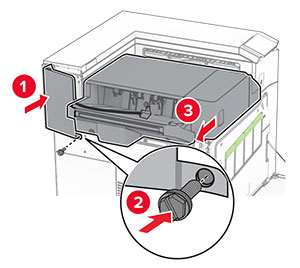
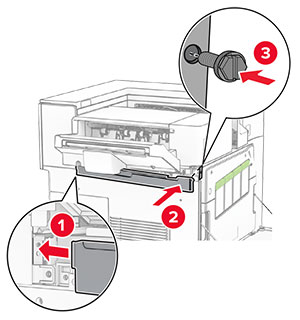
  19. 裝上分頁裝訂器隨附的左側上裁剪蓋板。

    The upper trim cover is inserted to the printer, and then secured with a screw.
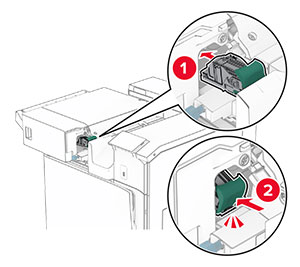
  20. 將裝釘匣插入分頁裝訂器,直到其卡入定位。

    The staple cartridge is inserted into place.
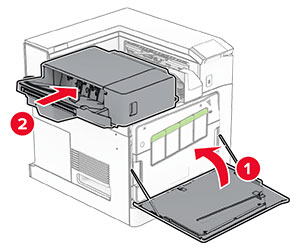
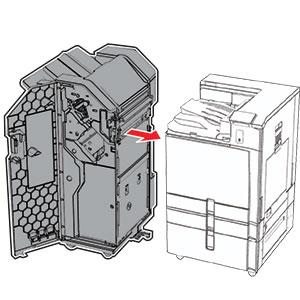
  21. 關上前門,然後將分頁裝訂器滑向印表機。

    The front door is closed, and then the staple finisher is secured into place.
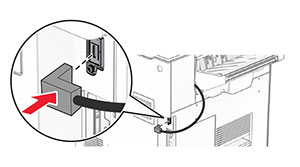
  22. 將選購品的電纜連接至印表機。

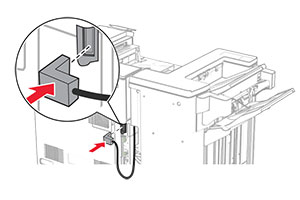
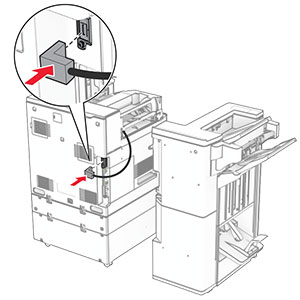
     The staple finisher cable is connected to the printer.
  23. 將印表機電源線的一端連接到印表機,然後將另一端連接到電源插座。

    標準請當心圖示 請當心—潛在受傷危險性: 為避免發生火災或觸電的危險,請將電源線連接至產品附近額定電壓相符且正確接地的電源插座,以便於使用。
  24. 開啟印表機電源。

請在列印驅動程式中新增此分頁裝訂器,才能將它用於列印工作。如需詳細資訊,請參閱在列印驅動程式中新增可用選購品

安裝偏位堆紙器

觸電危險請當心圖示 請當心—觸電危險: 為避免發生電擊的風險,若您是在安裝印表機之後,才要取用控制板或安裝選購性硬體或記憶裝置,請先關閉印表機電源,並從電源插座拔除電源線,再繼續作業。若您有任何其他裝置連接至印表機,請同時關閉它們的電源,並拔下所有連接到印表機的電纜。
  1. 關閉印表機電源。

    Power button on the side of the control panel is pressed for 5 seconds.
  2. 從電源插座拔除電源線,然後再從印表機拔除。

    Power cord is unplugged from the electrical outlet, and then from the printer.
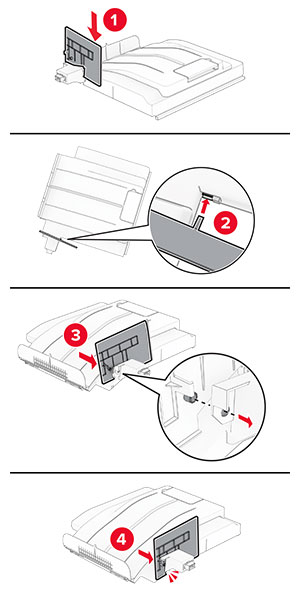
  3. 打開偏位堆紙器的包裝,並移除所有的包裝材料。

  4. 將內側後護蓋裝至偏位堆紙器。

    The inner rear cover is aligned, and then attached to the offset stacker.
  5. 卸下標準出紙槽。

    請注意: 請勿丟棄出紙槽。
    The tray extender is opened, and then the standard bin is pulled out from the printer.
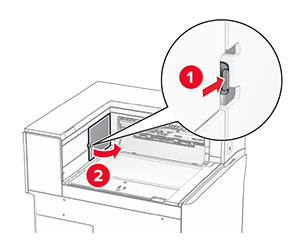
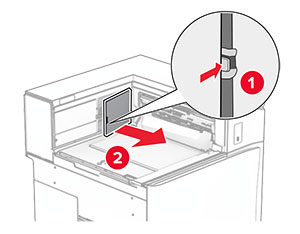
  6. 關上紙張傳輸連結器蓋板。

    請注意: 請勿丟棄蓋板。
    The paper transport connector cover is pried, and then removed from the printer.
  7. 安裝選購品之前,請將出紙槽標記放入關閉位置。

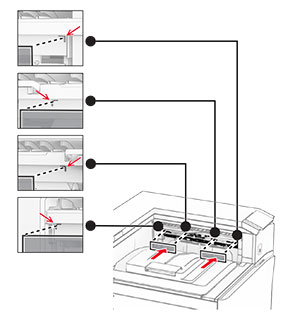
    The exit bin flag is stored back into the printer.
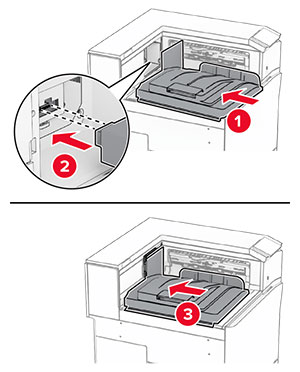
  8. 對齊,然後將偏位堆紙器安裝至印表機。

    The offset stacker is aligned, and then inserted into the printer.
    請注意: 確認零件已穩固裝上並對齊印表機。
    Correct alignment and placement of the offset stacker.
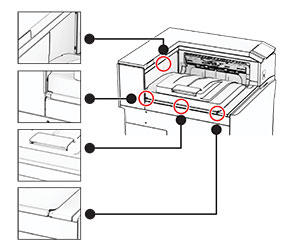
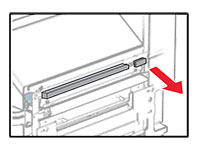
  9. 將偏位堆紙器的防護膠條裝至印表機。

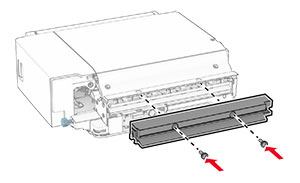
    The protective strips are aligned, and then attached to the printer.
  10. 請將出紙槽標記放入開啟位置。

    The exit bin flag is pulled out, and then placed into the open position.
  11. 裝上出紙槽標記蓋板,直到其卡入定位。

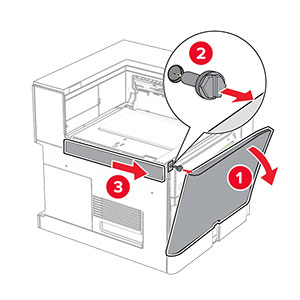
    The exit bin flag cover is aligned, and then attached to the printer.
  12. 將印表機電源線的一端連接到印表機,然後將另一端連接到電源插座。

    標準請當心圖示 請當心—潛在受傷危險性: 為避免發生火災或觸電的危險,請將電源線連接至產品附近額定電壓相符且正確接地的電源插座,以便於使用。
  13. 開啟印表機電源。

請在列印驅動程式中新增此偏位堆紙器,才能將它用於列印工作。如需詳細資訊,請參閱在列印驅動程式中新增可用選購品

安裝具摺疊選購品的紙張傳輸

觸電危險請當心圖示 請當心—觸電危險: 為避免發生電擊的風險,若您是在安裝印表機之後,才要取用控制板或安裝選購性硬體或記憶裝置,請先關閉印表機電源,並從電源插座拔除電源線,再繼續作業。若您有任何其他裝置連接至印表機,請同時關閉它們的電源,並拔下所有連接到印表機的電纜。

請注意:

  1. 關閉印表機電源。

    Power button on the side of the control panel is pressed for 5 seconds.
  2. 從電源插座拔除電源線,然後再從印表機拔除。

    Power cord is unplugged from the electrical outlet, and then the other end is removed from the printer.
  3. 拆開具摺疊選購品的紙張傳輸的包裝,並拆下所有的包裝材料。

  4. 卸下標準出紙槽。

    請注意: 請勿丟棄出紙槽。
    The standard bin is removed.
  5. 安裝選購品之前,請將出紙槽標記放入關閉位置。

    請注意: 移除選購品時,請將出紙槽標記放入開啟位置。
    The exit bin flag is stored back into the printer.
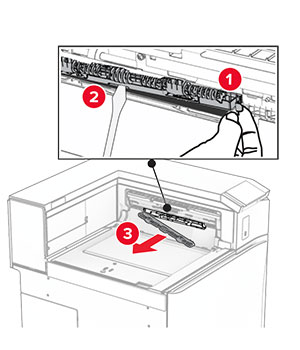
  6. 卸下備用滾輪。

    請注意: 請勿丟棄滾輪。
    The backup roller is pried using a screwdriver, and then removed from the printer.
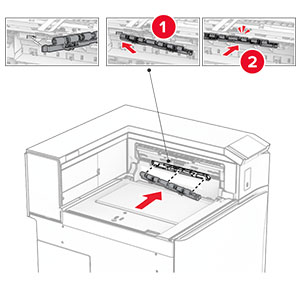
  7. 插入選購品隨附的送紙滾輪,直到其卡入定位。

    The roller is inserted into the printer.
    請注意: 確保金屬彈簧位於印表機的前方。
    The metal spring is positioned in front of the roller.
  8. 裝上滾輪蓋板,直到其卡入定位。

    The cover is attached to the printer.
  9. 打開前門,然後卸下印表機左側的蓋板。

    請注意: 請勿丟棄螺絲和蓋板。
    The front door is opened, and then the cover is unscrewed and removed.
  10. 關閉前門。

  11. 關上紙張傳輸連結器蓋板。

    請注意: 請勿丟棄蓋板。
    The paper transport connector cover is removed from the printer.
  12. 卸下左側後蓋板。

    請注意: 請勿丟棄螺絲和蓋板。
    The left rear cover is unscrewed and removed.
  13. 卸下內側出紙槽蓋板。

    請注意: 請勿丟棄螺絲和蓋板。
    The inner bin cover is unscrewed, and then removed from the printer.
  14. 對齊,然後插入選購品隨附的內側出紙槽蓋板。

    The inner bin cover is aligned, and then inserted into the printer.
  15. 將螺絲安裝至內側出紙槽蓋板。

    The screws are aligned, and then installed into the inner bin cover.
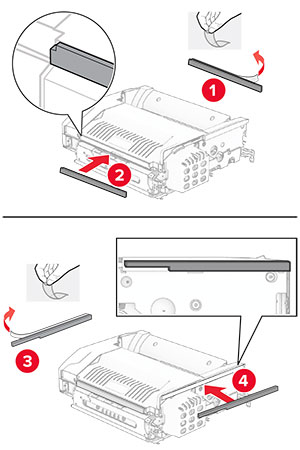
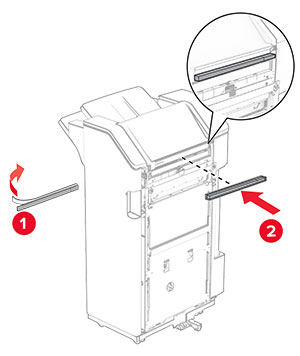
  16. 將泡棉膠帶裝至選購品。
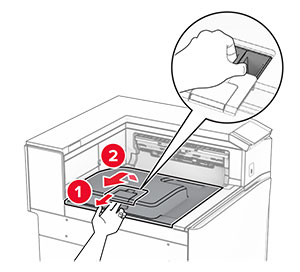
    The foam tapes are peeled, and then attached to the paper transport with folding option.
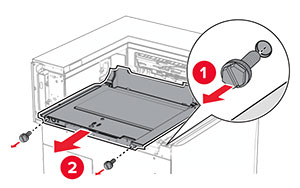
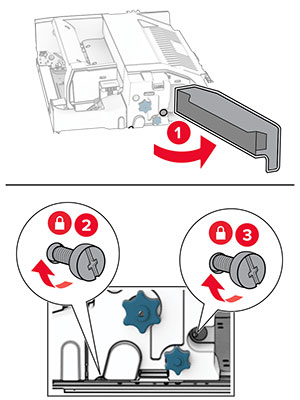
  17. 打開 F 門,然後拴緊螺絲。

    Door F is opened, and then the screws inside it are tightened.
  18. 關上 F 門。

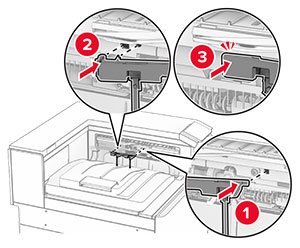
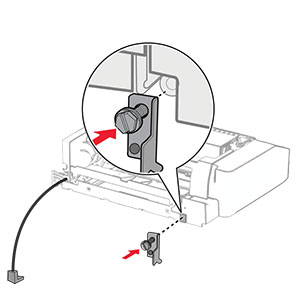
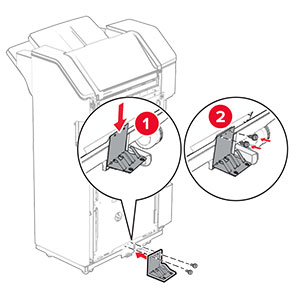
  19. 將金屬支架裝至選購品。
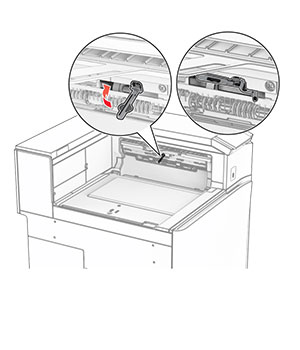
    The metal bracket with a screw is attached to the paper transport with folding option.
  20. 插入選購品。
    請注意: 確保金屬支架位於印表機的前方。
    The paper transport with folding option is inserted into the printer, with the metal bracket in front of the printer.
  21. 打開 F 門,然後使用選購品隨附的螺絲起子安裝螺絲。

    Door F is opened, and then the screw is installed using the screwdriver that came with the option.
  22. 關上 F 門。

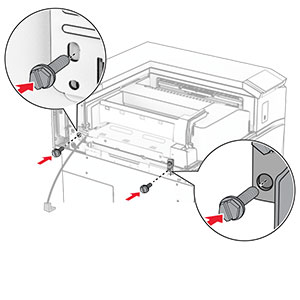
  23. 將螺絲安裝至選購品。
    The screws are installed into the paper transport with folding option.
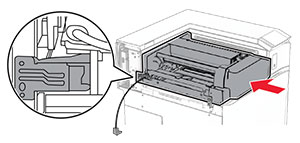
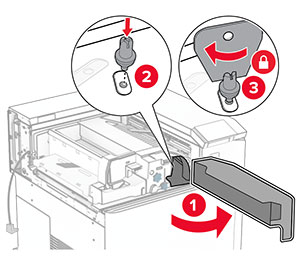
  24. 裝上左側後蓋板。

    The left rear cover is attached to the printer, and then secured with a screw.
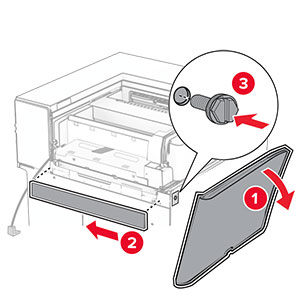
  25. 打開前門,然後將蓋板裝至印表機的左側。

    The front door is opened, and then the cover is attached and secured with a screw.
  26. 關閉前門。

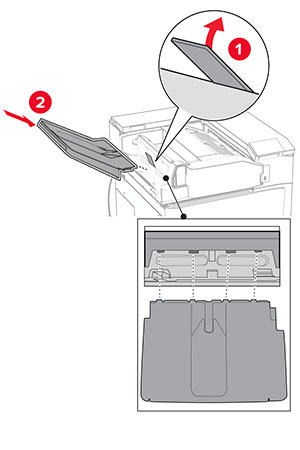
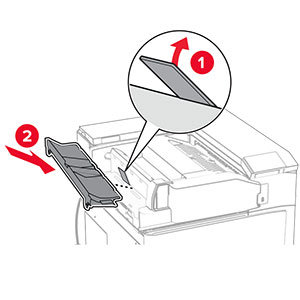
  27. 抬起出紙槽標記,然後對齊並裝上選購品出紙槽。

    The bin flap is raised, and then the option bin is attached to the paper transport with folding option.
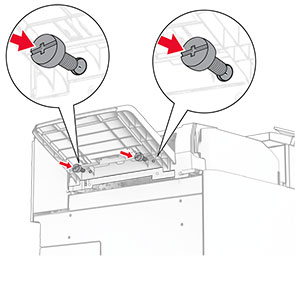
  28. 將螺絲安裝至選購品出紙槽。

    Screws are installed under the bin of the paper transport with folding option.
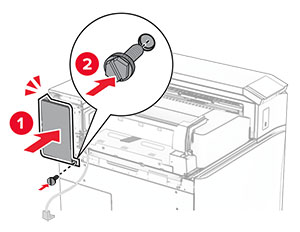
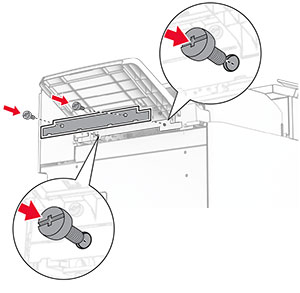
  29. 裝上裁剪蓋板。

    The trim cover is attached to the paper transport with folding option, and then secured with screws.
  30. 將選購品的電纜連接至印表機。

    The paper transport with folding option cable is connected to the printer.
  31. 將電源線的一端連接到印表機,然後將另一端連接到電源插座。

    標準請當心圖示 請當心—潛在受傷危險性: 為避免發生火災或觸電的危險,請將電源線連接至產品附近額定電壓相符且正確接地的電源插座,以便於使用。
  32. 開啟印表機電源。

安裝裝訂打孔分頁裝訂器和紙張傳輸選購品

觸電危險請當心圖示 請當心—觸電危險: 為避免發生電擊的風險,若您是在安裝印表機之後,才要取用控制板或安裝選購性硬體或記憶裝置,請先關閉印表機電源,並從電源插座拔除電源線,再繼續作業。若您有任何其他裝置連接至印表機,請同時關閉它們的電源,並拔下所有連接到印表機的電纜。
請注意: 此作業需要一字螺絲起子。
  1. 關閉印表機電源。

    Power button on the side of the control panel is pressed for 5 seconds.
  2. 從電源插座拔除電源線,然後再從印表機拔除。

    Power cord is unplugged from the electrical outlet, and then the other end is removed from the printer.
  3. 拆開紙張傳輸的包裝。

  4. 卸下標準出紙槽。

    請注意: 請勿丟棄出紙槽。
    The standard bin is removed.
  5. 安裝選購品之前,請將出紙槽標記放入關閉位置。

    請注意: 移除選購品時,請將出紙槽標記放入開啟位置。
    The exit bin flag is stored back into the printer.
  6. 卸下備用滾輪。

    請注意: 請勿丟棄滾輪。
    The backup roller is pried using a screwdriver, and then removed from the printer.
  7. 插入紙張傳輸隨附的送紙滾輪,直到其卡入定位。

    The roller is inserted into the printer.
    請注意: 確保金屬彈簧位於印表機的前方。
    The metal spring is positioned in front of the roller.
  8. 裝上蓋板,直到其卡入定位。

    The cover is attached to the printer.
  9. 打開前門,然後卸下印表機左側的蓋板。

    請注意: 請勿丟棄螺絲和蓋板。
    The front door is opened, and then the cover is unscrewed and removed.
  10. 關閉前門。

  11. 關上紙張傳輸連結器蓋板。

    請注意: 請勿丟棄蓋板。
    The paper transport connector cover is removed from the printer.
  12. 卸下蓋板。

    請注意: 請勿丟棄蓋板。
    The cover above the front door is removed from the printer.
  13. 裝上金屬支架。

    The metal bracket is attached into the slot above the front door.
  14. 插入紙張傳輸。

    The paper transport is inserted into the printer.
  15. 開啟握把 G,然後將螺絲安裝至紙張傳輸的前方。

    Handle G is opened, and then the screw is inserted into the paper transport.
  16. 關上握把 G。

  17. 將螺絲安裝至紙張傳輸的後方。

    The screw is inserted into the rear slot of the paper transport.
  18. 開啟前門,然後將紙張傳輸隨附的蓋板安裝至印表機的左側。

    The front door is opened, and then the cover is attached and secured with a screw.
  19. 關閉前門。

  20. 拆開分頁裝訂、打孔器的包裝。

  21. 安裝穩定器。

    The stabilizer is installed to the lower part of the finisher.
  22. 取下分頁裝訂器周圍的膠帶。

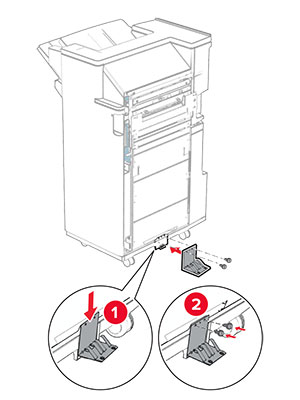
  23. 將支架裝至分頁裝訂器。

    The metal bracket is attached to the base of the staple, hole punch finisher, and then secured with screws.
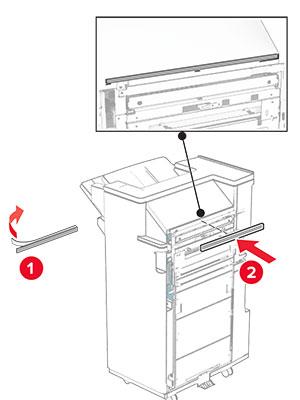
  24. 將泡棉膠帶裝至分頁裝訂器。

    The foam tape is peeled, and then attached to the staple, hole punch finisher.
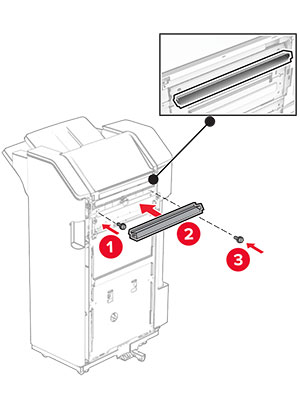
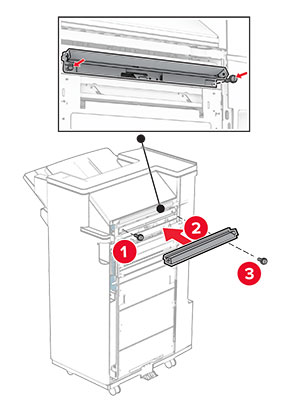
  25. 將送紙導引夾裝至分頁裝訂器。

    The feed guide is attached to the staple, hole punch finisher, and then secured with screws.
  26. 將出紙槽裝至分頁裝訂器。

    The bin is attached to the staple, hole punch finisher, and then secured with screws.
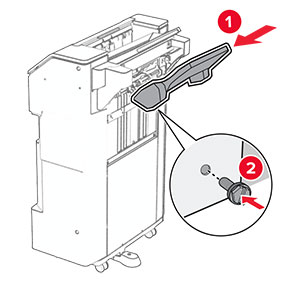
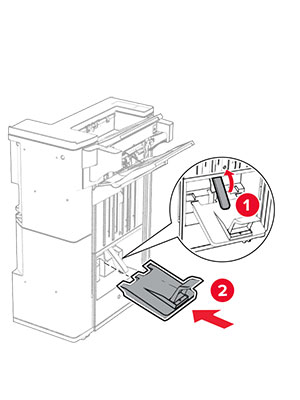
  27. 打開分頁裝訂器門板,然後插入打孔箱。

    The finisher door is opened, and then the hole punch box is inserted into the finisher.
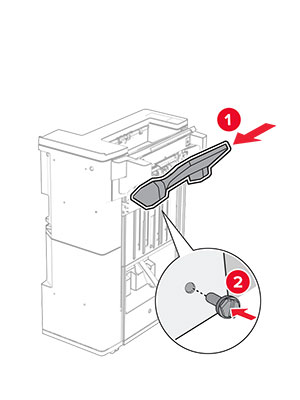
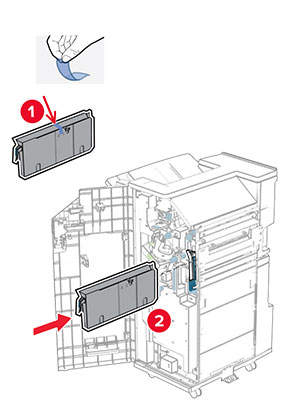
  28. 將出紙槽延伸組件放入分頁裝訂器出紙槽。

    請注意:

    • 出紙槽延伸組件可用於 A3 或更長的紙張尺寸,並在高濕狀況下可協助堆疊紙張。
    • 出紙槽容量在使用出紙槽延伸組件時降低。
    The bin extender is placed on the staple, hole punch finisher bin.
  29. 關閉分頁裝訂器門。

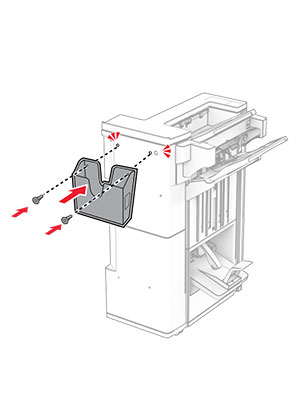
  30. 將裝載支架裝至印表機。

    請注意: 請確認螺絲與裝載支架上的標記對齊。
    The mounting bracket is attached to the printer, and then secured with screws.
  31. 將紙張傳輸隨附的金屬支架裝至印表機。

    The metal bracket is attached to the printer, and then secured with a screw.
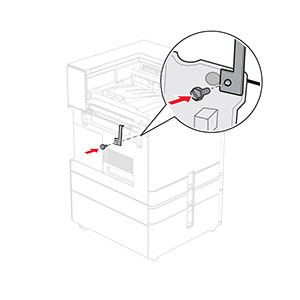
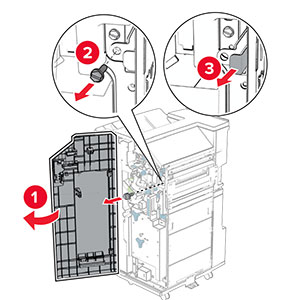
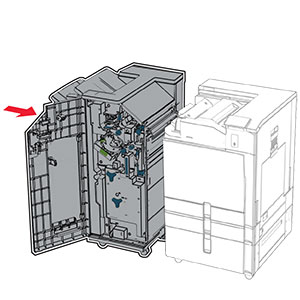
  32. 打開分頁裝訂器門板,卸下螺絲,然後拉起分頁裝訂器鎖。

    The finisher door is opened, and then the finisher is unlocked by removing the screw.
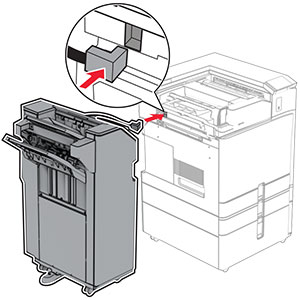
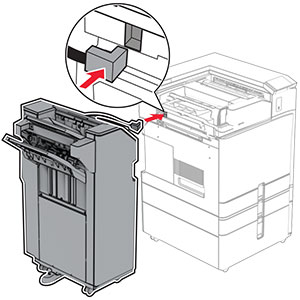
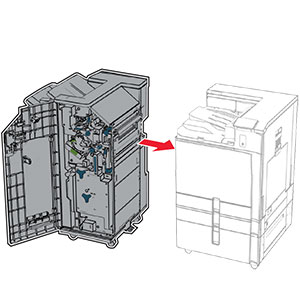
  33. 將分頁裝訂器裝至印表機。

    The staple, hole punch finisher is being attached to the printer.
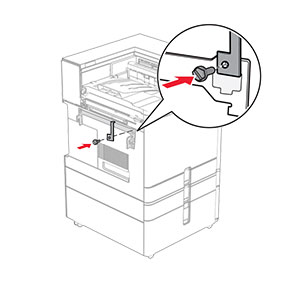
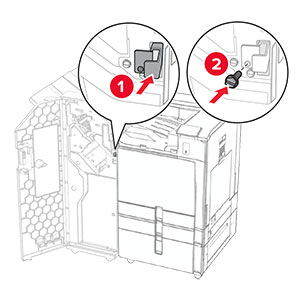
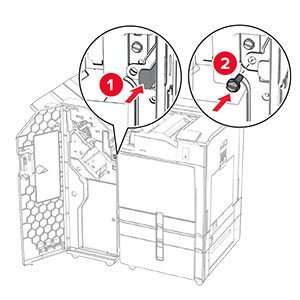
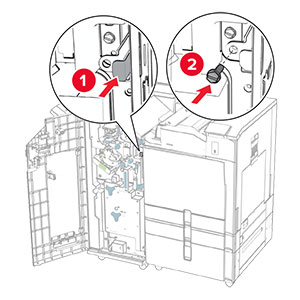
  34. 將分頁裝訂器鎖至印表機,然後安裝螺絲。

    The staple, hole punch finisher lock is pushed into the finisher, and then secured with a screw.
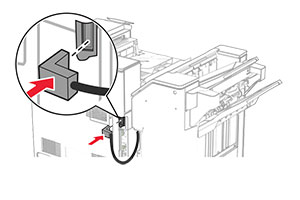
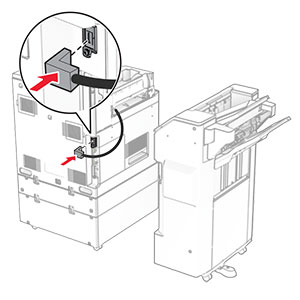
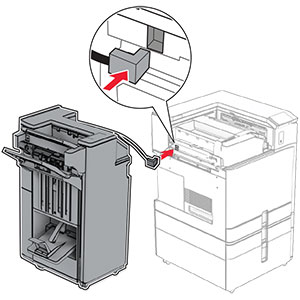
  35. 將分頁裝訂器電纜連接至印表機。

    The staple, hole punch finisher cable is being connected to the printer.
  36. 將電源線的一端連接到印表機,然後將另一端連接到電源插座。

    標準請當心圖示 請當心—潛在受傷危險性: 為避免發生火災或觸電的危險,請將電源線連接至產品附近額定電壓相符且正確接地的電源插座,以便於使用。
  37. 開啟印表機電源。

安裝裝訂打孔分頁裝訂器和具摺疊選購品的紙張傳輸

觸電危險請當心圖示 請當心—觸電危險: 為避免發生電擊的風險,若您是在安裝印表機之後,才要取用控制板或安裝選購性硬體或記憶裝置,請先關閉印表機電源,並從電源插座拔除電源線,再繼續作業。若您有任何其他裝置連接至印表機,請同時關閉它們的電源,並拔下所有連接到印表機的電纜。
請注意: 此作業需要一字螺絲起子。
  1. 關閉印表機電源。

    Power button on the side of the control panel is pressed for 5 seconds.
  2. 從電源插座拔除電源線,然後再從印表機拔除。

    Power cord is unplugged from the electrical outlet, and then the other end is removed from the printer.
  3. 拆開具摺疊選購品的紙張傳輸的包裝,並拆下所有的包裝材料。

  4. 卸下標準出紙槽。

    請注意: 請勿丟棄出紙槽。
    The standard bin is removed.
  5. 安裝選購品之前,請將出紙槽標記放入關閉位置。

    請注意: 移除選購品時,請將出紙槽標記放入開啟位置。
    The exit bin flag is stored back into the printer.
  6. 卸下備用滾輪。

    請注意: 請勿丟棄滾輪。
    The backup roller is pried using a screwdriver, and then removed from the printer.
  7. 插入選購品隨附的送紙滾輪,直到其卡入定位。

    The roller is inserted into the printer.
    請注意: 確保金屬彈簧位於印表機的前方。
    The metal spring is positioned in front of the roller.
  8. 裝上蓋板,直到其卡入定位。

    The cover is attached to the printer.
  9. 打開前門,然後卸下印表機左側的蓋板。

    請注意: 請勿丟棄螺絲和蓋板。
    The front door is opened, and then the cover is unscrewed and removed.
  10. 關閉前門。

  11. 關上紙張傳輸連結器蓋板。

    請注意: 請勿丟棄蓋板。
    The paper transport connector cover is removed from the printer.
  12. 卸下左側後蓋板。

    請注意: 請勿丟棄螺絲和蓋板。
    The left rear cover is unscrewed and removed.
  13. 卸下內側出紙槽蓋板。

    請注意: 請勿丟棄螺絲和蓋板。
    The inner bin cover is unscrewed, and then removed from the printer.
  14. 對齊,然後插入具摺疊選購品的紙張傳輸隨附的內側出紙槽蓋板。

    The inner bin cover is aligned, and then inserted into the printer.
  15. 將螺絲安裝至內側出紙槽蓋板。

    The screws are aligned, and then installed into the inner bin cover.
  16. 將泡棉膠帶裝至選購品。
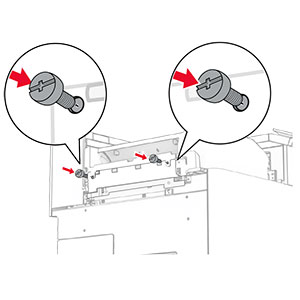
    The foam tapes are peeled, and then attached to the paper transport with folding option.
  17. 打開 F 門,然後拴緊螺絲。

    Door F is opened, and then the screws inside it are tightened.
  18. 關上 F 門。

  19. 將支架裝上選購品。
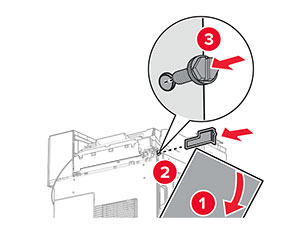
    The metal bracket with a screw is attached to the paper transport with folding option.
  20. 插入選購品。
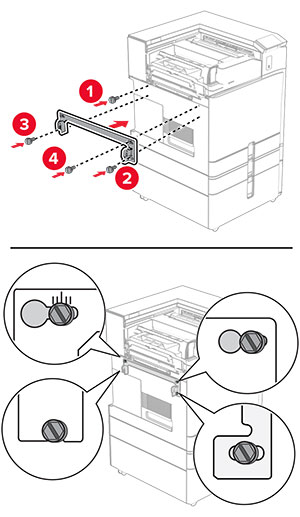
    請注意: 確保金屬支架位於印表機的前方。
    The paper transport with folding option is inserted into the printer, with the metal bracket in front of the printer.
  21. 打開 F 門,然後使用選購品隨附的螺絲起子安裝螺絲。

    Door F is opened, and then the screw is installed using the screwdriver that came with the option.
  22. 關上 F 門。

  23. 將螺絲安裝至選購品。

    The screws are installed into the paper transport with folding option.
  24. 裝上左側後蓋板。

    The left rear cover is attached to the printer, and then secured with a screw.
  25. 拆開分頁裝訂、打孔器的包裝。

  26. 安裝穩定器。

    The stabilizer is installed to the lower part of the finisher.
  27. 取下分頁裝訂器周圍的膠帶。

  28. 將支架裝至分頁裝訂器。

    The metal bracket is attached to the base of the staple, hole punch finisher, and then secured with screws.
  29. 將泡棉膠帶裝至分頁裝訂器。

    The foam tape is peeled, and then attached to the staple, hole punch finisher.
    請注意: 移除裝訂器右側的小部分泡棉。
    The small portion of foam is removed from the finisher.
  30. 將送紙導引夾裝至分頁裝訂器。

    The feed guide is attached to the staple, hole punch finisher, and then secured with screws.
  31. 將出紙槽裝至分頁裝訂器。

    The bin is attached to the staple, hole punch finisher, and then secured with screws.
  32. 打開分頁裝訂器門板,然後插入打孔箱。

    The finisher door is opened, and then the hole punch box is inserted into the finisher.
  33. 將出紙槽延伸組件放入分頁裝訂器出紙槽。

    請注意:

    • 出紙槽延伸組件可用於 A3 或更長的紙張尺寸,並在高濕狀況下可協助堆疊紙張。
    • 出紙槽容量在使用出紙槽延伸組件時降低。
    The bin extender is placed on the staple, hole punch finisher bin.
  34. 關閉分頁裝訂器門。

  35. 抬起出紙槽標記,然後對齊並將蓋板裝上選購品。

    The bin flap is raised, and then the cover is attached to the paper transport with folding option.
  36. 裝上螺絲。

    The screws are installed into the paper transport with folding option.
  37. 打開前門,然後裝上選購品隨附的裁剪蓋板。

    The front door is opened, the trim cover is attached and then secured with a screw.
  38. 將裝載支架裝至印表機。

    請注意: 請確認螺絲與裝載支架上的標記對齊。
    The mounting bracket is attached to the printer, and then secured with screws.
  39. 打開分頁裝訂器門板,卸下螺絲,然後拉起分頁裝訂器鎖。

    The finisher door is opened, and then the finisher is unlocked by removing the screw.
  40. 將選購品的電纜連接至印表機。

    The paper transport with folding option cable is connected to the printer.
  41. 將分頁裝訂器電纜連接至選購品。

    The staple, hole punch finisher cable is being connected to the paper transport with folding option.
  42. 將分頁裝訂器裝至印表機。

    The staple, hole punch finisher is being attached to the printer.
  43. 將分頁裝訂器鎖至印表機,然後安裝螺絲。

    The staple, hole punch finisher lock is pushed into the finisher, and then secured with a screw.
  44. 關閉分頁裝訂器門。

  45. 將電源線的一端連接到印表機,然後將另一端連接到電源插座。

    標準請當心圖示 請當心—潛在受傷危險性: 為避免發生火災或觸電的危險,請將電源線連接至產品附近額定電壓相符且正確接地的電源插座,以便於使用。
  46. 開啟印表機電源。

安裝小冊子分頁裝訂器和紙張傳輸選購品

觸電危險請當心圖示 請當心—觸電危險: 為避免發生電擊的風險,若您是在安裝印表機之後,才要取用控制板或安裝選購性硬體或記憶裝置,請先關閉印表機電源,並從電源插座拔除電源線,再繼續作業。若您有任何其他裝置連接至印表機,請同時關閉它們的電源,並拔下所有連接到印表機的電纜。
請注意: 此作業需要一字螺絲起子。
  1. 關閉印表機電源。

    Power button on the side of the control panel is pressed for 5 seconds.
  2. 從電源插座拔除電源線,然後再從印表機拔除。

    Power cord is unplugged from the electrical outlet, and then the other end is removed from the printer.
  3. 拆開紙張傳輸的包裝。

  4. 卸下標準出紙槽。

    請注意: 請勿丟棄出紙槽。
    The standard bin is removed.
  5. 安裝選購品之前,請將出紙槽標記放入關閉位置。

    請注意: 移除選購品時,請將出紙槽標記放入開啟位置。
    The exit bin flag is stored back into the printer.
  6. 卸下備用滾輪。

    請注意: 請勿丟棄滾輪。
    The backup roller is pried using a screwdriver, and then removed from the printer.
  7. 插入紙張傳輸隨附的送紙滾輪,直到其卡入定位。

    The roller is inserted into the printer.
    請注意: 確保金屬彈簧位於印表機的前方。
    The metal spring is positioned in front of the roller.
  8. 裝上滾輪蓋板,直到其卡入定位。

    The cover is attached to the printer.
  9. 打開前門,然後卸下印表機左側的蓋板。

    請注意: 請勿丟棄螺絲和蓋板。
    The front door is opened, and then the cover is unscrewed and removed.
  10. 關閉前門。

  11. 關上紙張傳輸連結器蓋板。

    請注意: 請勿丟棄蓋板。
    The paper transport connector cover is removed from the printer.
  12. 卸下蓋板。

    請注意: 請勿丟棄蓋板。
    The cover located at above the front door is removed from the printer.
  13. 裝上金屬支架。

    The metal bracket is attached into the slot above the front door.
  14. 插入紙張傳輸。

    The paper transport is inserted into the printer.
  15. 開啟握把 G,然後將螺絲安裝至紙張傳輸的前方。

    Handle G is opened, and then the screw is inserted into the paper transport.
  16. 關上握把 G。

  17. 將螺絲安裝至紙張傳輸的後方。

    The screw is inserted into the rear slot of the paper transport.
  18. 開啟前門,然後將紙張傳輸隨附的蓋板安裝至印表機的左側。

    The front door is opened, and then the cover is attached and secured with a screw.
  19. 關閉前門。

  20. 拆開小冊子分頁裝訂器的包裝,並移除所有的包裝材料。

  21. 將支架裝至分頁裝訂器。

    The metal bracket is attached to the base of the booklet finisher, and then secured with screws.
  22. 將泡棉膠帶裝至分頁裝訂器。

    The foam tape is peeled, and then attached to the booklet finisher.
  23. 將送紙導引夾裝至分頁裝訂器。

    The feed guide is attached to the booklet finisher, and then secured with screws.
  24. 將上出紙槽裝至分頁裝訂器。

    The upper bin is attached to the booklet finisher, and then secured with a screw.
  25. 抬起出紙槽標記,然後將下出紙槽裝至分頁裝訂器。

    The bin flap is raised, and then the lower bin is attached to the booklet finisher.
  26. 打開分頁裝訂器門。

  27. 從打孔箱取出包裝材料,然後將其插入分頁裝訂器。

    The hole punch box has its packing material removed, and then inserted into the booklet finisher.
  28. 將出紙槽延伸組件放入分頁裝訂器出紙槽。

    請注意:

    • 出紙槽延伸組件可用於 A3 或更長的紙張尺寸,並在高濕狀況下可協助堆疊紙張。
    • 出紙槽容量在使用出紙槽延伸組件時降低。
    The bin extender is placed on the booklet finisher bin.
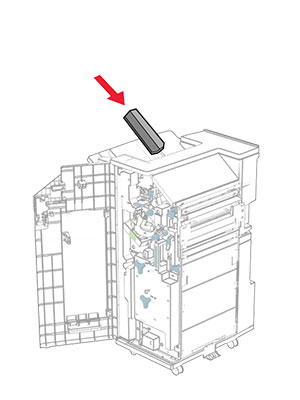
  29. 將支架安裝到分頁裝訂器的後部。

    The basket is aligned, and then attaced to the booklet finisher using pins.
  30. 關閉分頁裝訂器門。

  31. 將裝載支架裝至印表機。

    請注意: 請確認螺絲與裝載支架上的標記對齊。
    The mounting bracket is attached to the printer, and then secured with screws.
  32. 將紙張傳輸隨附的支架安裝到印表機上。

    The metal bracket is attached to the printer, and then secured with a screw.
  33. 打開分頁裝訂器門板,卸下螺絲,然後拉起分頁裝訂器鎖。

    The finisher door is opened, and then the finisher is unlocked by removing the screw.
  34. 將分頁裝訂器裝至印表機。

    The booklet finisher is being attached to the printer.
  35. 將分頁裝訂器鎖至印表機,然後安裝螺絲。

    The booklet finisher lock is pushed into the finisher, and then secured with a screw.
  36. 關閉分頁裝訂器門。

  37. 將分頁裝訂器電纜連接至印表機。

    The booklet finisher cable is being connected to the printer.
  38. 將電源線的一端連接到印表機,然後將另一端連接到電源插座。

    標準請當心圖示 請當心—潛在受傷危險性: 為避免發生火災或觸電的危險,請將電源線連接至產品附近額定電壓相符且正確接地的電源插座,以便於使用。
  39. 開啟印表機電源。

安裝小冊子分頁裝訂器和具摺疊選購品的紙張傳輸

觸電危險請當心圖示 請當心—觸電危險: 為避免發生電擊的風險,若您是在安裝印表機之後,才要取用控制板或安裝選購性硬體或記憶裝置,請先關閉印表機電源,並從電源插座拔除電源線,再繼續作業。若您有任何其他裝置連接至印表機,請同時關閉它們的電源,並拔下所有連接到印表機的電纜。
請注意: 此作業需要一字螺絲起子。
  1. 關閉印表機電源。

    Power button on the side of the control panel is pressed for 5 seconds.
  2. 從電源插座拔除電源線,然後再從印表機拔除。

    Power cord is unplugged from the electrical outlet, and then the other end is removed from the printer.
  3. 拆開具摺疊選購品的紙張傳輸的包裝。

  4. 卸下標準出紙槽。

    請注意: 請勿丟棄出紙槽。
    The standard bin is removed.
  5. 安裝選購品之前,請將出紙槽標記放入關閉位置。

    請注意: 移除選購品時,請將出紙槽標記放入開啟位置。
    The exit bin flag is stored back into the printer.
  6. 卸下備用滾輪。

    請注意: 請勿丟棄滾輪。
    The backup roller is pried using a screwdriver, and then removed from the printer.
  7. 插入選購品隨附的送紙滾輪,直到其卡入定位。

    The roller is inserted into the printer.
    請注意: 確保金屬彈簧位於印表機的前方。
    The metal spring is positioned in front of the roller.
  8. 裝上滾輪蓋板,直到其卡入定位。

    The cover is attached to the printer.
  9. 打開前門,然後卸下印表機左側的蓋板。

    請注意: 請勿丟棄螺絲和蓋板。
    The front door is opened, and then the cover is unscrewed and removed.
  10. 關閉前門。

  11. 關上紙張傳輸連結器蓋板。

    請注意: 請勿丟棄蓋板。
    The paper transport connector cover is removed from the printer.
  12. 卸下左側後蓋板。

    請注意: 請勿丟棄螺絲和蓋板。
    The left rear cover is unscrewed and removed.
  13. 卸下內側出紙槽蓋板。

    請注意: 請勿丟棄螺絲和蓋板。
    The inner bin cover is unscrewed, and then removed from the printer.
  14. 對齊,然後插入選購品隨附的內側出紙槽蓋板。

    The inner bin cover is aligned, and then inserted into the printer.
  15. 將螺絲安裝至內側出紙槽蓋板。

    The screws are aligned, and then installed into the inner bin cover.
  16. 將泡棉膠帶裝至選購品。

    The foam tapes are peeled, and then attached to the paper transport with folding option.
  17. 打開 F 門,然後拴緊螺絲。

    Door F is opened, and then the screws inside it are tightened.
  18. 關上 F 門。

  19. 將支架裝上選購品。

    The metal bracket with a screw is attached to the paper transport with folding option.
  20. 插入選購品。

    請注意: 確保金屬支架位於印表機的前方。
    The paper transport with folding option is inserted into the printer, with the metal bracket in front of the printer.
  21. 打開 F 門,然後使用選購品隨附的螺絲起子安裝螺絲。

    Door F is opened, and then the screw is installed using the screwdriver that came with the option.
  22. 關上 F 門。

  23. 將螺絲安裝至選購品。

    The screws are installed into the paper transport with folding option.
  24. 裝上左側後蓋板。

    The left rear cover is attached to the printer, and then secured with a screw.
  25. 拆開小冊子分頁裝訂器的包裝,並移除所有的包裝材料。

  26. 將支架裝至分頁裝訂器。

    The metal bracket is attached to the base of the booklet finisher, and then secured with screws.
  27. 將泡棉膠帶裝至分頁裝訂器。

    The foam tape is peeled, and then attached to the booklet finisher.
  28. 將送紙導引夾裝至分頁裝訂器。

    The feed guide is attached to the booklet finisher, and then secured with screws.
  29. 將上出紙槽裝至分頁裝訂器。

    The upper bin is attached to the booklet finisher, and then secured with a screw.
  30. 抬起出紙槽標記,然後將下出紙槽裝至分頁裝訂器。

    The bin flap is raised, and then the lower bin is attached to the booklet finisher.
  31. 打開分頁裝訂器門。

  32. 從打孔箱取出包裝材料,然後將其插入分頁裝訂器。

    The hole punch box has its packing material removed, and then inserted into the booklet finisher.
  33. 將出紙槽延伸組件放入分頁裝訂器出紙槽。

    請注意:

    • 出紙槽延伸組件可用於 A3 或更長的紙張尺寸,並在高濕狀況下可協助堆疊紙張。
    • 出紙槽容量在使用出紙槽延伸組件時降低。
    The bin extender is placed on the booklet finisher bin.
  34. 將支架安裝到分頁裝訂器的後部。

    The basket is aligned, and then attaced to the booklet finisher using pins.
  35. 關閉分頁裝訂器門。

  36. 抬起出紙槽標記,然後對齊並將蓋板裝上選購品。

    The bin flap is raised, and then the cover is attached to the paper transport with folding option.
  37. 裝上螺絲。

    The screws are installed into the paper transport with folding option.
  38. 打開前門,然後裝上選購品隨附的裁剪蓋板。

    The front door is opened, the trim cover is attached, and then secured with a screw.
  39. 將裝載支架裝至印表機。

    請注意: 請確認螺絲與裝載支架上的標記對齊。
    The mounting bracket is attached to the printer, and then secured with screws.
  40. 打開分頁裝訂器門板,卸下螺絲,然後拉起分頁裝訂器鎖。

    The finisher door is opened, and then the finisher is unlocked by removing the screw.
  41. 將選購品的電纜連接至印表機。

    The paper transport with folding option cable is connected to the printer.
  42. 將分頁裝訂器電纜連接至選購品。

    The booklet finisher cable is being connected to the paper transport with folding option.
  43. 將分頁裝訂器裝至印表機。

    The booklet finisher is being attached to the printer.
  44. 將分頁裝訂器鎖至印表機,然後安裝螺絲。

    The booklet finisher lock is pushed into the finisher, and then secured with a screw.
  45. 關閉分頁裝訂器門。

  46. 將電源線的一端連接到印表機,然後將另一端連接到電源插座。

    標準請當心圖示 請當心—潛在受傷危險性: 為避免發生火災或觸電的危險,請將電源線連接至產品附近額定電壓相符且正確接地的電源插座,以便於使用。
  47. 開啟印表機電源。

安裝智慧型儲存磁碟機

觸電危險請當心圖示 請當心—觸電危險: 為避免發生電擊的風險,若您是在安裝印表機之後,才要取用控制板或安裝選購性硬體或記憶裝置,請先關閉印表機電源,並從電源插座拔除電源線,再繼續作業。若您有任何其他裝置連接至印表機,請同時關閉它們的電源,並拔下所有連接到印表機的電纜。
請注意: 此作業需要一字螺絲起子。
  1. 關閉印表機電源。

    The power button on the side of the control panel is pressed for 5 seconds.
  2. 從電源插座拔除電源線,然後再從印表機拔除。

    The power cord is unplugged from the electrical outlet, and then from the printer.
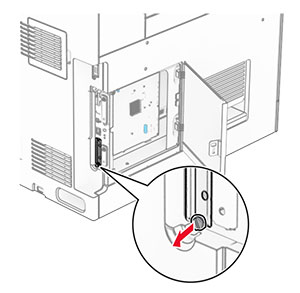
  3. 打開控制板蓋板。

    請當心—潛藏損壞危險性: 控制板上的電子元件很容易受靜電而毀損。觸摸控制板的電子元件或連結器之前,請先觸摸印表機上的金屬表面。
    The screw is removed, and then the controller board access cover is opened.
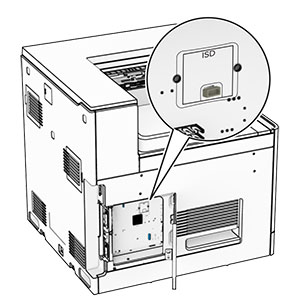
  4. 安裝智慧型儲存磁碟機 (ISD)。

    請當心—潛藏損壞危險性: 請避免碰觸儲存磁碟機邊緣的連接點。
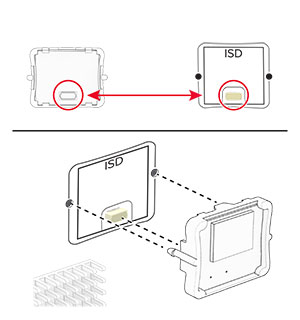
  5. 找出 ISD 連結器。

    The ISD connector is at the center of the controller board.
  6. 將 ISD 插入至其連結器。

    The ISD is inserted into its location on the controller board.
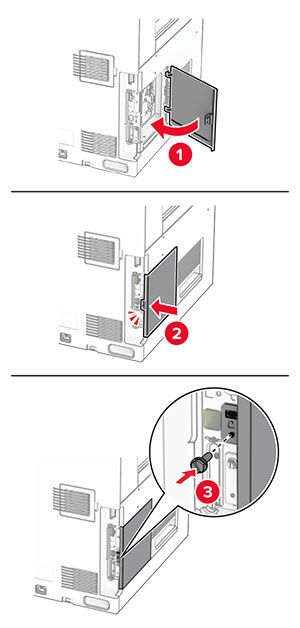
  7. 關上控制板蓋板。

    The door at the left side of the printer is closed, and then secured with a screw.
  8. 將電源線的一端連接到印表機,然後將另一端連接到電源插座。

    標準請當心圖示 請當心—潛在受傷危險性: 為避免發生火災或觸電的危險,請將電源線連接至產品附近額定電壓相符且正確接地的電源插座,以便於使用。
  9. 開啟印表機電源。

安裝內部解決方案連接埠

觸電危險請當心圖示 請當心—觸電危險: 為避免發生電擊的風險,若您是在安裝印表機之後,才要取用控制板或安裝選購性硬體或記憶裝置,請先關閉印表機電源,並從電源插座拔除電源線,再繼續作業。若您有任何其他裝置連接至印表機,請同時關閉它們的電源,並拔下所有連接到印表機的電纜。
請注意: 此作業需要一字螺絲起子。
  1. 關閉印表機電源。

    Power button on the side of the control panel is pressed for 5 seconds.
  2. 從電源插座拔除電源線,然後再從印表機拔除。

    Power cord is unplugged from the electrical outlet, and then from the printer.
  3. 打開控制板蓋板。

    請當心—潛藏損壞危險性: 控制板上的電子元件很容易受靜電而毀損。觸摸控制板的任何電子元件或連結器之前,請先觸摸印表機上的金屬表面。
    The screw is removed, and then the controller board access cover is opened.
  4. 卸下內部解決方案連接埠 (ISP) 蓋板。

    請注意: 請勿丟棄螺絲和蓋板。
    The ISP cover is unscrewed, and then removed.
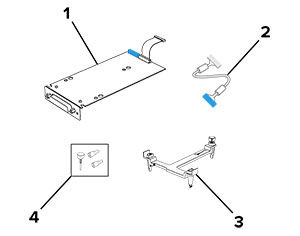
  5. 拆開 ISP 套件的包裝。

    Items that are included in the ISP kit with callouts.

    1

    ISP

    2

    ISP 延長電纜

    3

    裝載支架

    4

    指旋螺絲


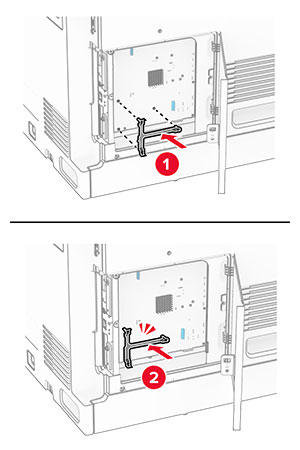
  6. 將裝載支架裝至控制板蓋板,直到卡入定位。

    The mounting bracket is aligned, and then attached to the controller board.
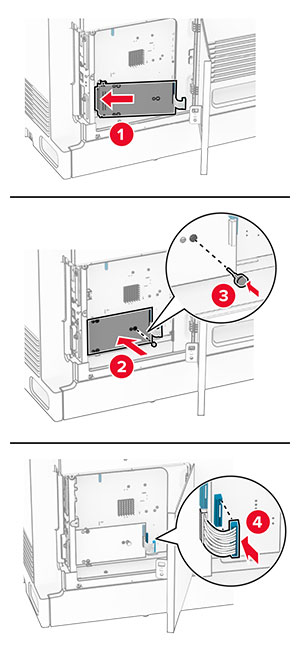
  7. 將 ISP 裝至裝載支架,然後將 ISP 延長電纜連接至控制板蓋板上的連結器。

    The ISP is aligned to the mounting bracket, secured using a thumbscrew, and then the ISP extended cable is connected.
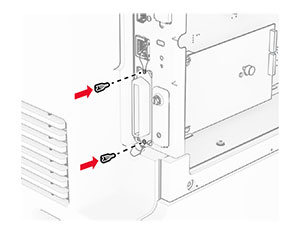
  8. 將 ISP 固定至印表機。

    The internal solutions port is secured using thumb screws.
  9. 關上控制板蓋板。

    The door at the left side of the printer is closed, and then secured with a screw.
  10. 將電源線的一端連接到印表機,然後將另一端連接到電源插座。

    標準請當心圖示 請當心—潛在受傷危險性: 為避免發生火災或觸電的危險,請將電源線連接至產品附近額定電壓相符且正確接地的電源插座,以便於使用。
  11. 開啟印表機電源。

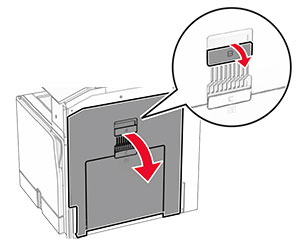
安裝讀卡器

觸電危險請當心圖示 請當心—觸電危險: 為避免發生電擊的風險,若您是在安裝印表機之後,才要取用控制板或安裝選購性硬體或記憶裝置,請先關閉印表機電源,並從電源插座拔除電源線,再繼續作業。若您有任何其他裝置連接至印表機,請同時關閉它們的電源,並拔下所有連接到印表機的電纜。
  1. 關閉印表機電源。

    The power button on the side of the control panel is pressed for five seconds.
  2. 打開 B 門。

    The door handle is pulled and door B is opened.
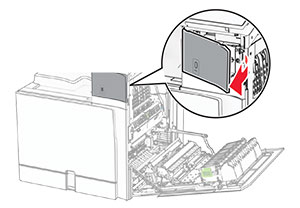
  3. 開啟前方 USB 連接埠蓋板。

    The front cover of the USB port is removed.
  4. 卸下下方 USB 連接埠蓋板。

    請注意: 如果您的印表機沒有此部分,請繼續進行下一步。
    The lower port cover is removed.
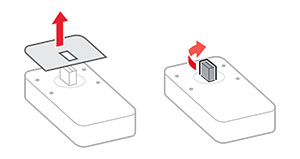
  5. 從讀卡器卸下防護蓋板。

    The protective cover of the card reader is removed.
  6. 插入讀卡器。

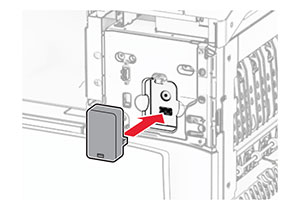
    The card reader is aligned and inserted into the USB port.
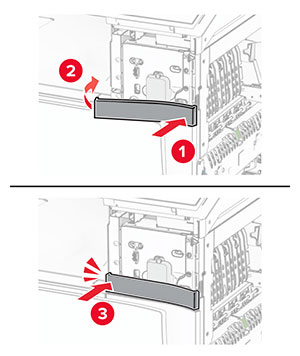
  7. 裝上下方連接埠蓋板,直到其卡入定位。

    The lower cover of the port is attached.
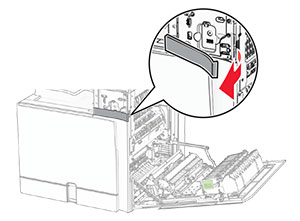
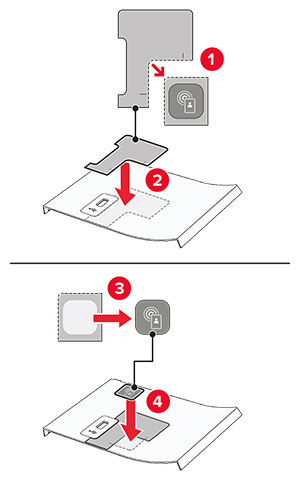
  8. 裝入貼紙導引夾。

    The sticker guides for the front cover are attached.
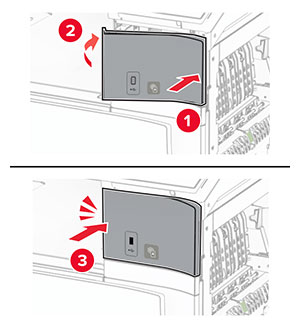
  9. 裝上前方 USB 連接埠蓋板,直到其卡入定位。

    The front cover for the USB port is attached.
  10. 關上 B 門,直到其卡入定位。

    Door B is closed.
  11. 開啟印表機電源。

在安裝內部解決方案連接埠後變更印表機連接埠設定

請注意:

Windows 使用者適用
  1. 開啟印表機資料夾。

  2. 從備有新 ISP 的印表機的快捷鍵功能表,開啟印表機內容。

  3. 配置清單中的連接埠。

  4. 更新 IP 位址。

  5. 套用所做的變更。

Macintosh 使用者適用
  1. 從 Apple 選單中的「系統偏好設定」,導覽至印表機列表,然後選取+ > IP

  2. 在位址欄位中輸入 IP 位址。

  3. 套用所做的變更。