CAUTION—SHOCK HAZARD:
 If you are accessing the controller board or installing optional hardware or memory devices sometime after setting up the printer, then turn the printer off, and unplug the power cord from the electrical outlet before continuing. If you have any other devices attached to the printer, then turn them off as well, and unplug any cables going into the printer.
Accessing the controller board
CAUTION—SHOCK HAZARD: If you are accessing the controller board or installing optional hardware or memory devices sometime after setting up the printer, then turn the printer off, and unplug the power cord from the electrical outlet before continuing. If you have any other devices attached to the printer, then turn them off as well, and unplug any cables going into the printer.
Note: This task requires a flat-head screwdriver.
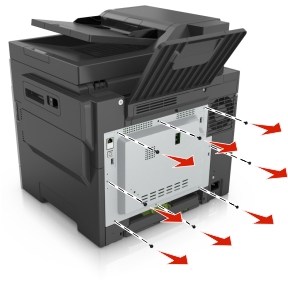
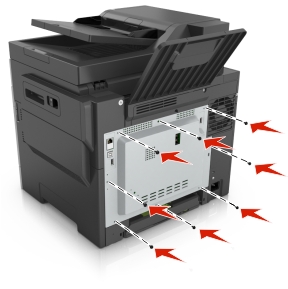
At the back of the printer, turn the screws counterclockwise to remove them.
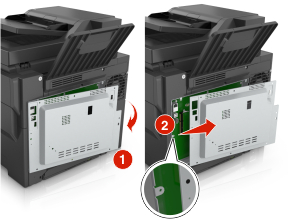
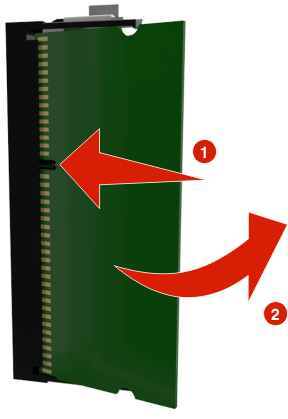
Slightly open the controller board access cover, and then shift to the right to remove it.
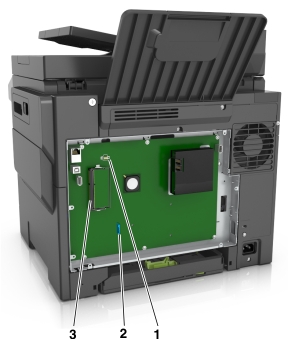
Locate the appropriate connector on the controller board.
Warning—Potential Damage: Controller board electronic components are easily damaged by static electricity. Touch a metal surface on the printer before touching any controller board electronic components or connectors.
1 | Flash memory or font card connector |
2 | Printer hard disk connector |
3 | Memory card connector |
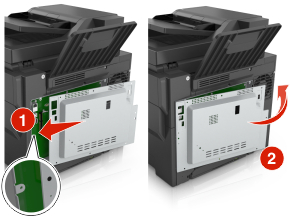
Reattach the cover.
Turn the screws clockwise to lock the cover.
Installing an optional card
CAUTION—SHOCK HAZARD: If you are accessing the controller board or installing optional hardware or memory devices sometime after setting up the printer, then turn the printer off, and unplug the power cord from the electrical outlet before continuing. If you have other devices attached to the printer, then turn them off as well, and unplug any cables going into the printer.
Warning—Potential Damage: Controller board electronic components are easily damaged by static electricity. Touch a metal surface on the printer before touching any controller board electronic components or connectors.
Access the controller board.
For more information, see Accessing the controller board.
Unpack the optional card.
Warning—Potential Damage: Avoid touching the connection points along the edge of the card.
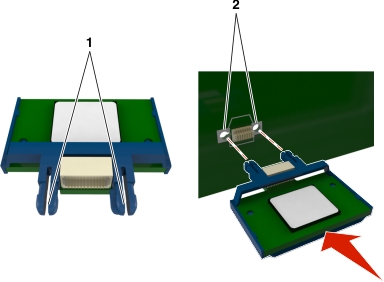
Holding the card by its sides, align the plastic pins (1) on the card with the holes (2) on the controller board.
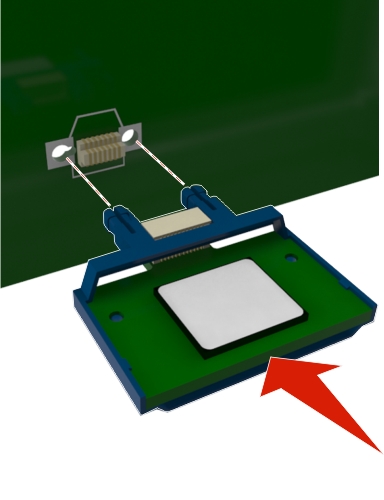
Push the card firmly into place as shown in the illustration.
Warning—Potential Damage: Improper installation of the card may cause damage to the card and the controller board.
Note: The entire length of the connector on the card must touch and be flushed against the controller board.
Close the controller board access door.
Note: When the printer software and any hardware options are installed, it may be necessary to manually add the options in the printer driver to make them available for print jobs. For more information, see
Adding available options in the print driver.