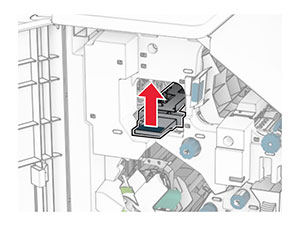
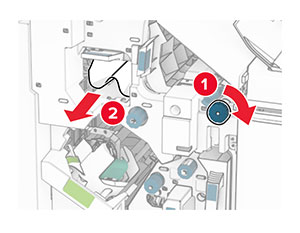
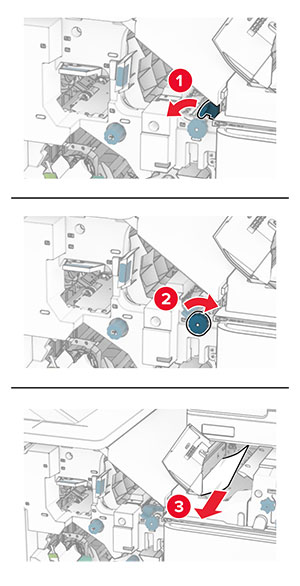
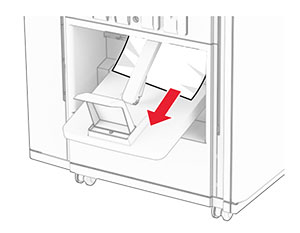
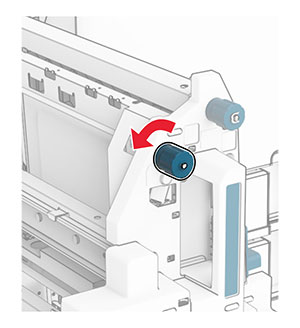
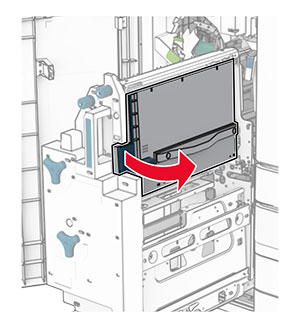
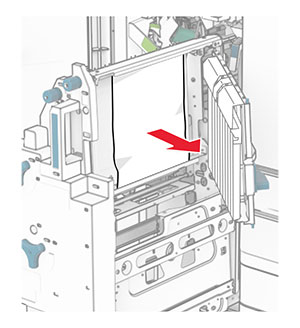
清除夾紙

避免夾紙

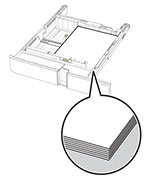
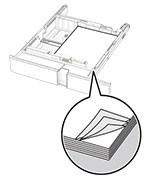
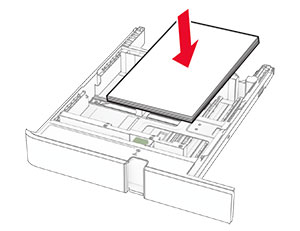
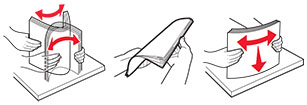
正確載入紙張
使用建議的紙張

識別夾紙位置

請注意:

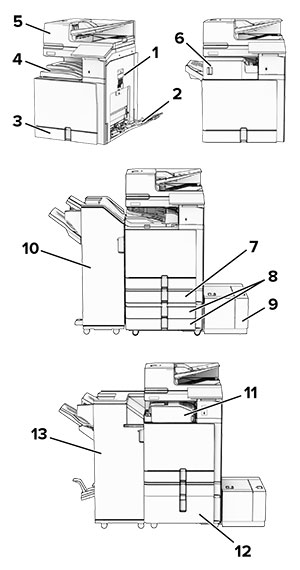
Paper jam areas in the printer with numbered callouts.
 

夾紙位置

1

B 門

2

多用途送紙器

3

標準送紙匣

4

標準出紙槽

5

自動送稿器

6

分頁裝訂器

7

選購性 550 張紙匣組件

8

2 x 550 張紙匣組件

9

1500 張紙匣組件

10

裝訂打孔分頁裝訂器

11

具摺疊選購品的紙張傳輸

12

2000 張雙進紙器

13

小冊子分頁裝訂器


標準送紙匣發生夾紙

標準送紙匣發生夾紙

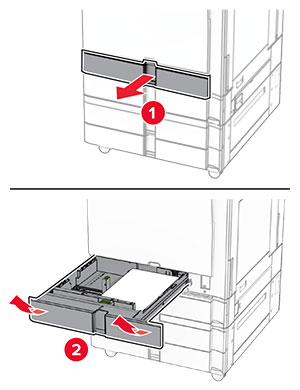
  1. 將標準送紙匣拉出。

    Tray insert is pulled out from the tray base with a slightly upward motion.
  2. 取出夾紙。

    請注意:  確定已取出所有紙張碎片。
    Jammed paper in the standard tray is removed.
  3. 插入紙匣組件。

選購性 550 張紙匣組件中發生夾紙

  1. 打開 D 門。

    The door handle is lifted, and then the door is opened.
  2. 取出夾紙。

    請注意:  確定已取出所有紙張碎片。
    Paper jam in door D is removed.
  3. 關上門。

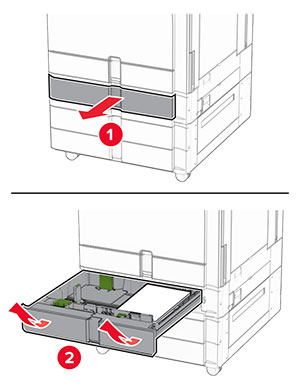
  4. 拉出選購性 550 張紙匣組件。

    Using the front handle, the tray is pulled out.
  5. 取出夾紙。

    請注意:  確定已取出所有紙張碎片。
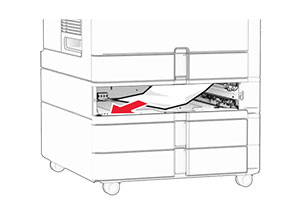
    Paper jam in the optional tray is removed.
  6. 插入紙匣組件。

自動送稿器中發生夾紙

A 門中發生夾紙
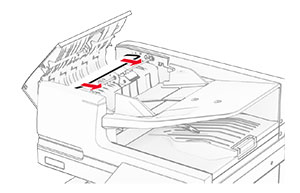
  1. 打開 A 門。

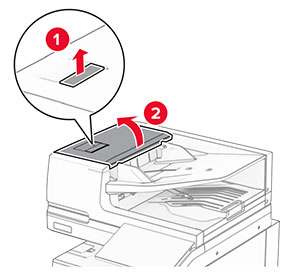
    Lever on the ADF cover is pulled and the ADF cover is opened.
  2. 取出夾紙。

    請注意:  確定已取出所有紙張碎片。
    Jammed paper in the ADF is pulled out.
  3. 關上 A 門。

A1 門中發生夾紙
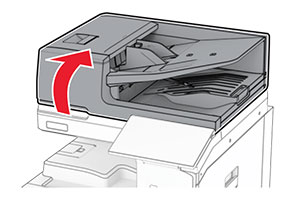
  1. 打開掃描器蓋板。

    The scanner cover is pushed up.
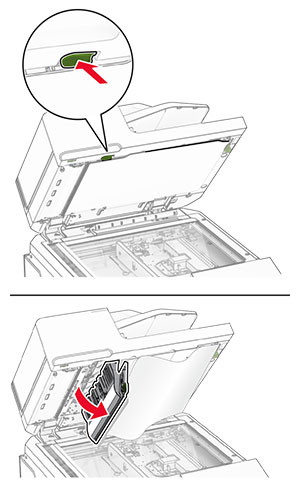
  2. 按下綠色卡榫以打開 A1 門。

    Door A1 is pulled open.
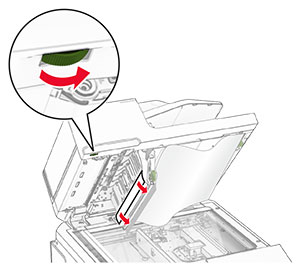
  3. 將靠近 A1 門的綠色旋鈕向右轉,然後取出夾紙。

    請注意:  確定已取出所有紙張碎片。
    Jammed paper is pulled out.
  4. 關上 A1 門,然後關上掃描器蓋板。

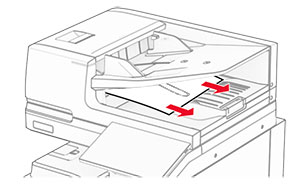
自動送稿器出紙槽中發生夾紙
  1. 從自動送稿器出紙槽取出任何夾紙。

  2. 取出夾紙。

    請注意:  確定已取出所有紙張碎片。
    Jammed paper is pulled out.

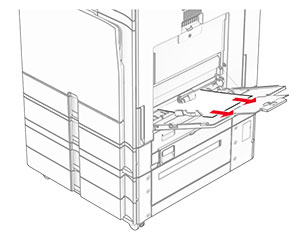
多用途送紙器中發生夾紙

  1. 取出多用途送紙器中的任何紙張。

  2. 取出夾紙。

    請注意:  確定已取出所有紙張碎片。
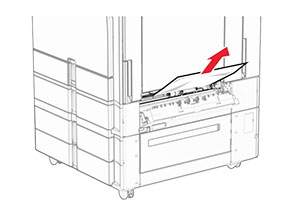
    Jammed paper in the multipurpose feeder is removed.

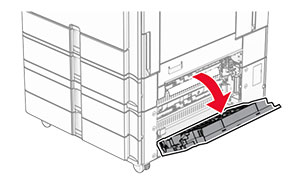
2 x 550 張紙匣組件中發生夾紙

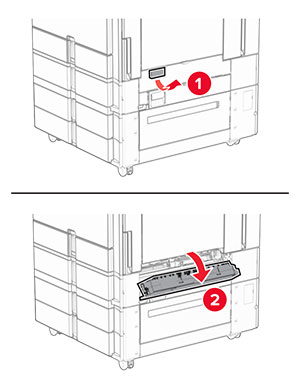
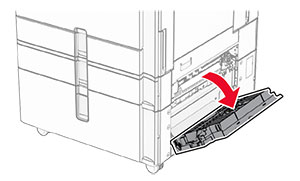
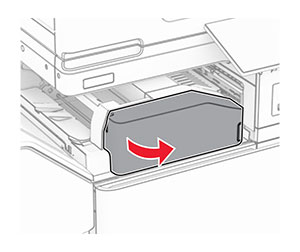
  1. 打開 E 門。

    Door E is opened.
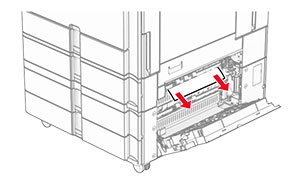
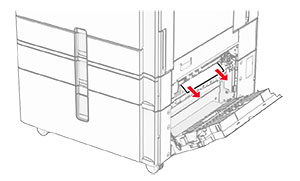
  2. 取出 E 門內的夾紙。

    請注意:  確定已取出所有紙張碎片。
    The jammed paper in door E is removed.
  3. 關上 E 門。

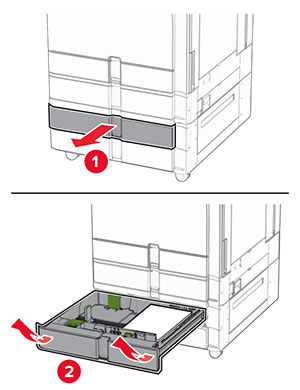
  4. 拉出 3 號紙匣組件。

    The tray is pulled out of the printer.
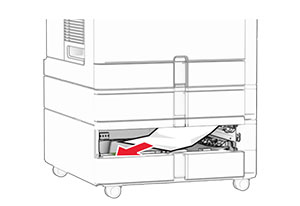
  5. 取出夾紙。

    請注意:  確定已取出所有紙張碎片。
    The jammed paper in tray 3 is removed.
  6. 插入 3 號紙匣組件。

  7. 對 4 號紙匣組件重複 步驟 4 步驟 6

2000 張雙進紙器中發生夾紙

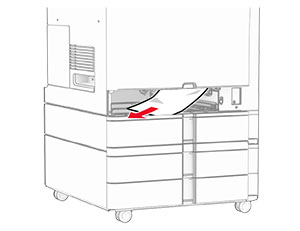
  1. 打開 E 門。

    Door E is opened.
  2. 取出 E 門內的夾紙。

    請注意:  確定已取出所有紙張碎片。
    Jammed paper in door E is removed.
  3. 關上 E 門。

1500 張紙匣組件中發生夾紙

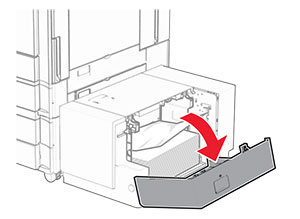
  1. 打開 K 門。

    Door K is pulled down to access the paper jam.
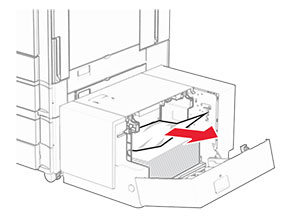
  2. 取出夾紙。

    請注意:  確定已取出所有紙張碎片。
    The jammed paper in the 1500-sheet tray is removed.
  3. 關上 K 門。

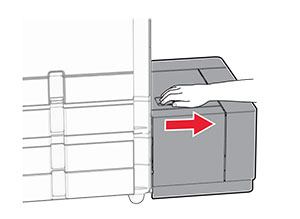
  4. 抓住握把 J,然後將紙匣組件滑至右側。

    The 1500-sheet tray is slid away from the printer.
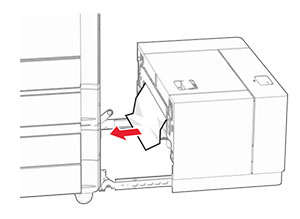
  5. 取出夾紙。

    請注意:  確定已取出所有紙張碎片。
    The jammed paper in the 1500-sheet tray is removed.
  6. 將紙匣組件滑回原位。

B 門中發生夾紙

  1. 打開 B 門。

    表面高溫請當心圖示   請當心—表面高溫:  印表機內部的溫度可能很高。為降低高溫組件導致受傷的風險,請先讓表面冷卻再碰觸。
    請當心—潛藏損壞危險性:  為了避免靜電放電造成損壞,在存取或觸碰印表機內部區域之前,請先觸碰印表機任何外露的金屬外框。
    The door handle is pulled, and then door B is opened.
  2. 在下列任何位置取出夾紙:

    請注意:  確定已取出所有紙張碎片。
    • 在加熱熔合組件上方

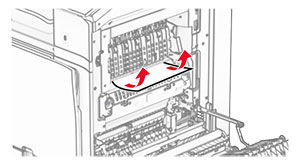
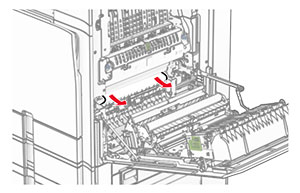
      Jammed paper above the fuser is removed.
    • 在加熱熔合組件中

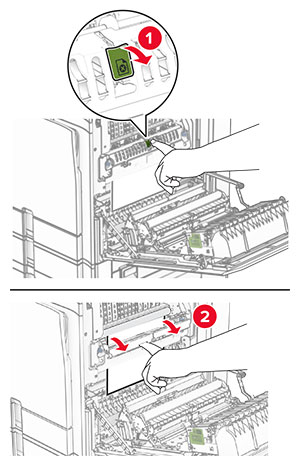
      Jammed paper in the fuser area is removed.
    • 在加熱熔合組件下方

      Jammed paper below the fuser is removed.
    • 在標準出紙槽出紙滾輪下方

      Jammed paper in the standard bin exit roller is removed.
    • 在雙面列印裝置中

      Jammed paper in the duplex unit is removed.
  3. 關上 B 門。

標準出紙槽中發生夾紙

  1. 取出標準出紙槽中的任何紙張。

  2. 取出夾紙。

    請注意:  確定已取出所有紙張碎片。
    Jammed paper in the standard bin is removed.

分頁裝訂器中發生夾紙

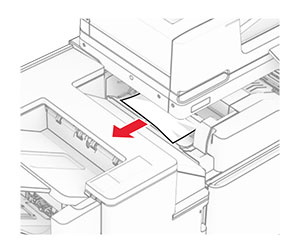
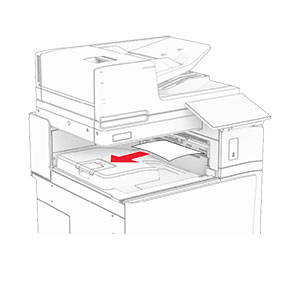
  1. 取出分頁裝訂器出紙槽中的夾紙。

    請注意:  確定已取出所有紙張碎片。
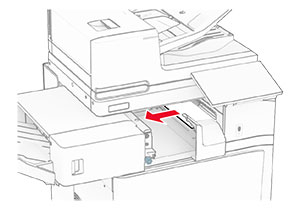
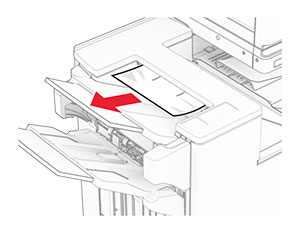
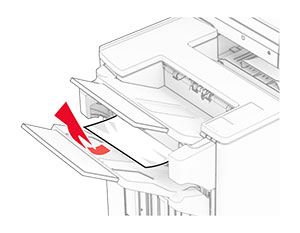
    Jammed paper in the staple finisher bin is removed.
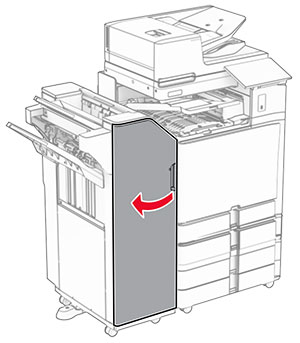
  2. 抓住握把 F,然後將分頁裝訂器滑至左側。

    The staple finisher is slid to the left.
  3. 打開 R1 門,然後以順時針方向旋轉旋鈕 R2。

    Door R1 is opened, and then the blue knob is rotated clockwise.
  4. 取出夾紙。

    請注意:  確定已取出所有紙張碎片。
    Jammed paper in door R1 is removed.
  5. 關上 R1 門。

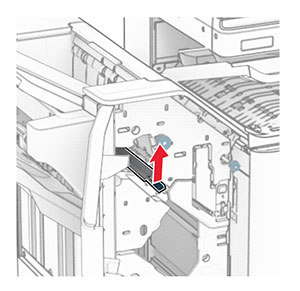
  6. 取出標準出紙槽出紙滾輪中的夾紙。

    請注意:  確定已取出所有紙張碎片。
    Jammed paper in the standard bin exit roller is removed.
  7. 將分頁裝訂器滑回原位。

    The staple finisher is slid back into place.

具摺疊選購品之紙張傳輸中的夾紙

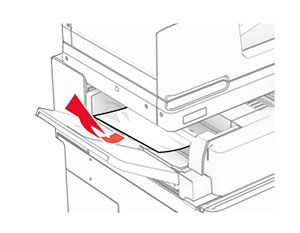
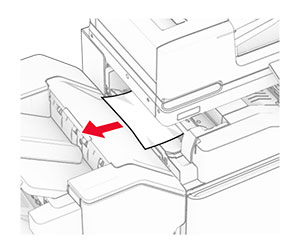
  1. 取出夾紙。

    請注意:  確定已取出所有紙張碎片。
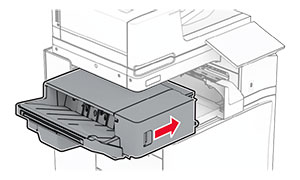
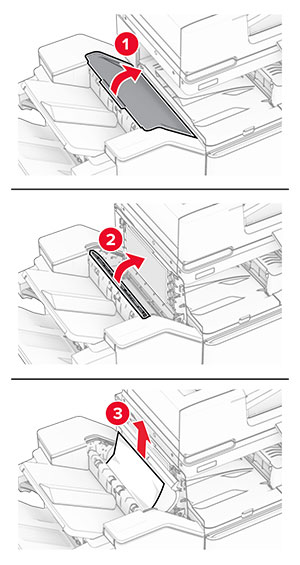
    Jammed paper is removed from the paper transport with folding option.
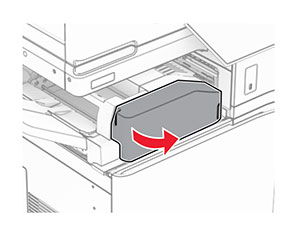
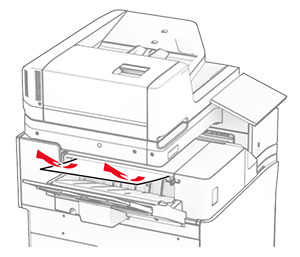
  2. 打開 F 門。

    Door F is being opened.
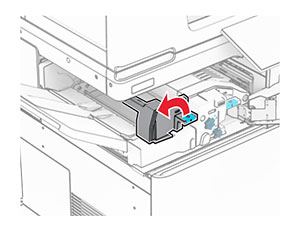
  3. 抬起握把 N4。

    Handle N4 of the paper transport with folding option is being lifted.
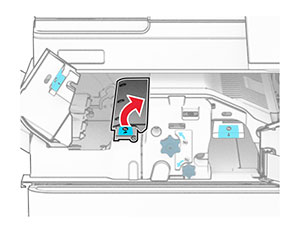
  4. 抬起握把 N5。

    Handle N5 of the paper transport with folding option is being lifted.
  5. 取出夾紙。

    請注意:  確定已取出所有紙張碎片。
    Jammed paper is removed from the paper transport with folding option.
  6. 關上握把 N5,然後握把 N4。

  7. 下壓握把 N1。

    Handle N1 of the paper transport with folding option is being pushed down.
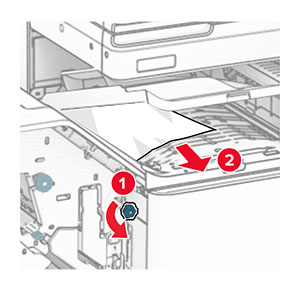
  8. 以逆時鐘方向轉動旋鈕 N2。

    Knob N2 of the paper transport with folding option is being turned counterclockwise.
  9. 取出夾紙。

    請當心—潛藏損壞危險性:  為避免導致的印表機損壞,請在取出夾紙前卸下任何手動配件。
    請注意:  確定已取出所有紙張碎片。
    Jammed paper is removed from the paper transport with folding option.
  10. 握把 N1 放為原位。

  11. 關上 F 門。

裝訂打孔分頁裝訂器中發生夾紙

如果您的印表機使用紙張傳輸進行配置,請執行下列動作:

  1. 取出 1 號出紙槽中的夾紙。

    請注意:

    • 確定已取出所有紙張碎片。
    • 不要取出位於裝訂編譯器中的列印頁面,以避免遺失頁面。
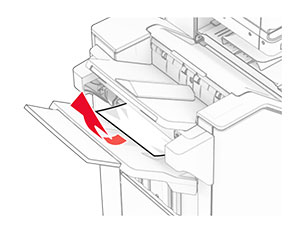
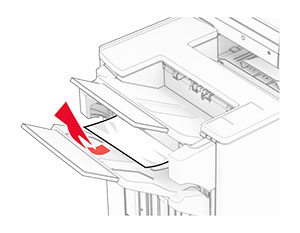
    Jammed paper is removed from the finisher staple, hole punch, offset bin.
  2. 取出分頁裝訂器標準出紙槽中的夾紙。

    請注意:  確定已取出所有紙張碎片。
    Jammed paper is removed from the finisher top bin.
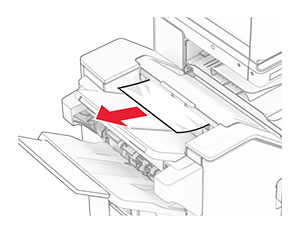
  3. 取出 2 號出紙槽中的夾紙。

    請注意:  確定已取出所有紙張碎片。
    Jammed paper is removed from the paper transport bin.
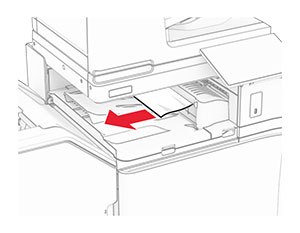
  4. 打開紙張傳輸蓋板 G,然後取出夾紙。

    請注意:  確定已取出所有紙張碎片。
    Paper transport cover G is opened, and then jammed paper is removed.
  5. 關上紙張傳輸蓋板 G。

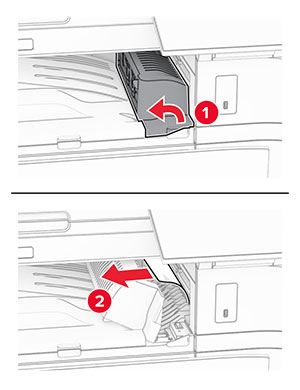
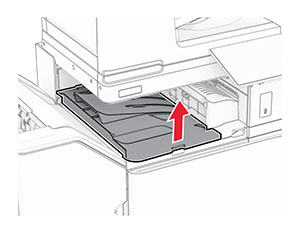
  6. 打開 I 門,打開 R1 門,然後取出夾紙。

    請注意:  確定已取出所有紙張碎片。
    Door I and door R1 of the finisher are opened, and then jammed paper is removed from the finisher.
  7. 關上 R1 門,然後關上 I 門。

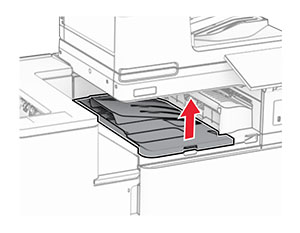
  8. 打開紙張傳輸蓋板 F。

    Paper transport cover F is opened.
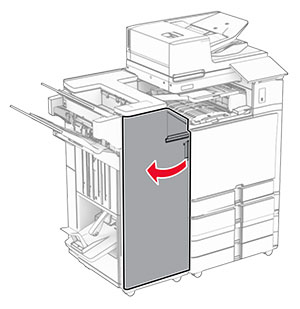
  9. 打開 H 門。

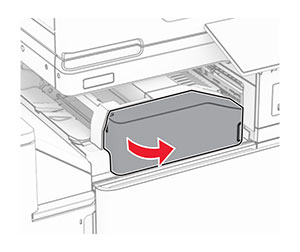
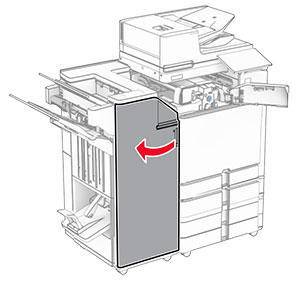
    Door H of the finisher is opened.
  10. 抬起握把 R4。

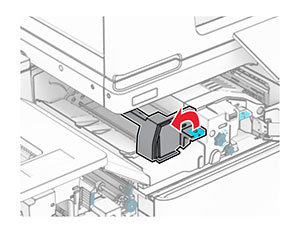
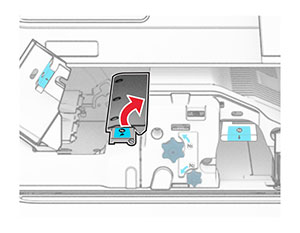
    Handle R4 inside the finisher is lifted.
  11. 以逆時鐘方向轉動旋鈕 R3,然後取出 1 號出紙槽中的夾紙。

    請注意:  確定已取出所有紙張碎片。
    Knob R3 in the finisher is turned to the left, and then jammed paper is removed from the staple, hole punch, offset bin.
  12. 以逆時鐘方向轉動旋鈕 R2,然後取出紙張傳輸蓋板 F 中的夾紙。

    請注意:  確定已取出所有紙張碎片。
    Knob R2 in the finisher is turned to the left, and then jammed paper is removed from inside paper transport cover F.
  13. 關上紙張傳輸蓋板 F。

  14. 將握把 R4 轉回原位。

  15. 關上 H 門。
如果您的印表機使用具摺疊選購品的紙張傳輸進行配置,請執行下列動作:

  1. 取出 1 號出紙槽中的夾紙。

    請注意:

    • 確定已取出所有紙張碎片。
    • 不要取出位於裝訂編譯器中的列印頁面,以避免遺失頁面。
    Jammed paper is removed from the finisher staple, hole punch, offset bin.
  2. 取出分頁裝訂器標準出紙槽中的夾紙。

    請注意:  確定已取出所有紙張碎片。
    Jammed paper is removed from the finisher top bin.
  3. 取出 2 號出紙槽中的夾紙。

    請注意:  確定已取出所有紙張碎片。
    Jammed paper is removed from the paper transport bin.
  4. 打開 F 門。

    Door F of the paper transport with folding option is opened.
  5. 打開 N4 門。

    Door N4 of the paper transport with folding option is opened.
  6. 打開 N5 門。

    Door N5 of the paper transport with folding option is opened.
  7. 打開 H 門。

    Door H in the finisher is opened.
  8. 抬起握把 R4。

    Handle R4 inside the finisher is lifted.
  9. 以逆時鐘方向轉動旋鈕 R3,然後取出 1 號出紙槽中的夾紙。

    請注意:  確定已取出所有紙張碎片。
    Knob R3 in the finisher is turned to the left, and then jammed paper is removed from the staple, hole punch, offset bin.
  10. 以逆時鐘方向轉動旋鈕 R2,然後取出 N4 和 N5 門之間的夾紙。

    請注意:  確定已取出所有紙張碎片。
    Knob R2 in the finisher is turned to the left, and then jammed paper is removed from between doors N4 and N5.
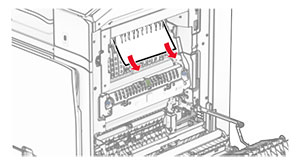
  11. 打開 B 門。

    表面高溫請當心圖示   請當心—表面高溫:  印表機內部的溫度可能很高。為降低高溫組件導致受傷的風險,請先讓表面冷卻再碰觸。
    請當心—潛藏損壞危險性:  為了避免靜電放電造成損壞,在存取或觸碰印表機內部區域之前,請先觸碰印表機任何外露的金屬外框。
    Door B is pulled down.
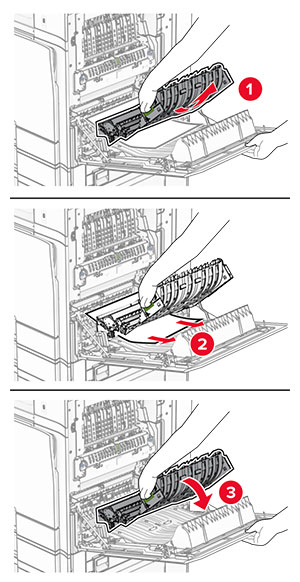
  12. 取出標準出紙槽出紙滾輪下的夾紙。

    請注意:  確定已取出所有紙張碎片。
    Jammed paper in the standard bin exit roller is pulled out.
  13. 關上 B 門。

  14. 下壓握把 N1。

    Handle N1 of the paper transport with folding option is being pushed down.
  15. 以逆時鐘方向轉動旋鈕 N2。

    Knob N2 of the paper transport with folding option is being turned counterclockwise.
  16. 取出夾紙。

    請當心—潛藏損壞危險性:  為避免導致的印表機損壞,請在取出夾紙前卸下任何手動配件。
    請注意:  確定已取出所有紙張碎片。
    Jammed paper is removed from the paper transport with folding option.
  17. 握把 N1 放為原位。

  18. 關上握把 N5,然後握把 N4。

  19. 關上 F 門。

  20. 將握把 R4 轉回原位。

  21. 關上 H 門。
小冊子分頁裝訂器中發生夾紙

如果您的印表機使用紙張傳輸進行配置,請執行下列動作:

  1. 取出分頁裝訂器標準出紙槽中的夾紙。

    請注意:  確定已取出所有紙張碎片。
    Jammed paper is removed from the finisher top bin.
  2. 取出 1 號出紙槽中的夾紙。

    請注意:  確定已取出所有紙張碎片。
    Jammed paper is removed from the finisher staple, hole punch, offset bin.
  3. 取出 1 號出紙槽中的夾紙。

    請注意:

    • 確定已取出所有紙張碎片。
    • 不要取出位於裝訂編譯器中的列印頁面,以避免遺失頁面。
    Jammed paper is removed from the finisher staple, hole punch, offset bin.
  4. 取出 3 號出紙槽中的夾紙。

    請注意:  確定已取出所有紙張碎片。
    Jammed paper is removed from the paper transport bin.
  5. 打開紙張傳輸蓋板 G,然後取出夾紙。

    請注意:  確定已取出所有紙張碎片。
    Paper transport cover G is opened, and then jammed paper is removed.
  6. 關上紙張傳輸蓋板 G。

  7. 打開紙張傳輸蓋板 F。

    Paper transport cover F is opened.
  8. 打開 H 門。

    Door H of the finisher is opened.
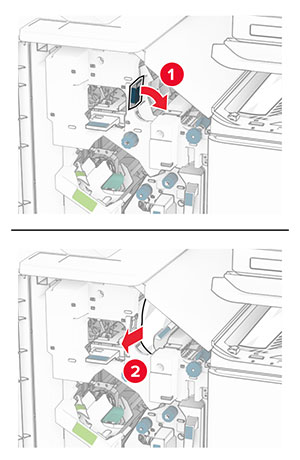
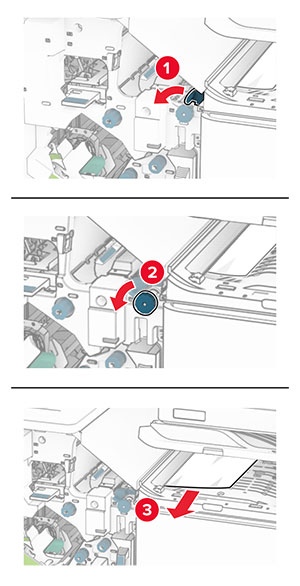
  9. 將握把 R3 移到右側,然後移除夾紙。

    請注意:  確定已取出所有紙張碎片。
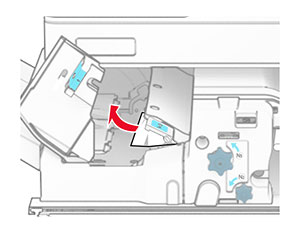
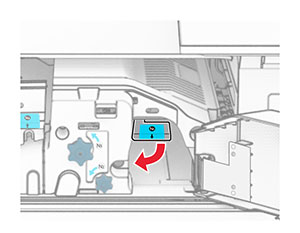
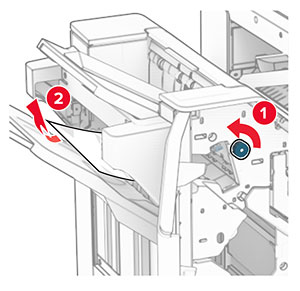
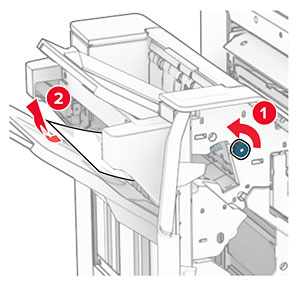
    Handle R3 in the finisher is moved, and then jammed paper is removed from behind handle R3.
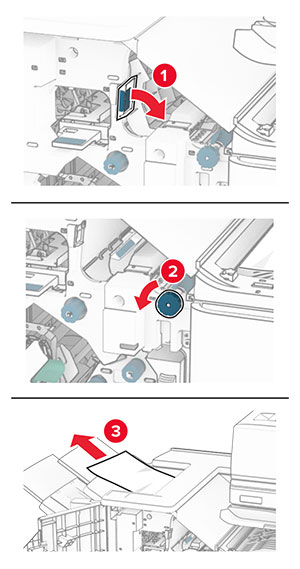
  10. 將握把 R1 移到左側,以逆時鐘方向轉動旋鈕 R2,然後取出夾紙。

    請注意:  確定已取出所有紙張碎片。
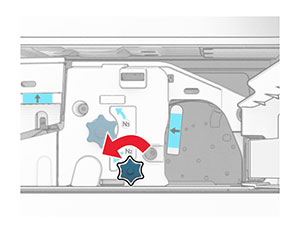
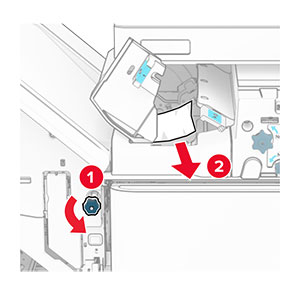
    The handle and the knob are moved and turned, and then jammed paper is removed.
  11. 以逆時鐘方向轉動旋鈕 R5,然後從分頁裝訂器標準出紙槽取出夾紙。

    請注意:  確定已取出所有紙張碎片。
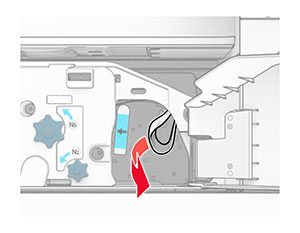
    Knob R5 in the finisher is turned, and then jammed paper is removed from the finisher top bin.
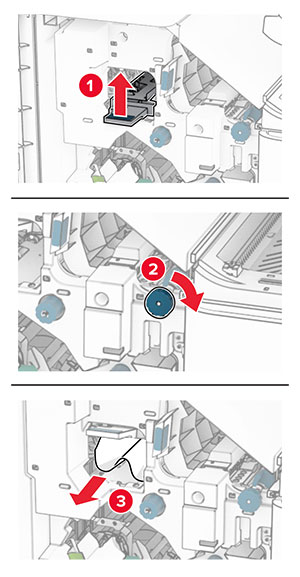
  12. 抬起握把 R4,以順時鐘方向轉動旋鈕 R2,然後取出夾紙。

    請注意:  確定已取出所有紙張碎片。
    The handle and the knob are lifted and turned, and then jammed paper is removed from inside handle R4.
  13. 關上紙張傳輸蓋板 F。

  14. 將握把 R1、R3 和 R4 轉回原位。

  15. 關上 H 門。
如果您的印表機使用具摺疊選購品的紙張傳輸進行配置,請執行下列動作:

  1. 取出分頁裝訂器標準出紙槽中的夾紙。

    請注意:  確定已取出所有紙張碎片。
    Jammed paper is removed from the finisher top bin.
  2. 取出 1 號出紙槽中的夾紙。

    請注意:  確定已取出所有紙張碎片。
    Jammed paper is removed from the finisher staple, hole punch, offset bin.
  3. 取出 1 號出紙槽中的夾紙。

    請注意:

    • 確定已取出所有紙張碎片。
    • 不要取出位於裝訂編譯器中的列印頁面,以避免遺失頁面。
    Jammed paper is removed from the finisher staple, hole punch, offset bin.
  4. 取出 3 號出紙槽中的夾紙。

    請注意:  確定已取出所有紙張碎片。
    Jammed paper is removed from the paper transport bin.
  5. 打開 F 門。

    Door F of the paper transport with folding option is opened.
  6. 打開 H 門。
    Door H in the finisher is opened.
  7. 打開 N4 門。

    Door N4 of the paper transport with folding option is opened.
  8. 打開 N5 門。

    Door N5 of the paper transport with folding option is opened.
  9. 抬起握把 R4。

    Handle R4 inside the finisher is lifted.
  10. 以順時鐘方向轉動旋鈕 R2,然後取出握把 R4 中的夾紙。

    請注意:  確定已取出所有紙張碎片。
    Knob R2 in the finisher is turned to the right, and then jammed paper is removed from inside handle R4.
  11. 將握把 R1 移到左側,以逆時鐘方向轉動旋鈕 R2,然後取出 N4 和 N5 門之間的夾紙。

    請注意:  確定已取出所有紙張碎片。
    The handle and the knob are moved and turned, and then the jammed paper is removed between doors N4 and N5.
  12. 打開 B 門。

    表面高溫請當心圖示   請當心—表面高溫:  印表機內部的溫度可能很高。為降低高溫組件導致受傷的風險,請先讓表面冷卻再碰觸。
    請當心—潛藏損壞危險性:  為了避免靜電放電造成損壞,在存取或觸碰印表機內部區域之前,請先觸碰印表機任何外露的金屬外框。
    Door B is pulled down.
  13. 取出標準出紙槽出紙滾輪下的夾紙。

    請注意:  確定已取出所有紙張碎片。
    Jammed paper in the standard bin exit roller is pulled out.
  14. 關上 B 門。

  15. 下壓握把 N1。

    Handle N1 of the paper transport with folding option is being pushed down.
  16. 以逆時鐘方向轉動旋鈕 N2。

    Knob N2 of the paper transport with folding option is being turned counterclockwise.
  17. 取出夾紙。

    請當心—潛藏損壞危險性:  為避免導致的印表機損壞,請在取出夾紙前卸下任何手動配件。
    請注意:  確定已取出所有紙張碎片。
    Jammed paper is removed from the paper transport with folding option.
  18. 握把 N1 放為原位。

  19. 關上 N5 門,然後關上 N4 門。。

  20. 關上 F 門。

  21. 將握把 R1 和 R4 轉回原位。

  22. 關上 H 門。
小冊子製作器中發生夾紙
  1. 取出 2 號出紙槽中的夾紙。

    請注意:  確定已取出所有紙張碎片。
    Jammed paper is removed from the finisher booklet bin.
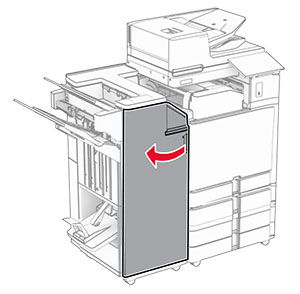
  2. 打開 H 門。
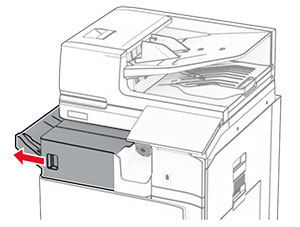
    Door H in the finisher is opened.
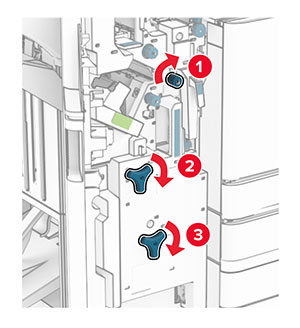
  3. 以順時鐘方向轉動 R6、R11 和 R10。

    Knobs R6, R11, and R10 inside the booklet finisher are turned to the right.
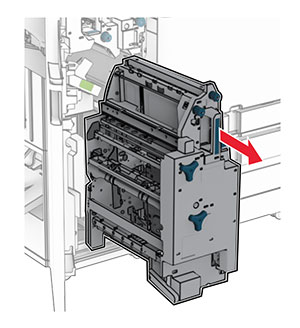
  4. 拉出小冊子製作器。

    Handle R7 is grasped, and then the booklet maker is pulled out of the finisher.
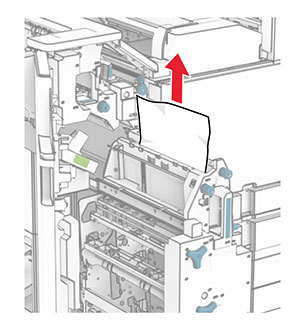
  5. 取出夾紙。

    請注意:  確定已取出所有紙張碎片。
    Jammed paper is removed from the top of the booklet maker.
  6. 以逆時鐘方向轉動旋鈕 R9,直到停止為止。

    Knob R9 in the booklet maker is turned to the left.
  7. 打開 R8 門。
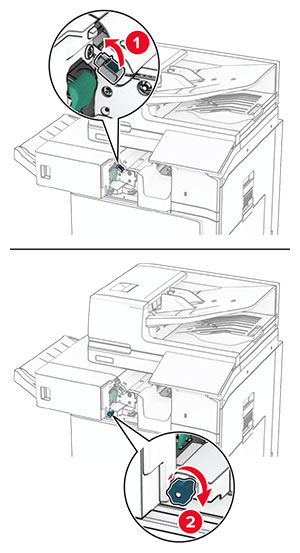
    Handle R8 is grasped, and then door R8 is opened.
  8. 取出夾紙。
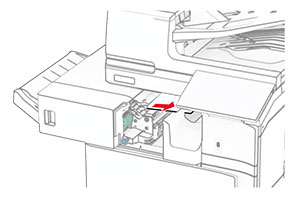
    請注意:  確定已取出所有紙張碎片。
    Jammed paper is removed from behind door R8.
  9. 關上 R8 門。

  10. 將小冊子製作器放回小冊子分頁裝訂器。

  11. 關上 H 門。