Load an original document into the ADF tray or on the scanner glass.
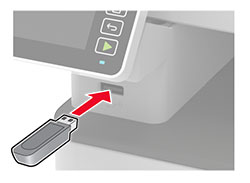
Insert the flash drive.
Touch Scan to USB and adjust the settings if necessary.
Notes:
- To save the scanned document to a folder, touch Scan to , select a folder, and then touch Scan Here .
- If the USB Drive screen does not appear, then touch USB Drive on the control panel.
Scan the document.
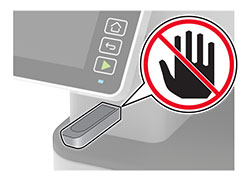
Warning—Potential Damage:
To avoid loss of data or printer malfunction, do not touch the flash drive or the printer in the area shown while actively printing, reading, or writing from the memory device.