
| | CAUTION—POTENTIAL INJURY: Do not set up this product or make any electrical or cabling connections, such as a power cord, a fax feature, or USB cable, during a lightning storm. |
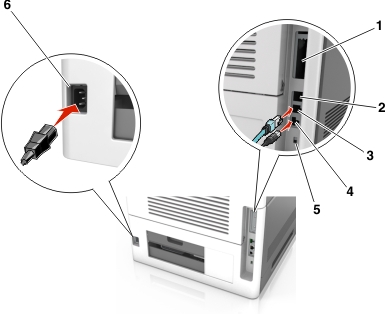
Connect the printer to the computer using a USB cable or Ethernet cable.
Make sure to match the following:
The USB symbol on the cable with the USB symbol on the printer
The appropriate Ethernet cable to the Ethernet port
The appropriate parallel cable with the parallel port
|
Use the |
To |
|
|---|---|---|
|
1 |
Parallel port |
Connect the printer to a computer. Note: This can also be used in installing an optional Internal Solutions Port (ISP). |
|
2 |
USB port |
Attach an optional wireless network adapter. |
|
3 |
Ethernet port |
Connect the printer to a network. |
|
4 |
USB printer port |
Connect the printer to a computer. |
|
5 |
Security slot |
Attach a lock that will secure the controller board. |
|
6 |
Printer power cord socket |
Connect the printer to a properly grounded electrical outlet. |
| Warning—Potential Damage: Do not touch the USB cable, any wireless network adapter, or the printer in the area shown while actively printing. Loss of data or a malfunction can occur. |
|
Note: This feature is available only if you purchase optional trays and a caster base. |
|
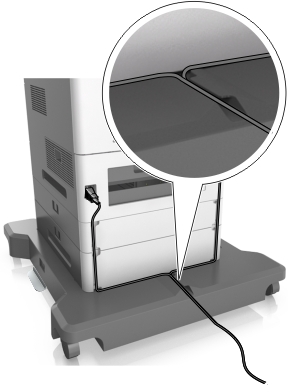
After attaching the Ethernet cable and power cord, neatly tuck the cables in the channels at the back of the printer. |
 |