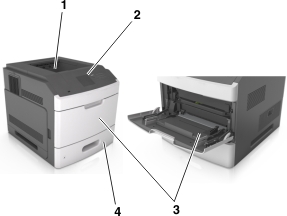
|
1 |
Standard bin |
||
|
2 |
Printer control panel |
||
|
3 |
Multipurpose feeder |
||
|
4 |
Standard 250- or 550-sheet tray (Tray 1) |
||
 | CAUTION—TIPPING HAZARD: Floor-mounted configurations require additional furniture for stability. You must use either a printer stand or printer base if you are using multiple input options. If you purchased a printer with a similar configuration, then you may need additional furniture. For more information, see www.lexmark.com/multifunctionprinters. |
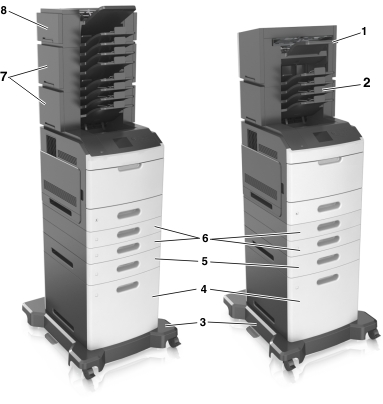
The following illustration shows the maximum number of optional finishers and trays that are supported by the printer. For more information on other configurations, visit www.lexmark.com/multifunctionprinters.
|
Hardware option |
Alternative hardware option |
|
|---|---|---|
|
1 |
Staple finisher |
|
|
2 |
4-bin mailbox |
|
|
3 |
Caster base |
None |
|
4 |
2100-sheet tray |
None |
|
5 |
550-sheet tray |
250-sheet tray |
|
6 |
250-sheet tray |
550-sheet tray |
|
7 |
4-bin mailbox |
Output expander |
|
8 |
Output expander |
4-bin mailbox |
The staple, hole punch finisher must not be combined with any other output option.
In a configuration with two or more optional finishers:
The staple finisher must always be on top.
The high-capacity output expander must always be at the bottom.
The output expander is the only option that can be placed on top of the high-capacity output expander.
The output expander and mailbox may be installed in any order.
When using optional trays:
Always use a caster base when the printer is configured with a 2100-sheet tray.
The 2100-sheet tray must always be at the bottom of a configuration.
A maximum of four optional trays may be configured with the printer.
The optional 250- and 550-sheet trays may be installed in any order.