|
Use the |
To |
|
|---|---|---|
|
1 |
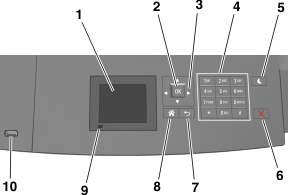
Display |
|
|
2 |
Select button |
Submit changes made in the printer settings. |
|
3 |
Arrow buttons |
Scroll up and down or left and right. |
|
4 |
Keypad |
Enter numbers, letters, or symbols. |
|
5 |
Sleep button |
Enable Sleep mode or Hibernate mode. Do the following to wake the printer from Sleep mode:
|
|
6 |
Stop or Cancel button |
Stop all printer activity. |
|
7 |
Back button |
Return to the previous screen. |
|
8 |
Home button |
Go to the home screen. |
|
9 |
Indicator light |
Check the status of the printer. |
|
10 |
USB port |
Connect a flash drive to the printer. Note: Only the front USB port supports flash drives. |