Updating the firmware using the control panel
Using the notification center
This method is applicable only in some printer models.
-
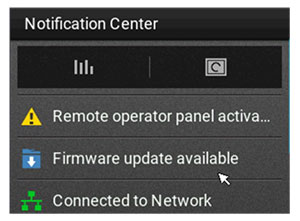
From the control panel, navigate to the notification center, and then select
Firmware update available
.
-
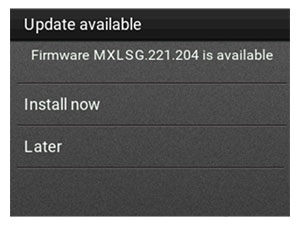
Select
Install now
.
The printer reboots automatically after the update.
Using the Settings menu
-
From the control panel, navigate to
Settings
>
Device
>
Update Firmware
.
-
Depending on your printer model, select
Check for updates
or
Check for updates now
.
-
If a new update is available, then select
Install now
.
The printer reboots automatically after the update.
Updating the firmware using the Embedded Web Server
Before you begin, make sure that:
-
You have downloaded the latest printer firmware from
https://support.lexmark.com
and saved it to your flash drive or computer.
Note:
To deploy the printer firmware, extract the .fls firmware file from the ZIP package.
-
You are not using a special code on your printer to avoid losing this functionality.
Warning—Potential Damage:
Make sure that all printers receiving firmware updates are turned on during the entire firmware update process. Turning off a printer during a firmware update can severely damage it.
If the printer is connected to the network when checking for updates, then downloading the firmware is not required.
-
Open a web browser, and then type the printer IP address in the address field.
Notes:
-
View the printer IP address on the printer home screen. The IP address appears as four sets of numbers separated by periods, such as 123.123.123.123.
-
If you are using a proxy server, then temporarily disable it to load the web page correctly.
-
Click
Device
.
-
Scroll down, and then click
Update Firmware
.
-
Depending on your printer model, click
Check for updates
or
Check for updates now
.
If a new update is available, then click
I agree, start update
.
The printer reboots automatically after the update.