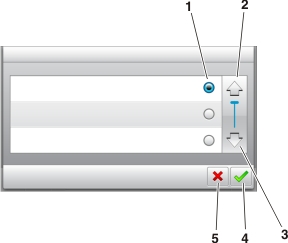
Touch the | To | |
|---|---|---|
1 | Radio button | Select or clear an item. |
2 | Up arrow | Scroll up. |
3 | Down arrow | Scroll down. |
4 | Accept button | Save a setting. |
5 | Cancel button |
|
Touch | To |
|---|---|
 | Return to the home screen. |
 | Open a context-sensitive Help dialog on the printer control panel. |
 | Scroll to the left. |
 | Scroll to the right. |