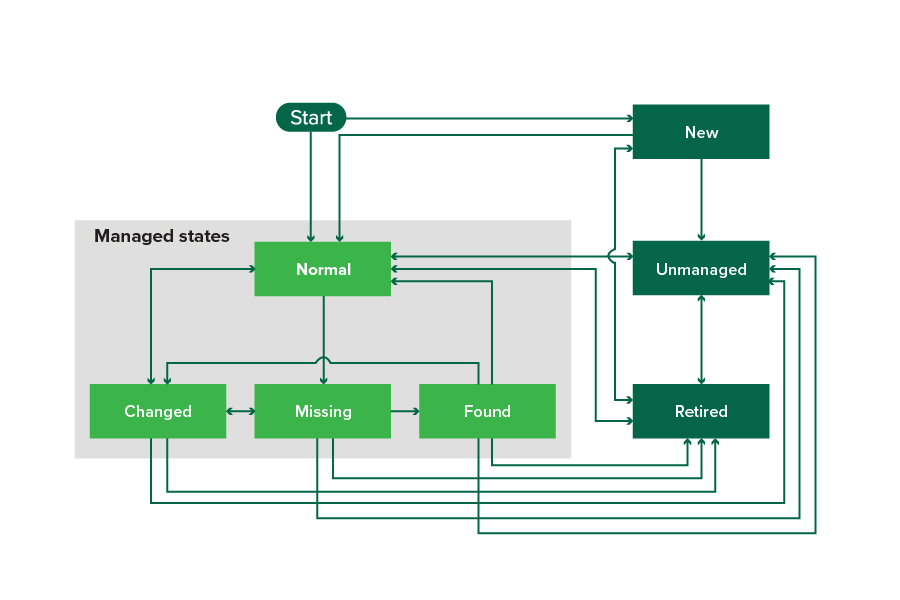
System-generated saved searches show the printers in the following printer life cycle states:
All Printers—All printers in the system.
Managed Printers—Printers that appear can be in any of the following states:
Managed (Normal)
Managed (Changed)
Managed (Missing)
Managed (Found)
Managed (Changed) Printers—Printers in the system whose following properties were changed at the last audit:
Property tag
Host name
Contact name
Contact location
Memory size
Duplex
Supplies (excluding levels)
Input options
Output options
eSF applications
Managed (Found) Printers—Printers that were reported as missing, but have now been found.
Managed (Missing) Printers—Printers that the system was unable to communicate with.
Managed (Normal) Printers—Printers in the system whose properties have remained the same since the last audit.
New Printers—Printers that are newly discovered and are not set to a Managed state automatically.
Retired Printers—Printers marked as no longer active in the system.
Unmanaged Printers—Printers marked for exclusion from activities performed in the system.
Beginning state | Ending state | Transition |
|---|---|---|
1 The "Automatically manage discovered printers" setting is enabled in the discovery profile. 2 The "Automatically manage discovered printers" setting is disabled in the discovery profile. | ||
Start | Normal | Discovered.1 |
Start | New | Discovered.2 |
Any | Normal, Unmanaged, or Retired | Manual (Missing does not change to Normal). |
Retired | Normal | Discovered.1 |
Retired | New | Discovered.2 |
Normal, Missing, or Found | Changed | New address when discovered. |
Normal | Changed | Audit properties do not match the database properties. |
Normal, Changed, or Found | Missing | Not found on audit or update status. |
Changed | Normal | Audit properties match the database properties. |
Missing | Found | Discovered, audit, or update status. |
Found | Normal | Discovered, audit, or update status. |