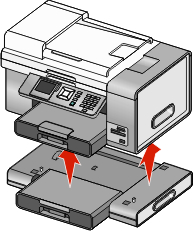
Removing the printer from the Tray 2 base

If you need to move the printer to a different location, be sure you first remove the printer from the Tray 2 base. This helps to avoid damaging the printer and the base.

To safely move the printer and the optional Tray 2, follow these precautions:

  1. Turn the printer off, and disconnect the power cord from the wall outlet.

  2. Disconnect all cables from the back of the printer.

  3. Remove any paper from Tray 1 and the paper exit tray.

  4. Grasp the printer on both sides using the handholds.

  5. Lift the printer off of the Tray 2 base, and set the printer aside.