Slightly dampen a soft, lint-free cloth or paper towel with water.
Open the scanner cover.
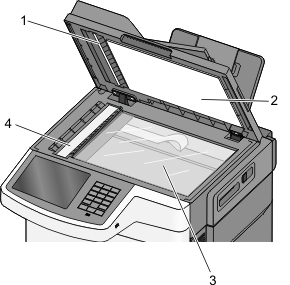
1 | White underside ADF cover |
2 | White underside scanner glass cover |
3 | Scanner glass |
4 | ADF glass |
Wipe the scanner glass until it is clean and dry.
Wipe the white underside of the scanner cover until it is clean and dry.
Close the scanner cover.