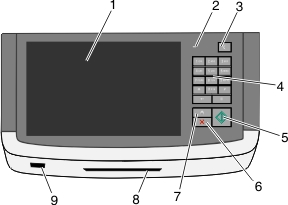
Item | Description | |
|---|---|---|
1 | Display | Lets you view scanning, copying, faxing, and printing options as well as status and error messages |
2 | Indicator light |
|
3 | Sleep | Activates Sleep Mode or Hibernate Mode The following are the statuses of the indicator light and the Sleep button:
|
4 | Keypad | Lets you enter numbers, letters, or symbols on the display |
5 | Submit | Lets you submit changes made in the printer settings |
6 | Stop/Cancel | Stops all printer activity Note: A list of option is displayed once appears on the display. |
7 | Home | Lets you navigate back to the home screen |
8 | Card reader | Limits the use of certain printer functions to authenticated users Note: The card reader may not be available on all printer models. |
9 | USB port | Lets you insert a USB flash drive to send data or to save scanned images |