部品と消耗品を交換する

トナーカートリッジを交換する

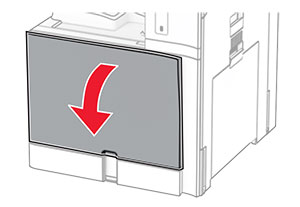
  1. 前面ドアを開きます。

    The front door is pulled down.
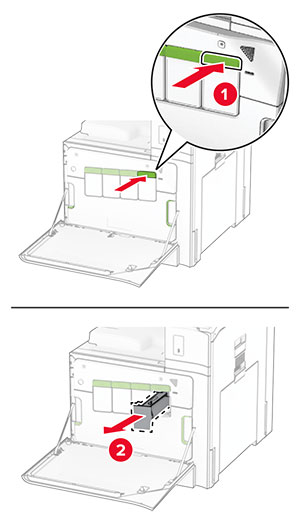
  2. 使用済みトナーカートリッジを取り外します。

    The green buttons are pushed, and then the cartridges are pulled out from the printer.
  3. 新しいトナーカートリッジを包装から取り出します。

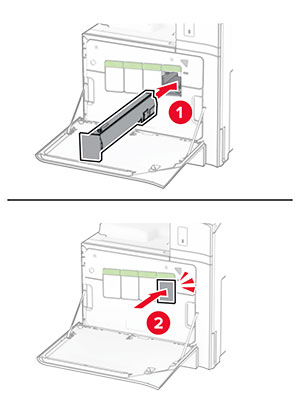
  4. 新しいトナーカートリッジを挿入し、カチッと音がすることを確認します。

    Toner cartridge is aligned, and then slid into the printer.
  5. ドアを閉じます。

ブラックイメージングユニットを交換する

  1. 前面ドアを開きます。

    The front door is pulled down.
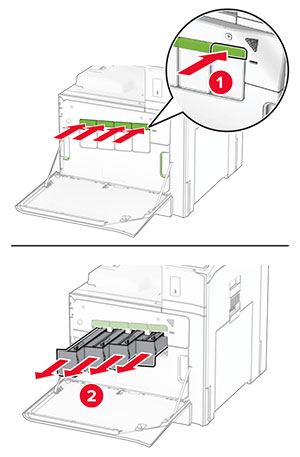
  2. トナーカートリッジを取り外します。

    The green buttons are pushed, and then the cartridges are pulled out from the printer.
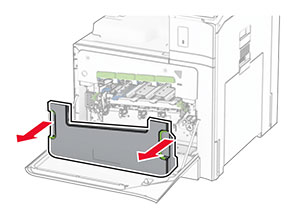
  3. 廃トナーボトルを取り外します。

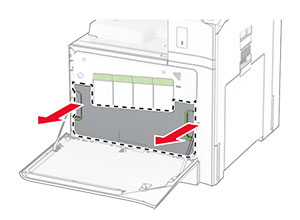
    Both sides of the waste toner bottle are grasped, and then the bottle is pulled out.
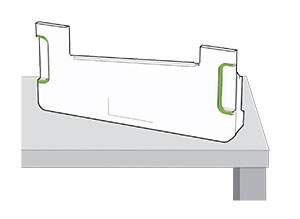
    メモ: トナーがこぼれるのを避けるため、ボトルは縦にして扱います。
    Proper position of the waste toner bottle upon removal from the printer.
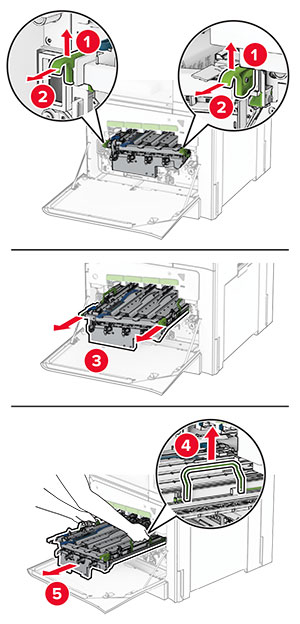
  4. イメージングキットを取り外します。

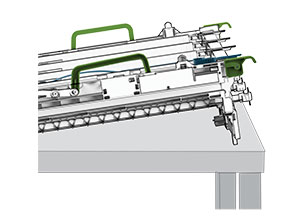
    The green latches of imaging kit are grasped and lifted, and the imaging kit is pulled out of the printer.
    警告—破損の恐れあり: イメージングキットを直射日光にさらさないでください。長時間直射日光にさらすと、印刷品質の問題が生じる可能性があります。
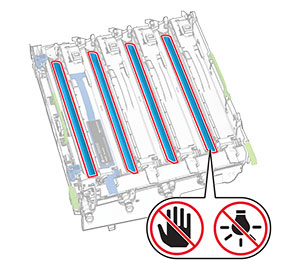
    警告—破損の恐れあり: フォトコンダクタードラムには触らないでください。触れると、今後の印刷ジョブの印刷品質に影響する可能性があります。
    A do not touch icon on the photoconductor drum.
    メモ: フォトコンダクタードラムに傷や損傷を与えないように、イメージングキットを清潔で平らな場所に、垂直に置きます。
    Proper position of the imaging kit after it is removed from the printer.
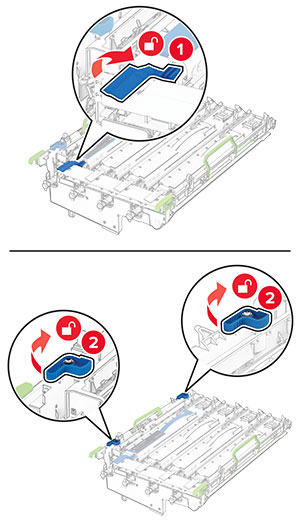
  5. 使用済みのブラックイメージングユニットのロックを解除します。

    The blue latches of the black imaging unit are unlocked.
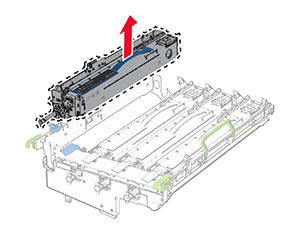
  6. 使用済みのブラックイメージングユニットを取り外します。

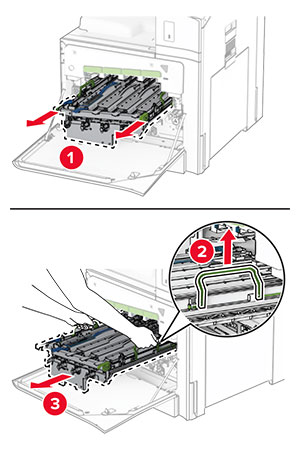
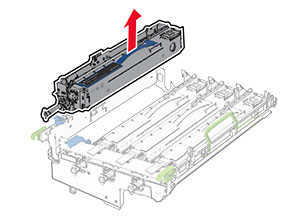
    The used imaging unit is pulled out, and then removed from the imaging kit.
  7. 新しいブラックイメージングユニットの梱包を取り外します。

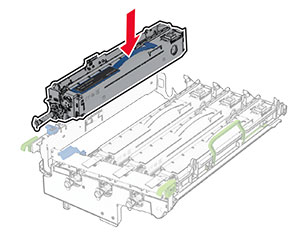
  8. 新しいブラックイメージングユニットを挿入します。

    The new imaging unit is inserted into the imaging kit.
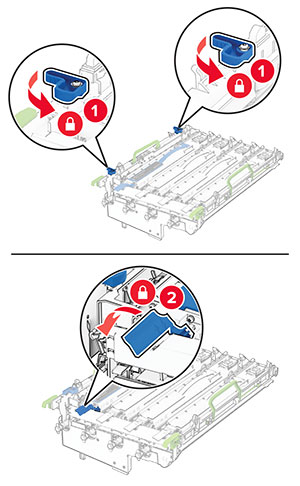
  9. 新しいブラックイメージングユニットをロックします。

    The blue latches of the imaging unit are locked.
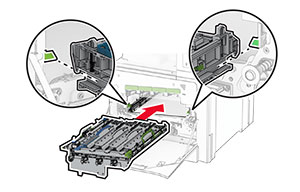
  10. イメージングキットがしっかりと装着されるまで挿入します。

    The imaging kit is inserted into the printer.
  11. 廃トナーボトルを挿入し、カチッと音がすることを確認します。

    The waste toner bottle is attached to the printer.
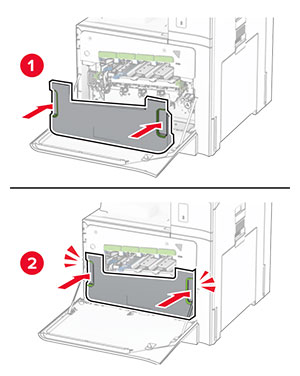
  12. プリントヘッドワイパーをゆっくりと引き出し、プリントヘッドレンズを清掃します。
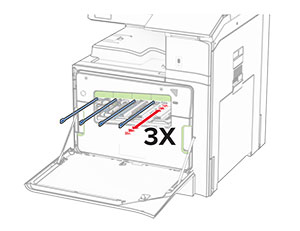
    The printhead wipers are pulled out, and then the printhead lenses are cleaned.

    プリントヘッドレンズの清掃の詳細については、プリントヘッドレンズの清掃を参照してください。

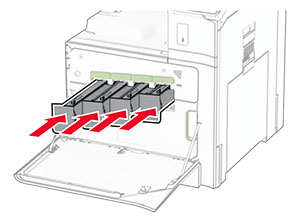
  13. トナーカートリッジを挿入します。

    The toner cartridges are inserted into the printer.
  14. ドアを閉じます。

カラーイメージングキットを交換する

  1. 前面ドアを開きます。

    The front door is pulled down.
  2. トナーカートリッジを取り外します。

    The green buttons are pushed, and then the cartridges are pulled out from the printer.
  3. 廃トナーボトルを取り外します。

    Both sides of the waste toner bottle are grasped, and then the bottle is pulled out.
    メモ: トナーがこぼれるのを避けるため、ボトルは縦にして扱います。
    Proper position of the waste toner bottle after it is removed from the printer.
  4. 使用済みイメージングキットを取り外します。

    The green latches of imaging kit are grasped and lifted, and the used imaging kit is pulled out of the printer.
    メモ: フォトコンダクタードラムに傷や損傷を与えないように、イメージングキットを清潔で平らな場所に、垂直に置きます。
    Proper position of the imaging kit after it is removed from the printer.
  5. ブラックイメージングユニットのロックを解除します。

    The blue latches of the black imaging unit are unlocked.
  6. ブラックイメージングユニットを取り外します。

    The imaging unit is pulled out, and then removed from the imaging kit.
    メモ: このブラックイメージングユニットは捨てないでください。これは、新しいイメージングキットに取り付けます。
  7. 新しいイメージングキットを包装から取り出します。

    メモ: イメージングキットには、イメージングバスケットとシアン、マゼンタ、およびイエローの現像体ユニットがあります。
    警告—破損の恐れあり: イメージングキットを直射日光にさらさないでください。長時間直射日光にさらすと、印刷品質の問題が生じる可能性があります。
    警告—破損の恐れあり: フォトコンダクタードラムには触らないでください。触れると、今後の印刷ジョブの印刷品質に影響する可能性があります。
    Warning icons are placed on the photoconductor drum.
  8. ブラックイメージングユニットを新しいイメージングキットに挿入します。

    The imaging unit is inserted into the imaging kit.
  9. ブラックイメージングユニットをロックします。

    The blue latches of the imaging unit are locked.
  10. 新しいイメージングキットを挿入し、しっかりと装着します。

    The imaging kit is inserted into the printer.
  11. 廃トナーボトルを挿入し、カチッと音がすることを確認します。

    The waste toner bottle is attached to the printer.
  12. プリントヘッドワイパーをゆっくりと引き出し、プリントヘッドレンズを清掃します。

    The printhead wipers are pulled out, and then the printhead lenses are cleaned.

    プリントヘッドレンズの清掃の詳細については、プリントヘッドレンズの清掃を参照してください。

  13. トナーカートリッジを挿入します。

    The toner cartridges are inserted into the printer.
  14. ドアを閉じます。

廃トナーボトルを交換する

  1. 前面ドアを開きます。

    The front door is pulled down.
  2. 使用済の廃トナーボトルを取り外します。

    Both sides of the waste toner bottle are grasped, and then the bottle is pulled out.
    メモ: トナーがこぼれるのを避けるため、ボトルは縦にして扱います。
    Proper position of the waste toner bottle after it is removed from the printer.
  3. 新しい廃トナーボトルの梱包を取り外します。

  4. 廃トナー転送ボックスを挿入し、カチッと音がすることを確認してから、ドアを閉じます。
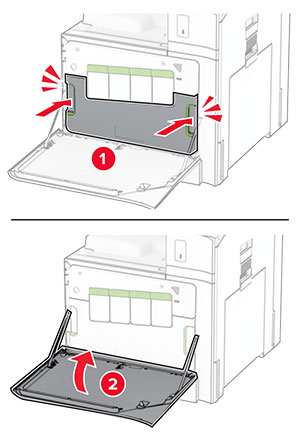
    The waste toner bottle is attached to the printer.

フューザーを交換する

  1. プリンタの電源を切ります。

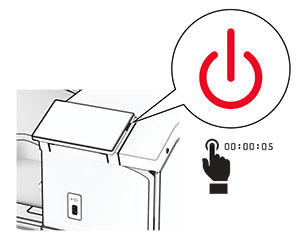
    The power button on the side of the control panel is pressed for 5 seconds.
  2. 電源コードをコンセントから抜き、次にプリンタから抜きます。

  3. ドア B を開きます。

    表面高温注意アイコン 注意—表面高温: プリンタの内部が高温になっている場合があります。高温のコンポーネントによる負傷の危険を減らすために、コンポーネントの表面が冷えるのを待ってから触れてください。
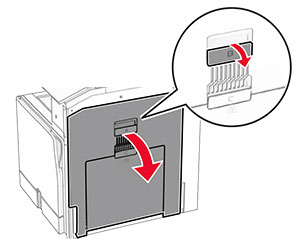
    Door B of the printer is opened.
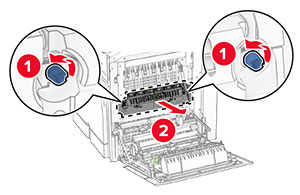
  4. 使用済みのフューザーのロックを解除してから、取り外します。

    The blue knobs are rotated counterclockwise, and then the used fuser is pulled out of the printer.
  5. 新しいフューザーを梱包から取り出します。

  6. 新しいフューザーを挿入して、カチッと音がすることを確認してから、ロックします。
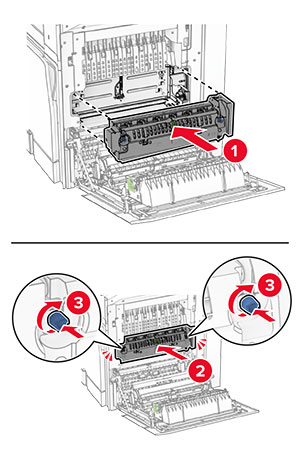
    The fuser is aligned, inserted into the printer, and then locked.
  7. ドア B を閉じます。

  8. 電源コードの一方の端をプリンタに接続してから、もう一方の端をコンセントに差し込みます。

    標準の注意アイコン 注意—傷害の恐れあり: 火災や感電の危険を避けるため、電源コードを接続するコンセントが、製品の設置場所の近くにあること、アクセスしやすいこと、正しく接地されていること、適切な定格であることを確認してください。
  9. プリンタの電源を入れます。

トレイの引き出し部を交換する

  1. 使用済みのトレイの引き出し部を引き出します。

    The used tray insert is removed from the printer with an upward motion.
  2. 新しいトレイの引き出し部を梱包から取り出します。

  3. 新しいトレイの引き出し部を挿入します。

    The new tray insert is inserted to the printer with a downward motion.

オプションの 550 枚給紙トレイでガイドを交換する

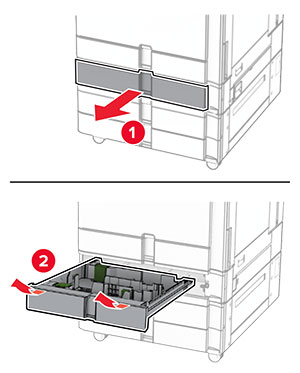
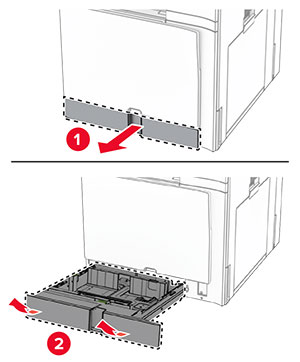
  1. トレイを引き出します。

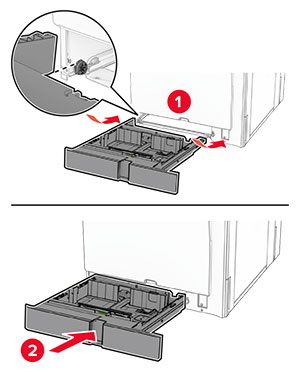
    The optional tray is removed from the printer.
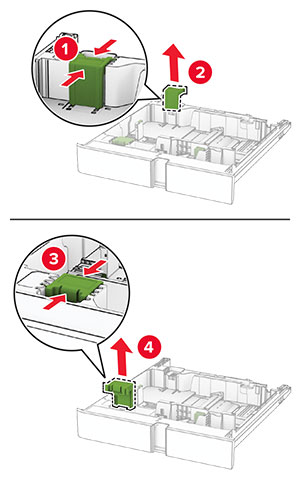
  2. 使用済みのサイズガイドを取り外します。

    The used size guides are removed from the optional tray.
  3. 新しいサイズガイドを梱包から取り出します。

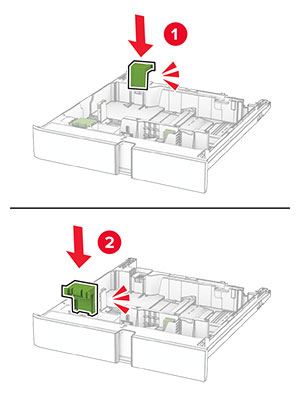
  4. 新しいサイズガイドを挿入し、カチッと音がすることを確認します。

    The new size guides are inserted into the optional tray.
  5. トレイを挿入します。

オプションの 550 枚給紙トレイのカバーを交換する

  1. 使用済みのトレイカバーを取り外します。

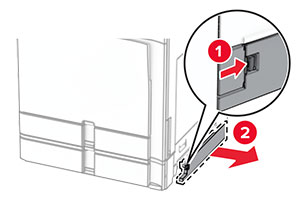
    The used cover for the optional 550-sheet tray is removed.
  2. 新しいトレイカバーを梱包から取り出します。

  3. 新しいトレイカバーを挿入し、カチッという音がすることを確認します。

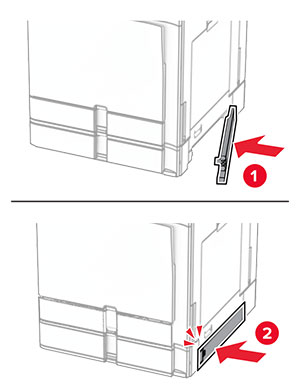
    The new cover for the optional 550-sheet tray is attached to the printer.

小冊子フィニッシャ上部排紙トレイ拡張機能を交換する

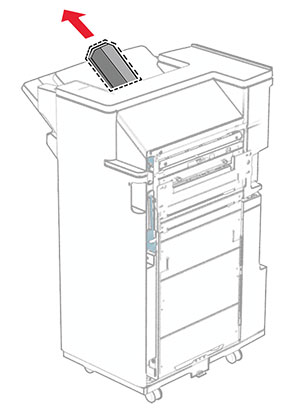
  1. 使用済みの上部排紙トレイ拡張機能を取り外します。

    The top bin extension of the finisher is pulled out.
  2. 新しいアクセス上部排紙トレイ拡張機能を梱包から取り出します。

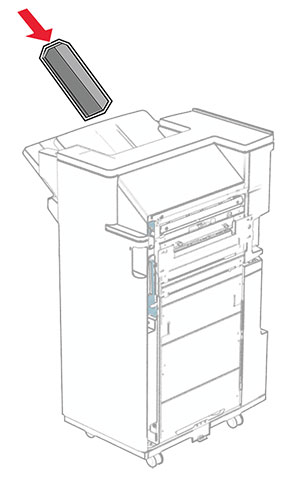
  3. 新しい上部排紙トレイ拡張機能を挿入します。

    The top bin extension of the finisher is inserted.

穴パンチボックスを交換する

メモ: 取り付けているフィニッシャによって、穴パンチボックスの外観は異なる場合があります。
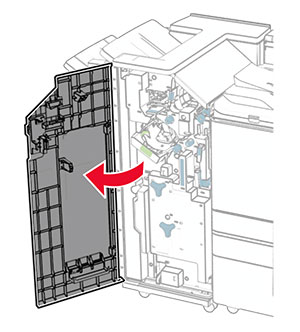
  1. フィニッシャのドアを開きます。

    The finisher door is opened.
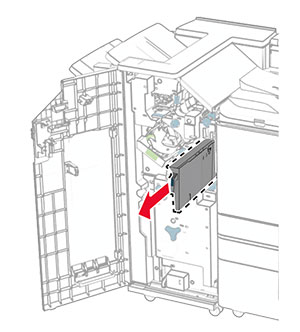
  2. 使用済みのホールパンチボックスを取り外します。

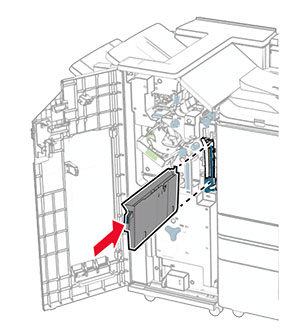
    The hole punch box is pulled out of the finisher.
  3. 新しい穴パンチボックスを取り出します。

  4. 新しい穴パンチボックスを挿入します。

    The hole punch box is inserted into the finisher.
  5. フィニッシャのドアを閉じます。

標準排紙トレイを交換する

  1. 使用済みの標準排紙トレイを取り外します。

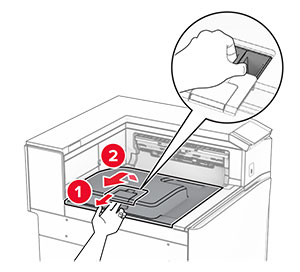
    The tray extender is opened, and then the used standard bin is pulled out from the printer.
  2. 新しい標準排紙トレイを梱包から取り出します。

  3. 新しい標準排紙トレイを取り付けます。

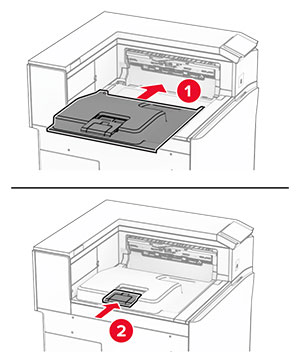
    The new standard bin is installed on the printer.

ファンカバーを交換する

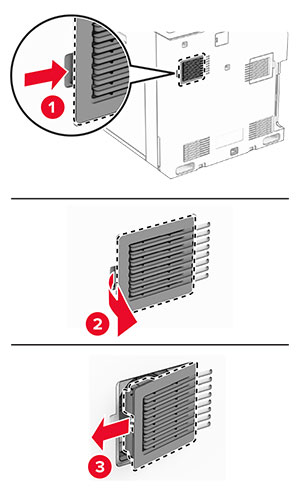
  1. 使用済みのファンカバーを取り外します。

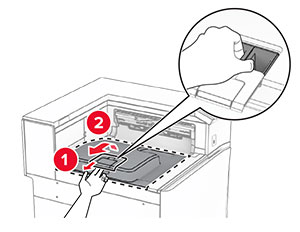
    The cover is pushed to the right, and then pulled away from the printer.
  2. 新しいカバーを梱包から取り出します。

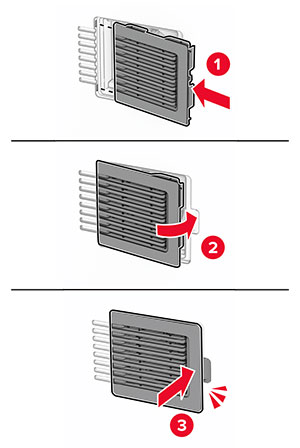
  3. 新しいカバーを挿入し、カチッという音がすることを確認します。

    The fan cover is attached to the printer.

右側カバーを交換する

  1. 使用中の右側カバーを取り外します。

    The door C is opened halfway, and the right cover is removed.
  2. 新しいカバーを梱包から取り出します。

  3. 新しいカバーを挿入し、カチッという音がすることを確認します。

    The new right cover is aligned to the slot, and then the cover is attached.

用紙搬送ユニットのコネクタカバーを交換する

  1. 標準排紙トレイを取り外します。

    The tray extender is opened, and then the used standard bin is pulled out from the printer.
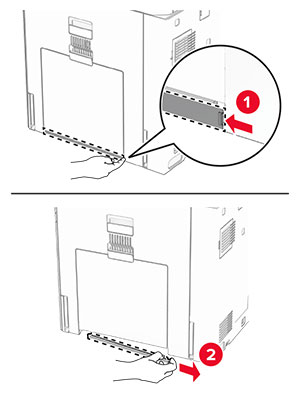
  2. 使用済みの用紙搬送ユニットのコネクタカバーを取り外します。

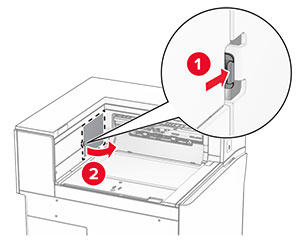
    The used paper transport connector cover is pried, and then  removed.
  3. 新しいコネクタカバーを梱包から取り出します。

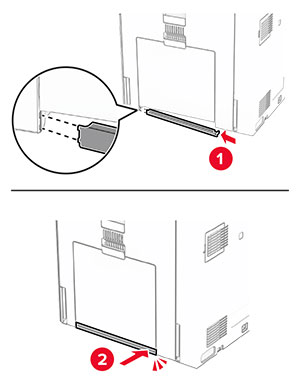
  4. 新しいコネクタカバーを取り付け、カチッと音がすることを確認します。

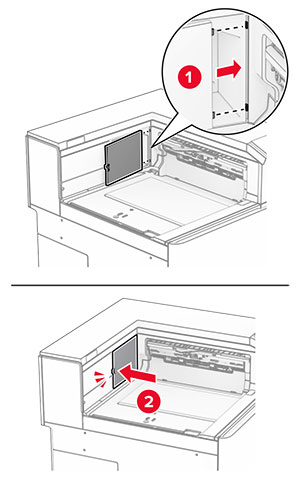
    The new paper transport connector cover is aligned, and then attached to the printer.
  5. 標準排紙トレイを取り付けます。

    The standard bin is attached to the printer.

ホチキスカートリッジユニットを交換する

ホチキスフィニッシャのホチキスカートリッジを交換する

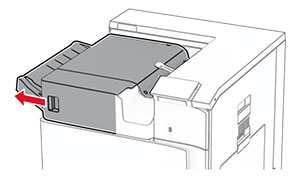
  1. ハンドル F をつかんで、ホチキスフィニッシャを左にスライドします。

    The staple finisher is slid to the left.
  2. ホチキスカートリッジホルダーを取り外します。

    The staple cartridge is pulled out of the finisher.
  3. 空のホチキスカートリッジを取り外します。

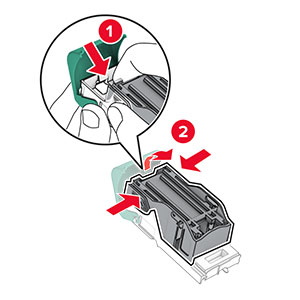
    The tabs on both sides and top of the cartridge are pressed to release it from the holder.
  4. 新しいホチキスカートリッジを、所定の位置でカチッという音がするまで挿入します。
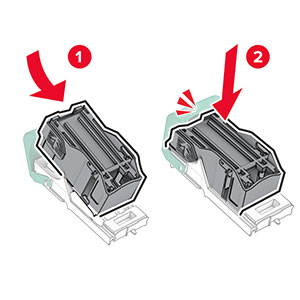
    The cartridge is inserted into the holder.
  5. カチッと音がするまで、ホチキスカートリッジホルダーを挿入します。

    The cartridge holder is inserted into the finisher.
  6. ホチキスフィニッシャを右にスライドします。

ホチキス、穴パンチフィニッシャのホチキスカートリッジを交換する

  1. ドア H を開きます。

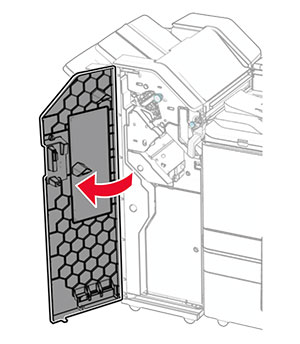
    The finisher door is opened.
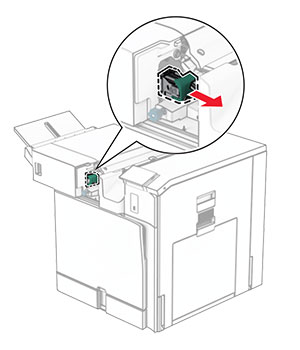
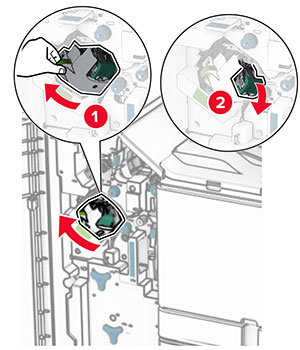
  2. 緑色のハンドルを引き抜き、ホチキスカートリッジホルダーを取り外します。

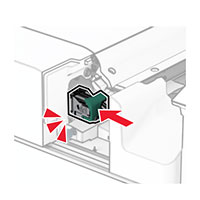
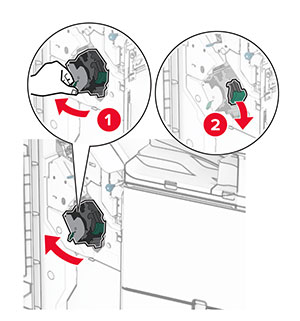
    The staple cartridge is pulled out of the finisher.
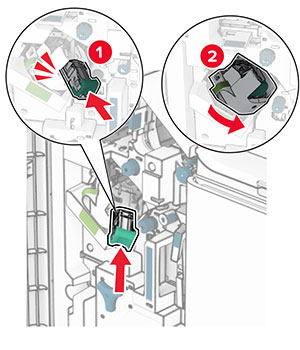
  3. 空のホチキスカートリッジを取り外します。

    The tabs on both sides and top of the cartridge are pressed to release it from the holder.
  4. 新しいホチキスカートリッジを包装から取り出します。

  5. 新しいホチキスカートリッジを、所定の位置でカチッという音がするまで挿入します。

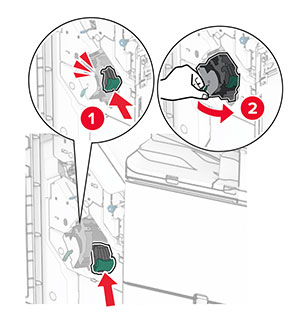
    The cartridge is inserted into the holder.
  6. カチッと音がするまで、ホチキスカートリッジホルダーを挿入します。

    The cartridge holder is inserted into the finisher.
  7. ドア H を閉じます。

冊子フィニッシャのホチキスカートリッジを交換する

  1. ドア H を開きます。

    The finisher door is opened.
  2. 緑色のハンドルを引き抜き、ホチキスカートリッジホルダーを取り外します。

    The staple cartridge is pulled out of the finisher.
  3. 空のホチキスカートリッジを取り外します。

    The tabs on both sides and top of the cartridge are pressed to release it from the holder.
  4. 新しいホチキスカートリッジを包装から取り出します。

  5. 新しいホチキスカートリッジを、所定の位置でカチッという音がするまで挿入します。

    The cartridge is inserted into the holder.
  6. カチッと音がするまで、ホチキスカートリッジホルダーを挿入します。

    The cartridge holder is inserted into the finisher.
  7. ドア H を閉じます。

冊子フィニッシャのホチキスカートリッジホルダーの交換

  1. フィニッシャのドアを開きます。

    The finisher door is opened.
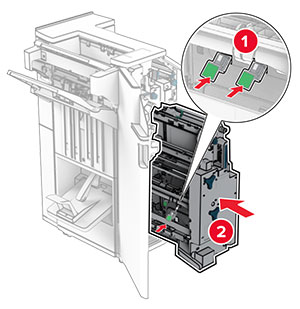
  2. 冊子メーカーを引き出し、使用済みホチキスカートリッジホルダーを取り外します。
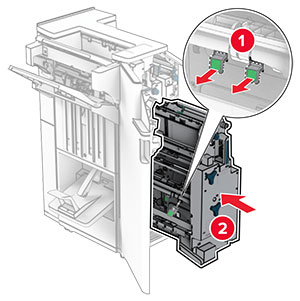
    The booklet maker is pulled out of the finisher, and then the used staple cartridge holders are removed.
  3. 新しいホチキスカートリッジを梱包から取り出します。

  4. 新しいホチキスカートリッジホルダーを挿入します。

    The staple cartridge holder is inserted, and then pushed into place.
  5. 冊子メーカーを挿入し、フィニッシャのドアを閉じます。

消耗品使用量カウンタをリセットする

  1. 操作パネルで、[設定] > [デバイス] > [メンテナンス] > [設定メニュー] > [消耗品使用量とカウンタ]の順に移動します。

  2. リセットするカウンタを選択します。

警告—破損の恐れあり: 返却プログラムの契約条項のない消耗品および部品は、リセットして再製造することができます。ただし、純正以外の消耗品または部品を使用したために発生した損傷については、製造元の保証は適用されません。適切に再生されていない消耗品および部品のカウンタをリセットするとプリンタが損傷する可能性があります。消耗品および部品のカウンタをリセットした後で、プリンタにリセットアイテムが存在することを示すエラーが表示される場合があります。