Label characteristics
The materials used to construct labels have a wide range of properties that can affect printing. Volatile components are in the label materials and in the adhesive itself. We recommend that volatile emissions from the label, up to 160°C (320°F), should be a minimal amount. The volatile components, which have low boiling point, produce emissions when heated in the fuser and could emit vapors that can damage the printer.
Preprinted inks can also cause printer contamination, and may be present on one or both sides of the label sheet.
Before purchasing large quantities of labels, make sure that you extensively test the labels with your printer.
Labels with a stripped edge matrix do not have the area around the outer edge of the cut sheet. Labels with a total strip matrix do not have the die‑cut stock around and between the labels. This property makes it easy to peel the labels from the backing.
Butt cut labels are cut flush to one another, with no extra area between them. Avoid using butt cut labels without a stripped edge matrix.
Die‑cut labels are cut with a non‑print area between each label. For best results, do not print within 2.3 mm (0.09 in.) of the edge of the label, of the perforations, or of the die‑cuts of the label.
If you are using a butt cut or die‑cut label, then make sure that adhesive contamination does not occur. Labels use varying levels and types of adhesive, and various liner materials and face stock papers. Adhesive can ooze from all label stocks. Make sure that die‑cuts are free of adhesive stringers. To prevent adhesive contaminations, use zone coating or pattern adhesive with a non‑adhesive border of about 1 mm (0.04 in.) or larger.
If zone coating is not used, then we recommend a stripped edge matrix. The stripped edge matrix varies with the type of face stock, liner, and adhesive materials. The following table shows the guidelines for stripped edge matrix.
|
Face type |
Total weight of label |
Edge matrix removal |
Location of strip |
|---|---|---|---|
|
Paper* (cut sheet or dual web) |
140–180 g/m2 |
1.6 mm (0.0625 in.) |
215.9 mm (8.5 in.) at leading edge 279.4 mm (11 in.) at driver edge (left margin side) |
|
Vinyl |
265–300 g/m2 |
||
|
Polyester and other face materials |
Varies |
* Use a non‑oozing adhesive.
Using cut sheet labels with adhesive applied to the edge of the sheet contaminates and voids your printer and cartridge warranties.
When using pressure‑sensitive materials without zone coating, choose butt cut labels without any stringers and with a stripped edge matrix. If a total strip matrix is in the design for the final product, then print before removing the matrix. If the matrix must be removed before printing, then round all corners, making sure that adhesive is not exposed.
Cut sheet paper labels
Generally, cut sheet paper labels work well with your printer.
Coating or sizing to make the paper liquid‑resistant decreases toner adhesion and increases the risk of toner contaminating the fuser. At a minimum, paper labels should be equivalent in weight and rigidity to a 20‑lb xerographic bond paper.
Dual web forms
Constructing dual web forms involves joining rolls of two different materials (usually pressure‑sensitive paper and bond paper) and then converting to a cut sheet product. This construction requires a stripped edge matrix. The liner must be rigid enough to withstand the pick force of the printer. The two materials must be thin enough for the sheet to lie flat in the paper tray. The differences in thickness may cause the materials to curl down toward the leading edge of the form which can negatively affect feeding.
We recommend that the leading label edge should be thicker than the dual web overlap to make sure that the sheet lies flat in the tray. The label should be placed with the label facedown in the tray. Orient the label in the tray so that the pressure‑sensitive area feeds into the printer first. The label should have no adhesive exposed in the overlay area or anywhere along the front or back of the label.
We recommend designing a non‑adhesive strip with a minimum width of 1 mm (0.04 in.) along the edges of the overlay. To help prevent material from slipping in the fuser, we recommend knurling, which roughens up the exposed silicon area at the glue joint.
The face sheet of a dual web form is usually a paper pressure‑sensitive product; therefore, the guidelines for paper labels are applicable to dual web forms.
The following diagram shows the recommended dual web form design. The non‑print area may vary depending on the printer model.
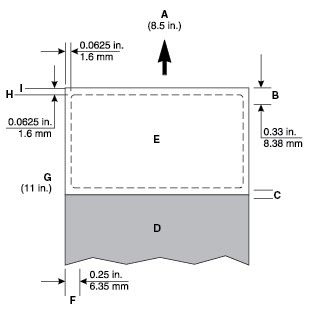
|
A |
Leading edge |
|
B |
Non‑print area |
|
C |
Overlay |
|
D |
Paper |
|
E |
Pressure‑sensitive |
|
F |
Non‑print area |
|
G |
Reference edge |
|
H |
Stripped edge |
|
I |
Liner edge |
Vinyl and polyester labels
Vinyl labels work well within specified design parameters. Vinyls are heat‑sensitive, so the liners need to be thick enough to absorb excess heat and prevent melting. A total strip matrix may cause adhesive contamination. Thin liners or weak pull strength may lead to labels peeling off the label inside the printer, which requires printer servicing.
Materials, which have liner face melt temperatures lower than the fuser temperature, may require the leading and trailing edge stripped areas to be 1.6 mm maximum due to feeding problems. We recommend that the liner face is constructed with material that can withstand the fuser temperature, which eliminates changing the stripped areas from 3 mm to 1.6 mm.
When a 1.6‑mm stripped area is used, it is very important that the 1.6‑mm tolerance be held tightly. With a stripped area of less than 1.6 mm, it is highly possible that adhesive contamination will occur.
Vinyls are non‑absorbing, which leads to toner buildup in the fuser that requires special maintenance. For more information about maintaining your printer, see the documentation that came with your printer. Vinyls may require a topcoat to ensure good toner adhesion. When you run vinyl labels, you may be required to install an oil fuser cleaner.
Polyester labels are less heat‑sensitive but are also non‑absorbing. Backings for polyester labels can be thinner, but requirements for coatings and cleaning are similar to vinyl labels.
Integrated forms
To create integrated forms, the converter uses hot melt adhesives to apply the label adhesive and liner to a base material (generally paper).
Oil bleed, recognizable by a discolored face sheet, can be a problem with these forms. Oil may also migrate from the top to the back surface of the liner while it is on the roll, before the conversion process takes place. The forms may be slick, and the pick mechanism of your printer may be unable to move all the sheets from the tray into the printer. Jamming and misfeeds increase when oil is present on the back of the liner.
The adhesive on these forms is commonly patterned on two or four sides (a non‑adhesive border on either two or four edges). We recommend designing a 1‑mm (0.04‑in.) non‑adhesive border (zone coated) on all four edges.
When printing on integrated forms with a grain long base material, position the form in the tray so the paper portion of the form feeds into the printer first. Position the pressure‑sensitive portion of the form toward the portrait left edge. For integrated forms with a grain short base material, position the form in the tray so the pressure‑sensitive portion feeds into the printer first.
Due to the unique construction of integrated forms, you may experience stacking problems in the output bin. If you experience stacking problems with these forms, then contact your marketing representative.