Label guidelines
-
Set the paper size, type, texture, and weight in the Paper menu to match the labels loaded in the tray.
-
Print samples on labels before buying large quantities.
-
Use labels designed specifically for laser printers.
-
Do not use labels with slick backing material.
-
Do not use labels with exposed adhesive.
-
Use full label sheets. Partial sheets may cause labels to peel off during printing, resulting in a jam. Partial sheets also contaminate the printer and the cartridge with adhesive, and could void the printer and toner cartridge warranties.
-
Flex, fan, and align the label edges before loading.
-
Use only label sheets that have no gaps between the labels.
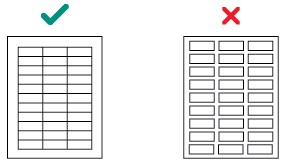
-
Do not print a large number of labels continuously.
-
Do not use labels that have coating or sizing applied to make the labels liquid‑resistant.
-
Run labels only once through the printer as this may contaminate the printer.
-
Load label sheets with the label end first.
-
Use grain long paper instead of grain short paper, which tends to curl easily.
Review label designs with a converter or a vendor who has extensive knowledge about labels and laser printers to ensure that you are using the proper type of labels.
For more information about label support for your printer, see "Printer-specific paper support."