Card stock and label guidelines
Card stock and label weights support
The following media types are not supported on this printer:
-
Vinyl and polyester labels
Printing these labels can lead to print quality problems and printer damage. For applications where these labels are run, use the Lexmark MS725 or MX725 printer model.
-
Narrow media batch jobs
When printing on paper less than 210 mm (8.3 inches) wide, the printer speed may decrease and throughput could substantially reduce. If you print large jobs on narrow paper regularly, use the Lexmark MS725 or MX725 printer model which is designed to print batches of 10 or more pages of narrow paper at a faster speed. For more information, contact your Lexmark sales representative.
Note: A5 default orientation is landscape, which is also called as LEF, and is not considered as narrow media.
The following table lists the maximum weights supported by the trays and multipurpose feeder:
|
Paper source |
Card stock1 |
Labels |
|||
|---|---|---|---|---|---|
|
Index Bristol |
Tag |
Cover |
Paper |
Dual‑web paper |
|
|
Standard and optional 550‑sheet trays1 |
199 g/m2 (110 lb) |
203 g/m2 (125 lb) |
176 g/m2 (65 lb) |
180 g/m2 |
180 g/m2 |
|
Multipurpose feeder2 |
199 g/m2 (110 lb) |
203 g/m2 (125 lb) |
176 g/m2 (65 lb) |
180 g/m2 |
180 g/m2 |
1 See for specific recommendations Grain orientation.
2 Due to label design characteristics, unacceptable feeding may be experienced from the multipurpose feeder.
|
Labels |
Thickness |
0.102–0.305 mm (0.004–0.012 in.) |
|
Smoothness |
100–400 Sheffield* |
* 150–250 Sheffield is optimal. Using media higher than 300 Sheffield could result in printing degradation.
Tray fill line information
Depending on construction, paper labels and card stock can sometimes be difficult to pick and feed reliably. Performance can be improved by controlling the number of sheets of media loaded in the tray. There are two fill lines in the tray. The solid line is the maximum paper fill indicator. No media should be loaded in the tray above this line or paper jams could occur. The dashed line is the alternate paper fill indicator and should be used if any feed or reliability issues are noted with specialty media, including labels and card stock. If paper jams occur when completely filling the tray, then load the specialty media only up to the alternate paper fill indicator.
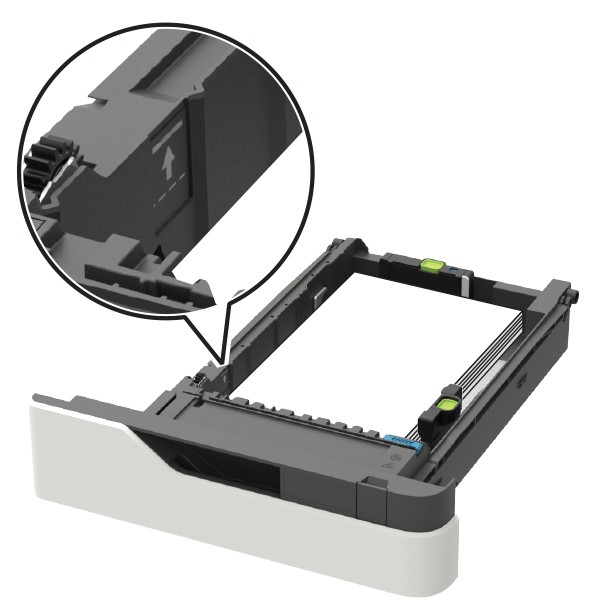
For more information on the printer models and feeding different types of media, contact your Lexmark sales representative.
When printing on paper labels:
-
From the control panel, set the paper size, type, texture, and weight in the Paper menu to match the labels loaded in the tray.
-
Do not load labels together with paper or transparencies in the same paper tray. Combining print materials can cause feeding problems.
-
Use full label sheets. Partial sheets may cause labels to peel off during printing, resulting in a paper jam. Adhesive material may contaminate your printer. It could also void your printer and cartridge warranties.
During printing, the number of labels per sheet can affect registration more than basis weight. Typically, the more labels per sheet, the better the registration.
When printing on card stock:
-
From the control panel, set the paper size, type, texture, and weight in the Paper menu to match the card stock loaded in the tray.
-
Do not use card stock that is creased. It may cause paper jams.
For more information, see the following: