Understanding ports and protocols
MVE uses different ports and protocols for several types of network communication, as shown in the following diagram:
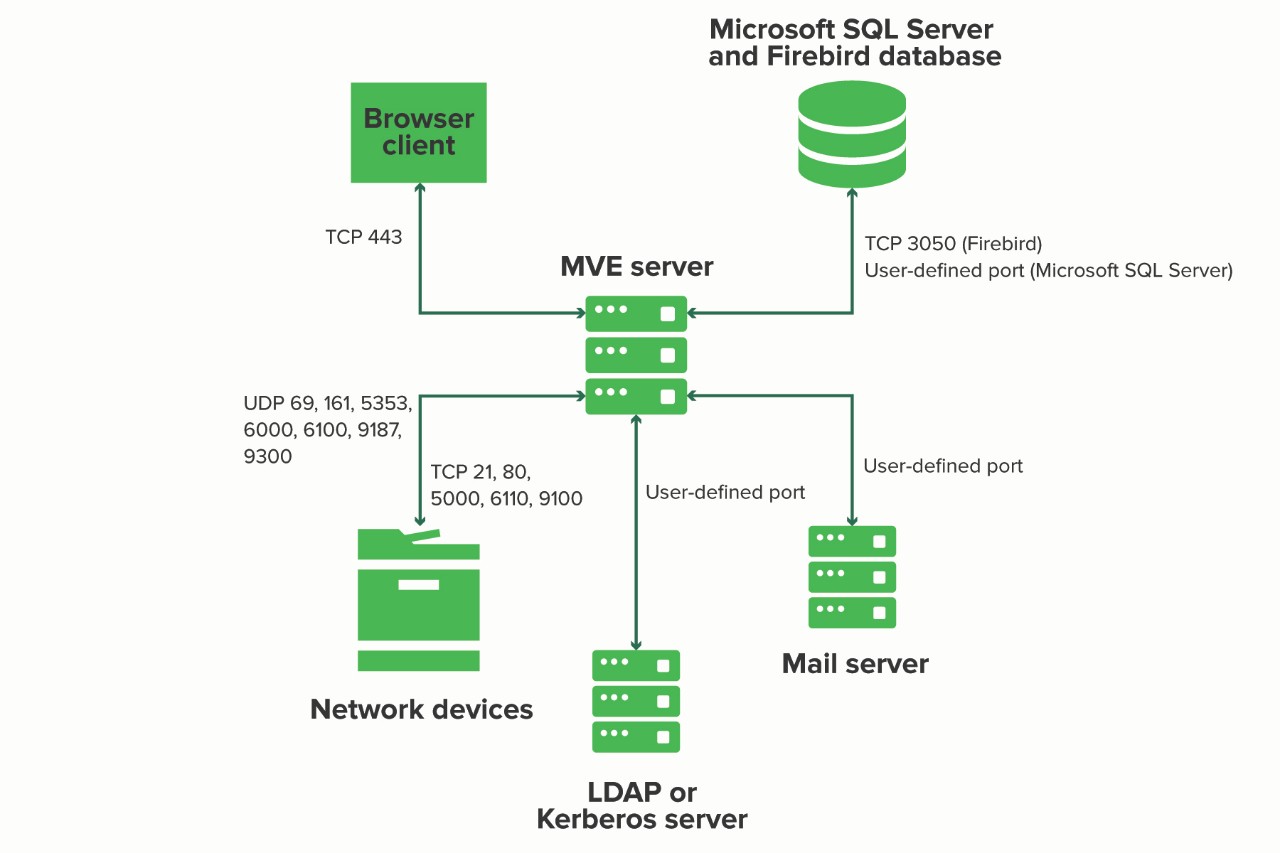
- The ports must be open or active for MVE to function properly. Make sure that all the printer ports are enabled.
- Some communications require an ephemeral port, which is an allocated range of available ports on the server. When a client requests a temporary communication session, the server assigns a dynamic port to the client. The port is valid only for a short duration and can become available for reuse when the previous session expires.
Server‑to‑printer communication
|
Protocol |
MVE server |
Printer |
Used for |
|---|---|---|---|
|
Network Printing Alliance Protocol (NPAP) |
UDP 9187 |
UDP 9300 |
Communicating with Lexmark network printers |
|
XML Network Transport (XMLNT) |
UDP 9187 |
UDP 6000 |
Communicating with some Lexmark network printers |
|
Lexmark Secure Transport (LST) |
UDP 6100 Ephemeral Transmission Control Protocol (TCP) port (handshaking) |
UDP 6100 TCP 6110 (handshaking) |
Communicating securely with some Lexmark network printers |
|
Multicast Domain Name System (mDNS) |
Ephemeral User Datagram Protocol (UDP) port |
UDP 5353 |
Discovering Lexmark network printers and determining the security capabilities of printers Note: This port is required to allow MVE to communicate with secured printers.
|
|
Simple Network Management Protocol (SNMP) |
Ephemeral UDP port |
UDP 161 |
Discovering and communicating with Lexmark and third-party network printers |
|
File Transfer Protocol (FTP) |
Ephemeral TCP port |
TCP 21 TCP 20 |
Deploying files |
|
Hypertext Transfer Protocol (HTTP) |
Ephemeral TCP port |
TCP 80 |
Deploying files or enforcing configurations |
|
TCP 443 |
Deploying files or enforcing configurations |
||
|
Hypertext Transfer Protocol over SSL (HTTPS) |
Ephemeral TCP port |
TCP 161 TCP 443 |
Deploying files or enforcing configurations |
|
RAW |
Ephemeral TCP port |
TCP 9100 |
Deploying files or enforcing configurations |
Printer‑to‑server communication
|
Protocol |
Printer |
MVE server |
Used for |
|---|---|---|---|
|
NPAP |
UDP 9300 |
UDP 9187 |
Generating and receiving alerts |
Server‑to‑database communication
|
MVE server |
Database |
Used for |
|---|---|---|
|
Ephemeral TCP port |
User‑defined port. The default port is TCP 1433. |
Communicating with an SQL Server database |
|
Ephemeral TCP port |
TCP 3050 |
Communicating with a Firebird database |
Client‑to‑server communication
|
Protocol |
Browser client |
MVE server |
|---|---|---|
|
Hypertext Transfer Protocol over SSL (HTTPs) |
TCP port |
TCP 443 |
Server-to-mail-server communication
|
Protocol |
MVE server |
SMTP server |
Used for |
|---|---|---|---|
|
Simple Mail Transfer Protocol (SMTP)[Encryption = None] |
Ephemeral TCP port |
User‑defined port. The default port is TCP 25. |
Providing email functionality for receiving alerts from printers and scheduled view export emails related to printer data |
|
Simple Mail Transfer Protocol (SMTP)[Encryption = SSL] |
Ephemeral TCP port |
User‑defined port. The default port is TCP 465. |
Providing email functionality for receiving alerts from printers and scheduled view export emails related to printer data over SSL |
|
Simple Mail Transfer Protocol (SMTP)[Encryption = TLS/STARTTLS] |
Ephemeral TCP port |
User‑defined port. The default port is TCP 587. |
Providing email functionality for receiving alerts from printers and scheduled view export emails related to printer data over TLS/STARTTLS |
Server-to-LDAP-server communication
|
Protocol |
MVE server |
LDAP server |
Used for |
|---|---|---|---|
|
Lightweight Directory Access Protocol (LDAP) |
Ephemeral TCP port |
User‑defined port. The default port is TCP 389. |
Authenticating MVE users using an LDAP server |
|
Lightweight Directory Access Protocol over TLS (LDAPS) |
Ephemeral TCP port |
User‑defined port. The default port is TCP 636. |
Authenticating MVE users using an LDAP server over TLS |
|
Kerberos |
Ephemeral UDP port |
User‑defined port. The default port is UDP 88. |
Authenticating MVE users using Kerberos |