Creating CSV files
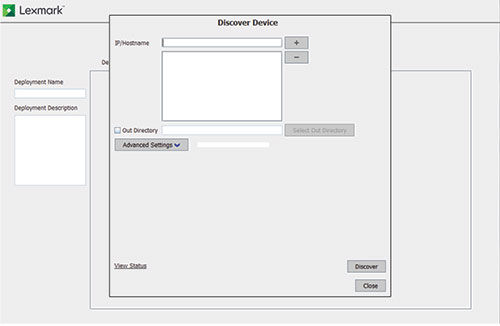
A CSV file is used for deploying and creating packages. It contains the details of the supported printers on the network.
-
In the IP/Hostname field, type the IP address or host name of the devices, and then click
 .
.
Use the following formats to add IP addresses:
-
(wildcards for only the last two octets)
-
(single IP address)
-
(IP address range)
-
(host name)
-
(single full IPv6 address; wildcards are not supported)
Note: To remove an IP address or host name, select it from the list, and then click .
. -
The following files are created in Out Directory:
-
PkgBldrInput.csv—You can directly import this file to Package Builder for creating packages.
-
DduInput.csv—You can use this file in DDU for deployment.
Notes:
- Only supported devices are added on the device lists.
- If the device lists are already created, and you want to create another device list, then make sure to update the file names. If you use the same file name as the existing device list, then DDU appends only the discovered supported devices.