Understanding the home screen
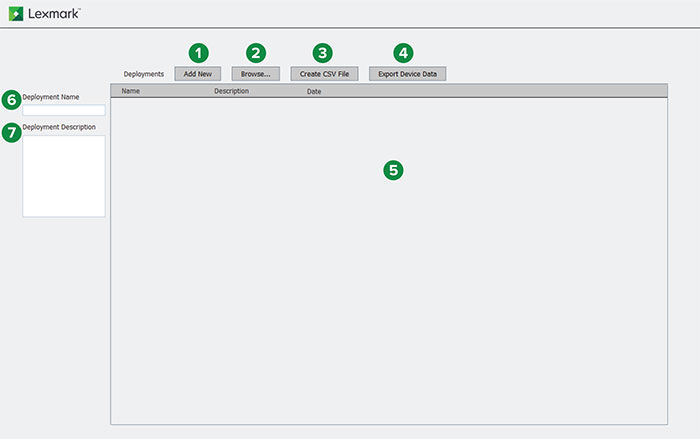
The following lets you navigate and use DDU:
|
Section |
Home screen tabs |
Description |
|---|---|---|
|
1 |
Add New |
Lets you create workflows. A workflow is a set of tasks that are performed on printers. Note: For information on creating workflows, see “Creating deployment workflows.”
|
|
2 |
Browse |
Lets you browse workflows. |
|
3 |
Create CSV File |
Lets you discover printers, and then create .csv files for deploying workflows and creating packages from the Package Builder utility. Note: To obtain the eSF application and license packages from the Package Builder utility, go to https://cdp.lemark.com/package‑builder/.
|
|
4 |
Export Device Data |
Lets you discover printers, and then export its certificate signing request (CSR), all device settings, shortcuts, logs, and reports information. |
|
5 |
Workflow panel |
Shows the list of created workflows. You can run, edit, or delete workflows from this panel. |
|
6 |
Deployment Name |
The name of the workflow. |
|
7 |
Deployment Description |
The description of the workflow. Note: This field is optional.
|