Understanding the workflows
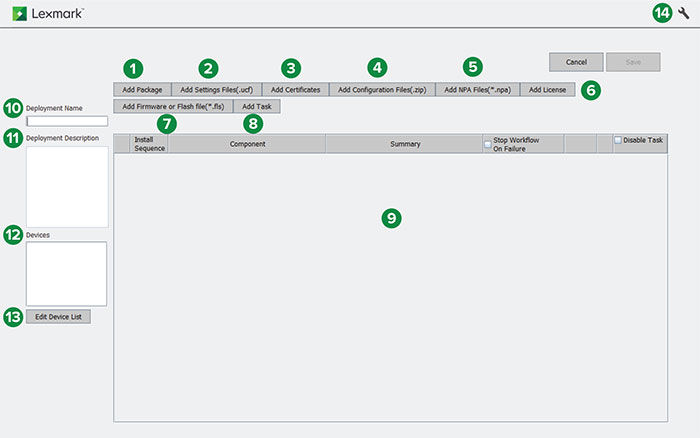
|
Section |
Workflow tabs |
Description |
|---|---|---|
|
1 |
Add Package |
Lets you add a custom package or a package from the Package Builder utility. Note: For more information, see Adding packages.
|
|
2 |
Add Settings Files(.ucf) |
Lets you add .ucf settings files for deployment. When adding printer settings files, make sure that the printer is running on eSF version 4 or earlier. You can add eSF settings files to any supported printer model. Notes:
|
|
3 |
Add Certificates |
Lets you add printer certificates for deployment. Note: For more information, see Adding certificates.
|
|
4 |
Add Configuration Files(.zip) |
Lets you add .zip configuration files for deployment to printers running on eSF version 4 or later. The configuration files can contain printer settings or eSF settings. Notes:
|
|
5 |
Add NPA files(*.npa) |
Lets you add .npa command files for deployment. Note: For more information, see Adding NPA files.
|
|
6 |
Add License |
Lets you add printer licenses for deployment. Note: For more information, see Adding licenses.
|
|
7 |
Add Firmware or Flash file(*.fls) |
Lets you add the following for deployment:
Note: For more information, see Adding a firmware or flash file.
|
|
8 |
Add Task |
Lets you add the following tasks for deployment:
Note: For more information, see Adding tasks.
|
|
9 |
Workflow panel |
Shows the list of created workflows. |
|
10 |
Deployment Name |
The name of the workflow. |
|
11 |
Deployment Description |
The description of the workflow. Notes: This field is optional.
|
|
12 |
Devices |
The printers added for the workflow. |
|
13 |
Edit Device List |
Lets you edit the printers added for the workflow. Note: For more information, see Adding printers.
|
|
14 |
Advanced Settings |
Lets you configure the deployment and discovery settings. Note: For more information, see Configuring deployment and discovery settings using DDU.
|