Reliability, scalability, and disaster recovery
Load balancing and redundancy
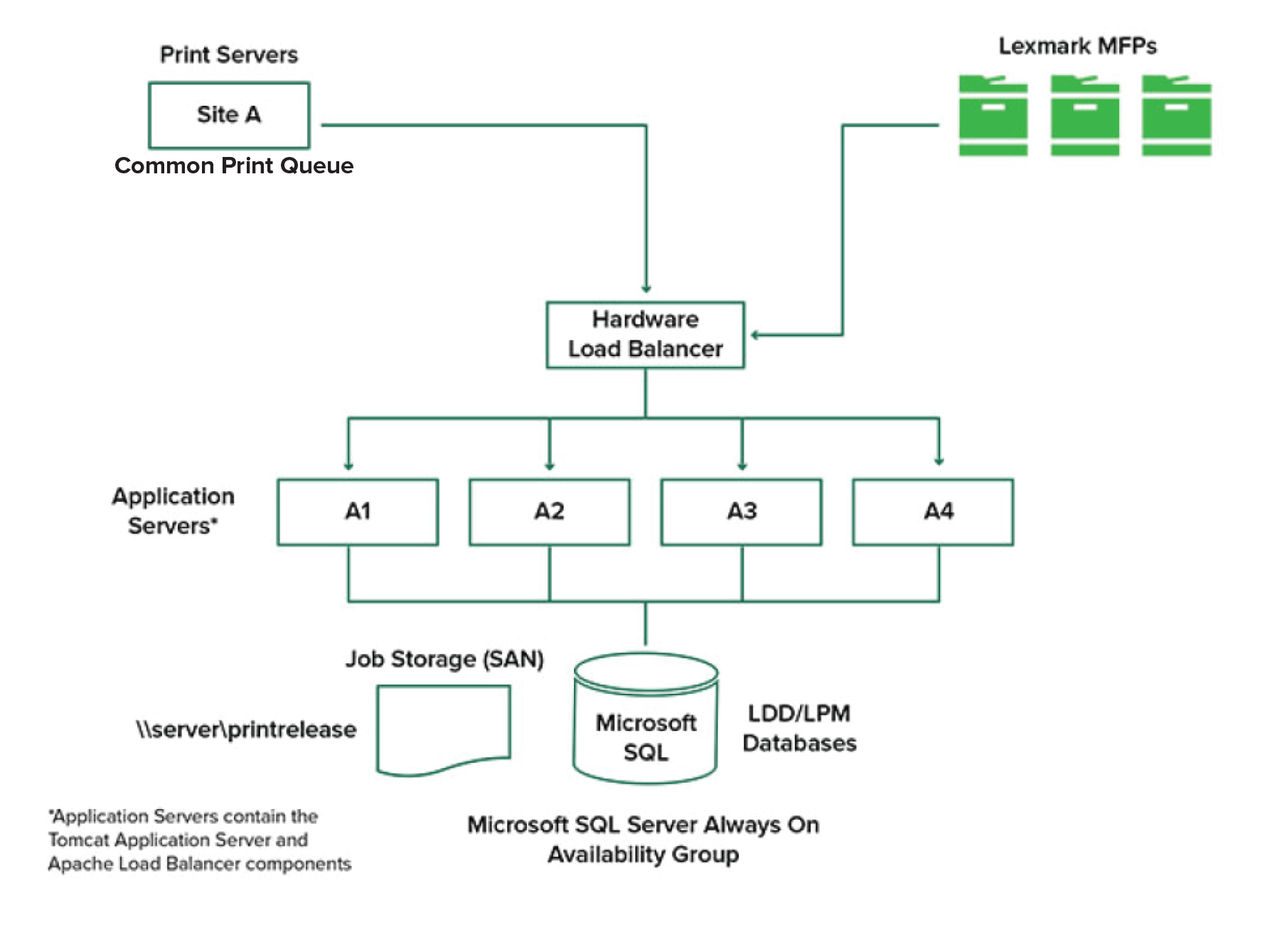
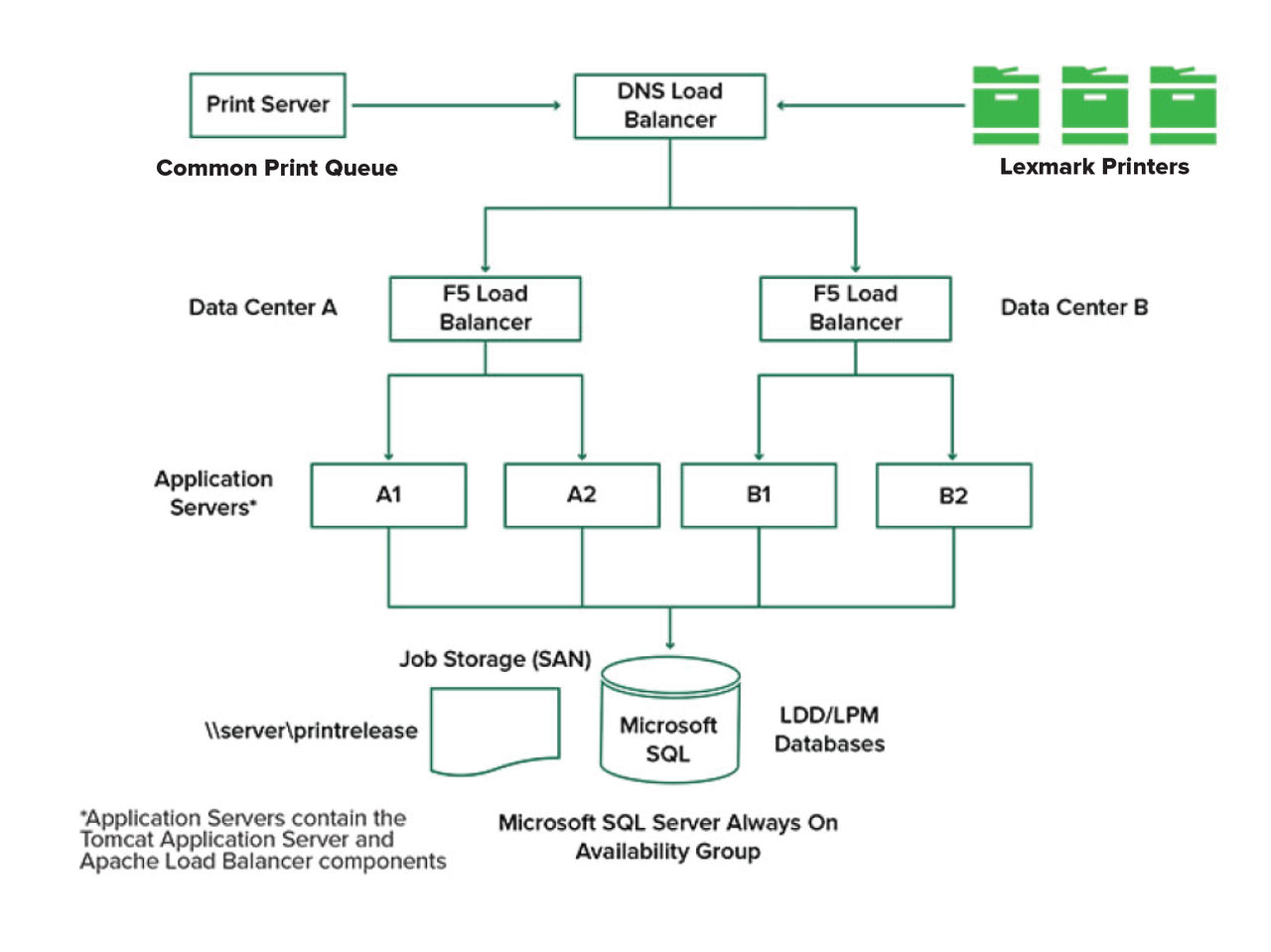
Depending on the volume of transactions, the load balancer, database, and application server components may be installed on a single server or separately on multiple servers. While a single server may be able to handle the load, if it fails, the entire system becomes unavailable. For environments that require high availability, we recommend using multiple servers along with a hardware load balancer.
Load‑balancing servers receive jobs from print clients, and then balance jobs across transaction servers using load‑balancing workers and load estimates. The load balancing is based on the number of session requests.
Multiple transaction servers are used to support an increasing number of users and to provide redundancy for continuous uptime when one of the servers fails. Having multiple servers also lets maintenance and upgrades occur without taking down the whole system.
If Firebird is used for the database, then system backups can be scheduled allowing you to restore the system easily in the event of a failure.
The following shows a sample diagram for achieving automated failover or redundancy using a single data center:
The following shows a sample diagram for achieving automated failover or redundancy using two data centers:
System sizing and scalability
LPM is scalable to support multiple clients, submitting jobs to as many servers as required to handle the load. The load balancer selects a server for each received job to distribute the total load and maintain system performance. Using multiple servers also increases system reliability. If one server fails, then the load balancer directs jobs to other servers until the failed server is back online.
The following can be used to determine the number of servers required to process jobs efficiently:
-
Peak demand—Usually the deciding factor when the average execution time for a solution is under 30 seconds.
-
Concurrency—Usually the deciding factor when the average execution time for a solution is over 30 seconds. Also, when the database is installed on the recommended hardware and connected using Gigabit Ethernet, it can process 200000 logged messages per hour. This number converts to approximately 40000 jobs per hour when using a typical solution (five logged messages per job). If this limit is reached, then it may be necessary to use multiple LDD systems.
Peak demand
To determine the number of servers necessary to handle peak load for a particular solution, use the following formulas:
-
System-wide hourly job rate = (system printer capacity) x (jobs per printer per day) / (length of business day)
-
Peak demand = 2 x (system-wide hourly job rate)
-
Minimum number of servers = (peak demand) / (single-server throughput for current solution)
Sample scenario
Consider an environment with a system capacity of 300 printers, with each printer averaging 100 jobs per day. If each server processes up to 3000 jobs per hour using the solution, then do the following:
-
Determine the system-wide hourly job rate.
(300 printers) x (100 daily jobs per printer) / (8 hours per day) = 3750 jobs per hour
-
Determine the peak demand.
2 x (3750 jobs per hour) = 7500 jobs per hour
-
Determine the minimum number of servers.
(7500 jobs per hour) / (3000 jobs per hour) = 2.5 servers
To handle the peak load reliably for a solution with an average execution time of 30 seconds or less, your system must have three servers.
|
Solution processing load |
Functions used |
Average single‑server throughput |
|---|---|---|
|
Typical |
|
6000 to 8000 jobs per hour |
|
Heavy |
|
2000 to 3000 jobs per hour |
|
Very heavy (optical character recognition) |
|
100 to 200 jobs per hour |
Concurrency
Each server that meets the recommended requirements can process up to 30 concurrent jobs from clients. Use the following formula to determine the number of servers that are necessary to meet the concurrency requirements:
Minimum number of servers = (number of printers expected to submit jobs at the same time) / 30
For example, if 100 out of 300 printers are active at the same time, then:
100 / 30 = 3.33
To allow 100 active printers for a solution with an average execution time of 30 seconds or lesser, your system must have four servers.